Flux converts natural language prompts into high quality, photorealistic images by using a rectified flow based multimodal diffusion transformer that operates in latent space. Its models include Flux 2, Flux2 Pro and FluxPro Kontext, where Flux2 Pro and Flux Pro Kontext ensure 100% consistency with reference images. Flux Pro Kontext also delivers super fast turnaround times. Flux is widely used for marketing, product photography, e-commerce visuals, UI design, concept art and brand asset creation. Stable Diffusion generates images using a latent diffusion architecture with a VAE, u-net and CLIP text encoder. It supports extensive customization through LoRA, DreamBooth, ControlNet, inpainting and outpainting. It is used for artistic generation, character design, game assets and experimental visuals.
Flux and Stable Diffusion have differences in image quality, prompt adherence, speed, customization and ecosystem. Flux focuses on high prompt adherence, superior photorealism, fast inference and strong text rendering, which makes it suitable for commercial workflows. Stable Diffusion focuses on customization, open source flexibility and stylistic diversity, supported by a large community model ecosystem. Flux produces more accurate, structured and realistic results with better spatial understanding, object counting and text accuracy. Stable Diffusion produces more varied, stylized and experimental outputs but struggles with complex prompt accuracy and consistency.
Flux is the better choice for high prompt adherence, superior photorealism and detailed prompt understanding, while Stable Diffusion is better for customization, creative control and artistic experimentation. Users can access Flux along with all its variants through VosuAI, as it is a unified platform that provides unrestricted access.
What is Flux?
Flux converts natural language descriptions into high quality photorealistic images. It was launched in August 2024 and generates images from text prompts with stronger prompt adherence than earlier text to image models. The flux diffusion model operates in latent space using a hybrid single stream and double stream multimodal diffusion transformer. This design allows precise processing of complex visual textual relationships. It integrates T5 text encoding and rectified flow techniques, which produce better image quality than earlier diffusion models. Its top models include Flux 2, Flux 2 Pro and Flux Pro Kontext, with Flux 2 Pro and Flux Pro Kontext ensuring reference consistency and Flux Pro Kontext offering fast turnaround.
What are the key features of Flux?
The key features of Flux are given below.
- High image quality and realism: Flux produces high quality, realistic output from complex creative prompts at up to 1024×1024 pixel resolution.
- Strong prompt adherence: Flux maps detailed natural language instructions to specific image elements with greater accuracy than earlier diffusion models.
- Accurate text rendering: Flux renders readable, correctly spelled text inside generated images, which includes signs, labels and typographic elements.
- Fast image generation: Flux generates images in 1 to 4 inference steps in under 2 seconds on optimized hardware.
- Multiple model variants: Flux offers 3 core variants such as Schnell for speed, Dev for research and Pro for commercial production requirements.
- Advanced image editing capabilities: Flux supports inpainting, outpainting, depth control and image remixing through dedicated editing modules.
- Consistent character output: Flux maintains stable facial features and body proportions across multiple generated frames using built-in consistency mechanisms.
- Local deployment: Flux can be deployed on-premises or locally, which allows offline use, privacy controls and hardware-accelerated inference on compatible GPUs.
What are the use cases of Flux?
The use cases of Flux are given below.
- Marketing and advertising: Flux supports the development of product photography for campaigns and generates accurate text rendering in ad visuals and branded creatives.
- Product photography: Flux generates photorealistic, studio quality product visuals with precise lighting based on detailed text descriptions.
- E-commerce visuals: Flux produces high quality e commerce product imagery across multiple formats that incluse white background, lifestyle and 360 degree product shots.
- Social media content: Flux generates platform ready visuals for creating social media content with precise dimensions, text and brand elements.
- UI and UX mockups: Flux generates interface wireframes, screen layouts and UI component visuals from structured text descriptions in seconds.
- Concept art: Flux supports generating artistic assets, which include character designs, environments and storyboard frames from complex scene prompts.
- Image editing: Flux allows inpainting, outpainting and depth controlled modifications through its dedicated Fill, depth and canny modules.
- Brand identity visuals: Flux maintains a uniform style, colour palette and character appearance across multiple brand asset generations consistently.
What is Stable Diffusion?
Stable Diffusion generates detailed images from text prompts. It was launched on August 22, 2022, as the first publicly available open source image generation model capable of running on consumer grade hardware. It uses a latent diffusion architecture that performs the denoising process in compressed latent space via a variational autoencoder, u-net and CLIP text encoder. It supports many commercial uses, which include editing specific parts of images through inpainting, outpainting and image to image transformation. Stable Diffusion model variants include SD 1.5, SDXL, Stable Diffusion 3 and Stable Diffusion 3.5 Large. They expand output resolution and prompt fidelity.
What are the key features of Stable Diffusion?
The key features of Stable Diffusion are given below.
- Text to image generation: Stable Diffusion generates detailed images from text prompts using its latent diffusion architecture at up to 1024×1024 resolution.
- Image to image transformation: Stable Diffusion applies prompt guided modifications to existing images, adjusting style, composition and colour while preserving the original structure.
- Model weight access and customization: Stable Diffusion releases open model weights, which allow developers to fine tune, modify and distribute the model freely.
- Inpainting: Stable Diffusion regenerates selected image regions from a new text prompt, which allows targeted, powerful editing of existing visuals.
- Outpainting: Stable Diffusion extends images beyond their original boundaries by generating new content that matches the existing style and composition.
- Prompt and composition control: Stable Diffusion accepts negative prompts, CFG scale adjustments and ControlNet conditioning to guide output style.
- Fine tuning and personalization: Stable Diffusion supports fine tuned models like DreamBooth and LoRA, which allow training on custom datasets for personalized outputs.
What are the use cases of Stable Diffusion?
The cases of Stable Diffusion are given below.
- Marketing and advertising: Stable Diffusion generates detailed images for social media campaigns, digital ads and promotional visuals from text.
- E-commerce product imagery: Stable Diffusion produces photorealistic product images with customizable backgrounds, lighting conditions and composition styles for online storefronts.
- Concept art and storyboarding: Stable Diffusion generates character designs, environment concepts and scene layouts for film and game content creation.
- Product and interior design: Stable Diffusion visualizes product prototypes and interior room layouts from text descriptions for rapid design iteration.
- Fashion design: Stable Diffusion generates garment designs, textile patterns and outfit compositions across different body types from text prompts.
- Image editing and enhancement: Stable Diffusion applies targeted inpainting, outpainting and style transfer to existing images without manual editing tools.
- AI avatars and personalized art: Stable Diffusion fine tunes on reference images via LoRA or DreamBooth to produce personalized character art.
- Game and VR asset creation: Stable Diffusion generates tileable textures, environment concepts and character sprites for game asset pipelines efficiently.
What are the differences between Flux and Stable Diffusion?
The differences between Flux and Stable Diffusion include image quality, prompt adherence, generation speed, customization and user friendliness. Flux is more focused on producing highly photorealistic outputs with stronger prompt accuracy, while Stable Diffusion offers greater flexibility and customization for a wide range of artistic styles.
The differences between Flux and Stable Diffusion are given below.
- Image quality and photorealism: Flux produces sharper photorealistic output than Stable Diffusion 3.5 Large, though community checkpoints narrow the gap in practice use cases.
- Prompt adherence and text rendering: Flux delivers a better understanding of complex, detailed prompts. Stable Diffusion handles specific stylized art through ControlNet conditioning, which allows advanced creative control.
- Generation speed: Flux generates images in 1 to 4 inference steps under 2 seconds, while standard Stable Diffusion requires 20 to 50 inference steps.
- Customization: Stable Diffusion supports greater flexibility through LoRA, DreamBooth and custom checkpoint fine tuning, while Flux limits personalization to API accessed Pro variants.
- User friendliness: Flux operates through straightforward API integration and hosted platforms, while Stable Diffusion requires local setup via AUTOMATIC1111, ComfyUI or Forge.
- Hardware requirements: Flux requires 24GB VRAM GPU for local inference, while Stable Diffusion 3.5 Medium runs on GPUs with as little as 9.9GB VRAM.
- Growth potential: Flux continues expanding with new model releases, including Flux 2, while Stable Diffusion growth depends on community fine tuned models and Stability AI's commercial partnerships.
- Ecosystem and community support: Stable Diffusion provides an extensive custom model library on Civitai and HuggingFace, while Flux expands through Black Forest Labs API partnerships.
- Cost of operation: Flux API access costs approximately $0.04 per image, while Stable Diffusion model weights are free for local generation, which makes it cost efficient for users.
- Versatility: Flux handles photorealistic imagery and commercial art, while Stable Diffusion XL and its fine tuned variants produce stylized art and anime image generation at a lower cost.
How do the prompt outputs differ between Flux and Stable Diffusion?
The differences between Flux and Stable Diffusion in prompt outputs include neon typography, hand interaction, complex scene detail, board readability, variable binding and spatial accuracy. Flux gives more accurate and coherent results, while Stable Diffusion gives more varied and experimental outputs.
The differences between Flux and Stable Diffusion in prompt outputs are outlined below.
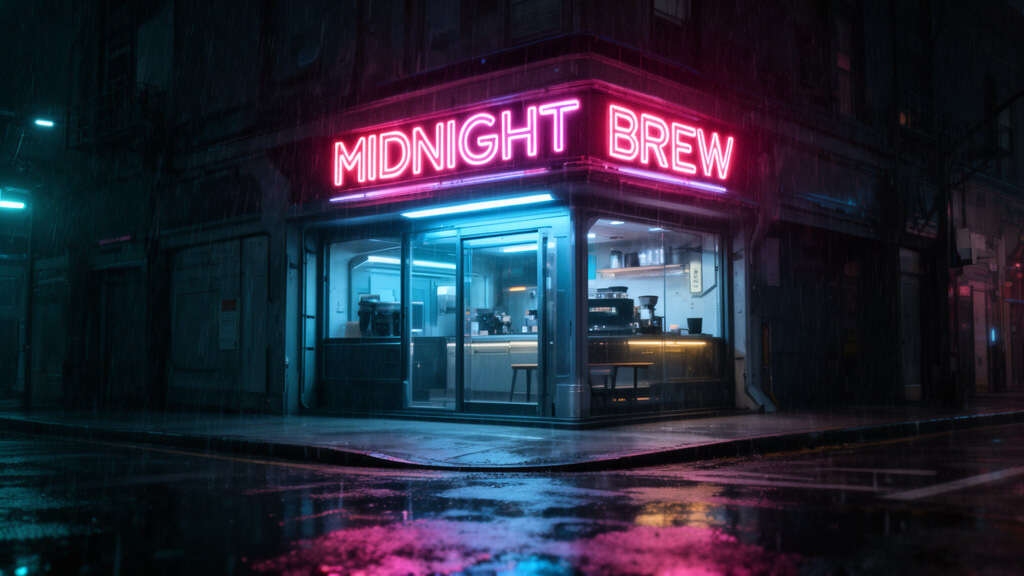
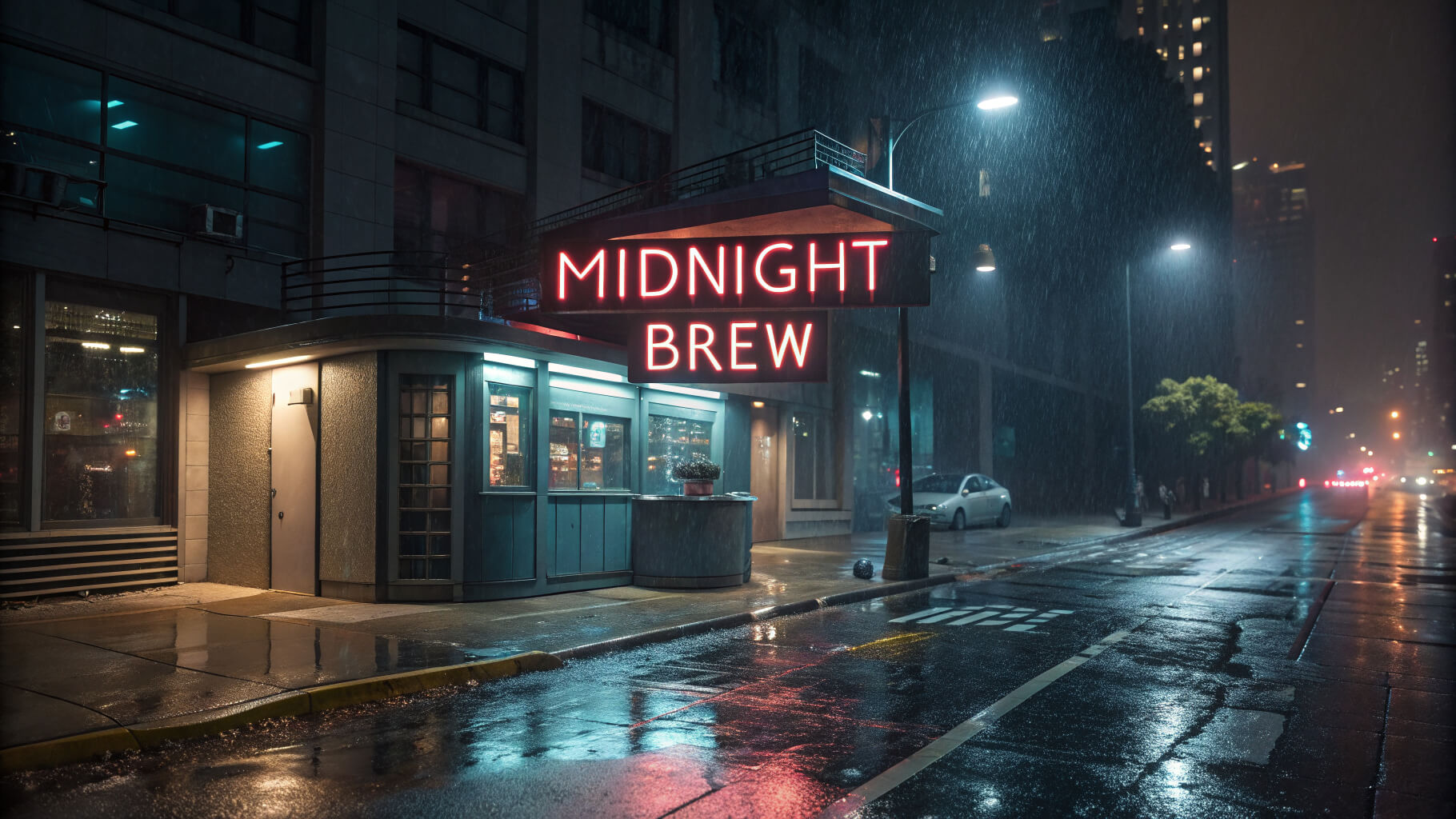
1. Neon typography test
Prompt: A cinematic night street scene with a small futuristic coffee shop on a rainy corner. A bright neon sign above the entrance clearly reads “MIDNIGHT BREW”. The letters must be sharp, correctly spelled, evenly spaced and fully visible. Wet pavement reflects the neon light, with soft rain, realistic shadows and a moody cyberpunk atmosphere.
What it tests: Text accuracy, spelling, typography, reflections and lighting.
The differences in prompt outputs for the neon typography test between Flux and Stable Diffusion are shown below.
1. Flux
2. Stable Diffusion
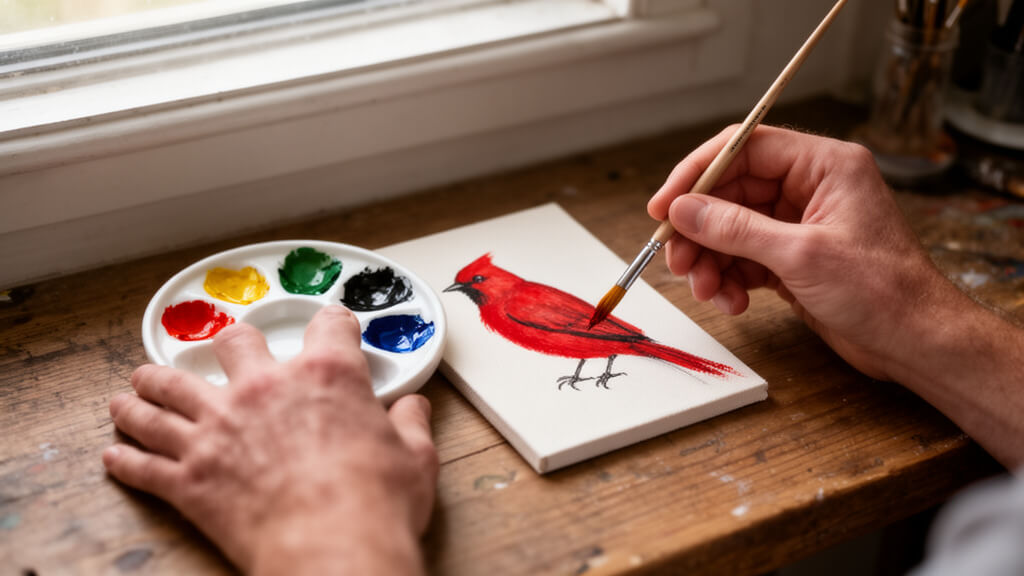
2. Hands and object interaction test
Prompt: A realistic first person view of an artist’s two hands at a wooden desk. The right hand is holding a fine paintbrush and painting a red bird on a small canvas. The left hand is gently holding a ceramic paint palette with six visible paint colors. Both hands must have five natural looking fingers, correct anatomy and realistic skin texture. Soft daylight enters from a nearby window.
What it tests: Hands, fingers, first person perspective, object interaction, realism.
The differences in prompt outputs for the hands and object interaction test between Flux and Stable Diffusion are shown below.
1. Flux
2. Stable Diffusion

3. Complex scene detail test
Prompt: A wide fantasy landscape at sunrise showing an ancient stone bridge crossing a clear river. On the bridge, three travelers wearing blue cloaks walk toward a glowing castle gate. Two white horses stand near the riverbank on the left. Five lanterns hang from the bridge railing. In the background, tall mountains, pine trees, flying birds, morning mist and golden sunlight create an epic cinematic scene.
What it tests: Prompt following, counting, scene composition and object placement.
The differences in prompt outputs for the complex scene detail test between Flux and Stable Diffusion are shown below.
1. Flux

2. Stable Diffusion

4. Readable classroom board test
Prompt: A bright modern classroom filled with small, friendly robots sitting at wooden desks. At the front of the room, a green chalkboard clearly displays the sentence “LEARNING WITH AI”. The text must be perfectly readable, centered and written in clean white chalk. The robots should have expressive eyes, simple metallic bodies and a cheerful classroom atmosphere.
What it tests: Readable text, character consistency and classroom environment.
The differences in prompt outputs for the readable classroom board test between Flux and Stable Diffusion are shown below.
1. Flux

2. Stable Diffusion

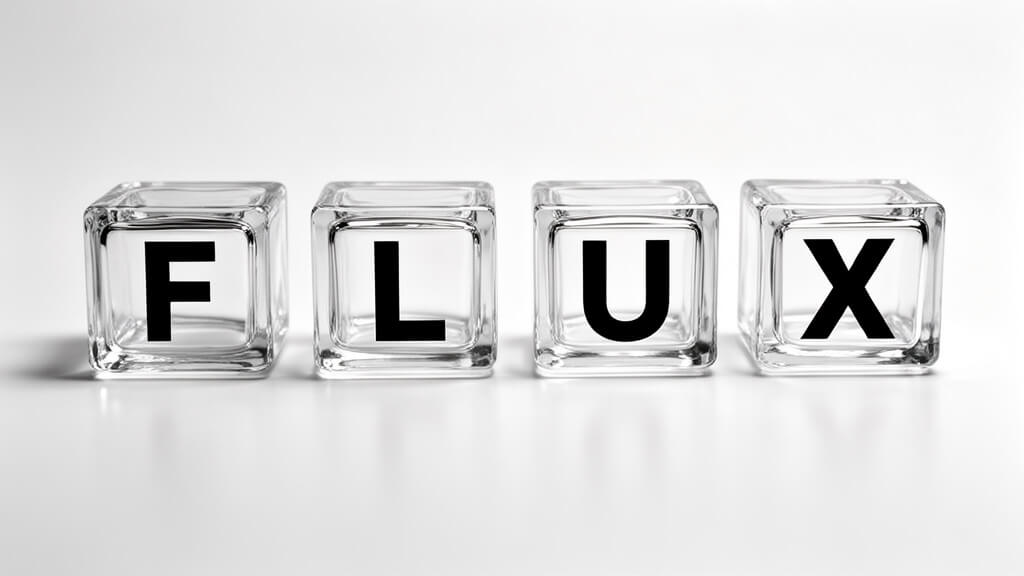
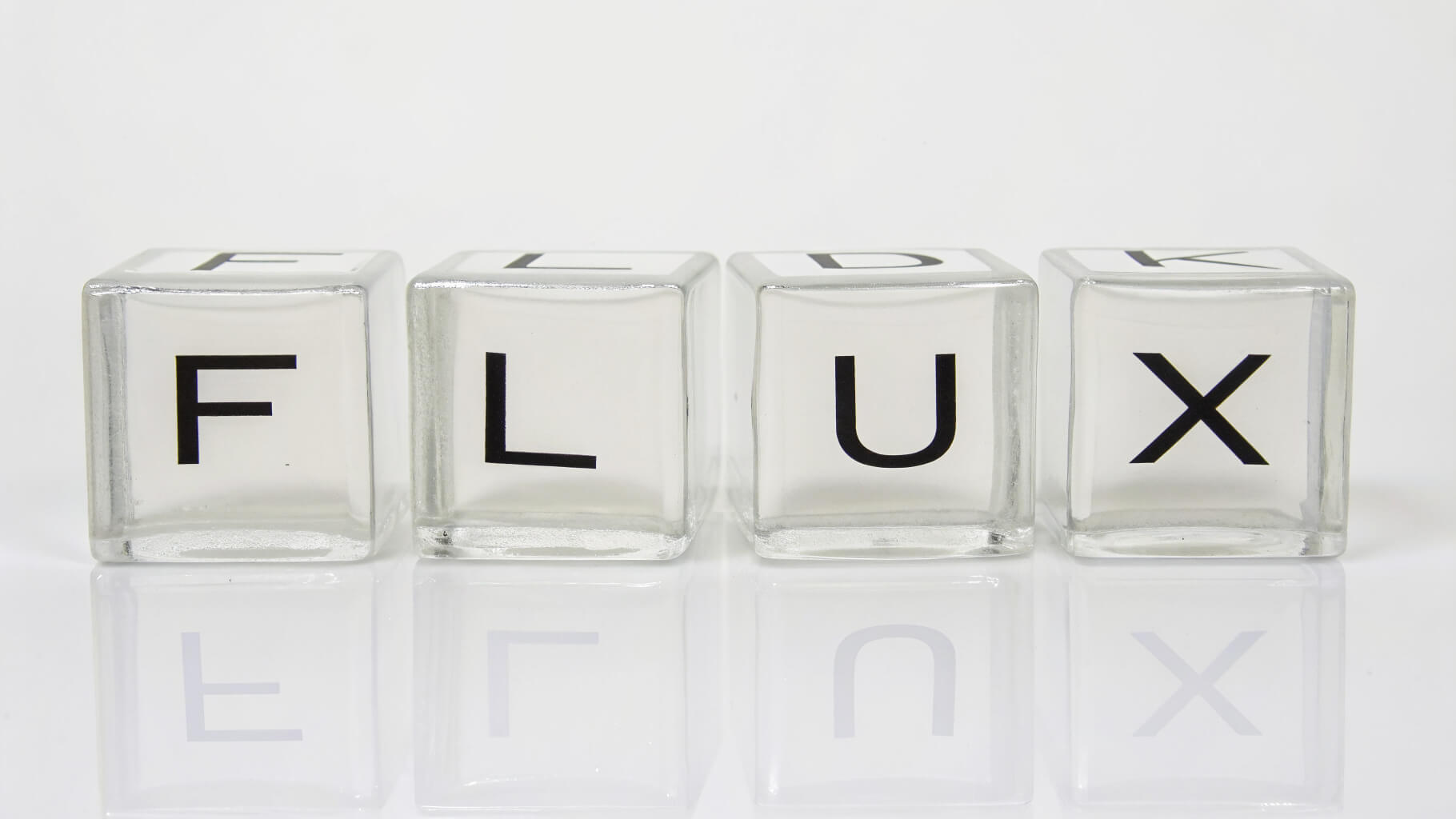
5. Variable binding cube test
Prompt: Four separate glass cubes are arranged in a straight line on a clean white studio surface. Each cube contains one large black letter on its front face. From left to right, the letters must spell “FLUX”. The first cube has F, the second cube has L, the third cube has U and the fourth cube has X. Use realistic reflections, soft studio lighting and a minimal product photography style.
What it tests: Variable binding, letter placement, object separation and product style clarity.
The differences in prompt outputs for the variable binding cube test between Flux and Stable Diffusion are shown below.
1. Flux
2. Stable Diffusion
6. Specific action and spatial relationship test
Prompt: A magical bedroom scene at night showing a tiny glowing tooth fairy carefully lifting a small white tooth from under a child’s pillow. The child is peacefully sleeping in bed. The pillow is slightly raised and the tooth is clearly visible halfway underneath it. Moonlight enters through the window, fairy dust sparkles in the air and the scene feels warm, gentle and storybook like.
What it tests: Action accuracy, spatial relationship, character placement, storytelling.
The differences in prompt outputs for the specific action and spatial relationship test between Flux and Stable Diffusion are shown below.
1. Flux

2. Stable Diffusion

Which one should you choose between Flux and Stable Diffusion?
You should choose between Flux and Stable Diffusion based on your creative and workflow requirements. Flux is the stronger choice for projects requiring photorealistic image quality, accurate text rendering and faster generation speeds. Stable Diffusion is better suited for specialized artistic workflows with extensive customization and open source flexibility. Flux performs well for complex scene generation, typography heavy visuals and commercial projects where prompt adherence and realism are important. Stable Diffusion is ideal for fine tuned model training, anime style artwork, experimental visuals and local image generation on consumer hardware without API costs. You can use Flux via VosuAI to gain immediate access to all Flux model variants without local hardware requirements or API configuration.
Which one should you choose between Flux and Stable Diffusion for real time applications?
You should choose Flux if you prioritize photorealistic image quality, accurate text rendering and strong prompt adherence. It is better suited for commercial visuals and realistic scene generation. Stable Diffusion is the better option for users who need advanced customization, creative flexibility and support for specialized artistic styles through tools such as ControlNet and LoRAs.
Which one generates images faster between Flux and Stable Diffusion?
Flux generates images faster than Stable Diffusion because of its variant Flux.1 Schnell generates in 1 to 4 inference steps, while standard Stable Diffusion takes 20 to 50 steps. Flux.1 Dev delivers results faster than Stable Diffusion XL on equivalent hardware, especially for generating complex scenes at high quality output levels.
Does Flux perform better than Stable Diffusion in prompt adherence?
Yes, Flux performs better than Stable Diffusion in prompt adherence. It excels in complex instructions like spatial relationships, object counting and text rendering in images. Flux uses a rectified flow transformer architecture that improves understanding of detailed natural language prompts. This leads to more accurate and consistent outputs compared to Stable Diffusion’s u-net based diffusion pipeline.
Can Flux produce results similar to Stable Diffusion?
Yes, Flux can produce results similar to Stable Diffusion in many image generation use cases, but they differ in strengths. Flux is better at photorealism, text rendering and prompt accuracy. Stable Diffusion offers a wider range of artistic styles through its large ecosystem of fine tuned models and custom extensions.
Is Stable Diffusion WebUI compatible with Flux?
No, Stable Diffusion is not WebUI compatible with Flux because it lacks native support for Flux based models in its standard WebUI architecture. Users seeking Flux integration usually need custom extensions, alternative interfaces or separate pipelines to achieve compatibility and proper model performance.
Does Stable Diffusion help create consistent characters?
Yes, Stable Diffusion creates consistent characters, but it requires specific techniques to maintain stability. Stable Diffusion uses ControlNet, DreamBooth fine tuning and LoRA adapters to preserve facial features and character consistency across different scenes, styles and angles.
Does Flux handle text rendering well in image generation?
Yes, Flux handles text rendering well in image generation by producing clear and correctly spelled text across various languages in graphics, signage and typographic designs. It sets the current benchmark for text accuracy in AI image generation, scoring 1153 ELO points on Artificial Analysis and surpassing Stable Diffusion in overall legibility.
Is Flux.1 Schnell better than Stable Diffusion 3 for generating text?
Yes, Flux.1 Schnell is better than Stable Diffusion 3 for generating text, producing accurate spelling on complex surfaces compared to SD3's inconsistent text output. Flux.1 Schnell delivers readable text results in under 2 seconds, while Stable Diffusion 3 requires 20 to 50 inference steps for similar text accuracy.
Can Flux. 2 create better anime style images than Stable Diffusion 3?
Yes, Flux. 2 creates better anime style images than Stable Diffusion 3 because it delivers higher aesthetic quality and overall image quality through improved prompt adherence. Flux. 2 produces sharper anime style character designs with greater colour saturation and style consistency than Stable Diffusion 3 at 1024×1024 resolution.
Is Flux.2 Pro better for commercial use?
Yes, Flux.2 Pro is better for commercial use, because it delivers the highest quality output with superior prompt adherence, designed for production workflows. It offers watermark free commercial licensing and priority API access, which makes it suitable for enterprise applications. It is optimized for both professional and commercial content creation.