Flux 2 Pro creates high resolution photorealistic images from text prompts and reference images developed by Black Forest Labs. It uses a flow matching latent transformer to handle complex compositions and generate accurate in-image text. Flux 2 Pro delivers photorealism, advanced prompt reasoning, multi reference consistency, high resolution outputs, HEX color accuracy and production grade fidelity. It supports detailed image editing, structural adjustments and maintains subject and brand identity across complex visuals.
Flux 2 Pro is used in marketing, gaming, architecture, UI/UX design, graphic design and character visualization. It allows production ready content for campaigns, catalogs, environment keys and storyboard frames while ensuring visual consistency. It has limitations such as high VRAM requirements, a complex interface, facial inconsistencies, occasional text/artistic inaccuracies and NSFW restrictions. These are mitigated using hosted platforms like VosuAI.
Flux 2 Pro costs $0.03 to $0.05 per first megapixel and $0.015 per additional megapixel. VosuAI costs start at 10 USD per month with 3,750 credits, a Pro plan for 29 USD per month with 11,608 credits and the enterprise plan comes with customized pricing and unlimited credits. Flux 2 Pro is accessible through VosuAI by configuring prompts, enabling the prompt enhancer, seeds, using PromptGPT for image references and generating images.
What is Flux 2 Pro?
Flux 2 Pro is a high end Flux 2 family model designed for generating and editing photorealistic images from text and references. It utilizes a flow matching latent transformer to generate and edit high resolution, photorealistic images from text prompts and image references. Flux 2 Pro also handles complex tasks such as detailed compositions and accurate in-image text rendering. Flux 2 Pro was created by Black Forest Labs as a production focused variant of Flux 2 and was first released publicly on 25th November 2024.
What are the features of Flux 2 Pro?
The features of Flux 2 Pro include photorealism and detail, text rendering, image editing, HEX color precision and production grade fidelity.
The key features of Flux 2 Pro are given below.
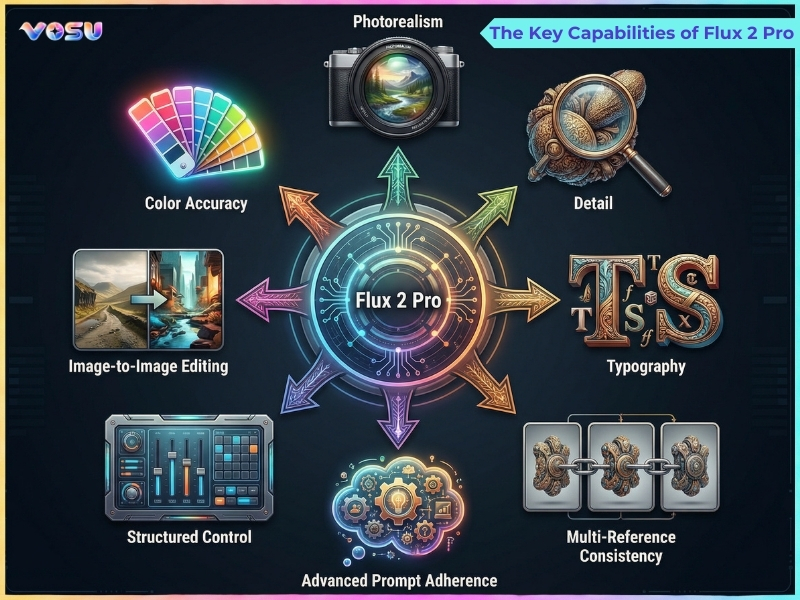
- Photorealism and detail: Flux 2 Pro delivers photorealism and detail with lifelike lighting, textures and anatomy, which closes the gap with real photography for production ready images and high end visual campaigns.
- Advanced prompt reasoning: Flux 2 Pro offers advanced prompt reasoning, interpreting long, structured prompts and maintaining consistent scenes, spatial layouts and character logic even in complex multi element compositions.
- Multi reference consistency: Flux 2 Pro provides multi reference consistency, which uses several reference images to preserve character, product and style continuity across shots for brand accurate, serialized visual content.
- Text rendering: Flux 2 Pro excels at text rendering, producing sharp, legible typography for UI mockups, posters, infographics and memes where on-image wording must remain clear and design accurate.
- Image editing: Flux 2 Pro supports image editing, which allows transformations, refinements and structural adjustments while preserving core shapes, brand elements and subject identity at high resolution.
- High resolution output: Flux 2 Pro generates high resolution output, which reaches multi megapixel or 4 K-like images suitable for print, marketing materials and detailed product or character visuals.
- HEX color precision: Flux 2 Pro allows HEX color precision, closely matching specified colors for brand palettes and UI work, which helps maintain consistent visual identity across campaigns and assets.
- Production grade fidelity: Flux 2 Pro delivers production grade fidelity with stable compositions, reliable anatomy and low artifacts, which supports automated pipelines and commercial use where predictability is critical.
The key capabilities of Flux 2 Pro are visualised below.
What are the applications of Flux 2 Pro?
The applications of Flux 2 Pro are e-commerce, fashion and apparel, architecture, UI/UX design and graphic design.
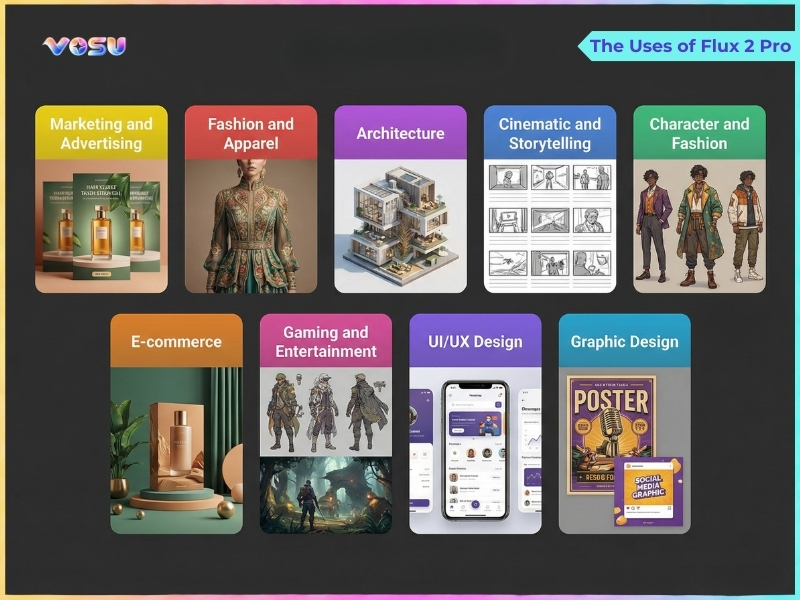
The uses of Flux 2 Pro are visualised below.
The applications of Flux 2 Pro are given below.
- Marketing and advertising: Flux 2 Pro creates photorealistic marketing visuals, campaign key art, social ads and OOH mockups with strong prompt adherence, accurate brand colors and consistent characters across many deliverables.
- E-commerce: Flux 2 Pro produces consistent product shots, packshots, lifestyle scenes and catalog images in varied environments, which reduces physical photoshoot needs while preserving realistic materials, lighting and reflections.
- Fashion and apparel: Flux 2 Pro renders garments, fabrics and textures on models with accurate drape, color and lighting, which allows lookbook visuals, try on concepts and campaign imagery without full scale studio production.
- Gaming and entertainment: Flux 2 Pro generates great detail concept art, key frames, worlds and cinematic scenes, which uses structured prompts and multi-reference control to keep characters and visual style consistent across shots.
- Architecture: Flux 2 Pro supports architectural visualization, interiors and exterior renders, which turn briefs into realistic images of spaces, materials and lighting conditions suitable for pitches, decks and moodboards.
- UI/UX design: Flux 2 Pro’s strong text rendering and layout control help create UI mockups, dashboards and app screens with legible labels, buttons and typography that closely match product design concepts.
- Cinematic and storytelling: Flux 2 Pro allows cinematic storyboards, hero frames and narrative sequences, which use multi-reference consistency for recurring characters and coherent visual language across episodes, chapters or scenes.
- Graphic design: Flux 2 Pro handles posters, social graphics, print ads and cards that combine imagery and typography, which supports hex color control and structured prompting for brand safe, layout aware compositions.
- Character and fashion: Flux 2 Pro maintains character identity and outfits over multiple images, which makes it suitable for virtual influencers, brand mascots and fashion storytelling where look, pose and styling must stay consistent.
You can use VosuAI’s user friendly web dashboard to create visuals for marketing, advertising and e‑commerce with Flux 2 Pro.
What are the limitations of Flux 2 Pro?
The limitations of Flux 2 Pro include high VRAM requirements, complex interface, facial and text inconsistencies and NSFW restrictions.
The limitations of Flux 2 Pro are given below.
- High VRAM requirement: Flux 2 Pro’s large parameter count creates extreme hardware demands, which need 12 to 23 GB or more VRAM for comfortable local use. It pushes most users toward cloud providers instead.
- Complex interface: Flux 2 Pro’s advanced options and production focused settings feel like a steep learning curve, especially when balancing quality, speed, seeds and multi-reference controls in complex interactions.
- Anatomical and detail errors: Flux 2 Pro makes occasional anatomical mistakes, warped hands or subtle texture glitches, so high fidelity shots require regeneration, inpainting or external upscaling and retouching.
- Difficulty with subject interaction: Flux 2 Pro struggles with multi-subject compositions like overlaps, occlusion or physical contact. It sometimes misplaces limbs or gaze direction when scenes contain complex interactions or crowded layouts.
- Facial inconsistency: Flux 2 Pro drift in face shape, age or expression across multiple images without careful seeding and reference control, which requires extra prompts or reference based workflows for stable identity.
- Artistic and text inconsistencies: Flux 2 Pro misrenders long text or niche artistic styles, which drop late prompt tokens or invent small artifacts, so designers add typography and fine styling in downstream tools.
- NSFW restrictions: Flux 2 Pro is deployed with strong safety filters and Flux 2 Pro NSFW blocks, which refuse explicit or adult content and sometimes overblock borderline artistic nudity or edgy fashion.
You can offset most of the limitations using VosuAI through managed hosting that eliminates local hardware needs, a simplified interface and platform level quality controls and guardrails.
How much does Flux 2 Pro cost?
Flux 2 Pro costs $0.03 to $0.05 for the first megapixel and an additional $0.015 billed per megapixel (MP), which depends on the provider and usage volume. Flux 2 Pro image generator pricing varies by provider, API route and billing models include hosted credits, direct MP billing and bundled subscription plans. Its image generation factors that affect price include output resolution, number and resolution of reference images, concurrency limits, volume discounts and usage through a platform or direct Flux 2 Pro API.
VosuAI pricing plans to access Flux 2 Pro.
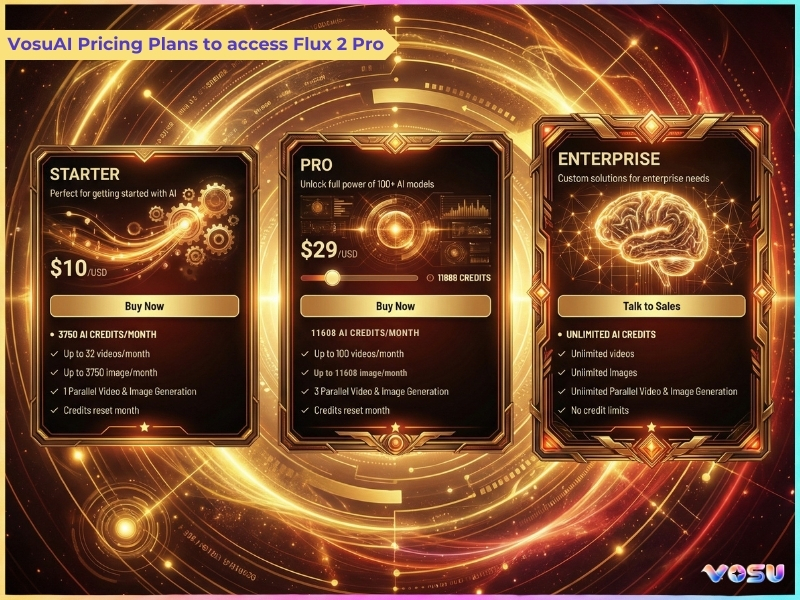
Flux 2 Pro is available through third party platforms like VosuAI, which offers credit based subscription plans like starter, pro and enterprise. VosuAI costs start at 10 USD per month with 3,750 credits, a Pro plan for 29 USD per month with 11,608 credits and the enterprise plan comes with customized pricing and unlimited credits. These credits are accessible for over 100 image generation models, which include all the Flux models such as Flux Dev, Flux Schnell, Flux SRPO Dev and Flux 2 from a single dashboard.
How to use Flux 2 Pro?
To use Flux 2 Pro models, you have to select the Flux 2 Pro model, enable or disable the prompt enhancer, enter your prompt, set a seed and generate the image.
6 steps to use Flux 2 Pro using VosuAI are outlined below.
- Select the Flux 2 Pro model: Select the Flux 2 Pro model from the Vosu AI interface to access its advanced generative capabilities and optimized performance for high resolution image creation.
- Enable or disable the prompt enhancer: Enable or disable the prompt enhancer to refine the model’s understanding of your input, which improves the precision, style and context alignment of the generated image.
- Enter your prompt: Enter a detailed description of the desired image, that specify objects, style and attributes to guide Flux 2 Pro in generating accurate and contextually rich visuals.
- Use PromptGPT: Use PromptGPT to craft and improve text or JSON prompts customized for the Flux 1 model. It utilizes image based or predefined style references to create well structured inputs for high quality results.
- Set a seed: Set a random or fixed seed to control reproducibility, which allows repeated generations of similar images or introduces variability for creative experimentation.
- Generate the image: Generate the generation process to create the image based on your prompt and settings, then review and adjust inputs for iterative improvement if necessary.
How to prompt Flux 2 Pro?
The techniques to prompt Flux 2 are outlined below.
- Natural language: Use clear natural language with the subject + action + style + context framework, which keeps prompts concise but specific about people, objects, environment and mood.
- Subject first: Start prompts with the main subject before adding modifiers, so Flux 2 Pro prioritizes who or what should dominate the frame.
- Structured sequence: Follow a consistent sequence such as subject, action, style, composition, lighting, mood and detail keywords to reduce ambiguity and improve prompt adherence across complex scenes.
- JSON control: Use JSON for complex control like define scene, subjects, positions, colors, lighting and camera in fields when building production workflows or automated pipelines.
- Positive only: Avoid negative prompts as Flux 2 Pro focuses on positive descriptions, so describe what you want instead of listing what to remove or avoid.
- Camera specs: Add camera language lens mm, angle, shot type, depth of field to push photorealism and control perspective, especially for product and portrait shots.
- Reference images: Attach reference images for character, product or layout to anchor identity and composition while still guiding Flux 2 Pro with specific text instructions.
Can I use Flux 2 Pro for commercial purposes?
Yes, you can use Flux 2 Pro for commercial purposes because its license explicitly permits commercial usage of generated outputs, subject to the model’s terms and content restrictions. Flux 2 Pro outputs can be sold, used in client work, advertising and branding as long as you follow any usage limits, legal compliance and prohibited content rules in the license. Users can generate high quality, brand ready visuals with Flux 2 Pro via VosuAI and legally deploy them in commercial projects and campaigns.
Is Flux 2 Pro free?
No, Flux 2 Pro is not free because most providers use per megapixel pricing or paid API plans, unless you run it locally on a powerful GPU. Flux 2 Pro is accessible through online and web based platforms like VosuAI, which allows limited free use for experimentation. It offers new users 150 free signup credits to try Flux 2 Pro before making any payment.
Is Flux 2 Pro better than Flux 2 Dev?
Yes, Flux 2 Pro is better than Flux 2 Dev because it is tuned for maximum visual quality, detail and consistency for professional use. Flux 2 Pro delivers cleaner, more photorealistic output and more reliable multi reference consistency. Flux 2 Dev prioritizes flexibility, open weights and faster experimentation on powerful hardware at the cost of polish.
Is Flux 2 Pro better than Flux 2 Flex?
Yes, Flux 2 Pro is better than Flux 2 Flex because it prioritizes maximum visual quality, realism and consistency for flagship, professional use images. Flux 2 Pro is for the highest, most stable flux 2 pro image quality and multi reference consistency. Flux 2 Flex is for stronger user control, typography precision and tunable performance quality trade offs.
Is Flux 2 Pro better than Flux 2 Max?
No, Flux 2 Pro is not better than Flux 2 Max because Max is the highest quality variant in the Flux 2 family. Flux 2 Pro is ideal for faster and high quality results at a lower cost for general production work. Flux 2 Max is better for absolute maximum fidelity, consistency and reliability at scale, where speed and volume still matter but quality is paramount.
Is Flux 2 Pro better than Nano Banana Pro?
No, Flux 2 Pro is not better than Nano Banana Pro because each wins on different strengths in real world tests. Flux 2 Pro is for artistic realism, lighting and speed for polished visuals. Nano Banana Pro is for logical instruction following, complex scene understanding and structured layouts or text accuracy matter more than pure aesthetics.