
Flux 2 AI converts text and reference images into high resolution, photorealistic visuals suitable for commercial and creative workflows. Flux 2 AI image generator is created by Black Forest Labs, which focuses on realism, precision and control.
Flux 2 works by combining a large vision language model with a rectified flow transformer operating in latent space. Its key features include high realism, native 4 megapixel image generation, strong prompt adherence, flexible control options and optimized speed. It is used for creative production, marketing and advertising, e-commerce visuals, UI or UX design and social media assets. It is valuable where brand consistency, realism and layout accuracy are required.
Flux 2 has some limitations like core technical limits, generation quality limits, integration and workflow limits and licensing and governance limits. Flux 2 pricing ranges from $0.012 to $0.07 per megapixel, while VosuAI offers credit based subscription plans that start at 15 USD per month for 320 credits. You can use Flux 2 via VosuAI by selecting the model, entering a prompt, adjusting the prompt enhancer or using PromptGPT, choosing aspect ratio and generating high quality images through its user friendly dashboard.
What is Flux 2?
Flux 2 is an AI powered text to image diffusion model by Black Forest Labs that generates high quality, realistic images from natural language prompts with improved accuracy and control. It is known for producing studio grade quality images at four megapixels, which offers precise control over visual style and layout, improved text and UI rendering and multi reference editing features. These allow users to maintain consistent appearances for specific characters, branded products and visual assets across multiple generated images. Flux 2 was launched on November 25, 2025, by Black Forest Labs. This company positioned Flux 2 as its flagship image generator due to its higher output resolution, improved editing controls and suitability for production level creative workflows.
How does Flux 2 work?
Flux 2 is an AI image generation model with a unique architecture that pairs a large vision language model (VLM) with a rectified flow transformer in latent space. It generates high resolution, photorealistic images from text and reference inputs with improved speed, quality and control over classic diffusion models. It replaces the U-Net diffusion backbone with a latent flow matching transformer (32B parameters in the dev variant) and a high resolution VAE. It allows faster, higher quality generation through smooth noise to image evolution.
Flux 2 core components include a rectified flow transformer for generation and editing, the Mistral 3 24B VLM for long and complex prompts and the FLUX.2 VAE. Flux 2 provides control mechanisms such as multi-reference conditioning (about 10 images) for character or product consistency and a 32K token context window for structured and JSON style prompting. It supports pose, composition, hex color and layout control, while guidance distilled sampling reduces inference steps to keep generation fast and stable.
What are the features of Flux 2?
The features of Flux 2 include high realism, prompt adherence, character consistency, style reference and flexible control. These features focus on realism, accuracy and creative flexibility, which are suitable for both professional and creative use cases.
The features of Flux 2 are visualised below.
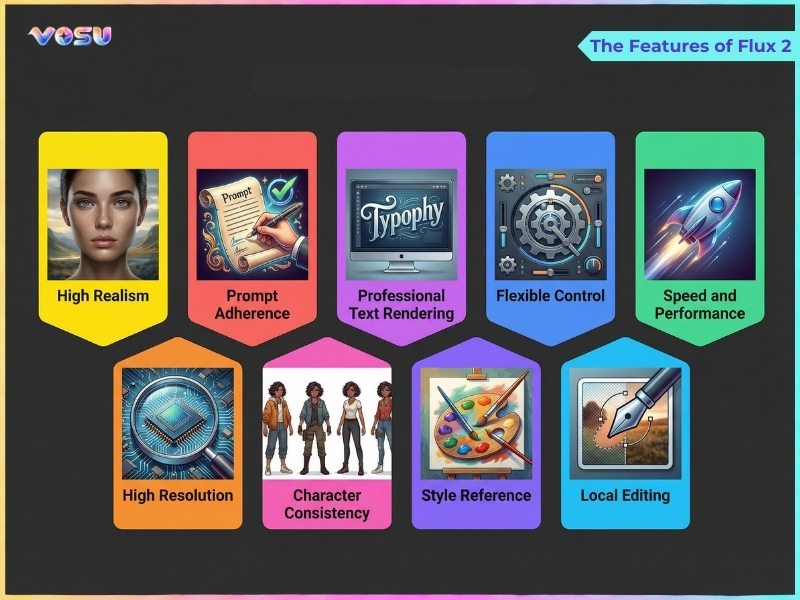
The key features of Flux 2 are listed below.
- High realism
- High resolution and detail
- Prompt adherence
- Character consistency
- Professional text rendering
- Style reference
- Flexible control
- Local editing
- Speed and performance
High realism
Flux 2 delivers high realism through a new architecture and training focus that targets photorealistic detail, spatial consistency and realistic lighting behavior. It operates in a high resolution latent space and is trained heavily on real photography, which allows materials such as skin, fabric, metal, glass and foliage. It supports consistent perspective, depth and occlusion, which keeps room layouts, street scenes and complex scenes spatially consistent. Its illumination model mimics real cameras and lighting setups, produces correct shadow direction, smooth highlight transitions and physically plausible global lighting that supports convincing materials and scene logic.
High resolution and detail
Flux 2 generates high resolution images at up to 4 megapixels (4MP), which makes them suitable for print, large displays and professional branding. It maintains visual consistency across the entire frame at that resolution. Its native high resolution supports multiple aspect ratios such as 16:9, 9:16 4:3,3:4 and 1:1, without depending on external upscalers, which prevents stretching and common artifacting issues. Flux 2 captures finer texture details in skin, fabric, hair, metal, foliage and small UI or product elements at the micro detail level. It preserves sharp edges and realistic surface structure when images are zoomed or printed, which supports production grade visual output.
Prompt adherence
Flux 2 excels at prompt adherence by accurately following complex user instructions and turning detailed textual prompts into scenes with correct objects, attributes and relationships. It means the generated image closely matches the description, even for multi-step or compositional requests. Flux 2 is better than earlier models because it combines a strong vision language encoder with a high capacity generative backbone. It improves semantic understanding and spatial reasoning. It controls prompt structure, guidance strength, step count and reference images or layout hints to anchor key elements in the scene.
Character consistency
Flux 2 confirms character consistency, which generates the same AI character across multiple images, scenes and outfits. It keeps the face, proportions and core identity recognizable while allowing changes in expressions, poses, clothing and environments. Flux 2 works by combining reference images, strong visual semantic encoding and optional fine tuned or LoRA style character models. VosuAI focuses on fine tuned character consistency Flux 2 model that makes it easier to maintain recognizable characters across different scenes. Character consistency is most useful for storyboards, comics, children’s books, virtual influencers and long form marketing campaigns. It is valuable for game or film concept art, where a recurring character must remain visually consistent across many different narrative situations.
Professional text rendering
Flux 2 delivers professional text rendering, which produces clean, readable text inside images instead of the warped or broken text of traditional AI image generation failures. It handles long sentences, punctuation, case sensitive lettering and complex typography layouts such as multi-line headlines, labels and UI elements. Flux 2 makes the text look like real graphic design rather than random glyphs. Its text rendering feature is useful for posters, ads, social media graphics, logos, packaging, infographics and UI/UX mockups, where accurate on-image text conveys real information and integrates seamlessly.
Style reference
Flux 2 supports style reference, a multi-reference feature that uses example images to guide a sophisticated style. Flux 2 guarantees new outputs share the same aesthetic, color language and overall visual identity without copying content pixel by pixel. Its style reference works through an identity reference system where one or more style images are provided. Flux 2 encodes palette, contrast, brushwork and composition, then applies that style to new scenes or subjects defined by the prompt.
VosuAI’s PromptGPT complements this workflow by supporting both image based style references and predefined style controls. It helps structure prompts using reference images alongside options such as visual style, camera type, camera angle and camera motion for the Flux 2 model. Flux 2 works best when users use a small number of high quality references and keep style references separate from character or product references. It maintains consistent art direction when prompts focus on content and the same reference set is reused.
Flexible control
Flux 2 offers flexible control, which provides granular control over the image generation process. It allows users to achieve a balance between quality, speed and creative interpretation for each project. Flux 2 includes prompting and structure control such as long, detailed prompts, subject first descriptions and layout style prompting. It offers visual and brand control through adjustable steps, guidance strength, seeds, aspect ratios and multi-reference inputs for logos, color palettes and style or character images. Flux 2 uses flexible control most effectively for marketing assets, UI/UX mockups, campaigns and production workflows that need strict brand consistency. It also supports production workflows by allowing fast iteration and controlled variation.
Local editing
Flux 2 offers local editing, which allows surgical modifications to specific regions of an image while preserving the overall scene’s integrity and style. It allows users to keep composition, lighting and character identity intact while changing only targeted elements such as clothing, small props, backgrounds or minor errors. Its local editing works best with image to image or edit workflows, where a base image and precise instructions define what should change and what should remain fixed. It allows Flux 2 to re-synthesize only the affected areas while maintaining global consistency in color, materials and scene logic.
Speed and performance
Flux 2 improves speed and performance through optimized variants and efficient architectures. It allows fast image generation while maintaining high quality and creative control. Flux 2’s core performance includes 4MP class outputs with strong realism using a few dozen inference steps, with the flexibility to trade speed for fidelity based on project needs. Flux 2 Dev offers maximum flexibility, but is slower. Flux 2 Flex lets users tune step count and guidance to balance speed and quality. Flux 2 Pro provides stable, production ready outputs with moderate latency. Flux 2’s turbo style distilled variants like Flux 2 Turbo and Flash reduce 50 steps to around 8 using timestep distillation. These are ideal for rapid iteration, real time use or large scale batch generation.
What are the uses of Flux 2?
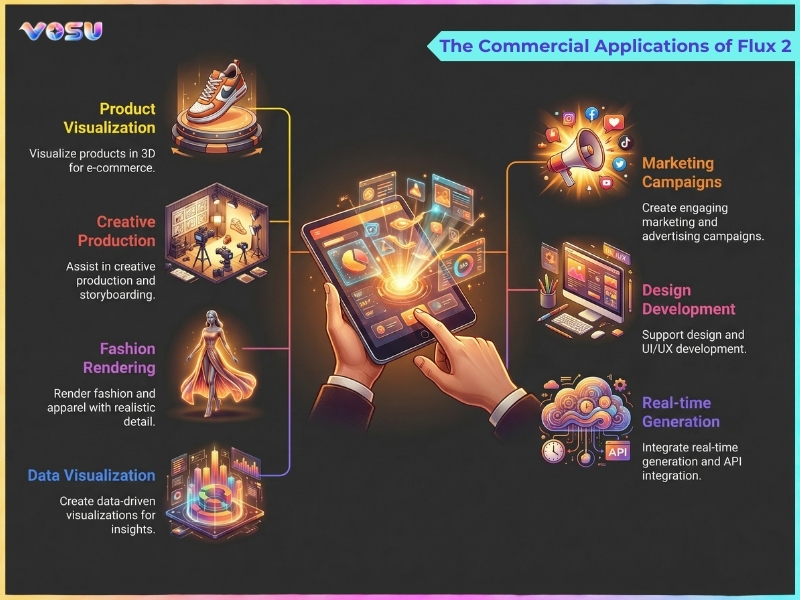
The use cases of Flux 2 are creative production, content creation, e-commerce visuals, UI/UXdesign, image to video and social media.
The uses of Flux 2 are given below.
- Creative production: Flux 2 supports creative production by exploring styles, compositions and concepts while keeping characters, products and lighting consistent across many shots.
- Content creation: Flux 2 secures content quality and faster output by producing visually compelling graphics for blogs, articles and multimedia campaigns.
- Marketing and advertising: Flux 2 produces branded visuals, campaign assets and promotional imagery that support consistent brand messaging and engaging high quality marketing efforts.
- E-commerce visuals: Flux 2 produces high quality product images, lifestyle mockups and catalog assets, which improve visual presentation and conversion rates for online stores and marketplaces.
- UI and UX design: Flux 2 accelerates UI and UX design by creating interface mockups, icon sets and layout explorations with accurate text and brand colors.
- Entertainment: Flux 2 generates entertainment assets like concept art, animated scenes and digital backgrounds, which allows faster production cycles for films, games and digital media projects.
- Social media: Flux 2 helps generate visually engaging social media posts, banners and promotional graphics customized for different platforms like Facebook or Instagram while maintaining visual quality and brand identity.
You can use VosuAI for content creation, e‑commerce visuals and entertainment workflows, as its user friendly dashboard makes Flux based image generation easier to manage for professional or non-professional creators.
The commercial applications of Flux 2 are visualised below.
What are the limitations of Flux 2?
The limitations of Flux 2 are core technical limits, generation quality limits, control and consistency limits, integration and workflow limits and licensing or governance limits.
The limitations of Flux 2 are given below.
- Core technical limits: Flux 2 faces core technical limits like extreme hardware demands, slower performance on consumer GPUs and configuration complexity for fully local, high precision deployments.
- Generation quality limits: Flux 2 shows generation quality limits on rare concepts, dense scenes and certain complex elements such as small text, intricate hands or unusual objects.
- Control and consistency limits: Flux 2 has control and consistency limits like possible prompt drift, residual character inconsistencies in extreme scene changes and a non‑trivial prompt engineering learning curve.
- Integration and workflow limits: Flux 2 encounters integration and workflow limits, where API costs, rate limits, security concerns and tooling friction slows large scale or enterprise pipelines.
- Licensing and governance limits: Flux 2 carries licensing and governance limits, with dev weights non‑commercial and commercial rights gated behind paid or negotiated licenses, plus usual bias and misuse concerns.
You can offset these limitations via VosuAI, which hides hardware complexity, handles licensing and provides a user friendly dashboard for both daily and professional use.
How much does Flux 2 cost?
Flux 2 costs ranges $0.012 to $0.07 per megapixel (MP) of output, with APIs billed per megapixel (MP) rather than per image. Flux 2 image generator pricing varies by provider and model type such as Dev, Pro and Flex. Dev is the lowest cost option while Pro charges a mid range price per megapixel and Flex applies a higher per MP rate. Flux 2 image generation pricing depends on factors such as output resolution, billed inputs, model variant, concurrency, licensing type and use of community providers or official endpoints.
Flux 2 is available on third party platforms like VosuAI, which offers credit based subscription plans like Starter, Creator and Business instead of raw per MP billing. VosuAI costs start at 15 USD per month with 320 credits, a Creator plan for 29 USD per month with 640 credits and Business plans from 129 USD per month with 2,941 credits. These credits are accessible for over 100 image generation models, which include all the Flux models such as Flux 2 Dev, Flux 2 Pro and Flux 2 Flex.
How to use Flux 2?
To use Flux 2 models, you have to select the Flux 2 model inside the VosuAI dashboard, enable or disable the prompt enhancer, enter your prompt, use PromptGPT, choose aspect ratio, set a seed and image generation.
7 steps to use Flux 2 using VosuAI are outlined below.
- Select a Flux 2 model: Select the Flux 2 model from the VosuAI interface to access its advanced generative capabilities and optimized performance for high resolution image creation.
- Enable or disable the prompt enhancer: Enable the prompt enhancer to let VosuAI intelligently expand and refine your prompt or disable it if you prefer full manual wording and strict prompt fidelity.
- Enter your prompt: Enter a clear text description specifying subject, style, lighting, camera angle and any brand or character details you want Flux 2 to follow consistently.
- Use PromptGPT: VosuAI PromptGPT creates model aware text and JSON prompts using image based or predefined style references, which provide structured inputs to guide Flux 2 for accurate and consistent results.
- Choose aspect ratio: Select the appropriate aspect ratio for your project needs, whether square, portrait or landscape dimensions for optimal visual composition.
- Set a seed: Set a numeric seed when you need reproducible results or controlled variations of one idea and leave it blank for more randomness and broader creative exploration.
- Generate the image: Generate the image, inspect the Flux 2 output, then refine by adjusting the prompt, seed or model variant and regenerating until the visual meets your production requirements.
How to prompt Flux 2?
The techniques to prompt Flux 2 are outlined below.
- Structured prompts: Flux 2 works best with structured prompts using a subject + action + style + context framework, which prioritizes key elements first for clarity.
- Reference images: Flux 2 benefits from reference images for identity and style, so attach character, product or style images, then describe what must be changed.
- Camera and lighting details: Flux 2 responds strongly to camera and lighting details, so specify focal length, angle, depth of field and lighting setup for realistic scenes.
- Color and mood: Flux 2 locks color and mood when users clearly state palette, grading and emotional tone, which includes optional hex codes for branding.
- Natural language: Flux 2 prefers natural language that is highly specific with details, lighting, camera settings and mood, so use VosuAI’s prompt enhancer to refine prompts automatically.
Is Flux 2 free?
No, Flux 2 is not free because Black Forest Labs charges megapixel based pricing for all hosted FLUX.2 production variants, with only the dev model free for non‑commercial local use. Flux 2 is available with free or limited access through third party platforms like VosuAI, which offer up to 12 free credits for completing onboarding for experimentation before paying.
How to use Flux 2 for free?
To use Flux 2 for free, you can access limited credits through third party platforms like VosuAI. VosuAI provides a user friendly interface that lets you try Flux 2’s generative features without a paid subscription.
Is Flux 2 better than Midjourney v7?
Yes, Flux 2 is better than Midjourney v7 for superior photorealism and stricter prompt adherence, while Midjourney v7 is stronger for accessible artistic flair and stylized images. Flux 2 is good for product shots, realistic humans and layout critical work and Midjourney v7 is for cinematic, highly stylized, emotionally rich artwork and broad creative exploration.
Is Flux 2 better than Imagen 4?
No, Flux 2 is not better than Imagen 4 because each excels in different areas, including complex and structured tasks, real world physics and photorealism. Flux 2 for top tier photorealism, strong prompt adherence and plausible, production grade scenes like products or realistic humans. Imagen 4 is for working in the Google or Vertex ecosystem or strong handling of long, structured prompts and complex multi-object compositions.
Is Flux 2 better than Nano Banana Pro?
No, Flux 2 is not better than Nano Banana Pro, because both are strong at different things. Flux 2 is great for artistic, cinematic and stylized visuals, while Nano Banana Pro is better for logical consistency, complex and structured tasks, real world physics and photorealism. Flux 2 is for stylized art and Nano Banana Pro is for reliable and realistic scenes.

