
Flux converts text based descriptions into detailed, visually consistent images with high realism, speed and creative flexibility using advanced generative techniques. It originated from Black Forest Labs, founded in 2024 by former Stability AI researchers, and was officially announced in August 2024. It gained recognition for outperforming several established models in prompt adherence and image quality. Flux evolved through milestones such as FLUX 1.1 Pro, the Kontext series for contextual editing and the next generation FLUX 2 family released in late 2025.
Flux functions by combining multimodal transformers with flow matching diffusion techniques to generate images in staged, high resolution steps. It relies on strong text encoders and shared vision-language embeddings to accurately map words to visual concepts. Flux offers features such as photorealistic detail, superior prompt adherence, accurate text rendering, high speed generation, character consistency and extensive customization controls. It has popular models like FLUX.1 Pro, FLUX.1 Schnell, FLUX 1.1 Pro, FLUX.1 Kontext variants and FLUX.2 Pro, Flex, Dev and Klein options
Flux is used for content creation, marketing, e-commerce, design exploration, UI prototyping, image editing, game development, education and brand customization. It faces limitations such as high hardware requirements, occasional artifacts, style inconsistency, prompt sensitivity, multi turn degradation and facial pose bias. Flux costs around $0.11 to $0.12 USD per image via API, while VosuAI offers credit based plans starting at $10 per month for 3750 credits. Flux is used by selecting a model, refining prompts, adjusting parameters, choosing aspect ratio, setting optional seeds and generating or iterating images through supported dashboards.
What is Flux?
Flux is an advanced open source text to image generation model developed by Black Forest Labs that converts written descriptions into high-quality visual images. It is known for its speed, efficiency and ability to generate photorealistic and artistically diverse images while maintaining strong alignment between text prompts and visual output.
What is the history of Flux?
The history of Flux begins with Black Forest Labs, founded in 2024 by former Stability AI researchers Robin Rombach, Patrick Esser and Andreas Blattmann, who previously worked on Stable Diffusion. It was officially announced on August 1, 2024, and quickly gained traction for surpassing models like Midjourney and Stable Diffusion in prompt adherence and image quality.
Flux achieved early milestones by securing $31 million in seed funding, which supported the development and expansion of its model lineup. Flux achieved its first major upgrade with FLUX 1.1 Pro, released on October 2, 2024, followed by additional improvements like FLUX 1.1 Pro Ultra. The FLUX.1 Kontext Series that includes FLUX.1 Kontext Pro, FLUX.1 Kontext Max, and FLUX.1 Kontext Dev, launched in May 2025, is introducing advanced contextual editing capabilities.
Flux entered its next generation phase with FLUX.2, released on November 25, 2025, which features FLUX.2 Pro, FLUX.2 Max, FLUX.2 Flex, FLUX.2 Turbo and FLUX.2 Dev for higher resolution, production grade workflows. Its efficient variants, FLUX.2 Klein (4B) and FLUX.2 Klein (9B), were also introduced for resource light deployments while maintaining strong image quality.
How does Flux work?
Flux works by converting text prompts into images through advanced AI techniques that combine transformer blocks with flow matching for staged image generation. It improves diffusion models with a hybrid architecture of multimodal transformers to produce prompt accurate images at high resolution.
Flux relies on strong text encoders and shared vision language embeddings, so the model aligns words with visual concepts precisely. Its design focuses on both speed and fidelity that allow it to render complex scenes, materials and lighting while maintaining consistency across different prompts and styles.
What are the features of Flux?
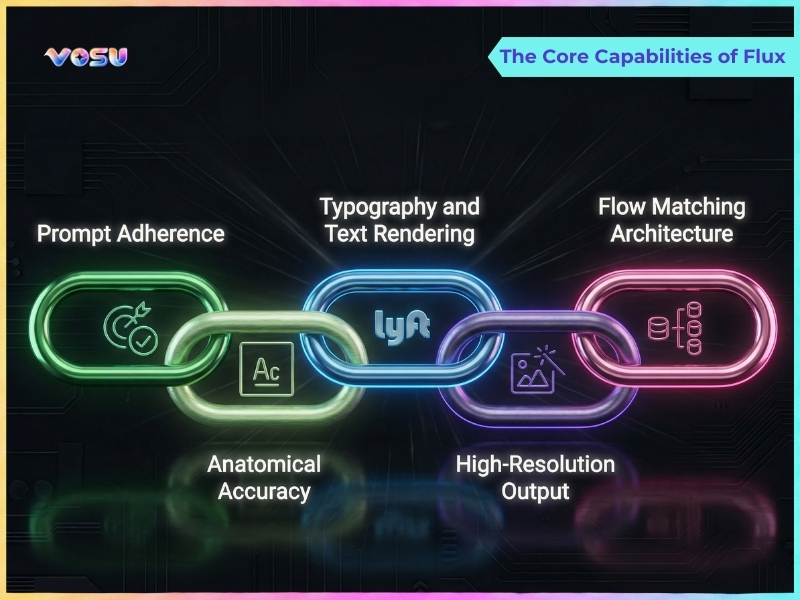
The features of Flux include photorealistic quality with fine details, superior prompt adherence for complex scenes, accurate text rendering, high speed generation, character consistency, extensive customization options, and multiple model variants for diverse needs.
The key features of Flux are given below.
- Photorealistic quality: Flux produces highly realistic images with fine detail, accurate lighting and natural textures that rival professional photography for many use cases like fashion editorials or real estate interiors.
- Superior prompt adherence: Flux interprets complex, multi-part prompts that keep composition, subjects and context aligned with user instructions, even in crowded or intricate scenes.
- Accurate text rendering: Flux renders clear, readable text inside images that support full sentences for posters, UI mockups, infographics and marketing visuals without spelling artifacts.
- High speed: Flux generates images in a few steps with optimized architectures and schnell variants, which allow rapid iteration for thumbnails, concept art and production workflows.
- Character and style consistency: Flux maintains consistent faces, outfits and visual style across multiple images, useful for branding, storytelling and recurring characters.
- Customization options: Flux offers rich parameter controls, aspect ratios, resolutions and guidance settings for customizable outputs to different platforms and use cases like social banners, YouTube thumbnails or Instagram stories.
- Multiple model variants: Flux provides Pro, Dev, Ultra and Schnell type models which balance quality, speed and resource usage to match hobby, professional and enterprise scenarios.
The core capabilities of Flux are visualised below.
What are the popular models of Flux?
The popular models of Flux are FLUX.1 Pro, FLUX.1 Dev, FLUX.1 Schnell, FLUX.1 Kontext Pro, FLUX 1.1 Pro and FLUX.2 Pro. These models represent flagship quality, experimentation, fast generation, context guided editing, refined upgrades, and next generation professional image creation.
12 popular models of Flux are given below.
- FLUX.1 Pro: FLUX.1 Pro is a high quality flagship model optimized for detailed, photorealistic images and strong prompt adherence in professional workflows where reliability and fidelity matter most.
- FLUX.1 Dev: FLUX.1 Dev is a balanced model intended for experimentation, prompt testing and iterative exploration that trades some absolute fidelity for flexibility and cost effective development cycles.
- FLUX.1 Schnell: FLUX.1 Schnell is a speed focused variant that generates images in very few steps, ideal for rapid ideation, thumbnails, drafts and scenarios where turnaround time is critical.
- FLUX.1 Kontext Max: FLUX.1 Kontext Max is the strongest Kontext tier that prioritizes reference image guidance, high conditioning strength and consistency, suited for demanding character, brand or shot matching tasks.
- FLUX.1 Kontext Pro: FLUX.1 Kontext Pro is a balanced Kontext option that combines solid reference alignment with good speed and quality, which fits everyday guided edit and style consistency projects.
- FLUX.1 Kontext Dev: FLUX.1 Kontext Dev is a Kontext variant geared toward experimenting with image conditioning, layout and style transfer, useful for research and development or pipeline prototyping.
- FLUX 1.1 Pro: FLUX 1.1 Pro is an updated Pro model with architecture and training refinements that improve stability, prompt following and image sharpness over the original 1.0 generation.
- FLUX 1.1 Pro Ultra: FLUX 1.1 Pro Ultra is a format tuned, premium variant highlighting maximum fidelity and layout aware control for portrait and landscape specializations and final assets.
- FLUX.2 Pro: FLUX.2 Pro is a general purpose FLUX.2 workhorse offering realistic detail, strong prompt adherenc, and suitability for most professional image generation and editing needs.
- FLUX.2 Flex: FLUX.2 Flex is a versatile FLUX.2 model optimized for exploration, fast variations and broad stylistic range, ideal when testing multiple creative directions.
- FLUX.2 Dev: FLUX.2 Dev is a development focused FLUX.2 tier used for experimenting with new prompts, workflows and integrations before scaling to higher cost production models.
- FLUX.2 Klein: FLUX.2 Klein is a lighter weight FLUX.2 configuration targeting efficiency and lower resource usage, suitable for constrained environments or high volume batch jobs.
What are the uses of Flux?
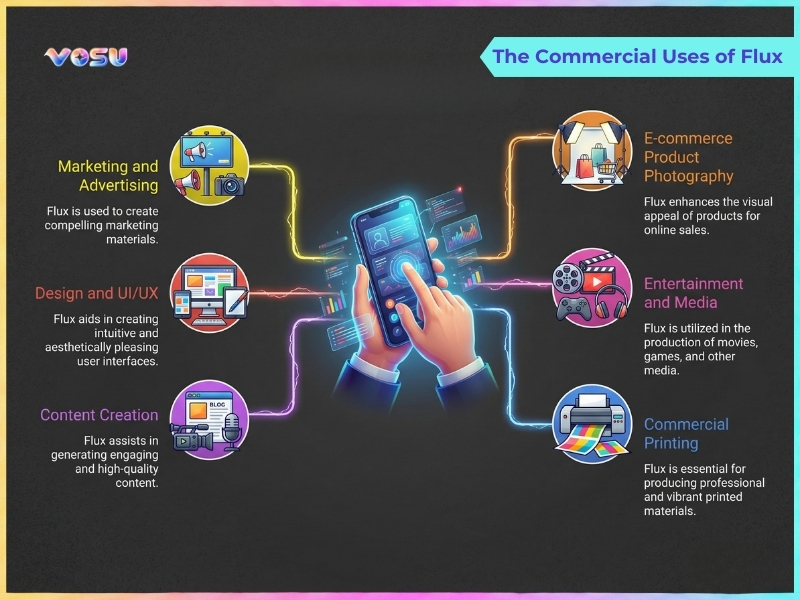
The uses of Flux are content creation, marketing, e-commerce, design, UI prototyping, image editing, game development, education and customization. These use cases allow visual production, creative exploration, branded consistency, efficient iteration and cost effective image generation across professional, commercial and academic workflows.
The uses of Flux are given below.
- Content creation: Flux supports fast production of illustrations, thumbnails, concept art and social visuals that help creators turn prompts into polished assets for platforms like YouTube, blogs and social media.
- Marketing: Flux helps branded campaign imagery, ad creatives and promotional banners customized to target audiences that improve visual experimentation while reducing the cost and time of traditional photo shoots.
- E-commerce: Flux powers product photography alternatives, lifestyle mockups and background variations, which allows online stores to showcase items in multiple contexts without reshooting physical inventory.
- Design: Flux helps designers explore layouts, visual directions and brand concepts that generate moodboards, posters, packaging drafts and visual references for client presentations.
- User interface (UI) prototyping: Flux assists in drafting UI screens, icon idea, and layout mood concepts, which provide visual references that accelerate early stage product and web design exploration.
- Image editing: Flux enables inpainting, outpainting and targeted modifications of existing images that refine composition, backgrounds or details while preserving key subjects and branding elements.
- Game development: Flux generates concept art, environment explorations, character ideas and props that give game teams fast visual iterations before committing to full production pipelines.
- Educational research: Flux supports instructional visuals, experiment diagrams and illustrative examples for teaching AI, design or media topics that explore generative model behavior in academic work.
- Fine tuned customization: Flux allows style or brand specific personalization through controlled prompts and workflows, which produce visuals aligned with a project’s unique aesthetic and consistency requirements.
Flux helps creators, marketers, designers, educators and game developers produce high quality visuals quickly and efficiently. VosuAI makes it even easier with a simple, user friendly dashboard for accessing and using all the Flux models.
The commercial uses of Flux are visualised below.
What are the limitations of Flux?
The limitations of Flux are hardware demands, artifacts, style inconsistency, prompt issues, multi-turn degradation and pose bias. These constraints affect accessibility, visual consistency, prompt reliability, iterative editing qualit, and the ability to generate diverse facial orientations.
The limitations of Flux are given below.
- High hardware requirements: Flux needs high VRAM GPUs or powerful cloud instances for smooth, high resolution generation, which makes local use expensive and limits accessibility for many users.
- Distillation artifacts: Flux distilled variants introduce grain, blur or small structural glitches in fine details, complex lighting or aggressive upscaling, which reduces overall image cleanliness and consistency.
- Inconsistent style: Flux struggles to maintain a consistent artistic or photographic style across multiple images or batches that cause shifts in color grading, texture treatment or overall aesthetic tone.
- Prompt following issues: Flux sometimes ignores nuanced constraints, compositional instructions or rare concepts that force long, engineered prompts and multiple retries to achieve the intended content.
- Multi turn degradation: Flux builds up artifacts and structural drift during repeated edits, so image quality declines and results move away from the original after several refinement steps.
- Face direction bias: Flux generates similar, forward-facing facial poses, which makes it difficult to obtain unusual or highly specific head orientations using prompts alone.
How much does Flux cost?
Flux costs around $0.11 to $0.12 USD per image via API (Pay-Per-Use), but exact rates depend on model variant, resolution and billing structure of third party providers like VosuAI. VosuAI bundles Flux model usage into its own credit based plans, so users spend credits instead of paying raw per call API prices.
VosuAI offers three pricing tiers like standard for individuals and light users, pro for heavier creators and enterprise for large-scale or team deployments. VosuAI costs start at $10 USD for 3750 credits per month, Pro $29 USD for 11608 credits per month and enterprise offers unlimited credits with custom pricing. VosuAI provides access to over 100 image generation models that include the Flux 1 and Flux 2 series, all inside a single, unified dashboard.
How to use Flux?
To use Flux, you have to select a model, configure prompts, refine inputs, set parameters and generate images. These steps guide users through choosing the right Flux variant, improving prompts, controlling outputs with seeds and iterating efficiently using VosuAI tools.
7 steps to use Flux through VosuAI are outlined below.
- Select a Flux model: Choose the Flux model variant that fits your goal to balance quality, speed and resources, such as Pro for fidelity or Schnell for faster, lightweight generations.
- Enable or disable the prompt enhancer: Toggle the built-in prompt enhancer to automatically expand your idea with richer details or disable it if you prefer full manual control over every descriptive element.
- Enter your prompt: Write a clear, specific text prompt describing subject, style, lighting and composition so the model interprets your creative intent and reduces unwanted randomness.
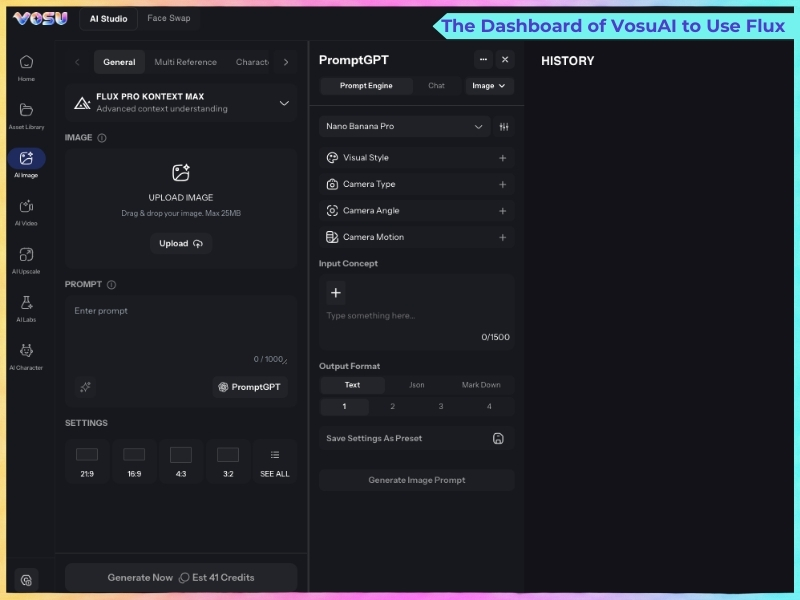
- Use PromptGPT: Open PromptGPT to write or refine text and JSON prompts from reference images, optimized to work smoothly with the Flux based image generation models.
- Choose aspect ratio: Select the appropriate aspect ratio for your project needs, whether square, portrait or landscape dimensions for optimal visual composition.
- Set a seed (optional): Specify a numeric seed to make outputs reproducible, which allows you to regenerate, tweak parameters or compare variations while keeping the same underlying composition.
- Generate the image: Click generate to start Flux inference, wait for rendering to complete, then review, upscale or iterate on the result with adjusted prompts or settings as needed.
The dashboard of VosuAI to use Flux is visualised below.
How to use Flux locally?
5 steps to use Flux locally are outlined below.
- Set up ComfyUI: Install and launch ComfyUI, which confirms it is updated to a Flux compatible version and configured with your GPU and drivers.
- Download the Flux model: Download your preferred Flux checkpoint like Dev or Schnell, and required text encoders or VAE files from trusted model repositories.
- Place the model in the correct folders: Move Flux, CLIP and VAE files into the appropriate ComfyUI subfolders like checkpoints, unet, clip or VAE, so nodes detect them.
- Build workflow: Create or import a ComfyUI workflow with text encoders, Flux model, sampler, VAE and save image nodes for text-to-image generation.
- Generate image: Enter your prompt, adjust steps and guidance, then run the workflow to render, preview, and save the generated image locally.
How long does Flux take to generate an image?
Flux generates a single image in about 2 to 10 seconds. Flux on a high end GPU renders in under a second to a few seconds, on a consumer GPU in several seconds up to about 10 and on slow, low VRAM or poorly optimized systems in tens of seconds or even minutes. Flux generation speed is influenced by hardware, model version, quantization, resolution, workflow setup and software optimizations. Its generation time is reduced through using VosuAI, which provides optimized cloud infrastructure and removes the need to deal with local hardware limits or complex system setup.
Is Flux a good tool for beginners?
Yes, Flux is a good tool for beginners because it offers an intuitive and user friendly interface with natural language prompting that helps generate high quality images. It is accessible through VosuAI, which offers beginners a simple, user friendly interface and quick Flux model access to create high quality images without a steep learning curve.
Can you use Flux for commercial projects?
Yes, you can use Flux for commercial projects because Black Forest Labs’ licenses and API terms permit commercial use of generated outputs when you follow each model’s specific conditions. Flux models such as Flux.1 Pro, Flux Dev, Flux.1 Schnell and Flux Kontext are suitable for commercial use. Users can access all the Flux models through VosuAI for commercial content creation without any restrictions.
Can you use Flux Image Generator for free?
Yes, you can use Flux Image Generator for free because the Flux AI Pro playground lets users access the FLUX.1 Schnell model with limited credits to try it out. You get free trial credits for Flux models like FLUX.1 upon signup**, VosuAI**, which provides limited free credits to generate Flux images with no upfront payment.
Is Flux the best image generator?
No, Flux is not the best image generator because performance depends on user needs, style preferences and workflow flexibility. Flux excels in speed and open-source accessibility, but competitors like Midjourney offer superior artistic quality, while Stable Diffusion provides broader customization, control and a larger ecosystem for advanced users.
Is Flux better than Dall-E?
No, Flux is not better than Dall E because each excels in different areas and the choice is use case specific. Flux suits open source, customizable, fast iteration workflows, while Dall E is preferable for polished, safe, high quality images with strong text understanding and ecosystem integration.
Is Flux better than Midjourney?
No, Flux is not better than Midjourney because Midjourney delivers more consistently artistic, stylized, production ready images overall. Flux is preferable for open source, fast, customizable, photoreal workflows, while Midjourney is better for distinctive art style, community driven creativity and polished visual impact.
Is Flux better than Adobe Firefly 3?
Yes, Flux is better than Adobe Firefly 3 because it delivers higher photorealistic image quality and flexible deployment for power users. Flux suits creators prioritizing creative control and raw speed over availability and safety. Adobe Firefly 3 suits teams that need safer defaults, broad availability, Adobe ecosystem alignment, integrated workflow and enterprise governance to support different user priorities.

