AI image generation is creating visual content from text or data using machine learning algorithms trained on large image datasets to produce original images. AI image generation turns written descriptions into pictures using the Stable Diffusion and Proprietary Diffusion Model visual system. It reads the text, finds the meaning and creates a matching image with structure, detail and style. AI image generation starts when you choose a tool and type a clear prompt to describe the image. Midjourney, DALL·E, Vosu.ai, Adobe Firefly and Stable Diffusion offer fast and flexible results. You adjust the image style, press generate, review the result and make edits if needed for accuracy.
AI image generation uses diffusion models that remove noise to form clean pictures and power the visual output. GANs use two systems to fine tune details, while VAEs compress and rebuild images with variations to support different visual goals. AI image generation works in steps and pulls data from large image text libraries to guide visual creation. It breaks the prompt into features with a tool like CLIP. The model maps features into pixels, fixes errors by repeating the process and learns from feedback to improve results.
AI image generation delivers quick, high quality results by using trained data, fast logic and improved hardware to speed up the process. It creates images in seconds with sharp lines, real textures and accurate color.
How to generate an AI image?
To generate an AI image, follow a simple step by step process that includes selecting a tool, writing a clear prompt, adjusting style parameters and refining the output. Each step gives users control over image content, quality and style.
5 steps to generate an AI image for beginners are given below.
- Open an AI image generator tool: Open an easy to use AI image generator tool, such as Vosu and provide access to advanced design features without complex setups. It supports various formats and options for users and delivers a user friendly interface.
- Write a text prompt: Write a text prompt that specifies the desired image content and style clearly. Prompts guide the tool to interpret user intent effectively. They drive precise visual results. Some AI image generator tools like Vosu have their own prompt generation system.
- Select style parameters: Select style parameters that affect the color, texture and mood of the image. It offers options for customization and creativity and influences overall image aesthetics.
- Generate the image: Generate the image that step applies the prompt and parameters to create visuals. It produces immediate results for review and the image appears based on user guidance.
- Refine and edit the image: Users refine and edit the image by adjusting prompts, modifying parameters or adding negative prompts to exclude unwanted elements for stronger control.
What are the top AI image generation tools?
The top AI image generation tools include Vosu.ai, Midjourney, DALL·E, Stable Diffusion and Adobe Firefly. These tools lead the competitive landscape in text to image and photorealistic image generation. AI image generation each tool offers unique strengths in quality, speed, style or integration.
The top AI image generation tools are given below.
- Vosu.ai: Vosu is known for combining powerful visual creativity with user-friendly features that cater to both beginners and professional content creators. The platform stands out for its advanced text-to-image capabilities that enable users to effortlessly create high-quality images from simple prompts or source visuals.
- Midjourney: Midjourney excels at text to image creation with artistic style and delivers photorealistic image generation for diverse concepts. Midjourney attracts many users in the competitive landscape and it focuses on rich, imaginative outputs.
- DALL·E: DALL·E produces varied, creative images from simple text prompts and handles native image generation in chat across platforms. DALL·E ranks highly within the competitive landscape and users appreciate its broad creativity and detail.
- Stable diffusion: Stable Diffusion offers open source text to image capabilities with custom control and powers advanced photorealistic image generation for professionals.
- Adobe Firefly: Adobe Firefly provides integrated text to image features inside Adobe apps and aids native image generation in chat workflows seamlessly.
What are models in AI image generation?
Models in AI image generation are specialized machine learning algorithms, typically deep neural networks, designed to create new images based on textual input or reference data. Models in AI image generation include diffusion models, generative adversarial networks (GANs) and variational autoencoders (VAEs). These models power text to image generation, enable creative diversity and scale efficiently across consumer hardware.
Models in AI image generation are given below.
- Diffusion models: Diffusion models such as Stable Diffusion and proprietary Diffusion implementations like DALL·E or Imagen generate images by gradually transforming random noise into detailed visuals through a multi-step denoising process. This provides precise control and high quality results.
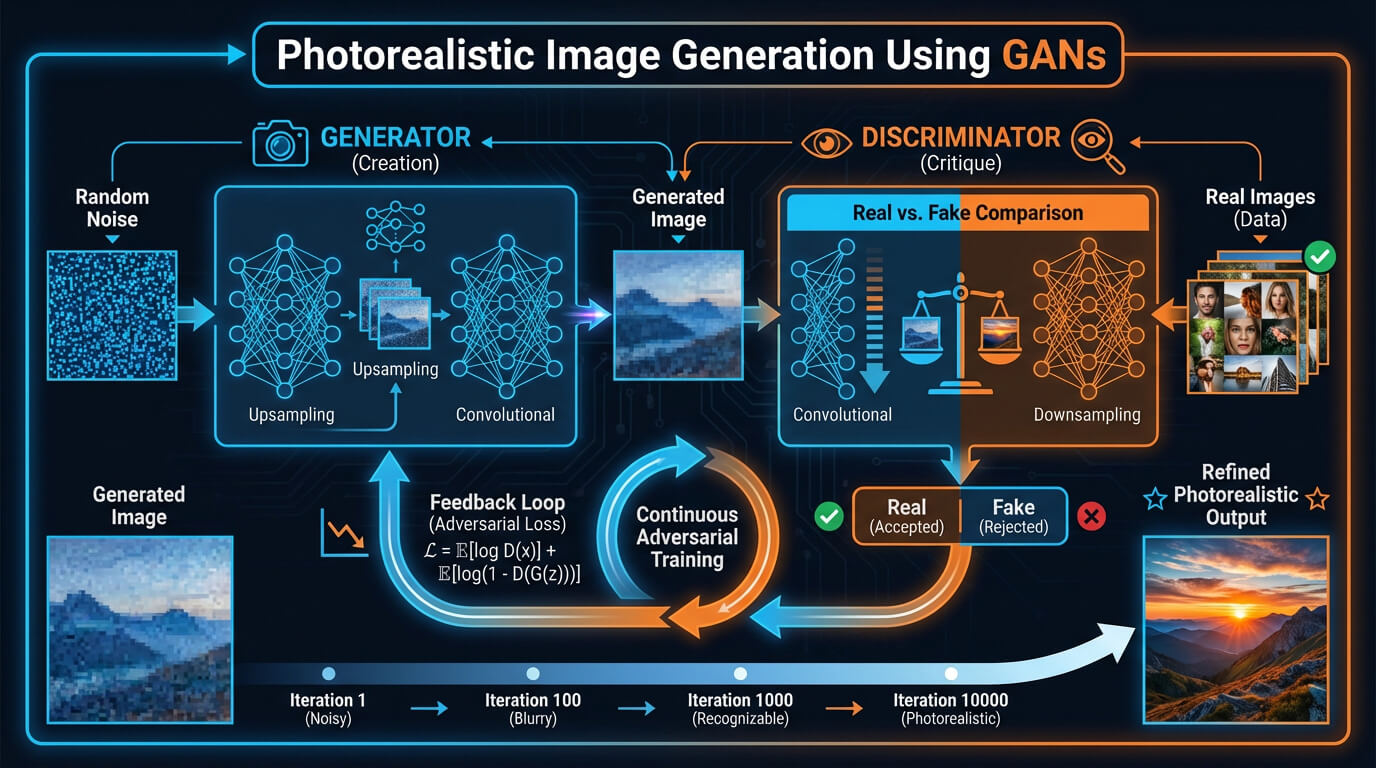
- Generative adversarial networks (GANs): Generative adversarial networks use two networks, a creator and a critic, competing to produce images that look like natural photographs while discarding fake attempts.
- Variational autoencoders (VAEs): Variational autoencoders convert an image into numbers, select similar numbers to represent new content and then reconstruct a new image with realistic shapes and clear details.
The key AI image generation models and their working process are visualised below.
How does AI image generation work?
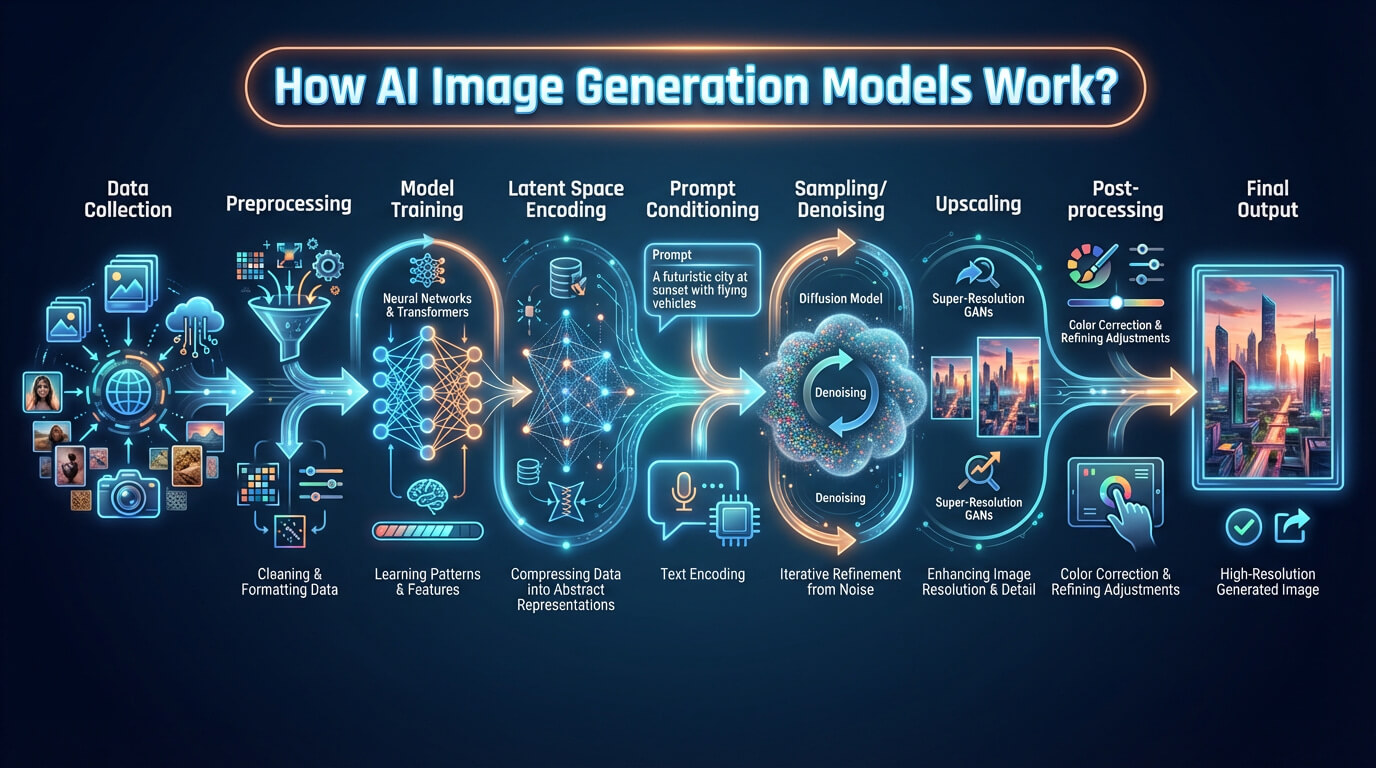
AI image generation works by training datasets, CLIP based prompt analysis and diffusion models. It refines visuals through iterative steps and feedback loops to enhance accuracy, realism and alignment with the prompt. This working process of AI image generation supports multi domain synthesis and continuous model improvement.
The working process of AI image generation is given below.
- Training dataset: Training dataset provides a large collection of labeled images and text and defines the visual knowledge base. The dataset supports diffusion model design and enables CLIP alignment for accurate image synthesis across multiple visual domains.
- Text prompt analysis: Text prompt analysis starts with CLIP, which transforms words such as color or object names into simple code like signals. CLIP connects text details to specific image features for further processing.
- Image generation via specialized models: Image generation via specialized models uses a diffusion model, which produces clear visuals by turning description codes into pixel maps. The diffusion model applies direct logic to create recognizable forms in a short time.
- Refinement and Iteration: Refinement and iteration shape visuals through repeated steps. They tune details, color and composition for better power output and accurate electricity generation. Diffusion models and neural networks fix errors with clear improvements.
- Model training and feedback loops: Model training and feedback loops evaluate images for warranty, cost, brand and performance. They use new examples and corrections, which directly improve the next results in future runs.
The working process of AI image generation is visualised below.
How does AI generate images so fast?
AI generates images so fast because it uses speed optimized diffusion with deep learning to quickly map words to visual features. It uses efficient algorithms that reduce extra steps and focus on accuracy. Hardware and software advancements push the process with high power and speed. They optimize models to cut delay and boost output efficiency.
How long does it take for AI to generate an image?
It takes 5 to 30 seconds to generate an image and it depends on the tool used and the prompt complexity. User workflow and internet connection influence the result.
Can AI generate realistic photos?
Yes, AI can generate realistic photos and it uses real image examples to learn how things look. It copies fine details from massive datasets of real images and matches colors, textures and lighting to create photos that look natural. AI improves accuracy by repeating this process with new data.
How to prompt AI for realistic images?
The techniques to prompt AI for realistic images are given below.
- Be specific and detailed: Be specific with AI prompts to give clear subjects, settings, and photographic elements, which reduces vagueness and boosts realism.
- Add emotional context: Add feelings and moods that match the scene, helping the AI express the intended atmosphere.
- Use composition and photographic terms: Use composition and photographic terms about lighting, angles, and resolution for a clear image structure and quality.
- Chain or iterate prompts: Iteration improves results by using chains or multiple prompts to refine output and adjust visual clarity.
- Reference examples: Reference known photos or styles as benchmarks, guiding the AI toward the desired visual outcome.
- Avoid ambiguity: Avoid ambiguity that harms by creating confusion and errors, which reduce realism and lower overall image quality.
Can I use negative prompts for AI image generation?
Yes, you can use negative prompts for AI image generation because they remove unwanted elements and improve clarity. They block common AI flaws like low quality, extra limbs or distorted faces. Negative prompts in AI filter visual noise using clear negative words. It increases control. One example is: “blurry, low quality, distorted, extra fingers”.

