The best AI image generators of 2026 include Vosu AI, ChatGPT (ChatGPT Image), Nano Banana (Gemini), Midjourney and Adobe Firefly. These platforms combine diffusion models, multimodal reasoning and large scale training on image text datasets to transform natural language prompts into high quality visuals. They serve creators, marketers, designers and enterprises by allowing faster ideation, scalable content production and more accessible visual storytelling across industries. Vosu AI is an all in one creative workflow hub focused on image generation, integrating over 100 AI models to enable seamless creation, editing and design of visuals in a single platform.
ChatGPT Image is a conversational image creation tool powered by GPT Image 1.5 and GPT Image 2, which allows users to generate and edit visuals directly through natural chat prompts. Nano Banana is an advanced, reasoning based professional image generation model designed for complex visual tasks and highly accurate outputs.
Midjourney is widely known for producing highly aesthetic, stylized concept art with strong artistic quality, while Adobe Firefly focuses on brand safe, commercially usable image generation that is tightly integrated with Creative Cloud tools. Ideogram stands out for its strong typography and precise layout control, making it ideal for designs that require clean and accurate text rendering.
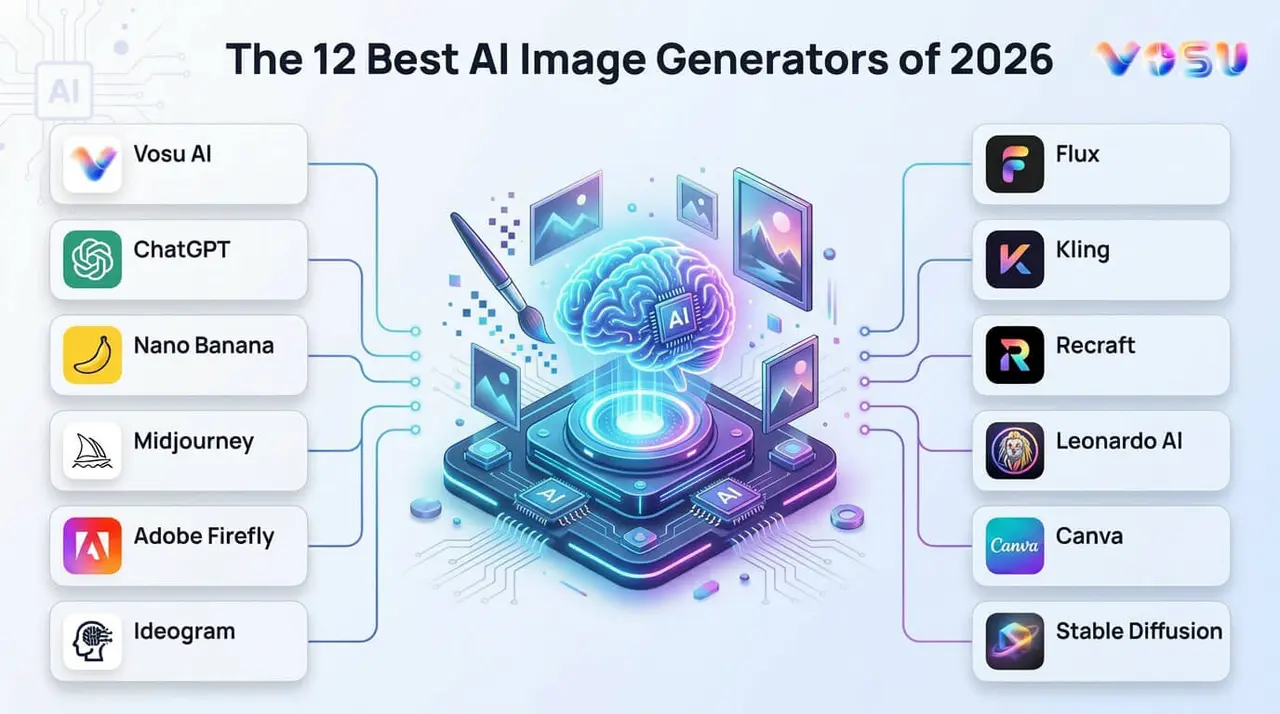
The 12 best AI image generators of 2026 are listed below.
1. Vosu AI
2. ChatGPT (ChatGPT Image)
3. Nano Banana (Gemini)
4. Midjourney
5. Adobe Firefly
6. Ideogram
7. Flux
8. Kling
9. Recraft
10. Leonardo AI
11. Canva
12. Stable Diffusion
1. Vosu AI
Vosu AI is an all in one CreativeOS that bundles AI image generation models, video models and animation models so creators can replace fragmented workflows in a single dashboard. It was launched on the web in 2025 and released its mobile app in May 2026 as an integrated hub for over 100 AI models.
VosuAI offers over 100 image generation models such as GPT Image 2, Nano Banana Pro, FLUX 2, Recraft and Ideogram 4.0 inside one interface. It works best for marketers, agencies and solo creators who are juggling multiple subscriptions and need centralized campaign visuals, UGC ads and product shots.
VosuAI’s key advantages include all in one access, fast project setup, text to image, image to image workflows, prompt enhancer, PromptGPT to write the prompt and consistent outputs across formats from prompt to final asset. It has limitations such as reliance on external providers and a learning curve due to its wide toolset. Its pricing starts at $10 per month, the creator plan at $29 per month and an enterprise plan at customized pricing.
2. ChatGPT (ChatGPT Image)
ChatGPT (ChatGPT Image) is an integrated text to image AI system within the ChatGPT interface that uses deep contextual understanding to generate and edit visuals from natural language prompts. It launched globally in March 2025 as GPT Image 1 and was updated to GPT Image 1.5 in December 2025. ChatGPT Image was later released as GPT Image 2, officially ChatGPT Image 2.0, in April 2026.
ChatGPT Images is powered by OpenAI's GPT Image family of models like GPT Image 1, GPT Image 1.5 and GPT Image 2. It is commonly used by designers, marketers, educators and content creators who need a conversational workflow for creating and refining visual content. It supports image generation, image editing and iterative prompting directly within the chat interface. ChatGPT still requires multiple revisions for highly specific results and can be subject to usage limits. It provides image generation across Free, Plus, Pro and Team plans, with paid tiers ranging from $20 per month to $200 per month, higher tiers offering greater access and higher limits.
3. Nano Banana (Gemini 3 Pro)
Nano Banana (Gemini) is Google’s advanced image generation and editing system within the Gemini ecosystem that creates and modifies visuals using multimodal AI that combines text and image understanding. It launched in 2025 as part of Google’s Gemini image generation system, with the base model introduced first. Its available models are Nano Banana, Nano Banana Pro and Nano Banana 2 for higher quality image generation, improved reasoning and better prompt understanding.
Nano Banana is best suited for advanced image generation, complex visual reasoning, prompt analysis, character consistency, and detailed visual editing workflows. Its strengths include strong instruction following, fast generation speed, realistic outputs and reliable multi-step editing. It may apply strict safety filters, produce occasional artifacts and struggle with highly niche or highly detailed creative constraints. Nano Banana pricing on Gemini includes a Free tier with limited usage, Gemini AI Pro at about $19.99 per month and Gemini Ultra at about $249.99 per month, depending on region and availability
4. Midjourney
Midjourney is a generative AI image generator that converts natural language prompts into highly artistic, evocative visual outputs. It was launched in March 2022 and opened to the public in open beta on July 12, 2022. Midjourney offers top models like V7 and V8.1, its current flagship, alongside the anime focused Niji series for image generation.
Midjourney is best suited for concept art, fantasy scenes and branding visuals where creators want to transform simple text into rich, stylized artwork. Midjourney provides exceptional aesthetics, strong composition and a vibrant community of prompt recipes. It has restrictions like no true free tier, Discord-centric workflows and occasional prompt unpredictability. Its subscription plan starts at $10 per month, a standard plan at $30 per month, a pro plan at $60 per month and a mega plan at $120 per month.
5. Adobe Firefly
Adobe Firefly is a generative AI web app and model family that creates images from text prompts and integrates directly into software like Photoshop and other Creative Cloud tools. It was launched in March 2023 as a beta focused on commercially safe training using Adobe Stock, licensed content and public domain imagery. It offers top image models like Firefly Image Model 3, Firefly Image Model 4, Firefly Image Model 4 Ultra and Firefly Image Model 5 for great detail visuals.
Adobe Firefly works best for brand safe marketing assets, product shots and composites where designers must control camera angles, styles and aspect ratios without leaving Adobe apps. Its advantages include commercially safe training, deep Creative Cloud integration and strong control over lighting and camera parameters. Its disadvantages include credit limits on lower plans, browser dependence for the web app and occasional rigidity compared with experimental open source models. It offers a standard plan at $9.99 monthly, a pro plan at $19.99 monthly, a pro Plus at $49.99 monthly or a premium plan at $199.99 monthly.
6. Ideogram
Ideogram is an AI image generator that specializes in highly accurate text rendering inside images and visually rich design layouts from natural language prompts. It launched publicly in 2023 as a web based platform positioned as an accessible alternative to Midjourney for everyday creators and marketers. It offers top models such as Ideogram 2a Turbo, Ideogram 2a, Ideogram 3 and the newer Ideogram 4.0 for faster, higher quality generation.
Ideogram works best for logo design, posters, social graphics and signage where typography must stay highly accurate while still looking polished. It offers clean text, strong brand style presets and time saving helpers such as its Creative Magic Prompt feature. Its cons include limited fine tuning controls, occasional style repetition and fewer 3D or hyper real options than some rivals. Ideogram offers flexible pricing options such as the Plus plan at $15 per month, while the Pro plan costs $42 per month with advanced features and higher usage limits.
7. Flux
Flux is an AI image generation model family from Black Forest Labs that focuses on exceptional prompt adherence, realistic rendering and flexible styles from photoreal to illustrative. It launched with FLUX.1 Dev and FLUX.1 Schnell in 2024 and expanded in 2025 for more advanced editing and contextual control. Flux offers top models such as FLUX.1 Pro, FLUX.1 Dev, FLUX.1 Schnell, FLUX.1 Kontext, FLUX1.1 Pro, FLUX.2, Flux 2 Pro and Flux Pro Kontex for image generation.
Flux works best for branding, product renders, portraits and UI mockups where users need exceptional prompt adherence and a model that handles intricate textures like fabrics, metals and skin. It provides sharp detail, strong world understanding and versatile style control across multiple variants. Flux has limitations like heavier GPU requirements, occasional over sharpening and dependence on third party platforms for easy access. Flux offers flexible plans for individuals and teams. Its cost starts with $20 monthly for beginners, the pro plan at $142 monthly for editors and the team plan at $158 monthly for organizational use.
8. Kling
Kling is a generative AI system that supports both image and video creation, with its image generation module designed for producing high quality visuals from text and reference prompts for professional creative workflows. Kling was launched in 2024 as part of the expansion of advanced multimodal AI tools focused on high resolution visual generation. Its image generation system includes models such as Image 2.1, Image 3.0, and Image O1 (Omni Image), which improve consistency, prompt understanding and multi reference image control.
Kling is best used for professional workflows requiring high-resolution images, cinematic detail, concept art, product visualization and marketing assets with strong visual realism and control. Its pros include high quality outputs, strong cinematic detail, improved reference based generation and suitability for production level creative work. Its cons include limited availability in some regions, higher computational demands and occasional inconsistencies with highly abstract prompts. Kling AI pricing starts at $10 monthly, a pro plan at $37 monthly the premier plan at $92 monthly and the ultra plan at $180 monthly.
9. Recraft
Recraft is an AI design platform and an AI image generation model built for professional designers who need vector graphics, clean typography accuracy and tight brand consistency across assets. Recraft was founded in 2022 and launched on May 31, 2023. It offers top models like Recraft V3, Recraft 20B and Recraft V4.1 for text to image, vector and raster outputs.
Recraft works best for logos, icons, marketing visuals and UI graphics where teams must combine vector graphics with brand colors and layout rules. It provides precise typography accuracy, scalable SVG output, brand style presets and conversational creation from prompts. It still has limitations like a focus on design use cases over 3D scenes, some learning curve around style systems and reliance on web or API access. Recraft has a basic plan priced around $10 monthly, a pro plan at $16 monthy and a teams plan at $18 monthly. It is suitable for individuals as well as small to medium design teams, based on usage needs.
10. Leonardo AI
Leonardo AI is a creative platform for AI generated images and videos that emphasizes robust control, high fidelity outputs and advanced dashboard features for managing models, prompts and projects. It was launched in 2022 and quickly scaled to tens of millions of users, which generates artwork for advertising, film and gaming. Leonardo AI offers top image models like Kino XL for cinematic scenes, Vision XL for photorealism, Leonardo Anime XL for stylized characters and Diffusion XL for general purpose work.
Leonardo AI works best for concept art, game assets, cinematic keyframes and print ready visuals where teams need robust control over styles, seeds and upscaling. It provides high fidelity outputs, workflow tools like Canvas, texture tiling and an asset library, plus advanced dashboard features for presets and pipelines. It has disadvantages like a busy interface for beginners, dependence on credits and occasional queue times at peak hours. Leonardo AI pricing scales based on usage limits and generation capacity like an essential plan at $12 monthly, a premium plan at $30 monthly and an ultimate plan at $60 monthly.
11. Canva
Canva is an online design platform that lets anyone generate AI generated images, professional photos and 3D artwork directly inside its editor using Magic Studio Tools like Magic Media and Create an image. It was launched in August 2013 as a browser based graphic design tool and later evolved into a full AI powered suite by 2026. Canva offers top image models such as its Dream Lab–powered Create an image engine and Magic Media text to image, alongside integrated models like DALL-E and Imagen.
Canva is best suited for marketers, teachers and small businesses that need on brand social posts, slide decks and quick hero images without leaving a drag and drop layout. It offers tight integration between layouts and AI, built-in stock photos and simple Magic Studio Tools for refining styles and formats. It has restrictions such as style limits compared with specialist generators, daily AI caps on free plans and less granular control over camera and render parameters. Canva Pro costs $15 to $18 per month for individuals, while Canva Business, formerly Teams, is about $20 to $25 per month.
12. Stable Diffusion
Stable Diffusion is an open source AI image generation model that converts text prompts into AI generated images and creates stunning visuals using latent diffusion. It was launched publicly on August 22, 2022, developed by Stability AI. It offers top model families like Stable Diffusion XL, Stable Diffusion 3.5 (Large, Turbo, Medium), SDXL Turbo and numerous fine tuned community models for specific styles.
Stable Diffusion works best for concept art, product renders and photography style scenes where creators need surgical creative control using inpainting, outpainting and ControlNet. It offers full local ownership, flexible extensions and broad ecosystem support for plugins and GUIs. It includes limitations such as a steeper technical setup, GPU requirements and variable quality depending on models and prompts. Stable Diffusion has a core plan priced around $50 monthly, while enterprise solutions come with custom pricing. It is more focused on professional and API based usage,
How do AI image generators work?
AI image generators work by training image-text datasets, learning image-text relationships, prompt interpretation, text encoding, diffusion process and final image generation. They transform random noise into structured visuals that match the given text prompt.
The processes of how AI image generators work are given below.
- Training on image text datasets: AI image generators train on billions of image text pairs, which builds a knowledge base that connects visual content to language through artificial neural networks at scale.
- Learning image text relationships: AI image generators learn which visual elements match which words by analyzing patterns across datasets that establish connections between token generation outputs and pixel arrangements.
- Prompt interpretation: AI image generators read your text input and break it into tokens, which map each word to learned visual concepts stored inside the AI image generation models.
- Text encoding: AI image generators convert encoded text into a mathematical representation that the model uses as a guide throughout the image generation process.
- Diffusion process: AI image generators start with an image of adding random pixel noise and gradually structure that noise into coherent visual content by following the encoded text signal at each step.
- Iterative denoising: AI image generators remove noise step by step across hundreds of iterations that refine the visual structure with each pass until recognizable shapes and textures emerge from the noise.
- Image refinement: AI image generators sharpen edges, correct proportions and align the visual output with the original prompt that adjusts colors, lighting and composition across multiple internal passes.
- Final image generation: AI image generators produce a completed image that matches the text prompt. This delivers a clean visual output ready for download, editing or direct use in your project.
How does an AI text to image generator work?
The process of how an AI text to image generator works is given below.
- Training: AI text to image generator trains on image text pairs, which link language with raw visual patterns.
- Text encoding: AI text to image generator converts natural language into numerical vectors representing structured visual concepts.
- Diffusion (Training): AI text to image generator learns to add structured noise to images during the training process.
- Reverse diffusion (Generation): AI text to image generator reconstructs images from noise using encoded text guidance step by step.
- Iterative refinement: AI text to image generator reconstructs images from noise using encoded text guidance step by step.
- Output: AI text to image generator produces a final, refined image matching the input prompt accurately.
How to use an AI image generator?
The steps to use an AI image generator are given below.
- Choose an AI image generator: Select a platform like VosuAI that fits your project needs and allows you to generate AI images in one place.
- Write a detailed prompt: Type a clear, descriptive text prompt that describes the subject, style, lighting and mood you want the generator to produce.
- Adjust image settings: Set your preferred aspect ratio, resolution and style before generating these settings, which shape the final output quality and format.
- Generate the image: Hit generate and let the model process your prompt within seconds using diffusion based generation pipelines.
- Refine and export the final image: Review the output, adjust the prompt or settings if needed, then export your finished image in your preferred format for direct use.
Is there any free AI image generator?
Yes, there is a free AI image generator because most platforms offer daily credits at no cost, which allows users to create images without a paid subscription. VosuAI provides limited credits upon signing up for free users to test image generation before purchasing a plan.
Do AI generated images have legal and ethical implications?
Yes, AI generated images carry legal and ethical implications because they raise ethical concerns regarding bias in training data and misuse for misinformation. They also trigger data privacy issues, as many models train on images scraped without the creator's consent. This makes legal accountability and ethical responsibility active and unresolved areas across most jurisdictions globally.
Can AI generated images be copyrighted?
No, AI generated images can not be copyrighted because copyright protection requires meaningful human authorship. Courts consistently rule that purely AI generated outputs do not qualify. A human creator cannot claim ownership of an AI image, though substantial human edits may establish partial digital rights over the modified final result.
How effective are AI generated image tools for business use?
AI image generation tools are highly effective for business use because they support rapid ideation and concepting by turning text prompts into usable visuals in seconds. They drive down design costs by reducing dependency on external designers for routine assets. Businesses using AI image generation tools consistently produce more content at a lower cost per asset across every campaign.
Can AI generated images benefit marketing campaigns?
Yes, AI generated images can benefit marketing campaigns because they deliver cost efficiency by replacing expensive stock photo subscriptions and designer hours with instant generations. They allow limitless ideation like marketers test dozens of visual concepts in minutes. They also work toward accelerating content production, giving campaign teams a continuous supply of on brand visuals across every channel without production bottlenecks.