
Kling AI 3.0 Pro is designed for high fidelity, cinematic content creation, defined by its ability to unify text to video, image to video and advanced video editing within a single multimodal platform. It was released on 5 February 2026 as the Pro tier evolution of Kuaishou’s Kling AI 3.0 that targets creators, studios and agencies.
Kling AI 3.0 Pro delivers advanced features such as a unified multimodal architecture, physics based world building, extended 15 second high fidelity clips, integrated editing tools and high resolution output. These capabilities make it suitable for applications including cinematic video generation, professional marketing and brand campaigns, advanced scene editing and control and high quality animation.
Kling AI 3.0 Pro costs around 37 USD per month on the official platform, which offers roughly 3,000 monthly credits with commercial rights, while VosuAI pricing tiers start at 15 USD and Creator tiers at 29 USD under a unified credit system. Kling AI 3.0 Pro is accessible via third party platforms such as VosuAI. You can use Kling AI 3.0 Pro through VosuAI by selecting the model, entering detailed prompts, choosing the video duration with audio and generating videos in a single, streamlined workflow.
What is Kling AI 3.0 Pro?
Kling AI 3.0 Pro is an advanced version of the Kling 3.0 AI video generation model that lets users create cinematic short videos with synchronized audio, multi shot scenes and strong character consistency from text, images or references in a single unified workflow. It builds on the Kling 3.0 framework to offer pro level creative control and higher output quality. Kling AI 3.0 Pro was released by the Chinese tech company Kuaishou Technology as part of the Kling 3.0 model series rollout on February 05, 2026. It focuses on professional filmmaking capabilities such as cinema style camera control, EXR or HDR export, VFX ready formats, consistent characters across multi shot sequences and long duration video generation for creators and studios.
What are the features of Kling AI 3.0 Pro?
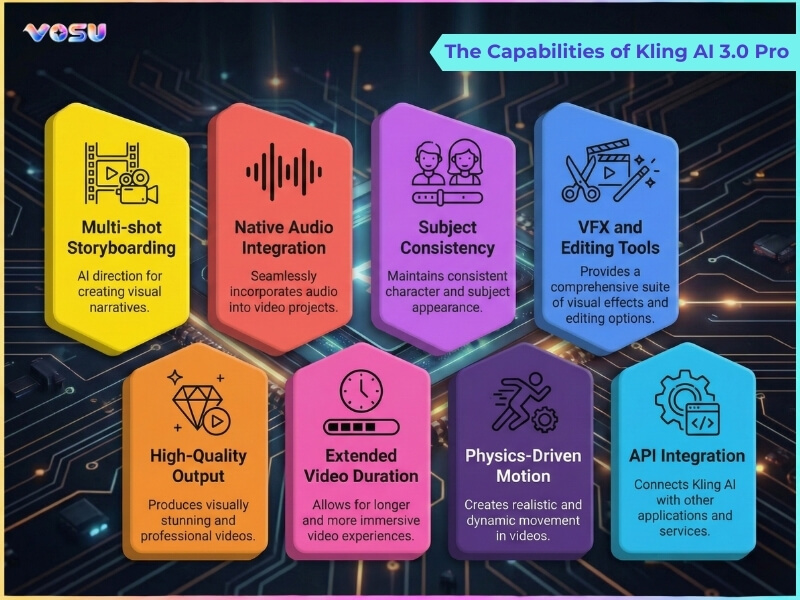
The features of Kling AI 3.0 Pro include a unified multimodal platform architecture, physics based world building, advanced cinematic control, extended video generation and high resolution output.
The key features of Kling AI 3.0 Pro are given below.
- Unified multimodal architecture: Kling AI 3.0 Pro combines text to video, image to video and advanced editing in one all in one AI video generation model, which streamlines professional workflows from idea to final render.
- Enhanced consistency: Kling AI 3.0 Pro uses superior character consistency systems like elements style controls to keep faces, outfits, colors and props stable across multi shot 15 second high fidelity video generation.
- Physics based world building: Kling AI 3.0 Pro employs a physics aware engine so characters, objects and cameras follow realistic gravity, collisions and motion, which reduces glitches and improves cinematic believability.
- Intelligent multi-shot narratives: Kling AI 3.0 Pro acts as an AI director, which understands scripts and generates multi shot narratives with consistent story beats, transitions and angles from a single prompt.
- Advanced cinematic control: Kling AI 3.0 Pro offers fine grained control over framing, camera moves and scene style, which allows professional grade filmmaking tools like complex tracking shots and cinematic lighting in native 4K or 60fps capability.
- Advanced editing tools: Kling AI 3.0 Pro supports video extension, restyling, background replacement, object edits and refinement passes in the same environment, which avoids round trips to separate editors.
- Extended video duration: Kling AI 3.0 Pro generates longer clips than earlier versions, with native video generation and platform specific options for even longer, production ready sequences.
- Image generation and editing: Kling AI 3.0 Pro creates and edits images alongside video, which includes stills for storyboards, thumbnails and key art, all driven by the same unified multimodal platform.
- Native audio and lip sync: Kling AI 3.0 Pro builds in native audio with character dialogue, ambient sound and music, plus accurate lip sync so talking characters match their speech without separate sound design passes.
- High resolution output: Kling AI 3.0 Pro delivers high resolution output with native 4K or 60fps capability, sharp text rendering and reduced artifacts, which makes results suitable for professional ads, large screens and broadcast use.
The capabilities of Kling AI 3.0 Pro are visualised below.
What are the applications of Kling AI 3.0 Pro?
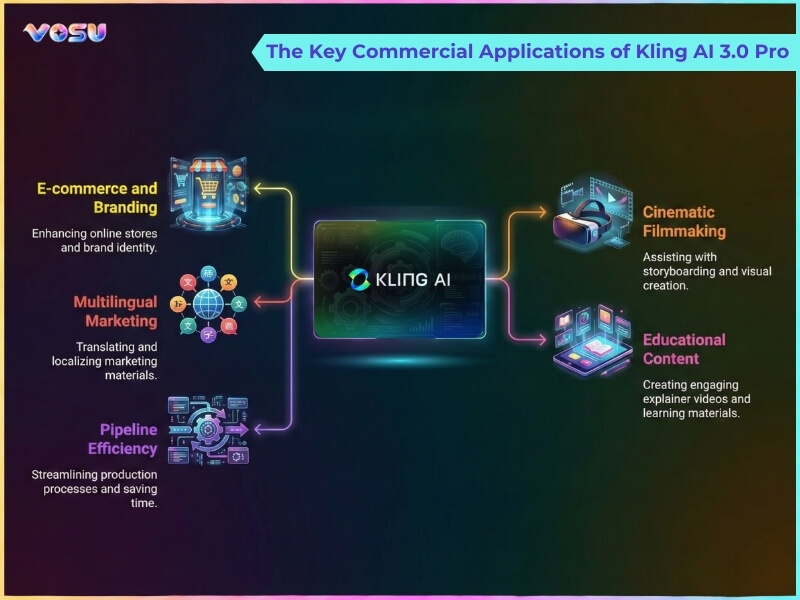
The applications of Kling AI 3.0 Pro are cinematic video generation, professional marketing, film quality storyboarding, advanced scene editing, advanced scene editing and control and high quality photo animation.
The best uses of Kling AI 3.0 Pro are given below.
- Cinematic video generation: Kling AI 3.0 Pro creates high resolution short films and trailers from detailed prompts, with complex multi shot storyboarding, cinematic camera moves and superior character and scene consistency suitable for narrative or commercial work.
- Professional marketing and brand content creation: Kling AI 3.0 Pro produces professional marketing content such as product videos, social ads and brand stories, which combine on‑brand visuals, synchronized audio and consistent characters across multiple assets and campaigns.
- Film quality storyboarding and production: Kling AI 3.0 Pro generates film quality storyboard sequences from scripts, testing scenes, pacing and angles before live shooting, which helps directors and agencies pre‑visualize complex multi shot storylines in minutes.
- Advanced scene editing and control: Kling AI 3.0 Pro refines existing footage with advanced scene editing such as background changes, style tweaks, motion adjustments and tight control over framing and timing while keeping continuity intact.
- High quality photo animation: Kling AI 3.0 Pro turns still photos into high quality animated clips, which adds realistic motion, expressions and synchronized audio to portraits or product shots for engaging intros, explainers or social content.
VosuAI provides a user friendly dashboard that integrates Kling style capabilities, which makes these use cases easier to access and manage for creators and marketers without complex technical setups.
How much does Kling AI 3.0 Pro cost?
Kling AI 3.0 Pro costs USD 37per month, which provides about 3,000 monthly credits for AI video and image generation with no watermarks and commercial use. It is accessible through on-demand web platforms like VosuAI, where pricing falls.
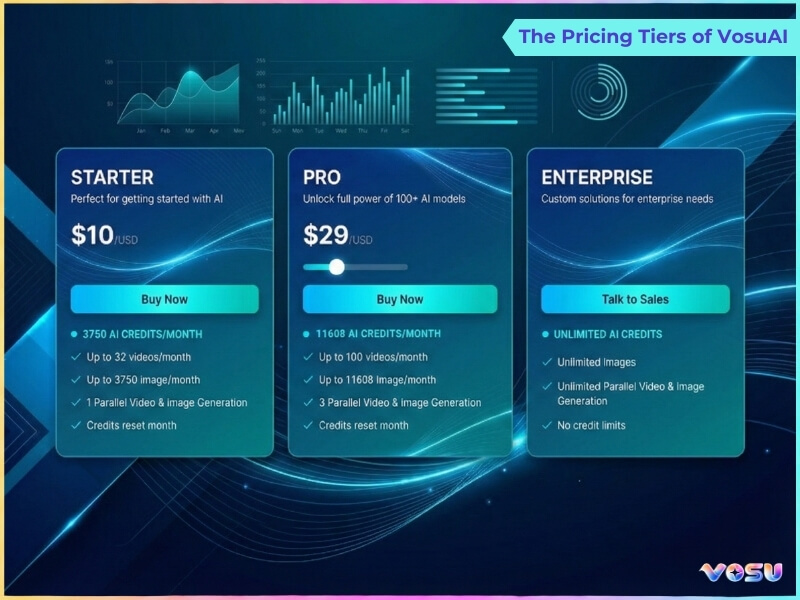
VosuAI provides three subscription tiers like Starter, Creator and Business. VosuAI pricing starts at $15 per month for the Starter plan with 320 credits, the Creator plan costs $29 per month with 640 credits and Business plans start at $129 per month with 2,941 credits. It also provides customized subscription options, which allow users to buy custom credit packages based on their scale and workflow needs. VosuAI provides access to over 100 video generation models like the Kling AI, Veo 3 and Sora series.
The pricing tiers of vosuAI are visualised below.
How to access Kling AI 3.0 Pro?
To access Kling AI 3.0 Pro, you can go through the official platform or third party platforms like VosuAI. Kling AI 3.0 Pro can be accessed on the official platform by signing up for an account on the Kling AI global site and selecting a paid plan that includes it. Kling AI 3.0 Pro allows Pro subscribers to select the model and generate professional grade videos from text, image or references.
Kling AI 3.0 Pro is not available to all users, as access is limited to specific regions and user groups on the official platform. VosuAI removes these access barriers by providing broader availability of Kling AI 3.0 Pro through a clean, user friendly dashboard that simplifies video creation. It provides access to multiple video generation models, which includes Kling AI series under a single credit system.
How to use Kling AI 3.0 Pro?
To use Kling AI 3.0 Pro models, you have to go to VosuAI’s dashboard, upload the start frame image, enter a text prompt or use PromptGPT, select the video duration and generate the video.
8 steps to use Kling AI 3.0 Pro using VosuAI are outlined below.
- Go to VosuAI's Kling AI 3.0 Pro dashboard: Go to VosuAI, log in to your account and access the video generation section, where all AI video models and creation tools are available.
- Select the Kling AI 3.0 Pro model: Select the Kling AI 3.0 Pro option so your generation uses Kling’s unified multimodal engine for high fidelity, physics aware video output.
- Upload the start frame image: Upload the start frame image and use it as a reference, like a character, scene or product, so Kling locks in the initial composition, style and subject details for the video.
- Upload the end frame image: Upload an end frame image to define how the scene should conclude, which allows smooth start to end transformations and controlled storytelling between the two states.
- Enter text prompt: Enter a detailed text prompt describing actions, mood, camera movement and environment, which guides Kling’s AI Director system for motion, framing and narrative beats.
- Enhance the prompt (Optional): Use the prompt enhancer feature to automatically improve and optimize your text prompt for better video output quality and accuracy.
- Use PromptGPT (Optional): Use PromptGPT to create Kling AI 3.0 optimized text or JSON prompts from reference videos for higher quality, more accurate outputs.
- Select video duration: Select the clip length such as 5 to 15 seconds, based on credits and creative needs, which balances longer narratives with generation time and cost.
- Pick aspect ratio: Pick the aspect ratio like 16:9, 9:16 or 1:1 to match platforms like YouTube, TikTok or Instagram, which ensures compositions are framed correctly for distribution.
- Enable audio generation: Enable audio generation so Kling generates synchronized dialogue, ambient sounds and music in one pass, which gives you a complete clip without separate sound design.
- Generate and download: Generate the image, wait for processing, review the preview, then download the final high resolution video from VosuAI for editing, publishing or client delivery.
What are the tips for using Kling AI 3.0 Pro?
The tips for using Kling AI 3.0 Pro are given below.
- Specify motion details: Define precise motion parameters for characters or objects to secure smooth, realistic animations across multi shot generation.
- Define camera motion: Set camera angles, movements and transitions to improve scene perspective and maintain consistent scenes.
- Define start and end frames: Establish initial and final frames to control animation flow, timing and scene continuity accurately.
- Enable synchronized audio: Use the synchronized audio generation to align dialogue and sound effects with animations to create consistent audiovisual outputs across multiple shots.
- Exclude visual artifacts: Remove glitches and inconsistencies in frames to maintain clean visuals when using reference images or custom characters.
- Adjust CFG scale: Adjust the classifier free guidance scale to balance prompt fidelity and creative variation while preserving character consistency.
- Structure prompts: Organize prompts logically with actions, scene descriptions and references to maintain consistent scenes and multi shot generation.
- Ensure consistency: Maintain visual and thematic uniformity for characters, backgrounds and props across scenes and shots.
- Generate mult shots: Produces multiple scene variations while preserving consistent scenes and accurate motion sequences.
Can you use Kling AI 3.0 Pro for commercial purposes?
Yes, you can use Kling AI 3.0 Pro for commercial purposes if you have an active paid subscription, as the paid plan explicitly grants full commercial rights to the generated output. You can monetize, distribute and create derivative works with these plans from your videos, provided you still follow Kling’s content, copyright and policy restrictions.
Can you use Kling AI 3.0 Pro for free?
Yes, you can use Kling AI 3.0 Pro for free through third party platforms such as VosuAI. You can sign up VosuAI for free credits to test Kling AI 3.0 Pro without an upfront payment.
Is Kling AI 3.0 Pro better than Kling AI 2.6 Pro?
Yes, Kling AI 3.0 Pro is better than Kling AI 2.6 Pro because it adds advanced features like multi shot generation, longer 15 second clips and native 4K or 60fps output for higher quality cinematic results. Kling 2.6 Pro remains strong for single 1080p shots with native audio, while Kling 3.0 Pro delivers clearer detail, stronger character consistency and a more powerful workflow.
Is Kling AI 3.0 Pro better than Kling AI 3.0?
Yes, Kling AI 3.0 Pro is better than Kling AI 3.0 because the Pro tier unlocks advanced features, higher quality outputs and advanced audio support customized for serious production work. Kling AI 3.0 Pro delivers cleaner renders, stronger consistency and more control over complex, cinematic scenes in comparison to Kling AI 3.0.
What are the alternatives to Kling AI 3.0 Pro?
The alternatives to Kling AI 3.0 Pro are listed below.
- Runway Gen 4: Runway Gen 4 is a production focused text to video and image to video model that offers strong motion realism, style control and professional grade AI video creation workflows.
- Google Veo 3.1: Google Veo 3.1 is Google DeepMind’s advanced text to video and image to video model with native audio, realistic physics and cinematic, higher quality storytelling control.
- Sora 2: Sora 2 is an OpenAI text to video system aimed at ultra realistic, physics aware scenes and longer, consistent narrative clips for professional grade productions.
- Pika 2.2: Pika 2.2 is a creator friendly text to video and image to video model that supports up to 10 second clips, rich camera controls and stylized cinematic animations.
Is Kling AI 3.0 Pro better than Runway Gen 4?
Yes, Kling AI 3.0 Pro is better than Runway Gen 4 if your priority is high fidelity, realistic and detailed video with cinematic production ready scenes and strong character consistency. Kling 3.0 Pro excels at director level multi shot storytelling and upgraded native audio, while Runway Gen 4 is stronger when you need faster generation speed, better physics and versatile VFX style experimentation.
Is Kling AI 3.0 Pro better than Google Veo 3.1?
Yes, Kling AI 3.0 Pro is better than Google Veo 3.1 if you prioritize cost effectiveness and scalable, high fidelity production for frequent campaigns and content batches. Google Veo 3.1 is a state of the art AI video generation model that remains superior for ultra cinematic quality, motion realism and top tier native audio when budget is secondary.

