Kling 2.6 Pro converts text prompts, images and reference videos into native 1080p cinematic clips with fully synchronized 48kHz audio generated in the same pass. It was developed by Kuaishou as an upgraded version of the Kling 2.6. It emphasizes motion realism, character consistency and integrated sound design for production ready outputs.
Kling 2.6 Pro is designed for creators, marketers and filmmakers who need high resolution, audiovisual videos without separate editing pipelines. It supports multiple input modes, improved prompt adherence, integrated audio visual generation, lip sync and dialogue alignment and default 5 or 10 second clip generation. Its applications include narrative storytelling, previsualization, character animation, game design, advertising and marketing and educational content.
Kling 2.6 Pro pricing ranges from $37 to $180 per month, which depends on the subscription, while VosuAI offers cost effective option. It is also accessible through Kling AI’s official platform or unified content creation OS VosuAI. You can use Kling 2.6 Pro via VosuAI by logging into the account, selecting the model, uploading start or end frames, entering prompts or using PromptGPT, choosing duration and aspect ratio, allowing audio and then generating downloadable clips.
What is Kling 2.6 Pro?
Kling 2.6 Pro is an advanced AI video generation model that turns text prompts or images into native 1080p cinematic videos with integrated audio in a single pass. It is developed by Kuaishou as part of their next generation AI creative studio, with the Pro variant of the 2.6 family. It was launched on December 3, 2025, as the flagship audiovisual model. Kling 2.6 Pro is known for its ability to create 1080p and cinematic videos with advanced features like built-in native audio, high precision motion control and motion transfer and superior character consistency that keeps identities, outfits and style stable across frames and shots.
What are the features of Kling 2.6 Pro?
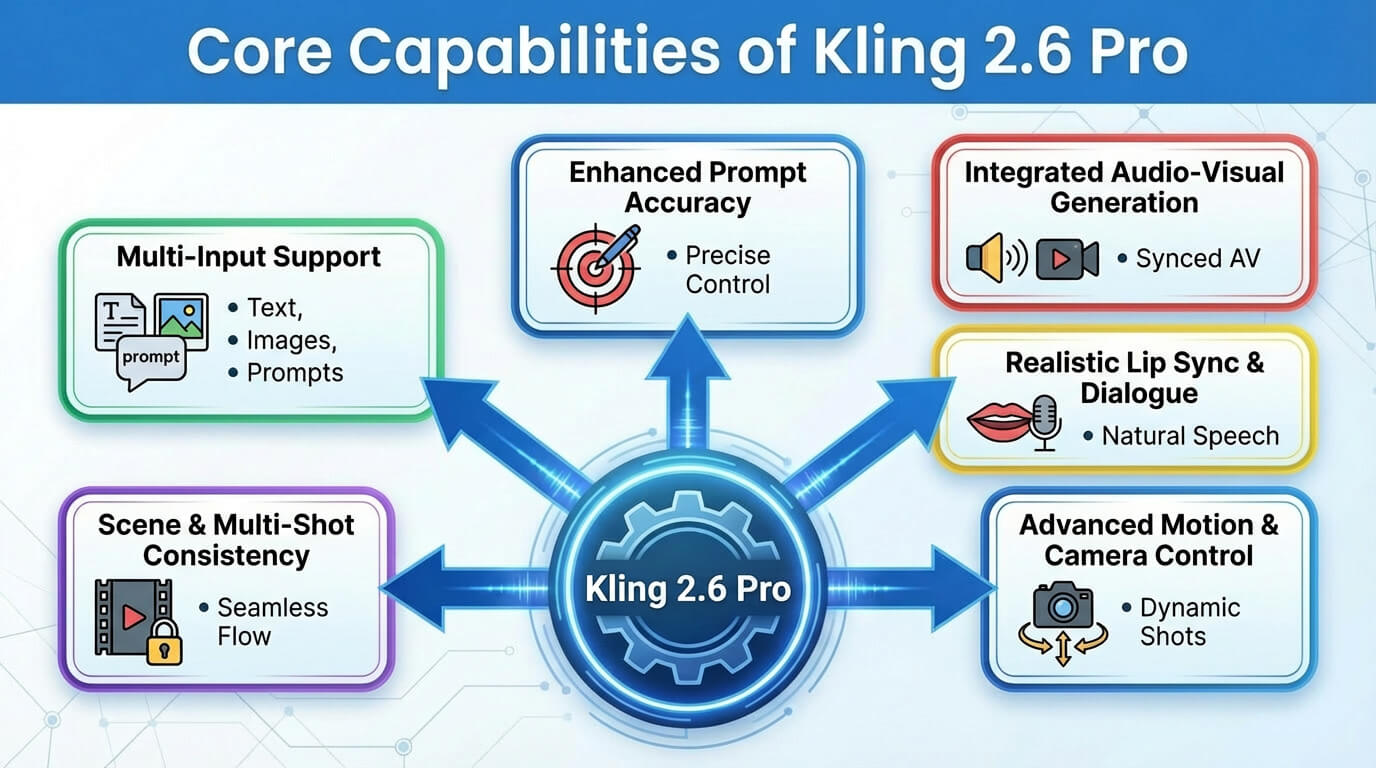
The features of Kling 2.6 Pro include multiple input modes, improved prompt adherence, integrated audio visual generation, lip sync and dialogue, advanced motion and camera control and high definition output. These features turn prompts or images into polished, cinematic videos with synced audio, stable characters and controllable camera moves for pro and social content.
The key features of Kling 2.6 Pro are given below.
- Multiple input modes: Kling 2.6 Pro supports text to video, image to video and reference video workflows, which let you start from prompts, still images or motion sources as your creative entry points.
- Improved prompt adherence: Kling 2.6 Pro follows written prompts more accurately, which preserves key subjects, actions, styles and camera notes so the final video better matches your described scene.
- Integrated audio visual generation: Kling 2.6 Pro generates video and audio together, which produces synchronized sound, ambience and effects in one pass instead of requiring a separate sound design step.
- Character and style consistency: Kling 2.6 Pro maintains stable character identity, outfits and overall look, which allows consistent story sequences and branded visuals across multiple shots or clips.
- Lip sync and dialogue: Kling 2.6 Pro aligns mouth shapes with spoken dialogue, which creates natural looking speech and talking head clips that feel more human and less robotic.
- Cinematic realism and physics: Kling 2.6 Pro produces more realistic lighting, shadows, motion blur and basic physics, which helps outputs resemble live action footage or high quality cinematics.
- Advanced motion and camera control: Kling 2.6 Pro offers refined motion control, which includes smoother tracking, complex camera moves and better motion transfer from references for precise choreography and action.
- High definition output: Kling 2.6 Pro renders at high definition resolution up to 1080p, which delivers sharper details suitable for professional content, social media and client ready work.
- Flexible output options: Kling 2.6 Pro supports different aspect ratios, durations and formats, which makes it easier to customize videos for platforms like YouTube, or TikTok.
- 5s and 10s generation: Kling 2.6 Pro generates short clips of around 5 seconds and 10 seconds by default, which allows quick iterations and fast experimentation with ideas and scenes.
The key features of Kling 2.6 Pro are outlined below.
What are the applications of Kling 2.6 Pro?
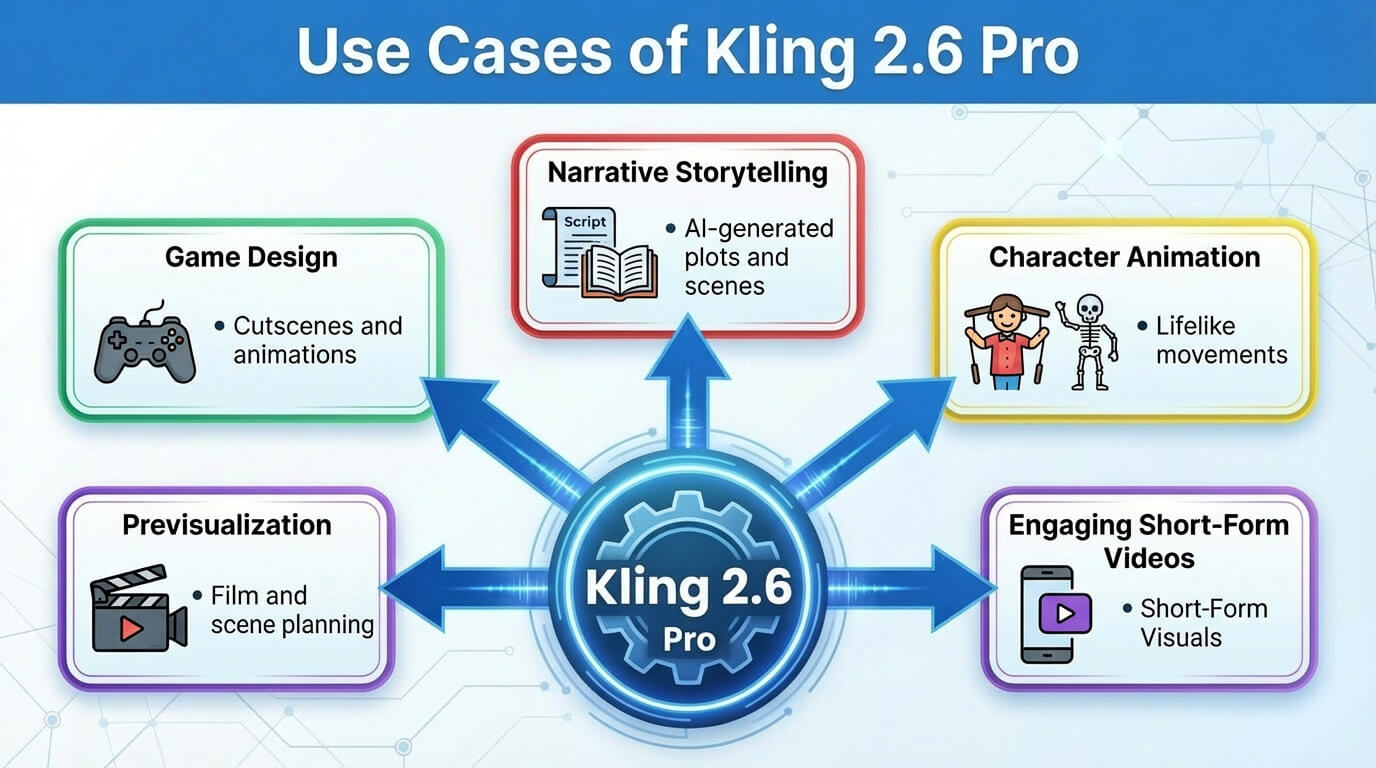
The applications of Kling 2.6 Pro are narrative storytelling, previsualization, character animation, game design, engaging short form videos and AI driven post production. These applications make Kling 2.6 Pro a versatile solution for creators, marketers, filmmakers and developers who want to produce high quality, cinematic content with greater speed, control, and creative flexibility.
The uses of Kling 2.6 Pro are given below.
- Narrative storytelling: Kling 2.6 Pro lets you build dialogue driven story scenes with consistent characters, cinematic motion and native audio, ideal for short films, trailers and episodic content across platforms.
- Previsualization: Kling 2.6 Pro allows directors and agencies to quickly previz shots, camera moves and action beats, which replaces traditional animatics with fast, editable concept sequences.
- Character animation: Kling 2.6 Pro animates illustrated or photo based characters with expressive motion and lip synced dialogue, which makes it suitable for virtual hosts, mascots and story driven avatars.
- Scene transformation: Kling 2.6 Pro transforms existing frames or reference motion into new environments, times of day and styles, which allows creative scene remixes without reshoots.
- Game design: Kling 2.6 Pro supports game designers with cinematic clips, character movement studies and mood shots to pitch mechanics, cutscenes and world atmospheres.
- Virtual influencers: Kling 2.6 Pro powers virtual influencers by keeping identity, style and motion consistent across many posts, which makes regular AI driven content feel consistent and recognizable.
- Product showcases: Kling 2.6 Pro produces cinematic product shots, rotations and lifestyle scenes, which help brands present features with controlled motion, framing and synchronized audio.
- Advertising and marketing: Kling 2.6 Pro generates scroll stopping ad creatives, hooks and A/B test variants rapidly, which fits agency workflows that demand fast iteration and platform ready assets.
- Brand consistency: Kling 2.6 Pro maintains visual identity, color and character looks across videos, which supports long term brand systems and multi-channel campaigns.
- Engaging short form videos: Kling 2.6 Pro creates high impact short form content for TikTok, Reels and Shorts, which combines dynamic motion and audio to maximize watch time and shares.
- Educational content: Kling 2.6 Pro turns explanations into visual demonstrations with narration and on-screen action, which makes complex topics easier to understand and remember.
- AI-driven post production: Kling 2.6 Pro assists post production by re-rendering scenes with new styles, motion or audio, which acts as an AI layer on top of traditional editing.
You can use the all in one content creation operating system VosuAI to explore these applications with ease. Its beginner friendly dashboard and streamlined workflow make it simple to create, manage and scale high quality videos using Kling 2.6 Pro.
The applications of Kling 2.6 Pro are outlined below.
How much does Kling 2.6 Pro cost?
Kling 2.6 Pro costs $37 to $180 per month, which depends on the subscription tier. Kling 2.6 Pro subscription plan includes the pro plan at $37 for 3000 credits, the premier plan at $92 per month for 8,000 credits and the ultra plan at $180 per month for 26,000 credits. Kling 2.6 Pro is also available through VosuAI, which offers a user friendly dashboard for social media content creation and professional filmmaking.
The pricing tiers of Kling 2.6 Pro are outlined below.
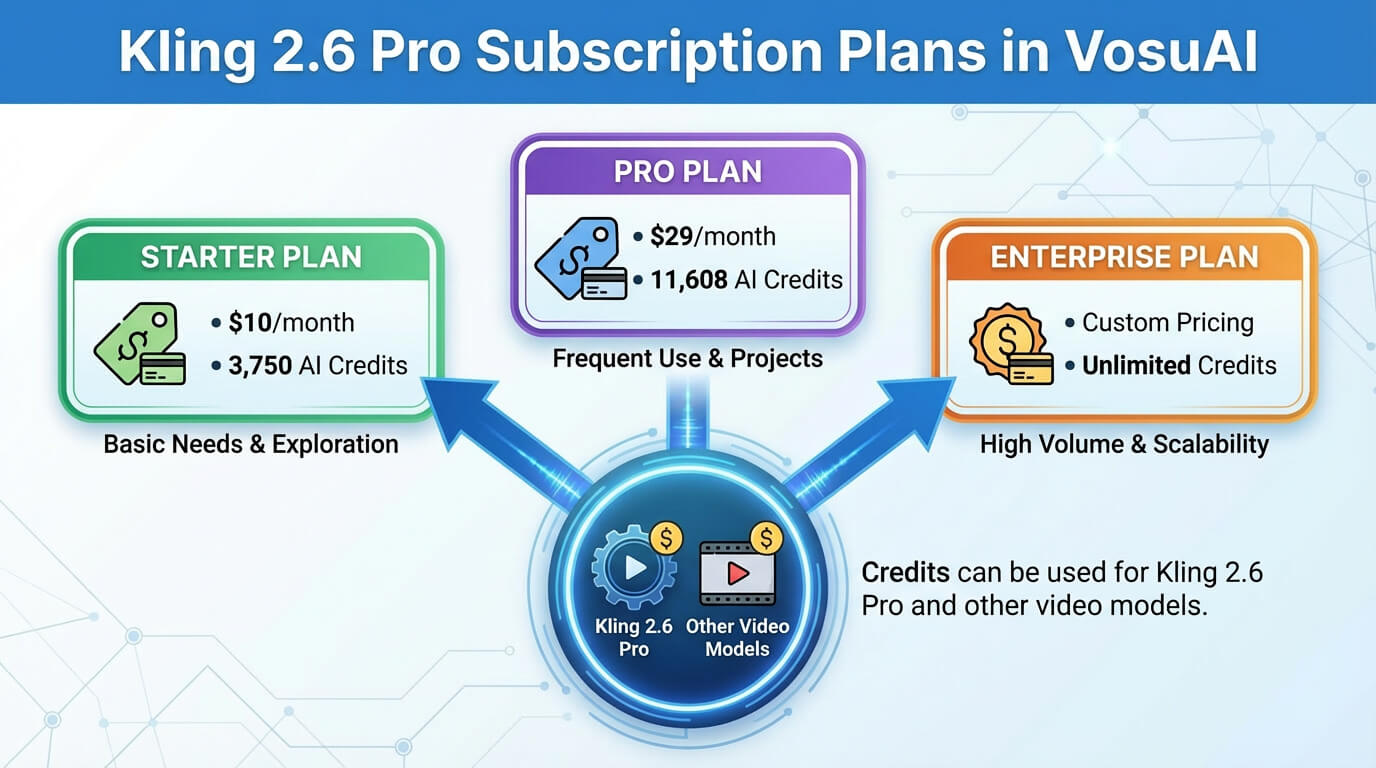
VosuAI subscription tiers include the standard plan, the pro plan and the enterprise plan. VosuAI pricing starts at 10 USD per month with 3,750 credits, the pro plan at 29 USD per month with 11,608 credits and the enterprise plan is fully customized. It also allows users to choose a customized plan based on their requirements, like 99 USD per month with 39,929 credits. VosuAI provides access to over 100 video generation models such as Veo 3, Wan 3.0, Seedance 2.0, Kling 3.0 and Sora 2 within the same subscription tier
How to access Kling 2.6 Pro?
To access Kling 2.6 Pro, you can use the official Kling AI platforms or VosuAI. You can also access Kling 2.6 Pro through its Android app or iOS app, which makes it easy to generate videos on mobile**.** You can go to the official Kling AI website, sign up with your account, then open the main creative dashboard and navigate to the video generation section. You have to then choose Kling 2.6 Pro from the model list and enter your prompt and settings to generate videos.
Kling 2.6 Pro can be accessed directly through all in one content creation OS VosuAI for instant video creation. VosuAI offers a user friendly dashboard and workflow, where you can open the dashboard, head to the video generation section, select the model and choose Kling 2.6 Pro to begin creating instantly.
How to use Kling 2.6 Pro?
To use Kling 2.6 Pro models, you have to go to VosuAI's dashboard, select the model, upload the start frame image, enter the text prompt, use prompt enhancer or PromptGPT, select the video duration, pick the aspect ratio and generate to download.
9 steps to use Kling 2.6 Pro using Vosu AI are outlined below.
- Go to VosuAI's dashboard: Go to the VosuAI, log in to your account and open the video generation section to create videos.
- Select the model: Click on the general and choose Kling 2.6 Pro from the model list to activate its advanced motion quality, cinematic rendering capabilities and enhanced prompt responsiveness for professional grade results.
- Upload the start frame image: Upload the start frame image as your main character or object, using a clean, well lit full body image that defines identity, outfit and framing for the animation.
- Upload the end frame image: Upload the end frame image to guide how the motion evolves visually between beginning and ending states in the clip.
- Enter text prompt: Enter a detailed text prompt that describes the scene, motion style, lighting and mood so Kling 2.6 Pro refines visuals, environment and camera feel around your frames.
- Use prompt enhancer: Enhance your prompt automatically to make it more detailed and optimized for the model that improves the accuracy and visual quality of generated videos.
- Use PromptGPT: Use PromptGPT to write or refine prompts in text or JSON format based on reference images or descriptions, which define camera movement, lighting, transitions and motion logic for optimized Kling 2.6 Pro output.
- Select video duration: Select a video duration like 5 to 15 seconds, to control how long Kling 2.6 Pro interpolates and animates between the start and end frames.
- Pick aspect ratio: Pick an aspect ratio such as 9:16, 16:9 or 1:1 so the output fits TikTok, Reels, YouTube or square feeds without extra cropping.
- Enable audio generation: Enable audio generation if you want Kling 2.6 Pro to add native sound, ambience or dialogue aligned with the visual motion and pacing.
- Generate and download: Click the generate button, wait for processing to complete, review the outputs and download your preferred clips for editing or publishing.
Can you use Kling 2.6 Pro for commercial projects?
Yes, you can use Kling 2.6 Pro for commercial projects if you use a paid subscription plan that includes a commercial license like Pro or Premier. These paid tiers remove watermark restrictions and grant the necessary license for professional use that includes client work and monetized content, while free plans are restricted to non-commercial and personal projects. You can also use Kling 2.6 Pro through VosuAI’s paid, user friendly workspace to handle commercial and client projects in one place without any extra hassle.
Does Kling 2.6 Pro include audio?
Yes, Kling 2.6 Pro includes audio, because the 2.6 generation introduces integrated audio generation that creates video and 48kHz audio tracks continuously. It synchronizes sound effects, ambience, music and character dialogue in one pass. Kling 2.6 Pro also removes separate dubbing, which keeps lips, actions and audio tightly aligned for natural and production ready outputs.
What audio types does Kling 2.6 Pro generate?
The audio types Kling 2.6 Pro generate are given below.
- Human vocals: Kling 2.6 Pro generates natural sounding speech, narration, singing and multi-person dialogues with distinct voices.
- Environmental sounds: Kling 2.6 Pro adds real world sounds like wind, rain, traffic or crowds that match each scene.
- Action sounds: Kling 2.6 Pro produces impact noises, footsteps, object movements and other effects tied to on-screen actions.
- Ambient backgrounds: Kling 2.6 Pro layers atmospheric beds, room tone and subtle textures to keep scenes feeling alive.
- Synchronized sound: Kling 2.6 Pro syncs sound effects and voices with visual timing, lip movements and motion.
- Integrated output: Kling 2.6 Pro delivers a single MP4 video file with fully mixed, layered audio seamlessly integrated into the final output.
Is Kling 2.6 Pro better than Kling AI 2.6?
Yes, Kling 2.6 Pro is better than Kling AI 2.6 because it adds better motion control for complex scenes, stronger prompt adherence and professional level video generation. It also synchronizes clear audio like voice and sound effects, which are integrated into one pipeline.
Is Kling 2.6 Pro better than Google Veo 3.1?
Yes, Kling 2.6 Pro is better than Google Veo 3.1 for short, cinematic clips with strong motion and native audio that feels production ready in one pass. Kling 2.6 Pro delivers advanced visual quality, controllable motion and physics, reliable character consistency and more native audio, which is ideal for stylized, audio driven content. Google Veo 3.1 is stronger in structural consistency, realistic lighting and long form narrative stability, which makes it better for precise, consistent storytelling.
Is Kling 2.6 Pro better than Runway Gen 4.5?
Yes. Kling 2.6 Pro is better than Runway Gen 4 for realism, character consistency and integrated audio. Kling 2.6 Pro is better for realistic motion with strong character consistency and built-in audiovisual synchronization, which is ideal for fast, audio ready social and narrative content. Runway Gen 4.5 excels at high fidelity, polished, fast and professional grade results, especially structural realism, physics and lighting for premium commercials and VFX.