Kling AI represents a generative artificial intelligence system that converts textual descriptions and visual inputs into professional grade video clips and images through an integrated creative engine. Kling AI was developed by the Chinese technology company Kuaishou and launched as a public beta in June 2024. It advanced with versions 1.5, 1.6, and later the 2.0 series and O1 model during 2025, which added multimodal sound and improved motion fluidity that strengthened industry leadership. It became popular among social media creators, marketers and AI filmmakers because accessible outputs reduced the need for complex skills or large teams.
Kling AI uses deep learning and diffusion transformer architectures alongside multimodal visual language and 3D motion reconstruction to interpret prompts and render videos with temporal consistency. Kling AI has several popular models like 1.5, 1.6, 2.0, 2.1, 2.5 Turbo, 2.6 and O1, each improving realism, speed, motion fidelity and audio. Kling AI costs vary by subscription tier, roughly $10 to $180 per month, and is accessible via VosuAI bundled with credit based cost effective plans. Kling AI is used for marketing, social media content, filmmaking, education, game development, art and corporate communications.
Kling AI offers high visual fidelity, consistent characters, longer videos and user friendly controls but suffers from occasional prompt inaccuracies, glitchy visuals, slow rendering and credit limits. Kling AI’s video generation workflow involves signing up, choosing mode, crafting prompts, setting length and aspect ratio, selecting audio, generating and downloading the video.
What is Kling AI?
Kling AI is a generative artificial intelligence platform that creates high quality videos and images from text or image prompts. It transforms text or image prompts into consistent video clips in 5 to 10 seconds at 1080p resolution and 30 frames per second. It offers advanced editing features like motion brush, lip sync and scene extension, plus camera controls and Elements for precise customization.
Kling AI's core capabilities include text to video, image to video animation, realistic motion modeling via diffusion transformer architecture and handling complex scenes with natural movements. Social media creators, marketers and AI filmmakers should use Kling AI for its efficient workflow from scripting to cinematic rendering. Creators lacking advanced skills benefit from accessible, professional grade outputs.
What is the history of Kling AI?
The history of Kling AI began with its creation as a revolutionary AI video generation platform. Kling AI was developed by Kuaishou, a Beijing based technology company founded in 2011 that operates a popular short video platform. Kling AI 1.0 launched in June 2024 as a public beta integrated with Kuaishou's video editing app, KuaiYing. Kling AI 1.5 followed in late 2024, which improved HD video generation, motion stability and camera movement tools. Kling AI 1.6 was released in December 2024 to enhance motion fluidity, semantic responsiveness and visual detail.
Kling AI launched the 2.0 model in April 2025 for achieving cinematic 1080p resolution with advanced editing and multimodal capabilities. It arrived with the 2.1 model in May 2025 to refine video quality and generation controls. Kling AI 2.5 Turbo was released in September 2025 to support faster processing and more complex scene creation. Kling AI 2.6 arrived in December 2025 that introduced simultaneous audio visual generation for fully integrated sound and visuals.
Kling AI O1 debuted in December 2025, which expands multimodal generation by combining text, image and video in a single engine. It strengthened Kling AI’s position as an industry leader by allowing creators to produce highly realistic image and video content.
How does Kling AI work?
Kling AI utilizes advanced deep learning models and diffusion models to interpret complex text prompts and visual inputs into high-quality videos. It employs multi modal visual language (MVL) for precise semantic understanding across modalities. Kling AI leverages 3D motion reconstruction to confirm lifelike dynamics and temporal consistency in generated sequences.
Kling AI streamlines text to video, image to video workflows from prompt analysis through iterative denoising to final rendering. It provides precise camera dynamics through cinematic controls and editing capabilities with integrated tools like motion brush, lip sync and scene extension. Kling AI integrates with platforms like VosuAI through its API, which lets creators add text to video generation right into their existing workflows for faster video production.
What are the technologies Kling AI uses?
The technologies Kling AI uses are advanced diffusion transformers, 3D variational autoencoders, spatiotemporal modeling, 3D face and body reconstruction, combined with NLP, MLV and audiovisual generation to deliver consistent, realistic and synchronized video outputs.
The key technologies Kling AI uses are outlined below.
- Diffusion transformer (DiT): Diffusion transformer structures the fundamental model architecture for advanced deep learning models. It improves temporal coherence, so video generation maintains frame consistency and reduces flickering in dynamic scenes
- 3D variational autoencoder (VAE): 3D variational autoencoder acts as a core self-developed feature that leverages synchronous spatiotemporal compression to preserve rich 3D detail while keeping computation efficient across long video sequences.
- Spatiotemporal modeling: Spatiotemporal modeling builds unified space time representations that capture object interactions, track scene evolution and predict motion paths to confirm smooth transitions between frames in complex environments.
- 3D face and Body reconstruction: 3D face and Body reconstruction recovers detailed facial structures and full-body geometry. It helps to create realistic avatars, expressive character animation and accurate pose transfer from simple visual or textual inputs.
- Natural language processing (NLP): Natural language processing interprets user prompts, extracts intent and aligns textual instructions with generation parameters so content responds accurately to nuanced language descriptions.
- Multimodal visual language (MVL): Multimodal visual language integrates text, images and video into a shared representation. It helps cross modal understanding by aligning visual content with linguistic cues for coordinated tasks such as visual question answering.
- Audio visual generation model (v2.6): Audio visual generation model synchronizes sound and imagery that generate integrated audio visual sequences where speech, music and on-screen motion align with user specified scenarios.
What are the available models of Kling AI?
The available models of Kling AI span versions 1.5, 1.6, 2.0, 2.1, 2.5, 2.6 and Kling O1, which improve realism, motion control, speed and audio integration. They support diverse needs, from efficient content creation to cinematic, high volume and production grade video generation.
The popular models of Kling AI are given below.
- Kling 1.5: Improves video generation with 1080p HD resolution and motion brush for precise object control, which delivers faster creation speeds and flexible modes.
- Kling 1.6: Focuses on reliable text to video (T2V) and image to video (I2V) generation that provides a solid baseline for creators who prioritize efficiency and stable, smooth motion in everyday use.
- Kling 2.0: Refines visual realism and semantic accuracy, which acts as a unified multimodal model that improves character consistency, lighting and scene understanding for more cinematic, instruction-following video outputs.
- Kling 2.1: Improves speed, motion control and prompt fidelity, which offers upgraded camera behaviors and better subject tracking so storytellers generate longer, smoother shots for production-like content.
- Kling 2.5 Turbo: Advances realism with improved micro-expressions, physics and camera control that support more complex narratives and deliver higher impact visuals suitable for marketing, trailers or cinematic experiments.
- Kling 2.6: Introduces native audio generation tightly aligned with visual events that allow sound synchronized clips where dialogue, sound effects and background audio evolve consistently with on-screen action.
- Kling O1: Focuses on scalable, cost efficient video generation, which balances quality with throughput so teams create high volumes of content, iterate quickly and flexibly match varying feature or workload requirements.
You can access all these models through VosuAI, which provides the unified interface for accessing, configuring and managing Kling AI video generation capabilities across versions.
How much does Kling AI cost?
Kling AI costs vary by plan because it uses a credit based subscription model with several monthly tiers like standard, pro, premium and ultra. Kling AI offers around $10 per month for a standard plan with 660 credits, $25 to $37 per month for a pro plan with 3,000 credits. It costs $65 to $92 per month for a premier plan with 8,000 credits and up to $180 per month for an ultra tier with roughly 26,000 credits.
Kling AI is accessible through VosuAI because it bundles Kling models into its own subscription tiers. It is cost effective compared to an official purchase. VosuAI costs around $10.00 per month for 3,750 credits, $29.00 per month for 11,608 credits and $99.00 per month for 39,929 credits. It offers custom or enterprise pricing for studios that need higher volumes or more parallel renders.
VosuAI credit limits translate into dozens to several hundred short Kling videos per month, which depends on each clip’s length, model quality and settings. Users can generate up to 30 videos using 3,750 credits, 100 videos using 11,608 credits and 347 videos using 39,929 credits per month.
What are the use cases of Kling AI?
The use cases of Kling AI include marketing or advertising, social media content creation, filmmaking, education, game development and entertainment, which allows engaging and visually compelling content across industries.
The applications of Kling AI are outlined below.
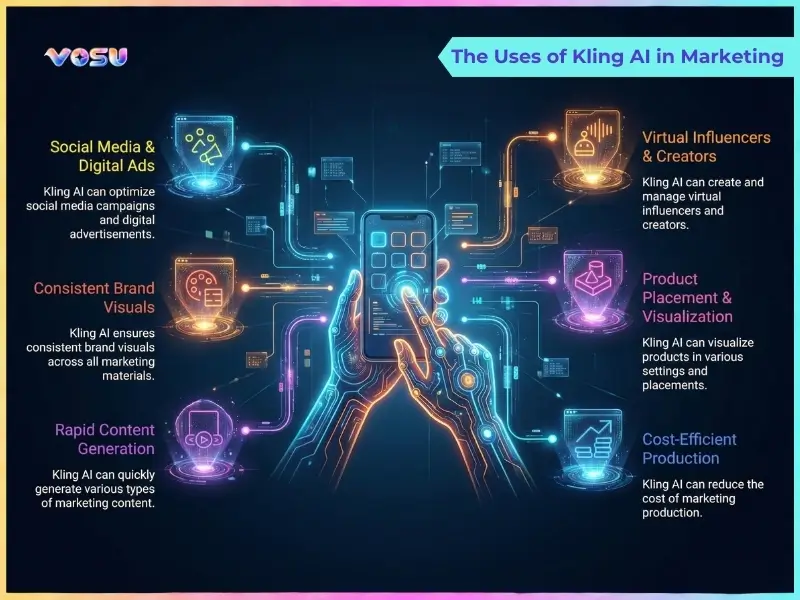
- Marketing and advertising: Kling AI helps brands create high quality promotional videos, product demos and customer onboarding clips that improve engagement while reducing production costs.
- Social media content creation: Kling AI allows influencers and businesses to produce engaging short form videos, memes and animated explainers with consistent videos that maintain stylistic branding across platforms like Facebook or YouTube.
- Filmmaking and pre-visualization: Kling AI assists directors and producers in generating realistic pre-visualizations, concept scenes and storyboards that optimize the creative process before full production.
- Education and training: Kling AI allows educators to design interactive lectures, simulations and consistent training modules that improve understanding and learner engagement through interactive visuals.
- Game development: Kling AI supports developers in generating character animations, immersive environments and prototype sequences that accelerate design workflows and visualization.
- Art and entertainment: Kling AI empowers artists to create generative art, visual installations and experimental storytelling that merge technology with creativity.
- Corporate communications: Kling AI helps businesses produce internal updates, leadership messages and multimedia presentations that strengthen communication and corporate culture.
- Customer service and sales: Kling AI helps sales and support teams generate personalized product videos, digital demonstrations and visual guides that boost trust and conversion.
The uses of Kling AI in marketing are visualised below.
What are the pros and cons of Kling AI?
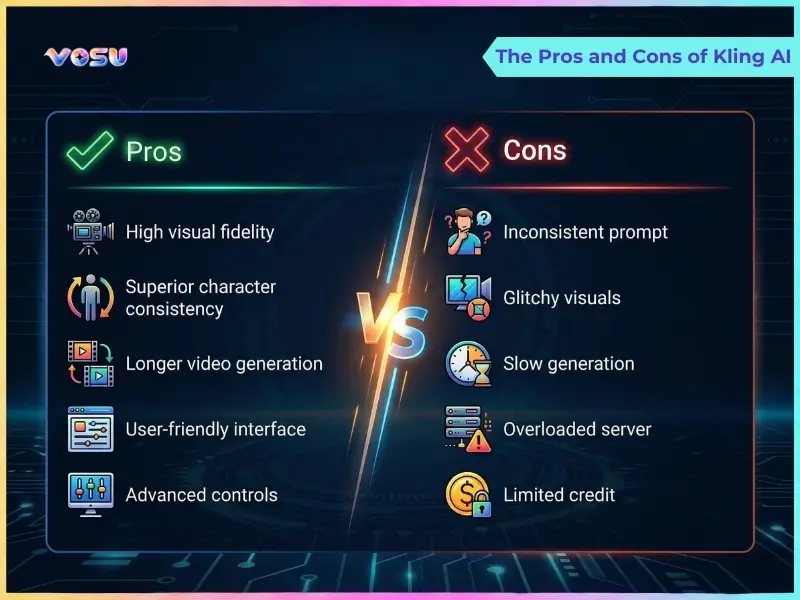
The pros and cons of Kling AI are reflected in its advanced creative capabilities and operational constraints. Kling AI allows visually rich videos with consistent characters, extended duration, flexible styles and accessible cinematic controls at lower production costs. It struggles with prompt accuracy, occasional visual distortions, slow rendering, heavy server traffic and restrictive credit limits that impact smooth and scalable content creation.
The pros and cons of Kling AI are visualised below.
What are the pros of Kling AI?
The pros of Kling AI are given below.
- High visual fidelity: Kling AI delivers high visual quality with realistic motion that allows creators to produce cinematic and visually striking outputs.
- Superior character consistency: Kling AI maintains strong character consistency across frames that confirm flow and professionalism in narrative or branded content.
- Longer video generation: Kling AI’s extended feature supports longer video generation up to 2 minutes, which provides storytelling opportunities without stitching shorter clips.
- User-friendly and accessible: Kling AI offers an intuitive interface that allows both professionals and beginners to create complex videos with ease.
- Advanced controls: Kling AI provides precise advanced controls over elements like camera movement that allow cinematic effects and dynamic shots effortlessly.
- Cost : Kling AI reduces production expenses by eliminating the need for large teams, expensive equipment or complex editing workflows.
- Adaptable and evolving: Kling AI continually improves through updates, which incorporate user feedback to improve stability and output quality.
- Versatile styles: Kling AI generates diverse video aesthetics from realistic scenes to stylized art, supporting creative needs across multiple industries like marketing, advertising or film.
What are the cons of Kling AI?
The cons of Kling AI are given below.
- Inconsistent prompt: Kling AI often produces irrelevant or static videos that don't match user prompts accurately, which require multiple retries for desired results.
- Glitchy visuals: Kling AI suffers from frustrating bugs like artifacts and distortions, which disrupt the smoothness and professionalism of generated footage.
- Slow generation: Kling AI takes considerable time to process videos, even for shorter clips, which slows down workflows and creative experimentation.
- Overloaded server: Kling AI frequently experiences overloaded servers that cause long queues and failed generations during peak usage hours.
- Limited credit: Kling AI provides limited credits in free or basic plans, which forces quick upgrades or restrictions on extensive video projects.
How to use Kling AI for video generation?
To use Kling AI for video generation, sign up on VosuAI, choose the mode, refine prompts with enhancement tools, set length, aspect ratio, audio preferences, then generate, review and download the final video.
The 9 steps to use Kling AI via VosuAI for video generation are outlined below.
- Go to VosuAI: Open VosuAI in your browser and click the main call-to-action button “Get started” on the homepage
- Sign up: Enter your email, set a password, complete any verification, accept terms, then sign in to access your video creation dashboard.
- Choose your mode: Select whether you want to use Kling AI to generate from text to video or image to video, which depends on your creative starting point.
- Craft your prompt: Write a detailed description of the scene, actions, style, and characters. Specify lighting, mood and motion, so Kling clearly understands your intent.
- Use prompt enhancer: Activate VosuAI’s prompt enhancement or optimization tools like PromptGPT to restructure wording, add useful descriptors and reduce ambiguity for more accurate Kling output.
- Select video length: Set your preferred duration by choosing either 5 or 10 seconds, which matches the clip length to your platform requirements and narrative pacing.
- Select aspect ratio: Choose the appropriate aspect ratio, landscape (16:9), portrait (9:16) or square (1:1), which aligns the format with your intended platform and audience experience.
- Choose audio mode: Decide to generate with background music, basic audio or silent export, based on whether you plan to edit sound later in VosuAI’s music generation tool.
- Generate: Click generate to let Kling AI process your setup, then review, iterate with adjusted prompts if needed and download the final video from VosuAI.
What type of video can Kling AI generate?
The types of video Kling AI generates are cinematic scenes, ads, character animation, tutorials, explanations and social media content. Kling AI creates realistic clips from text prompts or images, with smooth motion, reliable character consistency across frames and varied aesthetics like anime. These allow precise camera movements and audio syncing for commercial or personal use in short form videos.
Can Kling AI be used for professional video production?
Yes, Kling AI can be used for professional video production because it is designed with features that support commercial use, studio level filmmaking workflows and consistently high quality outputs. Kling AI offers paid plans, licensing options and resolutions suitable for broadcast and branded content.
What kind of input does Kling AI accept?
Kling AI accepts several inputs such as text prompts, still images, short source videos and specific parameters like style, motion and aspect ratio for its multimodal video generation model. Kling AI supports all these input options when used through VosuAI. VosuAI provides all the Kling AI models access like 1.0, 1.5, 2.0, 2.1, 2.5 Turbo, 2.6 and O1, to its users.
How long does Kling AI take to create a video?
Kling AI takes 5 to 15 minutes on average to create a video. Kling AI processes faster for paid users, while free users may wait hours or days. Kling AI generation speed depends heavily on server load, subscription tier, video complexity and processing stretches.
Can I use Kling AI for free?
Yes, you can use Kling AI for free because it offers a no-cost plan with very limited free credits that is ideal for beginners to test its core features. Kling AI free usage includes short video generation and basic tools, but applies limitations such as watermarks, credit caps and slower processing compared to paid tiers.
Is Kling AI easy to use for beginners?
Yes, Kling AI is easy to use for beginners because it supports straightforward text or image to video creation driven by simple prompts rather than complex timelines. VosuAI takes this further by offering a PromptGPT process that creates precise instructions customized to Kling AI's capabilities, which makes it more powerful and easier to use. It offers an intuitive interface and workflow that helps newcomers create quality videos without advanced editing skills.
Does Kling AI allow nsfw?
No, Kling AI does not allow nsfw because it enforces a firm and robust policy against unsafe or adult material. Kling AI strictly bans the use of any explicit or adult content generation and blocks prompts that attempt to produce nudity, pornography or other inappropriate scenes to keep the platform safe and brand friendly.
Is Kling AI worth it?
Yes, Kling AI is worth it because it produces high quality videos that approach traditional production standards for many use cases. Kling AI includes advanced options such as keyframing and camera control, which help creators deliver occasional high impact work. Kling AI still appeals to budget conscious creators through reasonably priced subscription plans.