Nano Banana Pro, branded as Gemini 3 Pro Image, supports the creation of high resolution, grounded visuals by allowing precise control, consistent detail and advanced image workflows for professional creative tasks. It was developed by Google DeepMind and launched on 20 November 2025, inside Gemini products and cloud integrations. It evolved from the earlier Nano Banana model that debuted in August 2025 as a fast image model. It upgraded the original approach by moving from Gemini 2.5 Flash to Gemini 3 Pro for better text rendering and multilingual support.
Nano Banana Pro works by processing text and image inputs, encoding them into high dimensional representations, refining results with factual grounding and generating polished images that match user intent. It delivers improved creative control, accurate text and detail rendering, brand consistency, advanced editing, real world data integration, map visualization and faster performance for iterative workflows.
Nano Banana Pro is used across photorealistic visuals, education, e-commerce, graphics, interior design, social media and daily life tasks that support creators, professionals and developers in generating high quality, context-aware images. It faces limitations such as prompt inconsistency, visual artifacts, slow generation, server overload, credit restrictions and reduced granularity for complex scenes that affect workflow efficiency.
Nano Banana Pro subscriptions cost range from 10 to 124.99 USD per month, where VosuAI offers an affordable option and access to flexible multi-model workflows. It is accessible through platforms like Gemini, Google AI Studio, Vertex AI, Google Workspace and VosuAI. Nano Banana Pro is used by selecting the mode, uploading images, entering prompts, choosing the aspect ratio and resolution, generating images, and then reviewing and downloading the results within a single workflow.
What is Nano Banana Pro?
Nano Banana Pro is an AI image generation and editing model built on Gemini 3 Pro, designed to create and modify images with high fidelity visuals at up to 4K resolution. Nano Banana Pro is known for advanced editing features that give creators precise, studio quality control over complex visual workflows.
What is the history of Nano Banana Pro?
The history of the Nano Banana Pro begins with its development by Google DeepMind as a professional AI image generation and editing model. Nano Banana Pro was launched on November 20, 2025, which surfaced inside Gemini products, Google Cloud and Workspace integrations for broad consumer and enterprise use. Nano Banana Pro inherits the Nano Banana codename from the earlier Gemini 2.5 Flash Image model, whose internal nickname leaked through the LMArena leaderboard before becoming an official product label.
Nano Banana Pro followed the original Nano Banana, which debuted in August 2025 as a fast, social‑friendly image model emphasizing character consistency and playful selfie transformations. It evolved this line by upgrading to Gemini 3 Pro, which improves text rendering, multilingual support and overall world knowledge in generated visuals. Nano Banana Pro expanded capabilities to support multi‑image composition, higher resolutions like 2K or 4K, and fine grained controls over lighting, camera and localized edits.
How does Nano Banana Pro work?
Nano Banana Pro processes text and image inputs, interprets them through advanced AI encoding, grounds results with real time Google Search data and generates refined images that align composition, lighting, and layout with user intent.
4 steps of how Nano Banana Pro works are outlined below.
- Text and image input: Nano Banana Pro accepts text prompts and optional reference images that let users start from scratch or edit uploads, interpret text prompts and reference images together as a single request.
- AI interpretation: Nano Banana Pro runs on Gemini 3 pro, which encodes inputs into high dimensional representations that capture style, layout, entities and constraints needed to solve complex tasks in visual form.
- Real time Google search integration: Nano Banana Pro grounds its understanding using real time Google Search data that pulls live facts for charts, infographics or weather‑style visuals before rendering scenes.
- Generation: Nano Banana Pro decodes this internal representation into images, iteratively refining composition, lighting and text placement until outputs match the user’s intent at chosen resolution.
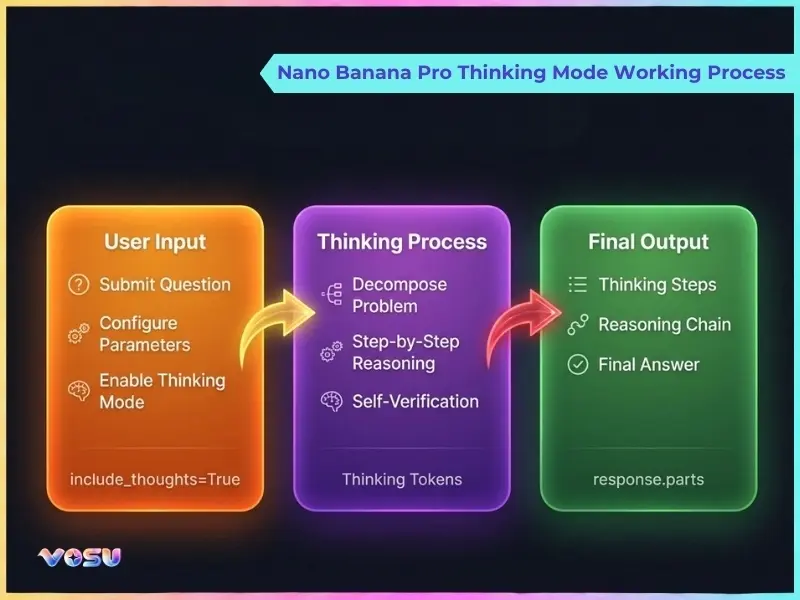
The working process of Nano Banana Pro's thinking mode is shown below.
What can Nano Banana Pro do?
Nano Banana Pro can deliver precise creative control, accurate text rendering, consistent branding, advanced editing, real world data integration, map visualization and faster performance for efficient, high quality image generation.
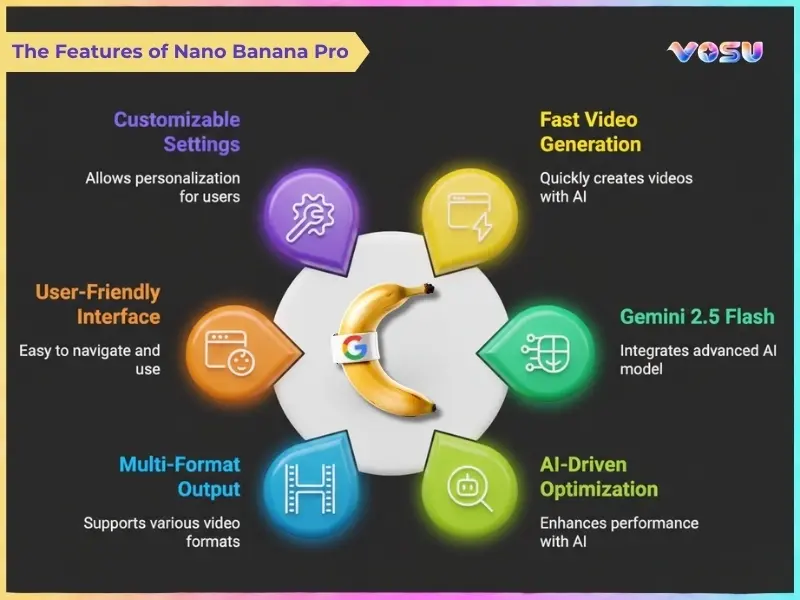
The key capabilities of Nano Banana Pro are given below.
- Enhanced creative control: Nano Banana Pro offers superior control, accuracy, and realism that let users steer style, composition and subjects to create high quality visuals for branding, storytelling or campaigns.
- Accurate text and details: Nano Banana Pro improves text rendering and small details that keep labels, UI elements, and fine patterns legible and consistent across multiple images or design variations. These help create visually rich and high quality infographics.
- Brand consistency: Nano Banana Pro helps maintain brand consistency by reusing characters, color schemes, logos and layouts, so a series of creatives feel aligned across platforms and formats.
- Advanced editing: Nano Banana Pro supports advanced image editing such as object replacement, background changes and wardrobe tweaks with fine tuned lighting or camera control to match scenes naturally.
- Real-world integration: Nano Banana Pro incorporates real data, screenshots or reference photos into scenes that ground visuals in actual products, dashboards or environments for believable mockups.
- Map visualization: Nano Banana Pro turns geographic or spatial information into rich map visualization, which highlights regions, routes or heatmaps in a presentation friendly style.
- Faster performance: Nano Banana Pro is optimized for faster performance, which lets users iterate on prompts and advanced image editing cycles without waiting long between revisions.
The Image below shows the features of Nano Banana Pro.
What are the use cases of Nano Banana Pro?
The use cases of Nano Banana Pro include photorealistic visuals, creative experiments, educational illustrations, e‑commerce renders, workplace graphics and photo editing, which allow diverse applications across marketing, design, learning and everyday tasks.
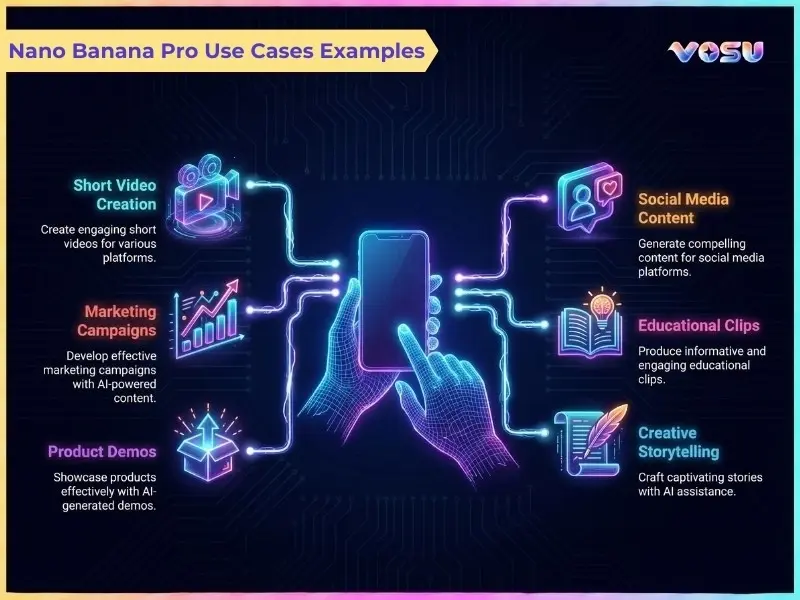
The use cases of Nano Banana Pro are given below.
- Photorealism and aesthetics: Nano Banana Pro creates highly photorealistic portraits, products and environments that let users explore different looks, moods and compositions for branding, campaigns and visual storytelling.
- Creative experiments: Nano Banana Pro supports stylized art, concept scenes and imaginative worlds by combining unusual prompts, references and styles that help exploration for comics, games and speculative design.
- Education and knowledge: Nano Banana Pro turns abstract ideas into diagrams, timelines, concept illustrations and visual walk throughs that help teachers and students understand complex topics.
- E-commerce and virtual studio: Nano Banana Pro generates product renders, lifestyle scenes and virtual studio shots, which reduce the need for physical photography while enabling quick A/B testing of backgrounds and props.
- Workplace and productivity: Nano Banana Pro supports slide visuals, reports, dashboards and internal documentation by producing charts, mock interfaces, explainer graphics and polished illustrations for presentations.
- Photo editing and restoration: Nano Banana Pro edits and restores images by removing distractions, repairing damage, changing backgrounds and updating outfits or props while keeping subjects recognizable.
- Interior design: Nano Banana Pro visualizes room layouts, furniture combinations, color schemes and lighting concepts that help designers and clients preview options before committing to real world changes.
- Social media and marketing: Nano Banana Pro creates hooks for content such as thumbnails, ad creatives, carousels and campaign variations customized to different platforms and audience segments.
- Daily life and translation: Nano Banana Pro helps with everyday tasks like translating instructions into annotated visuals, generating checklists as images or illustrating plans for travel, events and DIY projects.
- Social networking and avatars: Nano Banana Pro designs avatars, profile pictures and persona artwork, which allows users to maintain consistent visual identities across platforms and communities.
These use cases highlight how Nano Banana Pro supports everything from photorealistic portraits to full campaign visuals. Platforms like VosuAI and Headshotly AI provide intuitive interfaces that make it easy to create professional headshots, social media posts and YouTube thumbnails with Nano Banana Pro.
The examples of Nano Banana Pro use cases are shown below.
What are the limitations of Nano Banana Pro?
The limitations of Nano Banana Pro include prompt inconsistency, visual artifacts, slow generation, server overload, credit limitations and reduced control in complex scenes, which impact overall workflow efficiency and output reliability.
The limitations of Nano Banana Pro are given below.
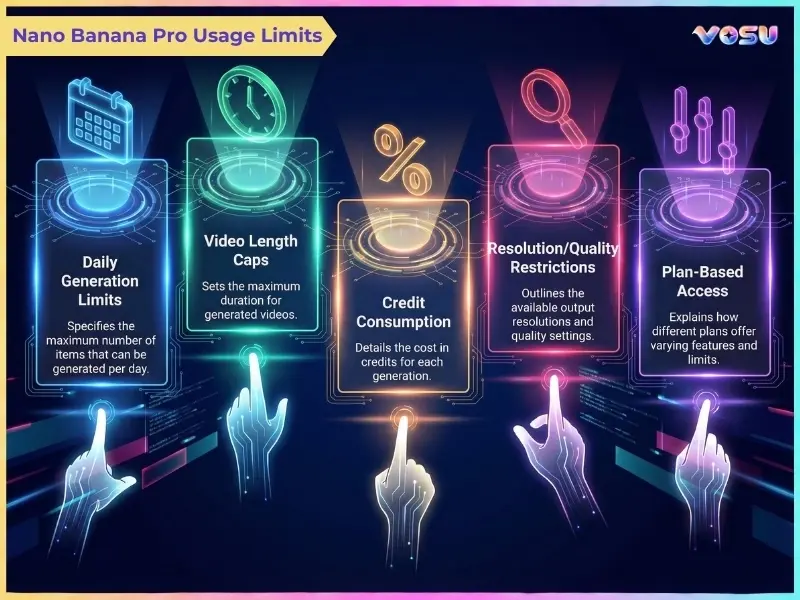
- Usage limits: Nano Banana Pro's daily limit feels tight on lower tiers, which makes heavy experimentation or high-volume production sessions harder to sustain in a single day.
- Server load: Nano Banana Pro slows down or briefly caps generations when servers are busy, which disrupts long creative runs and large prompt testing batches.
- Limited granularity: Nano Banana Pro takes a maximum of 6 images as input in some interfaces, which restricts complex scenes that depend on many reference photos or design elements.
- Editing capabilities: Nano Banana Pro has a lack of pixel level editing control, so ultra precise cleanup or tiny corrections still need traditional image editing software.
- Quality drift: Nano Banana Pro shows inconsistencies with fine details over iterations, so small elements like jewelry, labels or micro text sometimes shift or distort between versions.
These limitations mainly affect scale, precision and consistency rather than core image quality. VosuAI helps offset these constraints by offering watermark free outputs, no server or credit blocks, a smoother PromptGPT powered workflow and an affordable Nano Banana option.
The usage limits for Nano Banana Pro are shown below.
How much is a Nano Banana Pro subscription?
Nano Banana Pro subscriptions cost between 10 USD and 124.99 USD per month, which depends on the plan. Nano Banana Pro subscription options include Google Gemini Pro, Gemini Ultra, third party credit platforms like VosuAI and a developer API that covers different user needs and creative workflows.
The 4 subscription options of Nano Banana Pro are listed below.
- Google Gemini Pro: Google Gemini Pro costs about 19.99 USD per month and includes Nano Banana Pro with generous 4K image quotas, suitable for individual creators who need consistent, high quality image generation.
- Google Gemini Ultra: Google Gemini Ultra ranges roughly from 34.99 to 124.99 USD per month, which, depending on region and bundle, adds higher limits, priority performance and collaboration tools for teams and agencies.
- Third-party platforms: Third-party sites like VosuAI or Leonardo AI offer Nano Banana Pro from around 10 to 29 USD per month that uses credit systems and bundles multiple models, templates and workflow features for creators.
- API (developers): Nano Banana Pro official api cost is about 0.134 USD per 1K to 2K image and 0.24 USD per 4K, with some resellers discounting via batch or regional pricing.
You can use Nano Banana Pro very cost effectively with VosuAI pricing tiers that start from 10 dollar, which also give you access to more than 100 other models for flexible, multi model creative workflows.
How can I access Nano Banana Pro?
You can access Nano Banana Pro through the Gemini app, Google AI Studio, Vertex AI, Google Workspace and selected third party platforms like VosuAI. The Gemini app requires choosing an image capable “Thinking” model and switching the response type to “Create images”. The Gemini app with Google One AI Premium unlocks higher quotas and images with no watermarks. Developers access Nano Banana Pro in Vertex AI and Google AI Studio using paid API keys or cloud credits for backend and product integration. Google Workspace surfaces such as NotebookLM, Slides and Vids embed Nano Banana Pro to support enterprise document and presentation workflows. VosuAI offers Nano Banana Pro model access through a streamlined web interface that lets users pick the model, adjust presets and generate or edit multiple images in a single workflow.
How to use Nano Banana Pro?
To use Nano Banana Pro, users access VosuAI, select the mode, upload images or enter prompts, adjust settings like aspect ratio and resolution, generate images, then review, refine and download results for their workflows.
11 steps of how to use Nano Banana Pro using VosuAI are outlined below.
- Go to VosuAI: Go to VosuAI in your browser and sign up or log in so you can access the Nano Banana Pro model workspace and saved projects.
- Select the mode: Select the Nano Banana Pro image mode or workflow template, choosing between creation and editing options depending on whether you start from scratch or modify an existing image.
- Upload an image: Upload an image if you want to run edits, variations or image to image transformations. You can skip this step for pure text to image generation.
- Enter a prompt: Enter a detailed text prompt describing subject, style, camera, lighting and mood so Nano Banana Pro understands exactly what kind of output you expect.
- Enable or disable prompt enhancer: Enable or disable the prompt enhancer toggle to let Vosu automatically improve and enrich your prompt for better results or keep it off for fully manual prompting control.
- Use PromptGPT ideas: Use PromptGPT ideas or built‑in suggestions to adapt high quality prompt templates for portraits, products, ads or thumbnails without crafting everything from scratch.
- Set the number of images: Set the number of images Nano Banana Pro should generate in one run, which balances variation against quota usage and processing time per batch.
- Choose aspect ratio: Choose aspect ratio based on your target channel, like 16:9 for thumbnails, 9:16 for vertical shorts or 1:1 for feeds and profile images.
- Select resolution: Select a resolution such as 1K, 2K or 4K that balances quality requirements with any platform specific limits on high resolution generation.
- Generate image: Click the Generate button so Vosu sends your configuration and prompt to Nano Banana Pro, then wait while the model processes and returns candidate images.
- Review and download: Review the generated images, tweak prompts or rerun generations if needed, then download your chosen results for use in design workflows, social channels, or client deliverables.
How do everyday users use Nano Banana Pro?
Every day users use Nano Banana Pro inside Google’s Gemini or VosuAI to create creative image content for social posts, thumbnails and personal projects by generating visuals from text or image. They use it for editing photos with natural language, fixing backgrounds, changing outfits or re‑lighting scenes to better match their ideas. They visualize ideas like moodboards, UI mockups or infographics directly in consumer facing interfaces rather than complex developer tools.
How do professionals use Nano Banana Pro?
Professionals use Nano Banana Pro to generate high quality visual assets for real projects rather than experiments. They access Nano Banana Pro through the Gemini app, Google AI Studio, Vertex AI, Google Workspace and VosuAI. They use it for rapid prototyping, content creation, product mockups, data visualization and building consistent character designs from text or image prompts for campaigns and client deliverables.
How do creators use Nano Banana Pro?
Creators use Nano Banana Pro to generate highly detailed, context aware images for social content, thumbnails, videos and brand assets. They rely on it to streamline content creation for YouTube, courses and newsletters by turning ideas into polished visuals. Creators use Nano Banana Pro inside Google’s Gemini interface and Google Workspace surfaces for in-document artwork and through VosuAI to build educational infographics, marketing visuals and stylized character sheets.
How do developers use Nano Banana Pro?
Developers use Nano Banana Pro by integrating it into their apps and workflows to automate advanced and integrated image generation at scale. They call it through the Gemini API or deploy it on Vertex AI for server side pipelines that output high resolution (up to 4K) images. They use Nano Banana Pro from Google AI Studio to experiment with prompts, tune API parameters and then embed it into infographic apps, dashboards, maps and other production services. Developers use VosuAI to create step by step visual guides and diagrams to create or instruct the workflow.
How do advanced users use Nano Banana Pro?
Advanced users use Nano Banana Pro for complex, multi‑step visual workflows that demand precision, control and factual grounding. They work in Gemini, Google AI Studio, VosuAI and enterprise platforms built on Vertex AI. They use Nano Banana Pro’s deep semantic understanding and integration with Google Search to handle complex tasks like real-time data visualization and advanced image editing. Advanced users perform 2D, 3D conversion from sketches or blueprints and generate structured content such as infographics and UI layouts.
Can you use Nano Banana Pro for free?
Yes, you can use Nano Banana Pro for free because Google offers a small daily free quota in the Gemini app, but strict Nano Banana Pro limits apply and change over time. VosuAI provides limited access before requiring subscriptions or credits. You can get higher limits and more features through paid plans, which unlock larger daily caps and 4K output.
Is Nano Banana Pro safe?
Yes, Nano Banana Pro is safe because Google embeds SynthID watermarks, enforces safety filters and applies strict usage policies aligned with its AI principles. It is still important to recognize safety concerns, since any powerful model can be misused for deepfakes or other synthetic visuals that support misinformation or fraud if guardrails are bypassed or outputs are edited externally.
Is Nano Banana Pro worth it?
Yes, Nano Banana Pro is worth it because it delivers production grade image quality or control that improves visual workflows for creatives and professionals. It offers realistic text rendering, high resolution (up to 4K) and better editing control (lighting, camera angles) than earlier models or many competing tools for layout heavy work.
What is the difference between Nano Banana and Nano Banana Pro?
The difference between Nano Banana and Nano Banana Pro is in their target level of quality and complexity handling. Nano Banana is optimized for fast, casual image generation, with lower resolutions, lighter reasoning and simpler prompts that work well for playful content or quick social visuals. Nano Banana Pro uses a newer, stronger core model that delivers higher 2K or 4K resolution, better visual consistency, deeper reasoning and more precise creative control for professional branding, complex layouts and production design.
Are Gemini and Nano Banana the same?
No, Gemini and Nano Banana are not the same because Gemini is the full AI model and app ecosystem, while Nano Banana is one specific image model inside that stack. Gemini platform covers text, code and multimodal reasoning, whereas Nano Banana began as a community nickname and now labels Google’s Gemini 2.5 Flash Image model.