Kling AI 3.0 Standard represents an advanced multimodal video creation platform that converts written prompts, visual references and creative inputs into short, cinematic video sequences with cohesive visuals and synchronized audio. It operates through a diffusion transformer architecture that encodes prompts into latent video space, models motion and depth over time and decodes high resolution clips with native sound. It stitches multiple shots into one workflow that confirms visual continuity, character awareness and professional cinematic control. It supports advanced generation pipelines designed for high end creative and commercial video production needs.
Kling AI 3.0 Standard delivers features such as character and lighting consistency, intelligent multi shot storyboarding, extended video duration, native audio generation and precise on-screen text rendering. It allows 5 to 15 second videos with improved realism, smoother motion and up to 4K output quality. It supports applications including cinematic production, advertising, branded content, multi shot narratives, educational explainers, social media videos and character driven storytelling. It allows creators to design advanced camera movements, realistic physics interactions and synchronized audio visual scenes from a single prompt or script.
Kling AI 3.0 Standard has limitations such as short video length caps, slow processing times, occasional text distortion, strict content filtering and credit loss on failed generations. It follows a subscription model ranging from $10 to $180 per month that depends on credit volume and feature access. It is accessible through the official Kling AI platform or via third party services like VosuAI. VosuAI can be used by selecting the model, uploading reference frames, writing optimized prompts, setting duration and aspect ratio, enabling audio and generating downloadable videos.
What is Kling AI 3.0 Standard?
Kling AI 3.0 Standard is the latest unified multimodal AI video generation model designed to turn text, images and references into short cinematic videos with synchronized audio and consistent visuals. It creates complete video clips, animates images and supports editing in one platform that offers features like native sound, character consistency and multi shot storyboarding. It was developed by Kuaishou, a Chinese short video and social platform company behind the earlier Kling models. Kling AI 3.0 Standard was officially released on February 5, 2026, initially in exclusive early access. It has generation and advanced professional features for high end video workflows.
How does Kling AI 3.0 Standard work?
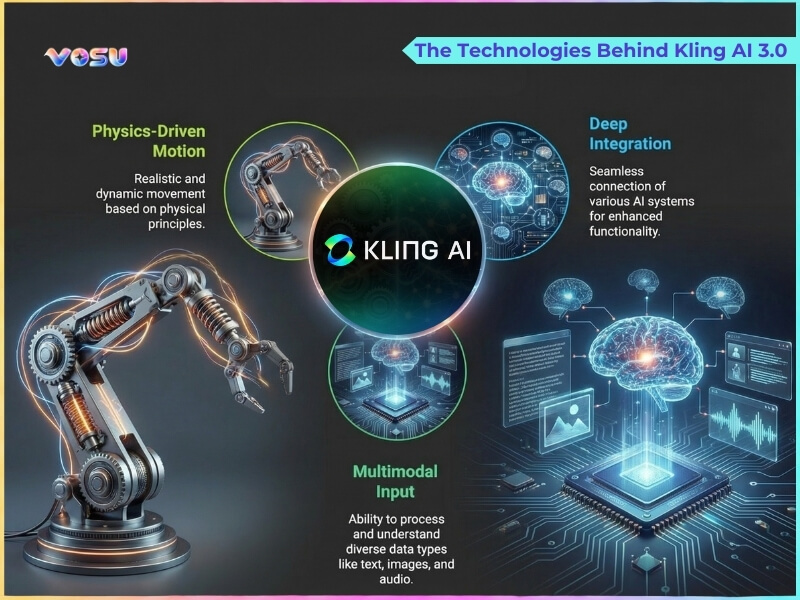
Kling AI 3.0 works as a unified diffusion transformer video model that turns text or image prompts into high fidelity, physically consistent scenes. It uses a 3D spatiotemporal VAE plus joint attention to model motion, depth and lighting over time while integrating advanced multimodal understanding for text, image, audio and video inputs.
Kling AI 3.0 Standard processes the prompt, encodes it into latent video space, iteratively denoises frames and then decodes them into high resolution clips with native audio and character aware, high level directorial controls. Kling AI 3.0 Standard finally stitches shots into a single workflow to deliver consistent and multi shot video in one pass.
The technologies behind Kling AI 3.0 are visualised below.
What are the features of Kling AI 3.0 Standard?
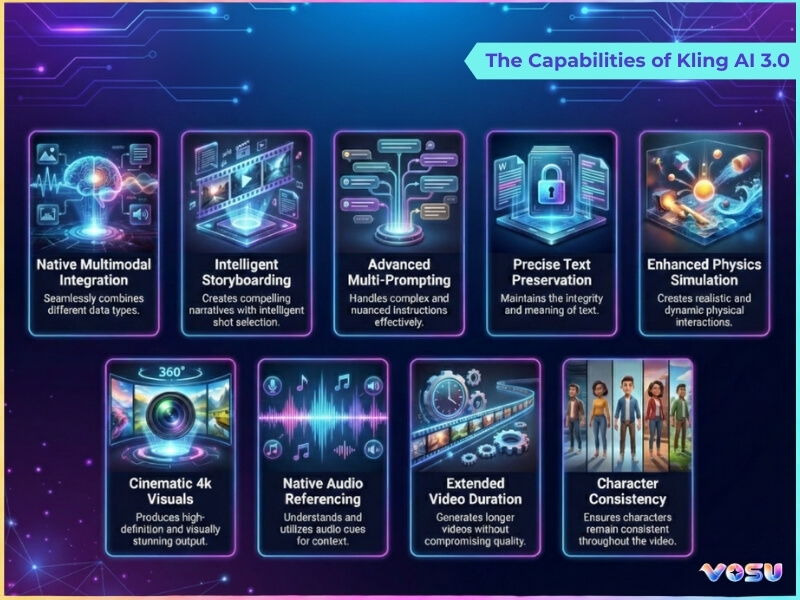
The features of Kling AI 3.0 Standard include consistency and control, multi shot storyboarding, high fidelity video generation, extended duration, native audio and precise text rendering. These capabilities allow clear 5 to 15 second videos with improved realism, synchronized sound, clear on-screen text, professional output quality and flexible creative control for narrative driven content creation.
The key features of Kling AI 3.0 Standard are given below.
- Advanced consistency and control: Kling AI 3.0 Standard maintains character identity, lighting and camera style across shots while giving granular control over motion, framing and scene changes.
- Intelligent multi-shot storyboarding: Kling AI 3.0 Standard generates sequences of shots from one prompt or outline, automatically planning angles and transitions to match a narrative flow.
- Improved video generation: Kling AI 3.0 Standard produces high fidelity, physics aware videos with smoother motion, better depth and more realistic materials and environments than previous versions.
- Extended duration: Kling AI 3.0 Standard supports single pass video generation from 5 to 15 seconds with improved temporal coherence for short narrative sequences.
- Upgraded native audio generation: Kling AI 3.0 Standard adds built‑in sound design and voice style options so scenes can be rendered with synchronized effects and ambience directly in one pass.
- Precise text rendering: Kling AI 3.0 Standard improves on‑screen text legibility, which allows accurate logos, UI elements and titles to appear clearly inside generated footage.
- High quality output: Kling AI 3.0 Standard delivers up to 4K, high bitrate results suitable for professional editing pipelines and large screen display.
- Expanded creative tools: Kling AI 3.0 Standard offers masks, region edits and reference based generation so creators can refine specific areas without rerendering entire videos.
- Storyboard narration 3.0: Kling AI 3.0 Standard interprets written scripts or outlines into visual storyboards, then converts them into matching animated sequences with appropriate pacing and shot composition.
The capabilities of Kling AI 3.0 are visualised below.
What are the applications of Kling AI 3.0 Standard?
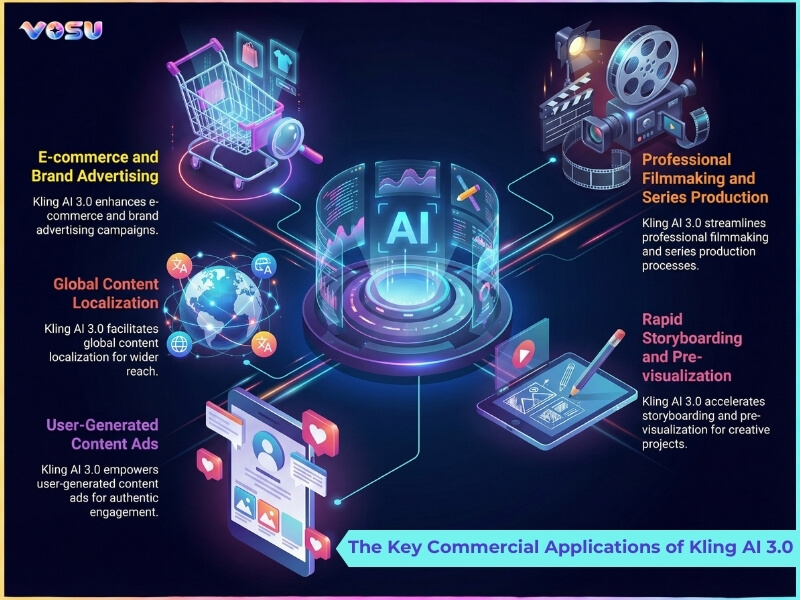
The applications of Kling AI 3.0 Standard include unified video creation, cinematic production, advanced camera motion, audio visual content creation, multi shot narratives and advertising. These use cases support realistic storytelling, dynamic scene design, consistent characters, fast prototyping for brands and scalable content creation for social media, education and short-form video platforms.
The uses of Kling AI 3.0 Standard are given below.
- Unified video creation and editing: Kling AI 3.0 Standard lets users script, generate, refine and revise videos in one environment that reduces dependence on separate shooting, VFX and post production tools.
- Cinematic production: Kling AI 3.0 Standard allows director style control over lenses, framing, lighting and scene composition that makes it suitable for trailers, short films, concept scenes and previsualization.
- Advanced camera control and motion: Kling AI 3.0 Standard supports complex moves like dolly, crane and orbital shots that help creators design dynamic sequences without physical rigs or on‑set equipment.
- Audio-visual content creation: Kling AI 3.0 Standard generates visuals and matching sound, which allows quick production of music videos, mood pieces, teasers and branded idents.
- Multi-shot narratives: Kling AI 3.0 Standard creates sequences of connected shots from one brief that support story arcs, dialogues and scene changes to be visualized as complete mini‑episodes.
- Enhanced realism and physics: Kling AI 3.0 Standard generates more believable motion, materials and interactions that support use cases that demand realistic water, cloth, crowds and environmental effects.
- Versatile input options: Kling AI 3.0 Standard accepts text, images and reference clips, so users can build videos from ideas, sketches or rough footage and iterate quickly.
- Character driven storytelling: Kling AI 3.0 Standard keeps characters consistent across scenes, which allows episodic content, recurring mascots and narrative campaigns with recognizable personalities.
- Advertising and marketing: Kling AI 3.0 Standard helps brands prototype or finish ads, explainer clips, product visuals and campaign assets without full scale shoots, which cuts cost and turnaround time.
- Creating social media content: Kling AI 3.0 Standard allows influencers and creators to spin out short, eye catching clips, trends and loops tailored for platforms like TikTok, Reels and YouTube Shorts.
- Generating education tutorials: Kling AI 3.0 Standard illustrates abstract concepts, step by step processes or simulations, which support teachers and course creators with visual explainers and training content.
These applications can be managed more efficiently on platforms such as VosuAI, which offers a user friendly dashboard to organize and deploy all these types of Kling AI 3.0 Standard workflows.
The commercial applications of Kling AI 3.0 are visualised below.
What are the limitations of Kling AI 3.0 Standard?
The limitations of Kling AI 3.0 Standard include video length caps, slow processing times, text rendering issues, strict content censorship, credit loss on failures and complex motion limitations. These constraints can hinder long-form storytelling, delay workflows, distort on-screen text, block valid prompts, waste credits on failed output and reduce realism in multi-subject or intricate motion scenes, alongside reported customer support challenges.
The limitations of Kling AI 3.0 Standard are given below:
- Video length cap: Kling AI 3.0 Standard limits the maximum duration to approximately 15 seconds per generation, which restricts longer narrative or storytelling content creation.
- Slow processing times: Kling AI 3.0 Standard takes over 8 minutes for paid users and several hours for free tier users during peak periods.
- Text rendering issues: Kling AI 3.0 Standard struggles with accurate text display in videos that produce distorted or illegible on-screen text despite detailed prompts.
- Strict content censorship: Kling AI 3.0 Standard uses aggressive filtering that blocks many legitimate prompts, which reject content involving weapons, certain clothing or ambiguous scenarios.
- Credit consumption on failures: Kling AI 3.0 Standard consumes credits even on failed generations, with users reporting no refunds for unsuccessful outputs or system errors.
- Complex motion limitations: Kling AI 3.0 Standard has difficulty handling intricate movements, multiple subjects or distant objects that produce unnatural transitions.
- Weak customer support: Kling AI 3.0 Standardusers frequently report unanswered support tickets, subscription cancellation difficulties and unresolved billing issues.
Users looking to overcome these limitations can explore VosuAI as an alternative platform that offers more flexible video generation options and fewer creative restrictions.
How much does Kling AI 3.0 Standard cost?
Kling AI 3.0 Standard costs between $10 and $180 per month, which depends on the subscription tier chosen. The official platform provides four subscription plans such as standard at $10 per month with 660 credits, pro at $37 per month with 3,000 credits, premier at $92 per month with 8,000 credits and ultra at $180 per month with 26,000 credits. Each tier provides increasing credits, faster processing, and access to advanced features like watermark removal and professional mode video generation.
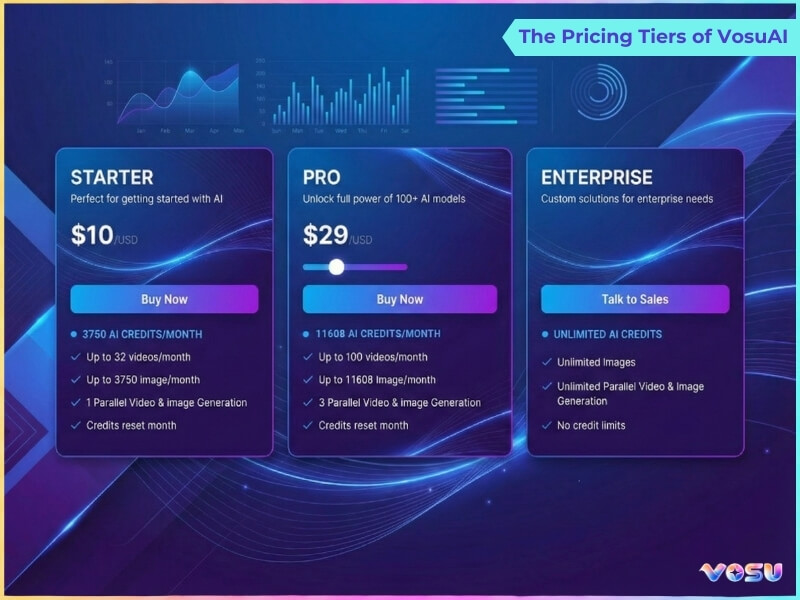
Users can also access Kling AI 3.0 Standard through on-demand web platforms such as VosuAI. It offers three pricing tiers such as standard for individuals and light users, pro for heavier creators and enterprise for large scale or team deployments. VosuAI costs start at $10.00 per month for the starter plan with 3,750 credits, the pro plan at $29.00 per month with 11,608 credits, while the enterprise plan is customizable. It also offers customized subscriptions, where users can purchase custom credit packages aligned with their scale and workflow demands. It provides access to over 100 popular video generation models like Veo3, Kling, PixVerse, Minimax Hailuo and Sora, which makes it a complete all in one AI creative studio for diverse video production needs.
The pricing tiers of vosuAI are visualised below.
How to access Kling AI 3.0 Standard?
To access Kling AI 3.0 Standard, users can visit the official Kling AI website and create an account or log in with existing credentials. The platform's dashboard allows navigation to video generation tools where users can select the Kling AI 3.0 Standard model from available options. Kling AI also offers a mobile app for iOS and Android that helps video creation directly from smartphones.
Kling AI 3.0 Standard is not available to all users, as access is currently limited to specific user groups and supported regions. VosuAI removes these regional and account based restrictions by providing unrestricted access to Kling AI 3.0 Standard. VosuAI provides multiple video generator models like Kling AI 3.0 Standard and Kling AI 3.0 Pro in any subscription tier, which offers flexibility without requiring separate platform subscriptions.
How to use Kling AI 3.0 Standard?
To use Kling AI 3.0 Standard using VosuAI, follow model selection, frame uploads, prompt creation, prompt enhancement, duration and aspect ratio settings and audio enablement. This workflow guides users from choosing the Kling AI 3.0 Standard model and refining prompts to configuring video format, generating synchronized audio and downloading polished short form videos efficiently
11 steps to use Kling AI 3.0 Standard through VosuAI are outlined below.
- Go to VosuAI's video generation dashboard: Navigate to VosuAI's website and access the video generation section, where all AI video models and creation tools are available.
- Select Kling AI 3.0 Model: Choose Kling AI 3.0 Standard from the available model options in the dropdown menu to utilize its advanced video generation capabilities.
- Upload the start frame image: Add your first reference image that will serve as the opening visual for your AI generated video sequence.
- Upload the end frame image: Provide a second reference image that defines how your video should conclude, which enables smooth transitions between frames.
- Enter text prompt: Write a detailed description of the scene, actions and visual elements you want Kling AI 3.0 Standard to generate in your video.
- Use Prompt enhancer: Use the prompt enhancer feature to automatically improve and optimize your text prompt for better video output quality and accuracy.
- Access PromptGPT: Use PromptGPT to generate Kling AI 3.0 Standard friendly text or JSON prompts from reference videos that help produce higher quality and more accurate outputs.
- Select video duration: Choose your preferred video length from available duration options like 10 or 15 seconds based on your content needs and creative requirements.
- Pick aspect ratio: Select appropriate dimensions for your video output such as 16:9 landscape, 9:16 vertical or 1:1 square formats.
- Enable audio generation: Toggle the audio generation option to add AI generated sound or music that complements the visual content of your video.
- Generate and download: Click the generate button to create your video, then download the final output once processing is complete.
Can you use Kling AI 3.0 Standard for commercial projects?
Yes, you can use Kling AI 3.0 Standard for commercial projects if you have a paid subscription like standard, pro, or premier. Its paid plans grant a commercial license allowing users to monetize, distribute and create professional content for business purposes. Kling AI 3.0 Standard free tier users are restricted to personal, non-commercial use and must retain the Kling watermark on generated videos, while VosuAI provides watermark free video generation suitable for commercial use across all its subscription tiers.
Is there a free trial for Kling AI 3.0 Standard?
Yes, there is a free trial for Kling AI 3.0 Standard through its basic plan, which provides 66 free monthly credits upon login for testing video generation features. These credits allow users to explore standard mode video creation with limited resolution and watermarked outputs. VosuAI also provides free credits to use Kling AI 3.0 Standard, which is an alternative way to test the model without official subscription restrictions.
Is using Kling AI 3.0 Standard safe?
Yes, using Kling AI 3.0 Standard is safe because the official platform implements encryption, access controls, and regular security audits to protect user data. Kling AI's privacy policy outlines transparent data handling practices for uploaded content and generated videos. Users should always verify they are accessing the authentic Kling AI website or VosuAI that has integrated Kling AI 3.0 Standard's API to avoid phishing sites distributing malware.
Is Kling AI 3.0 Standard better than Kling AI 2.6 Pro?
Yes, Kling AI 3.0 Standard is better than Kling AI 2.6 Pro because it adds longer 15 second clips, stronger character consistency, smarter multi shot storyboarding and higher end 4K focused output with unified audio-visual workflows. It also improves motion stability, camera control and text rendering, which makes it more suitable for cinematic, multi shot commercial projects than the 1080p limited 2.6 Pro model.
What are the alternatives to Kling AI 3.0 Standard?
The alternatives to Kling AI are outlined below.
- Runway Gen 4: Runway Gen 4 offers advanced text and image to video generation with strong temporal consistency, realistic motion and cinematic camera control for professional workflows.
- Google Veo 3: Google Veo 3 provides high end video generation with native audio, realistic physics and strong prompt understanding for premium creative and commercial projects.
- Sora 2: Sora 2 delivers highly realistic, physics aware video simulations with multi-shot control, ideal for complex, narrative driven scenes and cinematic storytelling.
- Luma Dream Machine: Luma Dream Machine helps cinematic video creation from text and images with intuitive camera control and high quality, visually rich outputs.
- Pika 2.2: Pika 2.2 specializes in turning still images into smooth cinematic animations that support flexible durations, aspect ratios and diverse creative styles.
Is Kling AI 3.0 Standard better than Runway Gen 4?
Yes, Kling AI 3.0 Standard is better than Runway Gen-4 because it delivers native 4K output, stronger character consistency, built-in audio and stronger multi shot storyboarding for cinematic narratives.
Is Kling AI 3.0 Standard better than Google Veo 3?
No, Kling AI 3.0 Standard is not better than Google Veo 3 because Veo 3 delivers more advanced native audio, stronger real world physics and superior cinematic camera control for premium productions.
Is Kling AI 3.0 Standard better than Sora 2?
Yes, Kling AI 3.0 Standard is better than Sora 2 because it offers stronger character consistency, more controllable multi shot storyboarding and native 4K focused workflows that many creators prefer for cinematic commercial projects.