Sora 2 turns written ideas and visual references into realistic moving scenes, where motion, sound and interactions feel natural and connected. It allows users to create high quality videos while keeping characters, scenes and actions consistent and believable. Sora 2 AI is the premium version of Sora, which was developed by OpenAI and released on 30th September 2025.
Sora 2 is capable of text to video generation, image to video animation, synchronized audio creation, realistic physics simulation and detailed video control. Sora 2 helps content creation, advertising, education, cameo style clips and AI research. These allow users to quickly turn ideas into visual media without traditional filming. Sora 2 has limitations like restrictions on real people, copyright and watermark controls and difficulty maintaining long narrative continuity.
Sora 2 price starts at $20 per month through ChatGPT Plus, while Sora 2 Pro costs $200 per month for higher quality and longer videos. Sora 2 is available through VosuAI for 10 USD per month and a Pro plan for 29 USD per month. It is accessible through the official app, web platform, invite code or third party platforms like VosuAI. VosuAI allows users to select the model, enter prompts, adjust video settings and generate content using Sora 2.
What is Sora 2?
Sora 2 is OpenAI’s advanced AI model that generates realistic video and audio from text, images or short video clips with improved physics and synchronized sound. Sora 2 is designed as a next generation world simulation system to represent motion, collisions and object interactions. These features maintain character and scene consistency across single and multiple shots. Sora 2 provides user control over camera position, pacing and visual style, which improves lip sync accuracy and sound effect timing compared with earlier versions. It allows simple prompts to produce consistent video and audio in one generation.
What is the history of Sora 2?
The history of Sora 2 begins with OpenAI’s original Sora, a text to video model previewed on 15th February 2024 and later launched for ChatGPT Plus or Pro users. Sora generates short video clips from text prompts and edits existing videos, but does not include built-in high quality audio. Sora 2 was developed to address these limitations. It was released on 30th September 2025 for selected users in the U.S. and Canada through the Sora app and web. Sora 2 continued alongside Sora Turbo, by OpenAI and introduced Sora 2 Pro, which is a higher quality version with longer clips and expanded controls.
What can Sora 2 do?
Sora can do text to video generation, image to video generation, synchronized audio generation, physical accuracy production and video control. It is designed to help users turn descriptive input into motion visuals without traditional filming.
The key capabilities of Sora 2 are given below.
- Text to video generation: Sora 2 converts detailed natural language prompts into high fidelity, multi shot videos with coherent motion, consistent characters and cinematic framing suitable for ads, explainers or story scenes.
- Image to video generation: Sora 2 animates single images into moving scenes that preserve original style while adding depth, camera movement and environmental effects to create intros, product shots or artwork animations.
- Synchronized audio generation: Sora 2 produces speech, ambience and sound effects in the same pass as video, so lip movements, actions and environment stay aligned with the generated soundtrack.
- Physical accuracy production: SSora 2 simulates believable physics, gravity, collisions, fluids and momentum, so interactions like walking, splashing or bouncing look stable and consistent across frames.
- Video control: Sora 2 offers control over camera moves, style, duration and shot structure, plus remix and cameo tools to insert people, extend clips or adjust scenes without regenerating from scratch.
What kind of videos can Sora 2 generate?
The kind of videos that Sora 2 can generate are given below.
- Cinematic narrative videos: Sora 2 generates cinematic narrative videos with multi shot storytelling, realistic motion and synchronized dialogue, which is suitable for short films or story driven social clips.
- Realistic human action clips: Sora 2 generates realistic human action clips, which show people walking, dancing, playing sports or performing stunts with physically accurate movement and expressive body language.
- Product and marketing videos: Sora 2 generates product and marketing videos that showcase items in realistic environments, with smooth camera moves, on‑screen text and persuasive voiceover or sound design.
- Concept and visualization videos: Sora 2 generates concept and visualization videos that turn rough ideas or image prompts into visual prototypes for scenes, locations, UX flows or fictional worlds.
- Complex action video: Sora 2 generates complex action video with multiple characters, fast motion and interacting objects while maintaining scene consistency and plausible physics.
- Consistent character video: Sora 2 generates a consistent character video where the same person or creature appears across shots with stable appearance, clothing and personality.
- Varied style video: Sora 2 generates varied style video, which ranges from photoreal and cinematic to anime or stylized looks with high definition visuals and synchronized audio.
How long does Sora 2 take to generate a video?
Sora 2 takes around 1 to 3 minutes to generate a 10 to 12 second video under normal conditions. Sora 2 generation time varies with video length and complexity, with longer or higher resolution content taking more time during peak usage or on lower subscription tiers. Sora 2 videos can be generated faster when accessed through VosuAI because of its efficient GPU allocation and queue management.
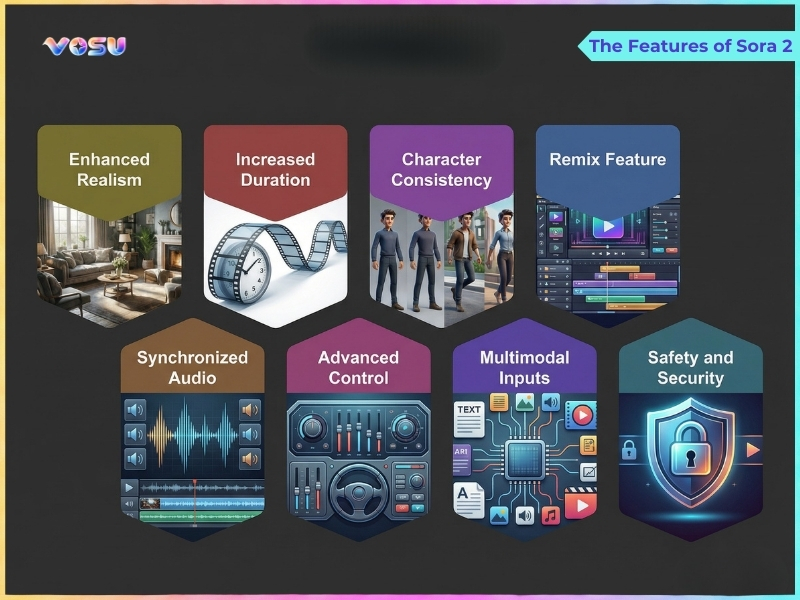
The features of Sora 2 are visualised below.
What are the use cases of Sora 2?
The use cases of Sora 2 include content creation, advertising, storytelling, education, personal use and research. It transforms text prompts or reference images into videos for social media, marketing, cinematic narratives, training simulations, interactive clips and AI experimentation.
The applications of Sora 2 are given below.
- Content creation: Sora 2 creates short form and long form videos in landscape and portrait (16:9 and 9:16) for YouTube, TikTok and reels from simple text prompts or reference images.
- Advertising: Sora 2 produces product demos, ad prototypes and A or B test creatives, which lets marketers quickly iterate on visuals, messaging and styles without full film crews.
- Storytelling: Sora 2 turns scripts or story ideas into cinematic narrative clips that visualize characters, worlds and scenes for trailers, animatics and proof of concept films.
- Education and training: Sora 2 generates explainer videos, scenario simulations and visual examples for lessons or corporate training, which makes abstract concepts easier to understand.
- Personal and interactive use: Sora 2 is used by individuals for fun, experiments, social media content and interactive prompts, which let users quickly visualize fantasies, memes or everyday ideas as shareable videos.
- Cameos generating: Sora 2 creates stylized cameo like appearances of fictional or user designed characters inside short clips such as greetings, shout outs or guest scenes.
- AI research: Sora 2 generates videos for studying multimodal generation and physics aware models. It supports controllable video synthesis and experiments in computer vision and generative modeling.
These applications show how Sora 2 supports creators, marketers, educators, researchers and individuals. VosuAI allows them to turn ideas, scripts and experiments into high quality videos across multiple formats and use cases.
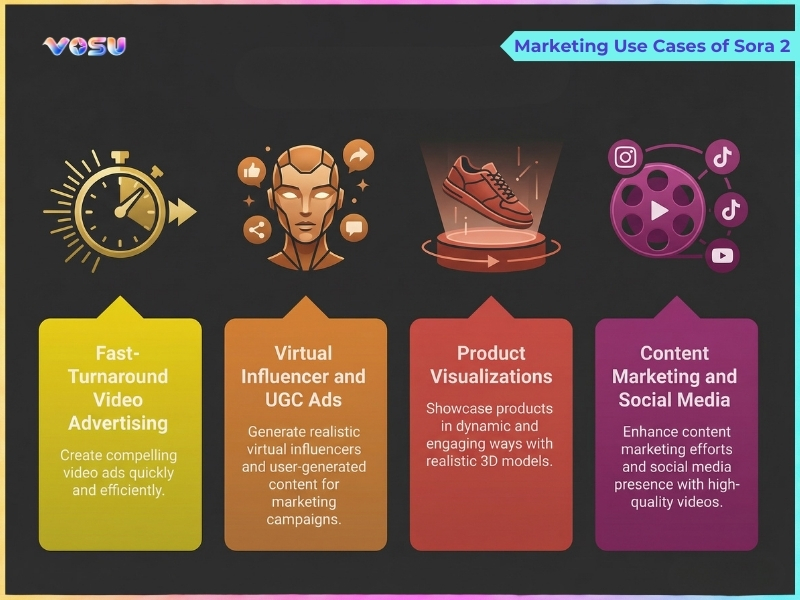
The marketing use cases of Sora 2 are visualised below.
What are the limitations of Sora 2?
The limitations of Sora 2 are copyright and watermarks, harmful and sensitive content, prompt rejection and content and story length.
The limitations of Sora 2 are given below.
- No real people: Sora 2 blocks most prompts using identifiable real people, which includes celebrities, politicians and realistic human faces, to prevent deepfakes and IP infringement.
- Copyright and watermarks: Sora 2 adds watermarks and applies strict third party content similarity checks for brands, IP characters, logos and music. It limits commercial reuse without extra editing in tools like VosuAI.
- Harmful and sensitive content: Sora 2 restricts violent, sexual, hateful or self harm content connected to minors, so edgy or graphic storytelling ideas are blocked outright.
- Prompt rejection: Sora 2 rejects prompts that contain certain keywords or vague references to copyrighted or sensitive material, which requires users to rephrase descriptions before generation.
- Sanitized output: Sora 2 returns overly safe or generic scenes, which remove implied violence, logos or realistic faces, even when prompts pass, so users adjust with post editing or alternative workflows via VosuAI.
- Limited continuity: Sora 2 struggles with long narrative continuity, complex multi scene stories or strict frame by frame control. It requires external editing and sequence tools like VosuAI to stitch consistent episodes.
These limitations like copyright restrictions, watermarks and content filtering, can be overcome with VosuAI, which lets users generate videos, edit via prompts, use them commercially and enjoy greater creative control across projects.
How much does Sora 2 cost?
Sora 2 basic access costs 20 USD per month for ChatGPT Plus users with a limited monthly video generation quota. Its premium version, Sora 2 Pro, costs 200 USD per month, which provides longer, higher resolution, watermark free videos. Sora 2 API uses a per second billing model for developers. It costs 0.10 USD per second at 720p, while Sora 2 Pro costs 0.30 to 0.50 USD per second for higher resolution output.
VosuAI pricing plans to access Sora 2.
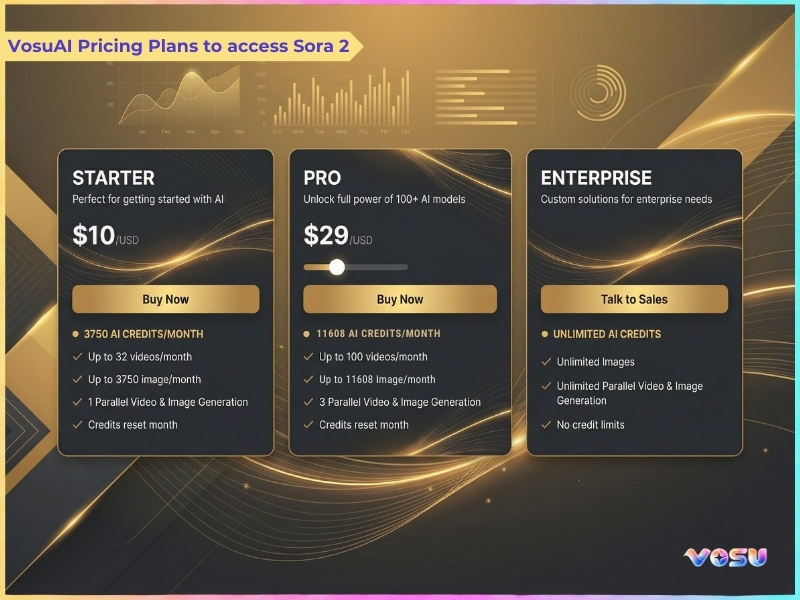
Sora 2 is accessed by users through VosuAI with its credit based subscription instead of using OpenAI directly. VosuAI offers monthly plans with limited credits and access to over 100 video generation models, which include Sora 2 and Sora 2 Pro. VosuAI costs start at $10 per month for the basic plan with 3,750 credits, $29 per month for the Pro plan with 11,608 credits and an enterprise plan with unlimited usage. These credits are usable across Sora 2, Sora 2 Pro and other supported video generation models.
How to access Sora 2?
To access Sora 2, use the official Sora app, web version, invite and waitlist system and third party platforms.
4 steps to access Sora 2 are outlined below.
- Official Sora app (iOS): Download the Sora app from the iOS App Store, sign in with your OpenAI account, then use an invite code or in-app waitlist to request access.
- Web version (browser): Visit the Sora web page in a supported browser, log in with your OpenAI account and activate access using your invite code or approved waitlist status to begin generating videos.
- Invite and Waitlist System: Open the Sora app or website, sign in, then either redeem an invite code or select the waitlist option and wait for OpenAI to notify you when access is granted.
- Third party platforms: use third party platforms such as VosuAI that integrate Sora 2 model, which lets users generate videos without requiring a direct OpenAI invite.
How to get the Sora 2 invite code?
3 steps to get the Sora 2 invite code are given below.
- OpenAI Discord: Join the official OpenAI Discord server, watch Sora related channels and redeem fresh invite codes as soon as they appear.
- Social media: Look up Sora 2 invite code on X, Reddit and YouTube, which filters for latest posts that still contain unused codes.
- Follow influencers: Follow leading AI and tech creators who release Sora 2 invite codes during tutorials, livestreams or special community events.
How to use Sora 2?
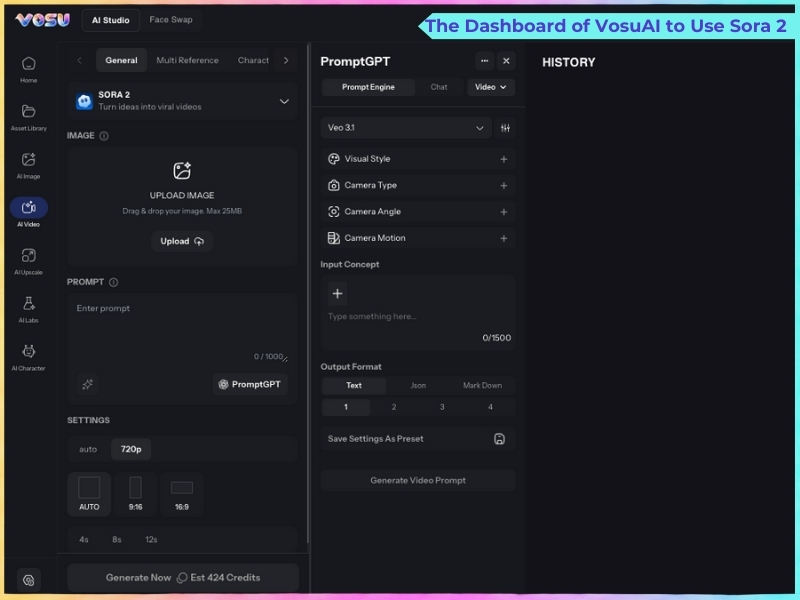
To use Sora 2, you have to go to the official website or third party platforms like VosuAI that use this model. You can use Sora 2 through VosuAI by selecting the model, uploading images, enabling or disabling the prompt enhancer, choosing video length and aspect ratio and generating the video.
11 steps to use Sora 2 using VosuAI are outlined below.
- Go to VosuAI: Open the VosuAI website in your browser and sign up or log in to access the video generation dashboard.
- Select Sora 2 model: Choose the Sora 2 video model so all subsequent generations use OpenAI’s latest engine.
- Upload an image: Add a reference image to guide Sora 2 on the subject, visual style and overall scene composition for the video.
- Enter a prompt: Describe the scene, motion, style and mood in natural language so Sora 2 understands what video you want to create.
- Prompt enhancer (on/off): Toggle the prompt enhancer to automatically improve your input with cinematic details or turn it off for full manual control.
- Use PromptGPT ideas: Use PromptGPT to write or refine text and JSON prompts from reference images. It is optimized around Sora 2 prompt characteristics to ensure high quality, structured prompts that produce realistic and cinematic video outputs..
- Choose video length: Choose video length by selecting the desired duration range, for example, 8 to 12 seconds, which balances storytelling space with Sora 2 cost and render time.
- Choose aspect ratio: Choose an aspect ratio such as landscape and portrait (16:9 and 9:16) for YouTube, TikTok or Reels, which matches Sora 2’s output to the target platform.
- Select resolution: Select a resolution like 720p to control visual sharpness and file size, which notes that higher resolutions increase cost and latency.
- Generate video: Hit the generate button so VosuAI sends your configured prompt, reference, and settings to Sora 2 for rendering.
- Review and download: Play back the finished clip, decide whether to tweak and re-run, then export the final version to your device.
The dashboard of VosuAI to use Sora 2 is visualised below.
How to prompt Sora 2?
7 steps to prompt Sora 2 are outlined below.
- Define subject and action first: Define subject and action first by stating who is on screen, what they do and their emotion or intent.
- Specify environment and time: Specify environment and time by describing location, weather and time of day so Sora 2 knows the overall scene context.
- Lock camera and motion: Lock camera and motion by naming shot type, angle, lens and movement so Sora 2 follows a clear director level storyboard.
- Control lighting and look: Control lighting and look by describing light source, mood and visual style like film stock, anime and vintage to anchor Sora 2’s aesthetic.
- Add mood and pacing: Add mood and pacing by mentioning tone like tense, calm, playful and tempo like slow, fast, dynamic to shape how Sora 2 animates the scene.
- Add dialogue and audio: Add dialogue and audio using short, quoted prompts, plus key sound effects and music cues, in a separate block beneath your visual description.
- Stay concise but specific: Stay concise but specific by using a few focused sentences that cover essentials like subject, setting, camera, motion and lighting so Sora 2 has direction without overwhelming detail.
How long are Sora 2 videos?
Sora 2 videos are a maximum of 12 seconds long per generation for standard users on the app or web and in the browser for Pro users. Sora 2 Pro configurations support segments of up to 12 seconds when using storyboard features and tools for sequencing multiple shots.
How to make Sora 2 videos longer?
4 steps to make Sora 2 videos longer are given below.
- Generate short clips: Create several shorter Sora 2 shots, each with a clear beginning and ending that flow into the next.
- Use storyboards: Use Sora 2’s storyboard feature to plan each shot so clips stay aligned in action, timing and transitions.
- Combine in the editor: Combine multiple short clips in a video editor like CapCut, DaVinci Resolve or Premiere Pro to form one continuous, longer video.
- Maintain continuity: Reuse last frames as references and repeat key details in prompts to keep characters, lighting and motion consistent between clips.
How to remove the Sora 2 watermark?
4 steps to remove Sora 2 watermarks are outlined below.
- Download the video: Download the video from the official Sora app or platform to obtain a local file ready for Sora 2 AI watermark removal processing.
- Upload to an AI watermark remover site: Upload to a watermark remover site such as Bylo, Kie.ai or specialized to remove the Sora 2 watermark.
- Mark the watermark: Highlight or box the visible Sora 2 watermark area so the AI knows exactly what to erase
- Process and download: Let the AI clean the watermarked area, then export or download the watermark free video.
You can use VosuAI to skip this removal process entirely, as it generates watermark free videos.
Is Sora 2 legal?
Yes, Sora 2 is legal because it follows current laws, regulations and standard industry practices. It allows individuals and organizations to use it safely for various purposes without facing legal challenges, restrictions or compliance issues. It ensures all lawful applications remain fully supported and risk-free under existing legal frameworks.
Can you use Sora 2 for free?
No, you cannot use Sora 2 completely for free because official OpenAI access either requires an invite only free tier or a paid ChatGPT Plus or Pro subscription with limits. Sora 2 is accessible for free via VosuAI that allows users to generate videos using trial credits before any paid usage.
Is Sora 2 free with ChatGPT Plus?
No, Sora 2 is not free with ChatGPT Plus because it provides limited access to standard Sora features, while Sora 2 requires separate credits, usage limits or higher tier plans for full video generation capabilities.
What are the alternatives to Sora 2?
The 5 alternatives to Sora 2 are listed below.
- Sora 2 Pro: Sora 2 Pro offers higher-quality renders, longer durations and more control features for professional grade AI video production workflows.
- Google Veo: Google Veo focuses on cinematic realism, strong physics and higher resolutions that make it suitable for filmic, enterprise and product videos.
- Runway (Gen 2 and Gen 4): Runway (Gen 2 and Gen 4) provides advanced timeline editing, inpainting and motion tools, ideal for creators needing precise compositing control.
- Pika (2.0): Pika (2.0) specializes in stylized, animated and social ready clips with simple controls that appeal to beginners and short form content creators.
- HeyGen: HeyGen centers on talking avatars and business videos that simplify training, marketing and localization with template driven, avatar based video creation..
Is Sora 2 better than Sora 2 Pro?
No, Sora 2 is not better than Sora 2 Pro because Pro is the higher fidelity version with superior resolution and realism. Sora 2 is better for cheaper, faster AI video creation and tests. Sora 2 Pro targets professional work with longer clips, stronger physics and watermark free, higher quality output at a higher cost.
Is Sora 2 better than Veo 3?
No, Sora 2 is not better than Veo 3 because each wins in different areas of AI video creation. Sora 2 leads on complex motion, physical consistency, narrative prompts and longer, audio rich sequences, but is capped to lower resolutions. Veo 3 wins on pure cinematic realism, 4K grade polish, wider angle shots and optimized, widely available API workflows.
Is Sora 2 better than Runway Gen 4?
No, Sora 2 is not better than Runway Gen 4 because they are optimized for different priorities and workflows. Sora 2 is more prompt centric, which focuses on realism, consistency and integrated audio for short narrative clips. Runway Gen 4 focuses on photorealism, brand safe polished outputs, strong consistency and professional pipelines with timelines and fine tuning tools.

