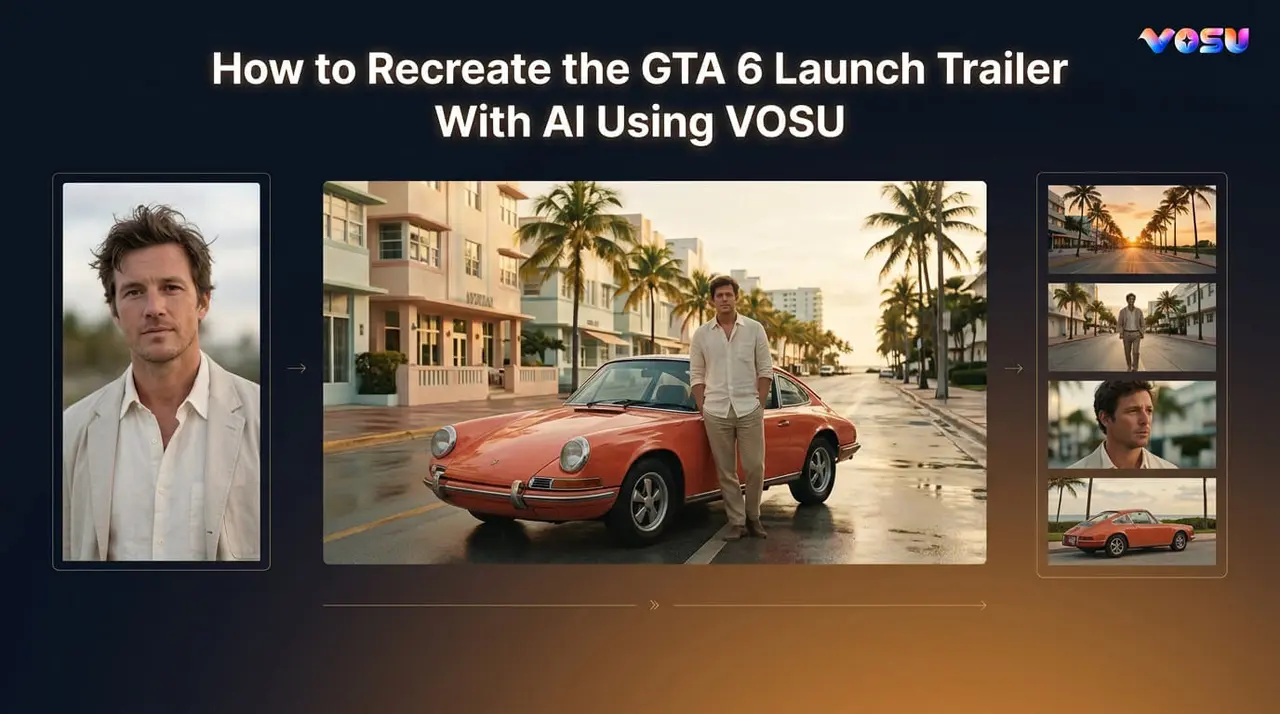
Recreate the visual rhythm of the GTA 6 launch trailer with AI by turning a clear portrait into a Vice City-style keyframe, animating several original frames shot by shot, and editing the clips into a short fan-made trailer. VOSU's GTA Vice City Style template handles the first image stage. It does not generate an entire trailer by itself.
Rockstar released the official Grand Theft Auto VI Launch Trailer on October 15, 2026. This tutorial does not reproduce Rockstar's footage, characters, logo, dialogue, or soundtrack. It uses original images and a fan-made workflow to study the neon coastal atmosphere, fast trailer pacing, low-angle vehicles, character introductions, and cinematic camera movement associated with the current trend.
The most reliable approach is not a single giant prompt. Build a short sequence from controlled shots. Start with one consistent character, create reusable keyframes, animate each shot separately, and review the complete edit for face drift, unstable vehicles, flicker, and misleading branding before publishing.
What Is the GTA 6 Launch Trailer AI Recreation Trend
The GTA 6 launch trailer AI recreation trend involves making original game-trailer scenes that borrow broad cinematic ideas from Vice City, such as sunset streets, palm-lined skylines, bright nightlife, fast vehicles, social-video inserts, and crime-drama tension. Some creators want a stylized portrait. Others want to place themselves inside a complete AI game trailer.
Those are different jobs. A portrait generator needs to preserve a face in one image. A GTA 6 AI fan trailer must maintain the same person, clothing, vehicle, color palette, and visual world across multiple moving shots.
Public creator discussions reveal the same practical questions repeatedly. People ask which tools were used, whether the creator generated the full trailer at once, how much manual editing was required, and why faces or vehicles changed between frames. Current launch-trailer discussions on Reddit also ask why the video arrived this early, why it appears soft, whether the scenes represent gameplay or cutscenes, and which music plays in the trailer.
| Query pattern found in public discussions | What the reader actually needs |
|---|---|
| “Can AI recreate the whole trailer?” | A realistic explanation of shot-by-shot production |
| “What AI model did you use?” | Model selection based on the type of shot |
| “Can I do it from one selfie?” | Clear reference-image requirements and limitations |
| “Why does the face or car keep changing?” | Consistency controls and troubleshooting |
| “Is this official, leaked, or AI-generated?” | Source verification and prominent disclosure |
| “Why does the launch trailer look blurry?” | A cautious explanation of compression and presentation |
Viewers also notice physical mistakes immediately. In one widely discussed AI-generated GTA trailer, comments focused on waves moving too far onto the beach, a bird appearing to walk in the air, a car leaving its expected path, and characters changing during motion.
That feedback points to the real challenge. Generating one attractive frame is relatively easy. Creating a sequence that remains believable from the opening shot to the final title card requires planning, references, iteration, and editing.
What Does the GTA Vice City Style Template Create
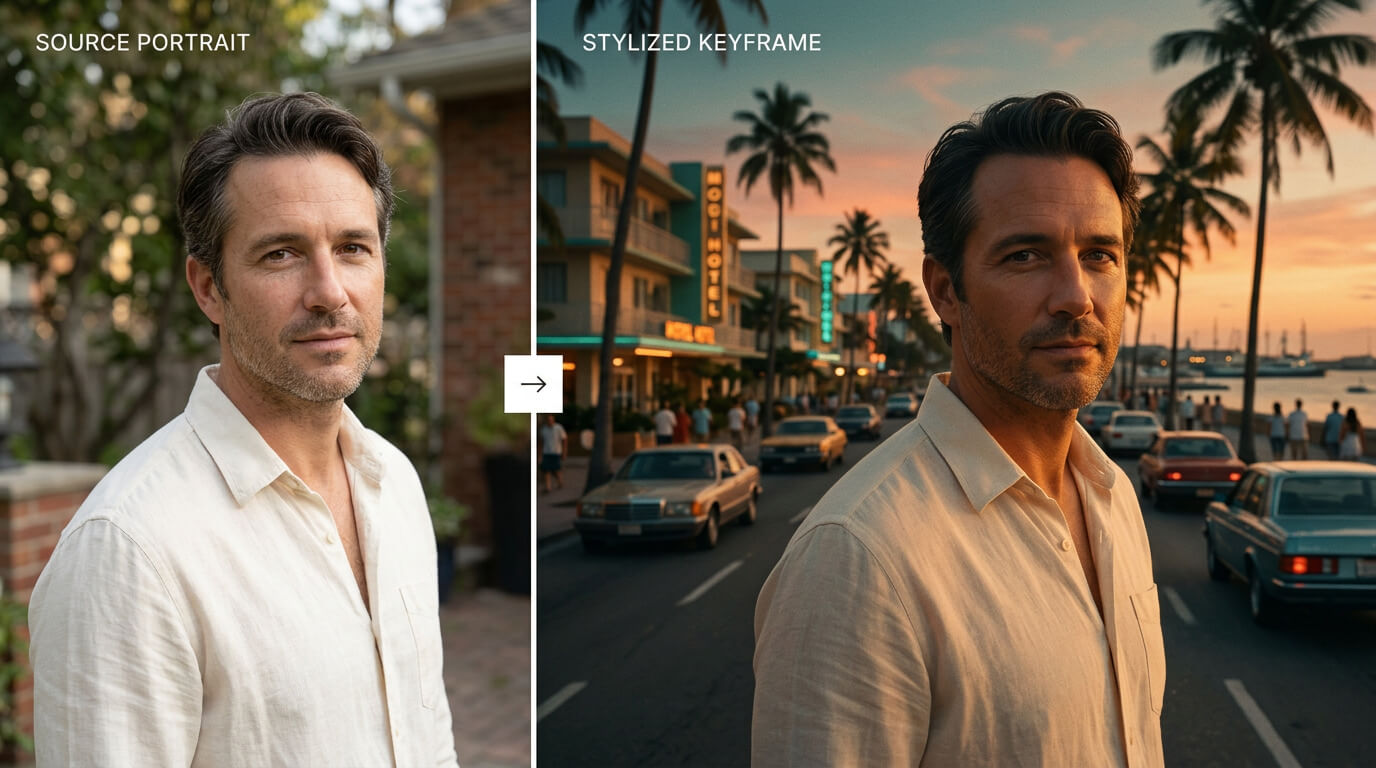
The template establishes the first visual identity anchor.
The GTA Vice City Style template in VOSU AI Labs transforms an uploaded image into a stylized Vice City loading-screen illustration. It is an image template, not a one-click GTA 6 launch trailer template.
The current template screen provides a single image-upload area, accepts an image up to 25 MB, and displays a generation estimate starting from 0.8 credits. Check the live interface before publishing because pricing, credit estimates, and input limits can change.
This distinction makes the template useful in a larger workflow:
| Stage | What it produces | Why it matters |
|---|---|---|
| GTA Vice City Style template | A stylized still image | Establishes the character and art direction |
| Additional keyframe creation | Several related scene images | Provides visual targets for individual shots |
| Image-to-video generation | Short animated clips | Adds controlled movement and camera action |
| Timeline editing | A complete fan-made trailer | Controls pace, audio, captions, and disclosure |
Someone searching for a GTA 6 launch trailer template may expect one upload to produce a complete multi-shot video. Other SERP results use “template” for editable timeline projects, prompt collections, or one-selfie video generators. The VOSU template shown here performs the first visual transformation. The remaining shots still need to be designed, animated, and assembled.
A search for a free GTA 6 AI trailer template can also create the wrong expectation. The VOSU screen reviewed for this article displayed a credit estimate rather than unlimited free generation. Check the live estimate before starting because availability and credit requirements can change.
How Do You Use the GTA Vice City Style Template on VOSU
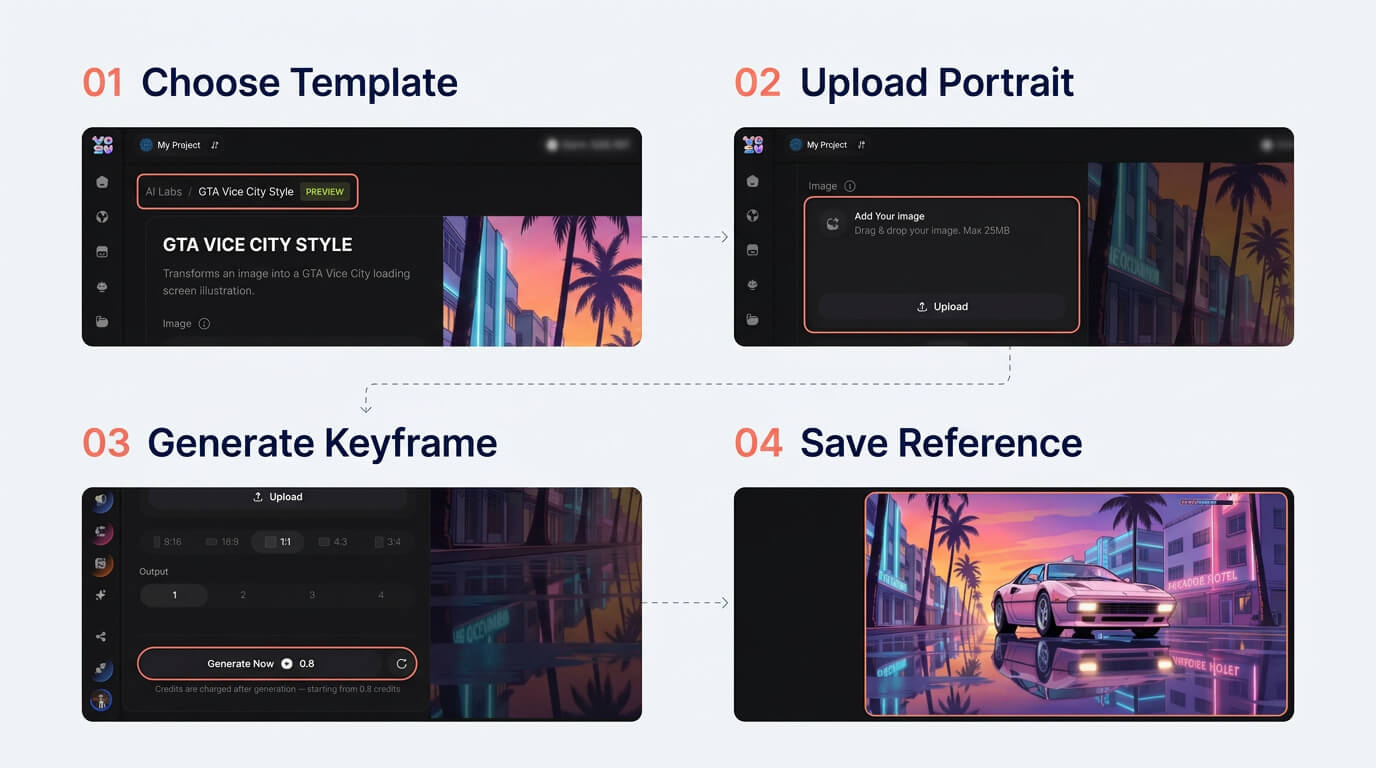
Create and approve the identity anchor before animating.
Open VOSU AI Labs, select Image Labs, and choose GTA Vice City Style. The template opens with an example preview and an image-upload field.
1 Choose one clear source image
Use a sharp image containing one main person. A front-facing or three-quarter portrait normally gives the transformation a clearer identity target than a distant group photo. Keep the face unobstructed and avoid strong blur, sunglasses, heavy filters, or hair covering important facial features.
If the final trailer will show the character from head to toe, prepare a separate full-body reference as well. A portrait can define a face, but it cannot reliably communicate trousers, footwear, height, or body proportions.
2 Upload the image
Select Add Your Image and upload the source file. The current interface states a maximum file size of 25 MB. Confirm that the preview contains the intended person and that the crop has not removed important facial or clothing details.
3 Generate the Vice City style keyframe
Select Generate Now after reviewing the displayed credit estimate. Treat the first result as a visual starting point rather than a finished asset.
Inspect five details:
· Does the face still resemble the source person?
· Is the outfit usable in later scenes?
· Are hands, glasses, jewelry, and hair structurally believable?
· Does the background leave enough room for camera movement?
· Can the image work as a landscape or vertical video frame after reframing?
4 Save the strongest result as the identity anchor
Choose the image with the clearest face and most reproducible outfit. This becomes the anchor for subsequent keyframes. Avoid selecting only on the basis of a dramatic background. A beautiful frame with an unstable identity will create more work in every later shot.
5 Create related scene keyframes
The loading-screen illustration is only one shot. Use the chosen identity and a fixed description to create additional original scenes such as a sunset arrival, a low-angle vehicle shot, a neon street close-up, and a wide skyline.
Keep the character description, hair, outfit colors, vehicle description, and time of day stable. Change one major production variable at a time. For example, change the location while keeping the character pose simple, then introduce more complex action during animation.
What Images Work Best for a GTA 6 AI Trailer
A clean image with one visible face is the strongest starting point for a personalized GTA 6-style AI trailer. Use multiple references when the trailer needs full-body shots or repeated wardrobe details.
| Reference asset | What it controls | Preparation rule |
|---|---|---|
| Close facial image | Eyes, nose, lips, jaw, hairline | Neutral light and minimal obstruction |
| Three-quarter portrait | Face shape and depth | Head turned partly to one side |
| Full-body image | Build, outfit, trousers, and shoes | Entire body visible with relaxed posture |
| Vehicle reference | Color, silhouette, and details | Use the same angle family as the planned shot |
| Environment reference | Architecture, light, and palette | Remove logos and protected game assets |
Do not combine multiple people in the same identity reference unless the tool explicitly asks for a group. The model may average facial features or assign clothing to the wrong person.
Give each uploaded reference one job. A face image should establish identity. A full-body image should establish clothing and proportions. A location image should control the world. This makes errors easier to diagnose than using one busy collage for everything.
How Should You Break the GTA 6 Launch Trailer Into AI Ready Shots
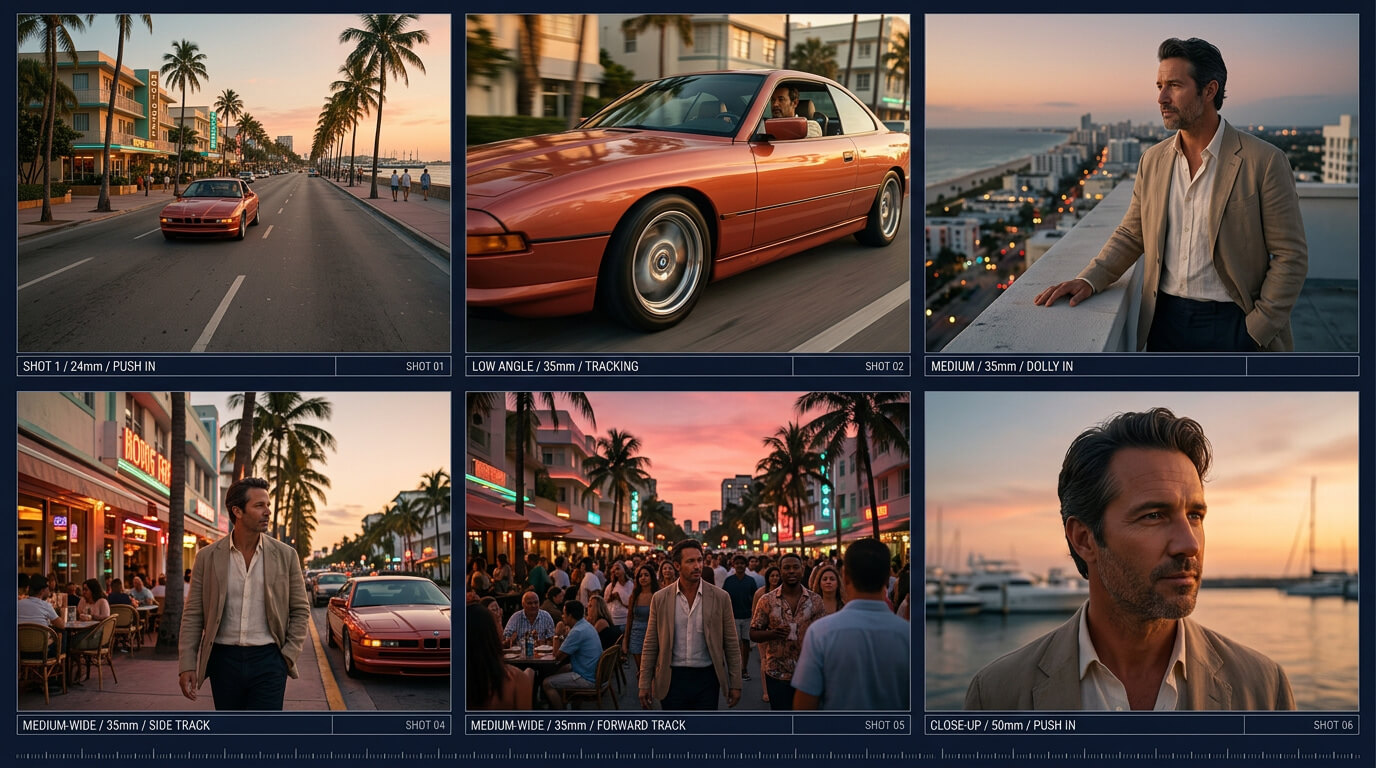
One shot, one action, and one camera movement.
Break the concept into clips lasting roughly two to five seconds, then give each clip one subject action and one camera instruction. Short shots are easier to regenerate, reorder, and replace than one long sequence containing several locations and character actions.
This approach matches how human recreators handle the same creative problem. YouTube creators have rebuilt GTA VI trailers shot by shot in Miami and documented the production work in a separate behind-the-scenes recreation. AI changes the tools, but it does not remove the need to plan individual beats, locations, camera angles, and transitions.
Use an original shot plan instead of tracing the official trailer frame for frame:
| Shot | Length | Visual beat | Subject action | Camera direction |
|---|---|---|---|---|
| 01 | 3 sec | Coastal city at sunset | No main character | Slow aerial push forward |
| 02 | 3 sec | Main character introduction | Looks toward passing traffic | Restrained dolly-in |
| 03 | 2 sec | Sports car insert | Drives through wet street | Low side tracking shot |
| 04 | 3 sec | Social-video moment | Friend records from sidewalk | Handheld vertical framing |
| 05 | 4 sec | Police pursuit | Vehicle takes one controlled turn | Rear chase camera |
| 06 | 3 sec | Final hero frame | Character exits vehicle | Slow push-in, then hold |
This six-shot plan is long enough to feel like a trailer but short enough for a useful first test. Add more shots only after the character, world, and motion remain consistent in the short version.
Which GTA 6 Inspired Scenes Should You Recreate
Choose scene types that communicate the coastal crime-game atmosphere without copying an official frame. Strong options include a palm-lined road at dusk, an invented neon entertainment district, an unbranded sports car, a motel exterior, a crowded boardwalk, a helicopter crossing the skyline, and a tense character close-up.
The best scene mix changes scale:
· Begin with a wide establishing view
· Move to a recognizable character shot
· Insert a fast vehicle or action beat
· Add a close detail or social-camera moment
· End on a controlled hero image and original title card
Avoid placing the character in every shot. An environment-only opening gives viewers a sense of place and reduces the number of clips in which facial consistency can fail. It also gives the edit room to establish color, weather, and lighting before introducing the main subject.
Use invented business names, fictional signs, and original character details. The result should communicate a neon coastal crime-game genre rather than claim to be official GTA 6 footage.
Which AI Video Method Should You Use for Each Shot
An image-to-video workflow is the most practical method for character-led shots because the generated keyframe supplies the identity, wardrobe, composition, and starting environment. Text-to-video is more flexible for wide scenes without a recurring person. Video-to-video is appropriate only when you own or have permission to use the source motion.
| Shot requirement | Recommended route | Main advantage | Main risk |
|---|---|---|---|
| Character close-up | Image-to-video | Starts from a controlled face | Face can drift during a large turn |
| Vehicle insert | Image-to-video | Locks the vehicle design | Wheels and road contact may deform |
| Empty skyline | Text-to-video | Allows broad visual exploration | May not match the established world |
| Original recorded movement | Video-to-video | Retains timing and motion | Source rights and identity must be clear |
| Multi-shot sequence | Separate generations plus editing | Maximum control per shot | Requires more assembly work |
Choose the model after defining the shot. Do not select one model first and force it to handle every scene. A portrait shot, crowd shot, aerial view, and high-speed chase impose different motion and consistency demands.
What AI Prompt Can Create a GTA 6 Style Trailer Shot
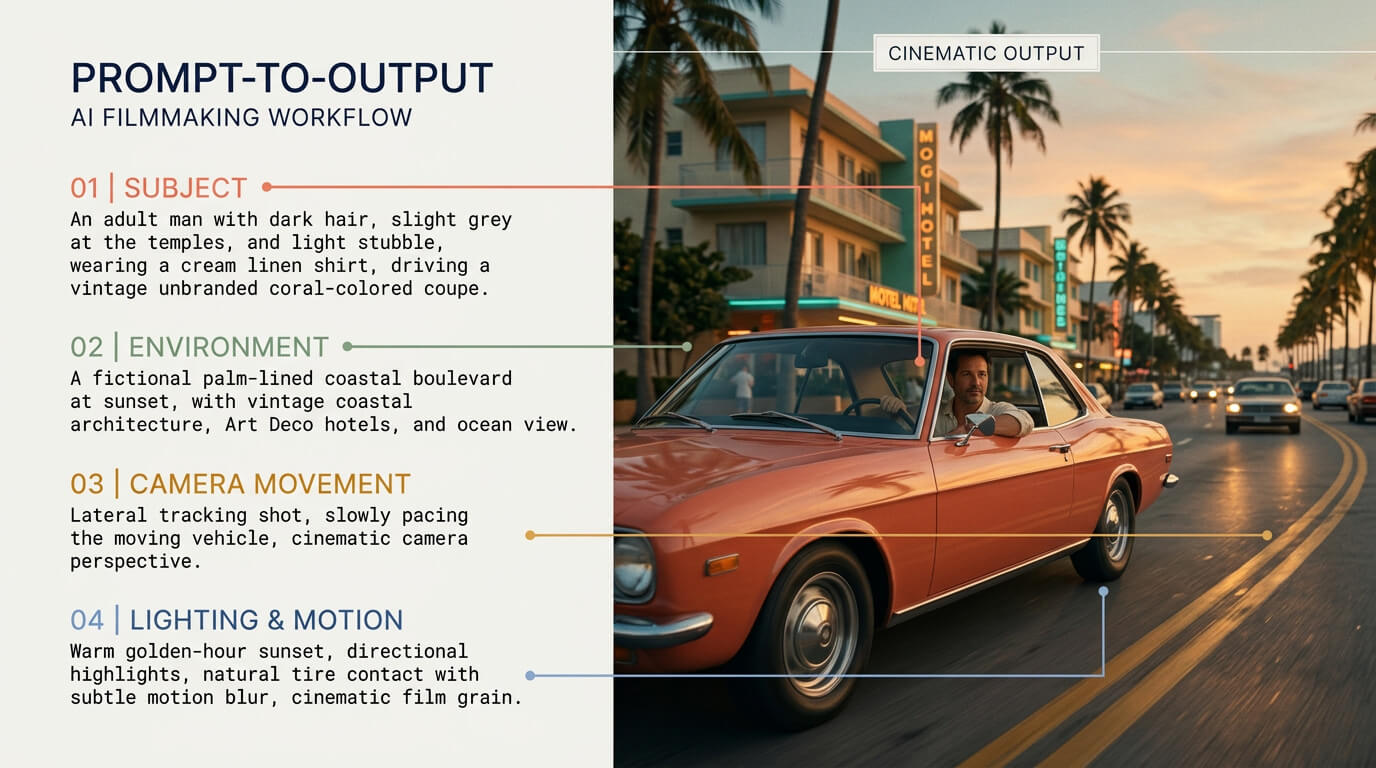
Define the subject, camera, environment, and motion separately.
An effective GTA 6 trailer AI prompt describes one shot in production order: subject, action, environment, camera, lighting, motion, visual treatment, continuity constraints, and unwanted behavior.
Use this original image-to-video prompt as a starting point:
Animate the uploaded original keyframe as a cinematic shot from a fictional open-world crime game set in a neon coastal city. The same main character stands beside an unbranded coral-pink sports coupe on a wet boulevard at blue hour. Preserve the character's exact face, hairstyle, body proportions, white sleeveless top, pale trousers, and silver sunglasses from the reference image. The character closes the car door and looks toward distant police lights. Use a slow low-angle dolly from left to right with restrained background parallax. Palm trees and neon storefront reflections move naturally in the wet road. Maintain realistic body balance, grounded feet, stable vehicle geometry, coherent reflections, natural skin texture, and consistent clothing. No logos, game title, celebrity likeness, extra limbs, morphing face, floating objects, sliding tires, unreadable foreground text, or sudden camera spin.
If the result is unstable, reduce the prompt rather than adding more adjectives. Keep the identity and action. Remove secondary background events, competing camera moves, and unnecessary style phrases.
A prompt is not proof of output quality. Show the prompt beside the frame it produced, then document what changed between the first and corrected generation. That comparison contributes more original value than publishing a large list of untested prompts.
How Do You Keep the Character and Vehicle Consistent
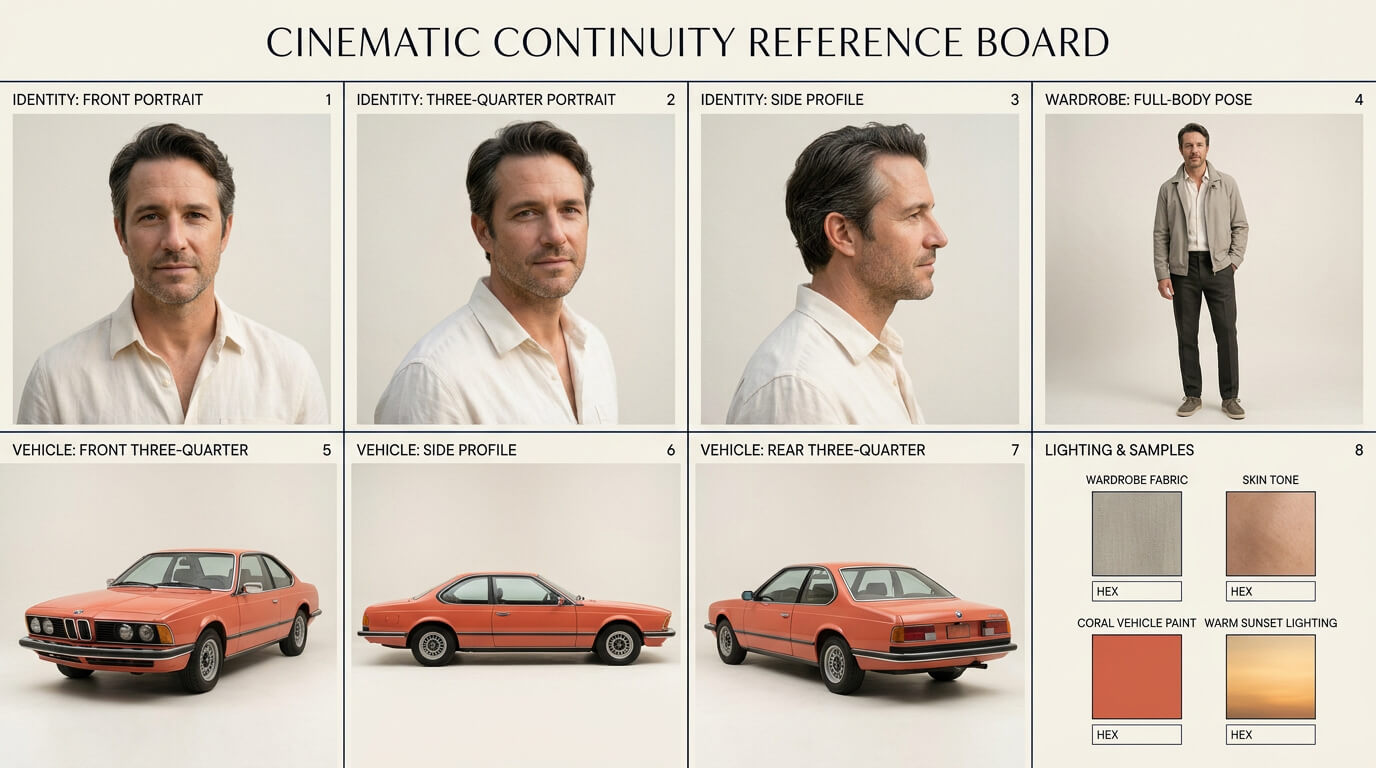
Lock visual references before producing additional shots.
Character and vehicle consistency comes from repeating controlled information, not from asking the model to “keep everything consistent.” Reuse the same identity image, clothing description, vehicle description, lighting period, and color palette across related shots.
Create a short continuity sheet before generating:
| Element | Locked description |
|---|---|
| Character | Same face, shoulder-length blond hair, silver sunglasses |
| Wardrobe | White patterned sleeveless top, pale trousers, silver jewelry |
| Vehicle | Unbranded coral-pink two-door sports coupe |
| World | Fictional neon coastal city with art-deco architecture |
| Time | Blue hour after a warm sunset |
| Texture | Stylized realism with visible skin and material detail |
Generate a new keyframe when the location or camera angle changes significantly. Asking one still image to support a full facial close-up, rear driving view, and wide aerial scene forces the model to invent too much hidden information.
Review consecutive clips side by side. A face may look acceptable in isolation but noticeably change when the edit cuts directly between two angles.
How Do You Generate Driving Chase and Crowd Scenes
Driving and chase scenes need explicit direction, grounded contact, and limited simultaneous action. Define where the vehicle begins, where it travels, and how the camera follows it. Avoid prompts that ask for several cars to collide, pedestrians to scatter, a helicopter to descend, and the camera to orbit within the same short clip.
For a controlled driving shot, use a prompt such as:
The same coral-pink sports coupe drives forward in the right lane, follows the road through one gentle left turn, and remains in contact with the wet asphalt. The camera tracks parallel from a low side angle at matching speed. Wheels rotate naturally, the body remains rigid, reflections travel across the panels, and background lights create restrained motion blur. No sideways sliding, changing vehicle design, floating tires, collision, sudden lane change, or camera orbit.
Crowds create a different problem. The more faces visible in the foreground, the more opportunities the model has to produce unstable identities. Keep important characters close and distinct. Let secondary figures remain farther from the camera, partially turned, or visible for a shorter time.
Community reactions to AI trailer attempts show that viewers quickly notice vehicles leaving the road, subjects passing through objects, impossible water motion, and faces changing during action. Use those observations as a quality-control checklist, not as proof that every model behaves the same way.
How Do You Add Original Music Dialogue and Sound Effects
Build a new audio track rather than copying the official launch-trailer song or dialogue. A short trailer can work with an original instrumental cue, one or two lines of original dialogue, environmental ambience, and a few synchronized effects.
For readers asking what song appears in the official GTA 6 launch trailer, Rockstar identifies it as “Flower in a Hurricane” from original score composers Justice featuring Tame Impala, SZA, and King Gizzard & The Lizard Wizard. That fact helps explain the current search interest, but it does not grant permission to reuse the recording in a fan trailer.
Plan the audio before the final edit:
| Time | Audio cue | Visual purpose |
|---|---|---|
| 0:00–0:03 | Coastal ambience and distant traffic | Establish the city |
| 0:03–0:06 | Low musical pulse | Introduce the main character |
| 0:06–0:08 | Engine rise | Prepare the action cut |
| 0:08–0:12 | Original beat enters | Support vehicle montage |
| 0:12–0:15 | Siren and music drop | Create pursuit tension |
| 0:15–0:18 | Final impact and tail | Land on the title card |
Keep effects subordinate to dialogue and avoid continuous maximum loudness. A brief drop in the music before the final image can create more impact than adding another visual effect.
What Settings Work for a GTA 6 AI Trailer
Use the aspect ratio required by the publishing platform, then keep it consistent across all generated clips. A 16:9 landscape project is suitable for a YouTube-style launch trailer. A 9:16 version should be treated as a separate social edit, not created by carelessly cropping faces and vehicles from the landscape master.
The exact model settings must be recorded during the VOSU test because available controls differ by model. Capture these fields for the article:
· Selected image-to-video model
· Resolution
· Clip duration
· Aspect ratio
· Seed or reference-strength setting, when available
· Camera or motion control
· Audio option, when available
· Number of variations generated
· Displayed credit estimate
Generate one short draft before rendering the full set. The first test should answer whether the face survives motion, the vehicle remains grounded, and the style holds across the chosen duration.
What Common GTA 6 AI Trailer Problems Should You Fix
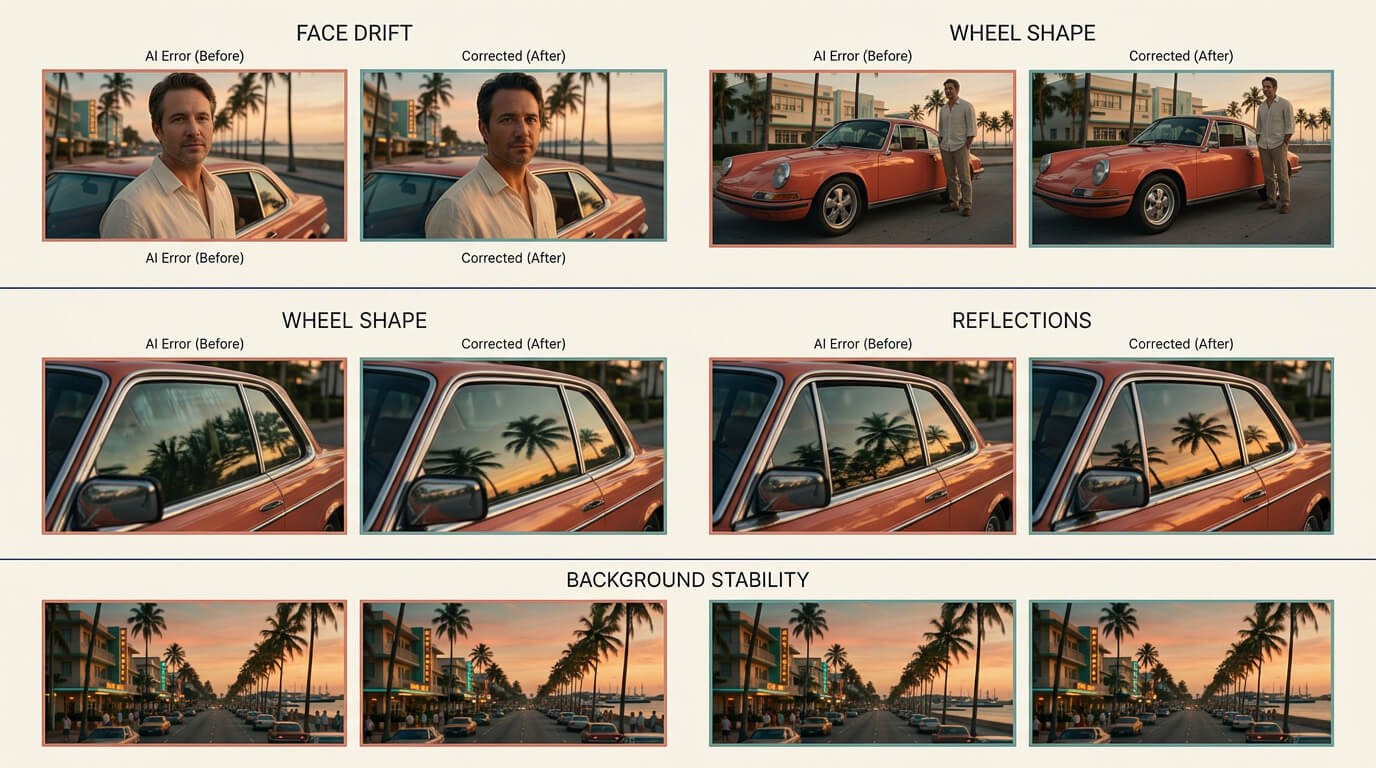
Review identity, geometry, reflections, and background stability.
The most common GTA 6 AI trailer problems are identity drift, unstable movement, inconsistent world design, unreadable text, and too much action inside one generation.
| Problem | Likely cause | Practical correction |
|---|---|---|
| Face changes during a turn | Large rotation with a weak reference | Reduce the turn and add another angle reference |
| Vehicle slides sideways | Direction and camera path are unclear | Define the lane, path, turn, and tracking direction |
| Outfit changes between clips | Wardrobe description varies | Copy the same locked wardrobe line into each prompt |
| Background flickers | Too much local detail in motion | Shorten the clip or simplify the camera move |
| Text becomes distorted | Generative video is redrawing lettering | Add titles and captions during editing |
| Prompt is refused | Protected names or ambiguous risky instructions | Use original fictional entities and plain production language |
| Shots feel unrelated | Color, lens, or time of day changes | Reuse a small visual bible across every keyframe |
| Output looks generically “AI” | Prompt relies on style adjectives | Add specific action, camera, environment, and continuity constraints |
Do not hide failed generations from the tutorial. An annotated failure frame followed by the corrected prompt provides first-hand information that another creator can actually use.
How Was This GTA 6 AI Trailer Workflow Evaluated
This workflow was evaluated through a live VOSU interface review, official Rockstar information, public search results, creator case studies, and community discussions. The GTA Vice City Style template was checked on October 16, 2026. The visible interface supplied the template name, image-only behavior, 25 MB upload limit, and displayed credit estimate used in this article.
The workflow also incorporates public creator evidence. A Tom's Guide experiment generated roughly 20 clips and retained nine for a 45-second trailer, with unusable examples including a character merging with a vehicle and a motorbike moving incorrectly. That is one creator's historical result, not a benchmark for current VOSU models, but it exposes why variation generation and rejection are part of the process.
Reddit, YouTube, X, and public forum discussions were used to identify questions, objections, and visible failure patterns. They were not used to establish official GTA 6 facts or guaranteed model performance. Quora pages blocked automated access, and private Facebook group posts were not treated as evidence.
What Should You Check Before Publishing a GTA 6 AI Fan Trailer
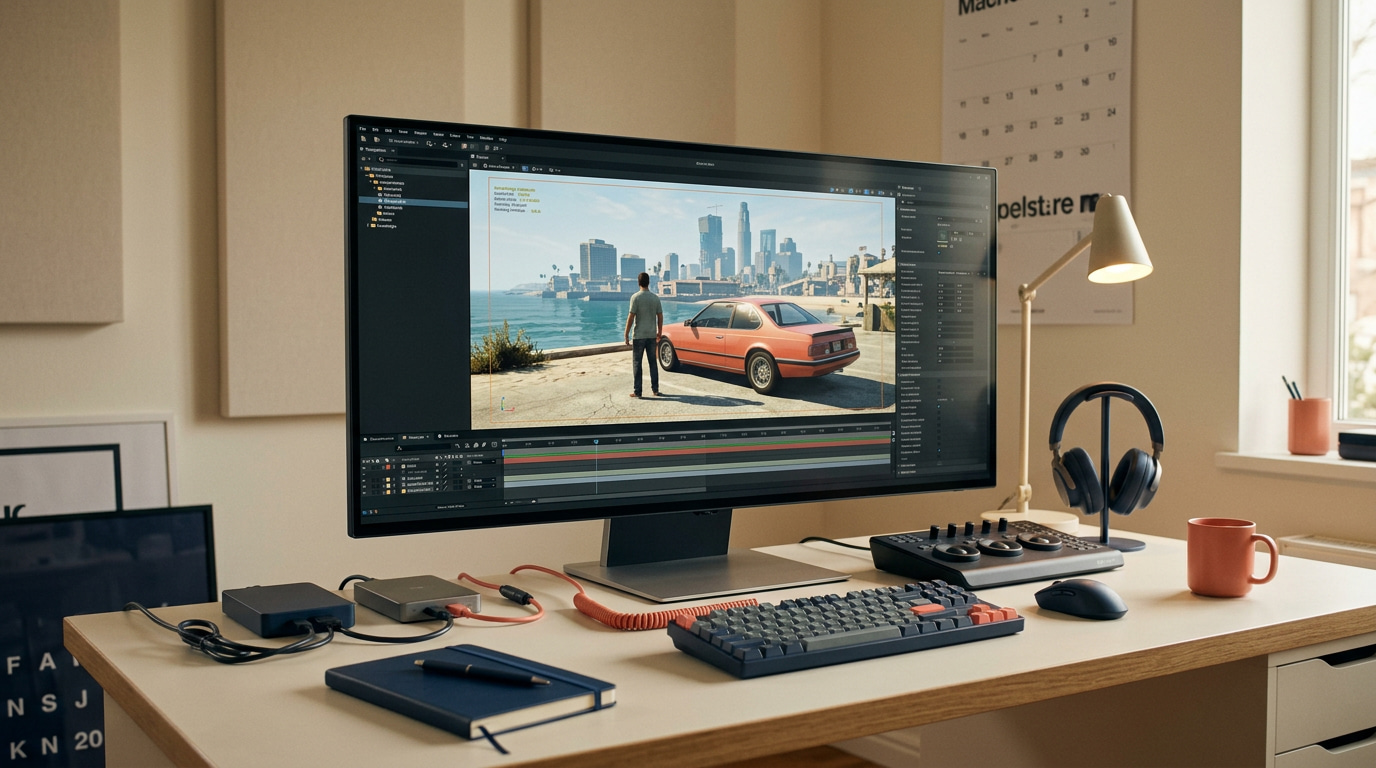
Confirm originality, disclosure, audio rights, and continuity.
Check ownership, disclosure, source clarity, platform rules, and visual continuity before publishing a GTA 6 AI fan trailer.
Label it clearly, verify every asset, and review the full sequence before publishing:
- Official-status clarity: Do not present the video as a leak, an official Rockstar upload, or authentic unreleased gameplay.
- Fan-made label: Add a clear label such as “Fan-made AI concept created with original assets” to the title or opening frame.
- AI disclosure: Repeat the fan-made and AI-generated disclosure in the video description.
- Asset ownership: Use original or properly licensed visuals, characters, music, voices, and other production assets.
- Brand protection: Avoid official logos, copied title cards, official soundtrack audio, leaked materials, and thumbnails designed to imitate Rockstar’s channel.
- Platform rules: Review the current policies of each platform, forum, community, or social media group before sharing the video.
- Community acceptance: Remember that disclosure does not guarantee acceptance because some communities restrict AI-generated, altered, or potentially misleading content.
- Full-sequence review: Watch the complete video from beginning to end instead of approving individual clips separately.
- Visual continuity: Check character faces during turns, hands near objects, wheel contact, reflections, clothing, and background consistency.
- Final production check: Confirm title spelling, audio rights, source clarity, export quality, and the final disclosure.
- Publishing decision: Export and publish only after the complete sequence looks consistent and can be clearly identified as an original fan-made AI concept.
How Should You Label a GTA 6 AI Trailer as Fan Made
Use direct language in three visible places: the video title, the opening or closing card, and the post description. “Fan-made AI concept” is clearer than a vague hashtag. Do not use “official,” “leaked gameplay,” or “new Rockstar trailer.” If the video contains a real person's likeness, state that the scene is synthetic and does not show a real performance or endorsement.
Disclosure becomes more important when a real person's face is transferred onto a recorded performance. VOSU Character Swap separates identity from motion, while the Drake Burning Bridges character swap guide shows how a portrait and preset movement work together. Use only original or permitted source media, and describe the result as a synthetic fan concept rather than a real performance or endorsement.
Can You Use Official GTA 6 Footage Logos or Music
Using official footage, logos, game characters, or soundtrack audio may create copyright, trademark, platform-policy, or licensing issues. This tutorial is safer when it uses original people, invented locations, unbranded vehicles, original music, and a distinct title card. If a commercial campaign depends on protected material, obtain qualified rights advice rather than assuming a fan-made label provides permission.
Build replacement assets instead. The VOSU music generator can create an original cue around the intended mood and output format. For vehicle edits, the 24 Car transition workflow shows how an original or licensed source clip, a car reference, and one controlled reveal can support a transformation without reusing GTA footage, logos, or soundtrack audio.
How Can You Tell an Official GTA 6 Trailer From an AI Fan Trailer
Check the publishing source before inspecting visual artifacts. An official trailer should be traceable to Rockstar Games, its verified channels, or an official announcement page. A fan trailer may contain disclosure language, unfamiliar branding, inconsistent faces, unstable objects, or invented scenes. Visual quality alone is not reliable because both official rendering and generative video can appear highly polished.
Do not use face drift as conclusive proof either. Identity stability is a production variable, and VOSU's consistent character guide explains how reference images, repeatable descriptions, and controlled prompts can reduce those changes. Source attribution remains the stronger test because a carefully generated fan trailer may avoid many visual artifacts commonly associated with AI.
Does the GTA 6 Launch Trailer Show Gameplay or Cutscenes
Use Rockstar's own wording when describing the official launch trailer. Do not turn community interpretation into a confirmed production detail. Viewers may debate whether individual moments represent gameplay, real-time cinematics, or edited scenes, but that discussion does not change the tutorial workflow. Your AI recreation should be labeled as a cinematic fan concept rather than gameplay footage.
When rebuilding a comparable cinematic beat, describe it as a generated shot. The Kling 3.0 Motion Control guide is relevant when an original or licensed reference clip supplies timing and body motion while a separate image supplies identity. That workflow can create a controlled fan sequence, but it does not turn the result into captured GTA 6 gameplay or an official cutscene.
Why Does the GTA 6 Launch Trailer Look Soft or Blurry
Apparent softness can come from streaming compression, playback resolution, motion blur, scaling, post-processing, or the viewer's display. Check the highest-quality official upload before drawing a conclusion and compare playback on another device. Do not treat softness as evidence that a shot is AI-generated. Source verification is more reliable than trying to identify AI from one compressed frame.
If softness appears in your own generated clip, correct the source problem before polishing it. VOSU Video Upscale can improve resolution, detail, noise, and motion smoothness after the motion is stable, but it cannot repair a changing face, broken wheel contact, or impossible movement. Export improvement and source verification remain separate tasks.
Can You Recreate the Full Trailer From One Prompt or One Selfie
One selfie can establish a main character, but it cannot reliably define every body angle, outfit detail, vehicle, location, and movement required by a multi-shot trailer. A single prompt may produce a short concept clip. For a controlled sequence, use a face reference, a full-body reference, several original keyframes, short video generations, and a manual edit.
Use an image-to-video workflow for controlled character shots, then animate each keyframe separately. When two identities must remain distinct, the Hotel Lobby character swap workflow explains separate left-and-right character references, while the Alors on Danse two-photo workflow demonstrates assigned roles inside one moving scene. Those references solve different continuity problems that a single selfie cannot cover.
What Is the Easiest Way to Recreate the GTA 6 Launch Trailer With AI
The easiest workflow is to create one strong character image with VOSU's GTA Vice City Style template, build five or six related keyframes, animate each shot separately, and assemble the clips with original audio. Keep the first version under 20 seconds. A shorter original trailer gives you enough material to test identity, motion, pacing, and disclosure without multiplying the same errors across a long edit.
Draft one action and one camera move per shot with PromptGPT's cinematic camera library, then use VOSU's AI video prompt guide to keep subject, action, camera, lighting, and continuity instructions in a repeatable order. For keyframe animation, Seedance 2.5 on VOSU provides reference inputs, start and end frames, aspect-ratio, duration, resolution, bitrate, and optional audio controls.