Sora 2 Pro represents OpenAI’s premium AI video generation system designed for professional, high fidelity video creation with synchronized sound and cinematic control. It works by interpreting detailed text prompts, reference images or storyboards to plan multi shot scenes across space and time. Sora 2 Pro uses a multimodal diffusion transformer architecture that maintains object permanence, realistic motion, lighting accuracy and narrative continuity.
Sora 2 Pro offers native synchronized audio, high resolution output, improved realism, precise cinematic control, multimodal inputs, strong prompt adherence and extended clip durations of up to 15 to 25 seconds. It allows AI filmmaking, marketing campaigns, storyboarding, education, social media content, cameos and concept visualization across creative and commercial contexts.
Sora 2 Pro has limitations like short maximum duration, continuity drift in complex scenes, occasional physics inaccuracies, imperfect text or hand rendering and slower generation at high resolutions. It costs $200 per month via a ChatGPT Pro subscription, with API pricing around $0.30 to $0.50 per second, while VosuAI offers $10.00 per month for the basic plan. Sora 2 Pro is accessed through official OpenAI invitations, third party platforms like VosuAI and limited experimental programs. It is used by selecting the model, adding references, entering prompts, choosing settings, generating videos and reviewing outputs.
What is Sora 2 Pro?
Sora 2 Pro is OpenAI's most advanced AI video generation model that produces short, high fidelity videos with synchronized visuals and sound for professional use cases like marketing and filmmaking. It was developed by OpenAI as a premium tier version of the Sora 2 system, intended to offer higher quality and more control than the base Sora 2 experience.
Sora 2 Pro was introduced with Sora 2 on September 30, 2025, when OpenAI announced advanced video creation with integrated audio, accessible to ChatGPT Pro users and other paying customers. It builds on earlier models such as Sora and Sora 2, which established core text to video generation and then extended it with richer motion, detail, and sound.
How does Sora 2 Pro work?
Sora 2 Pro works by transforming user instructions into clear, multi shot videos through a large scale generative video model that plans scenes across space and time. It interprets detailed text prompts, storyboard style descriptions and reference images or clips to understand characters, environments, and actions. Sora 2 Pro supports text to video generation and image to video expansion that animates static frames while preserving composition, continuity and realistic details like lighting, physics or camera motion.
Sora 2 Pro uses a multimodal diffusion transformer (MM-DiT) architecture that represents footage as spatiotemporal latent patches. It utilizes this structure using a reasoning mode to maintain object permanence, causal consistency and narrative flow over long video durations.
What are the key features of Sora 2 Pro?
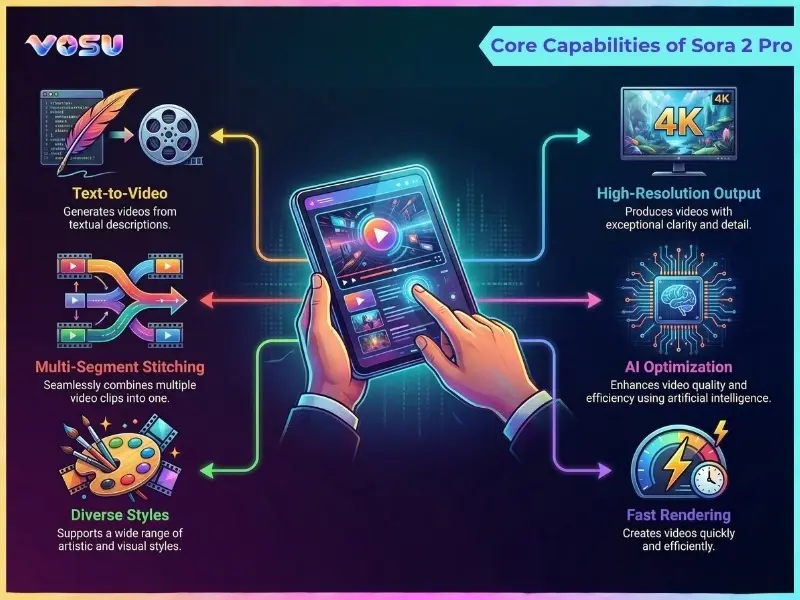
The key features of Sora 2 Pro are synchronized audio, high-resolution output, improved realism, cinematic control, multimodal inputs and prompt adherence. These capabilities allow visually consistent, physics aware, well directed video generation with accurate audio sync and longer, consistent clips for professional storytelling.
The key features of Sora 2 Pro are given below.
- Native synchronized audio: Sora 2 Pro generates realistic dialogue, environmental soundscapes and context aware music with precise lip sync and ambient depth for cinematic quality results.
- High resolution output: Sora 2 Pro delivers smooth, detailed visuals with output up to 1080p that maintains clarity and motion stability across complex scenes.
- Improved realism and physics: Sora 2 Pro uses a physics engine and dynamic balance algorithm to achieve natural body motion, weight distribution and object interaction.
- Precise cinematic control: Sora 2 Pro provides frame level camera movements, refined lighting transitions and scene composition tools for advanced creative direction.
- Multimodal inputs: Sora 2 Pro accepts text prompts or reference images for seamless visual storytelling and fine grained content generation.
- Improved prompt adherence: Sora 2 Pro confirms that generated scenes follow creative instructions with refined contextual alignment and visual consistency.
- Extended duration: Sora 2 Pro supports video generation up to 15 to 25 seconds, which allows longer, unified clips with adaptive scene continuity.
The image below shows the core capabilities of Sora 2 Pro.
What are the use cases of Sora 2 Pro?
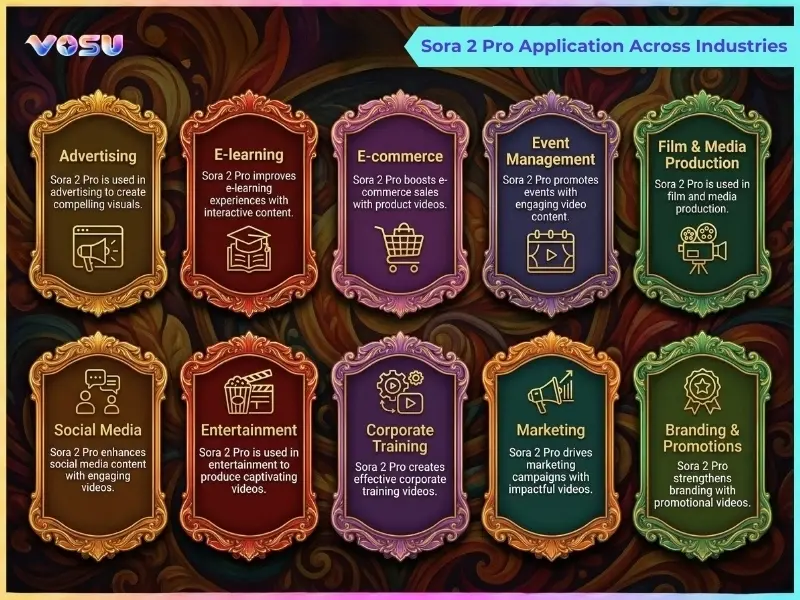
The use cases of Sora 2 Pro are AI films, marketing, storyboarding, education, social content and concept visualization. It helps cinematic prototyping, brand campaigns, pre-visualization, training simulations, rapid social storytelling, and idea to motion visuals across creative and commercial workflows
The applications of Sora 2 Pro are outlined below.
- AI films and documentaries: Sora 2 Pro allows advanced filmmaking with complex scene continuity that helps creators to prototype long stories, blend live action or virtual scenes and produce realistic dialogue without full scale sets.
- Marketing videos and advertisements: Sora 2 Pro supports commercial production and high-end marketing that lets brands generate localized campaigns, product introductions and variants customized to different audiences, channels and seasonal promotions.
- Storyboarding and pre-visualization: Sora 2 Pro helps directors and teams test camera angles, blocking, lighting and motion before shoots that reduce risk, miscommunication and reshoots across film, TV or game cinematics pipelines.
- Training and educational videos: Sora 2 Pro allows educators to visualize abstract ideas, simulations and role play scenarios that improve clarity, engagement and retention for corporate training, online courses or classroom materials.
- Social media content creation: Sora 2 Pro streamlines short clips for platforms like TikTok and Instagram that give creators fast iteration on trends, skits, promos and episodic micro stories with consistent characters and styles.
- User generated content (UGC) and cameos: Sora 2 Pro lets fans, influencers and communities insert stylized avatars, branded mascots or self cameos into scenes that increase participation, co-creation and fan driven storytelling for campaigns.
- Concept visualization: Sora 2 Pro helps artists, designers and innovators turn rough ideas into moving visual sequences, which clarify mood, environment and interactions for pitches, prototypes or internal stakeholder reviews.
Users can create films, marketing videos, storyboards, training content, social media clips, UGC and concept visualizations through VosuAI with integrated Sora 2 Pro access for streamlined workflows.
The image below shows the applications of Sora 2 Pro across industries.
What are the limitations of Sora 2 Pro?
The limitations of Sora 2 Pro are video duration, continuity drift, physics errors, text or hand accuracy and generation time. These constraints affect long form storytelling, visual consistency, realism in complex scenes, text heavy outputs and rapid high resolution iteration workflows.
The limitations of Sora 2 Pro are outlined below.
- Video duration: Sora 2 Pro is constrained to a maximum duration of around 25 seconds, which makes it less suitable for unbroken long form content and requires stitching or editing for extended narratives.
- Long scene continuity: Sora 2 Pro struggles to maintain perfect character appearance and background continuity over complex sequences that introduce drift in outfits, props or environmental details across shots.
- Physical inaccuracies: Sora 2 Pro sometimes produces objects floating unnaturally, incorrect lighting changes or implausible interactions in complex physics scenarios, crowds or fast moving, multi object scenes.
- Text and hand accuracy: Sora 2 Pro renders distorted or unclear embedded text and imperfect hands or fine finger poses, which limit its reliability for UI demos or text heavy scenes.
- Generation time: Sora 2 Pro requires substantial generation time and computing at higher resolutions or with multiple variants, which slows rapid experimentation and iteration cycles.
How much does Sora 2 Pro cost?
Sora 2 Pro costs $200 per month as an official OpenAI subscription through ChatGpt Pro, which includes full access, 10,000 monthly credits and supports up to 1080p videos. Sora 2 Pro offers an API, with usage based pricing around $0.30 per second for standard HD 720p and $0.50 per second for full HD 1080p. Third party providers like VosuAI offer savings of up to 60% compared to official rates
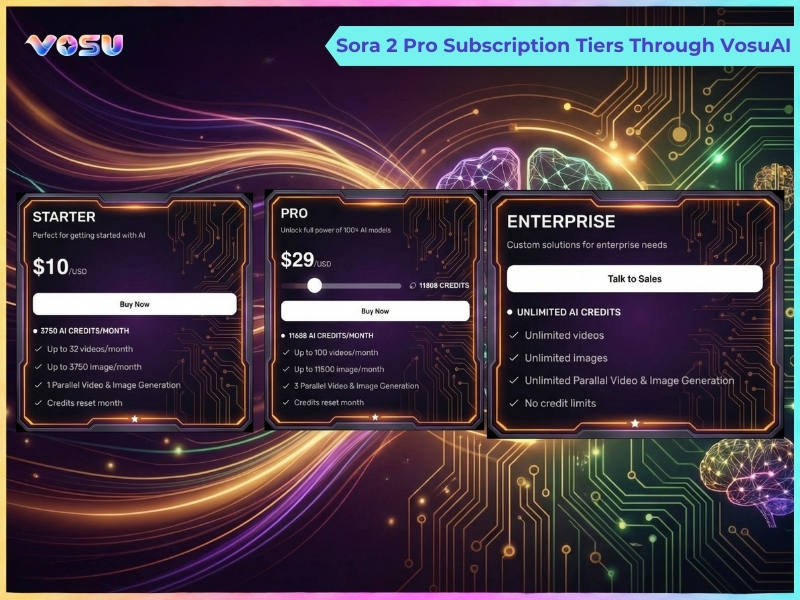
Users can access Sora 2 Pro through VosuAI, which integrates over 100 video generation models like Sora 2, Kling AI and Veo 3.1. VosuAI costs around $10.00 per month for 3,750 credits, $29.00 per month for 11,608 credits and $99.00 per month for 39,929 credits. It offers custom or enterprise pricing for studios that need higher volumes or more parallel renders.
The image below shows the subscription tiers available through VosuAI.
How to get Sora 2 Pro access?
To get Sora 2 Pro access, users can request an official invite from OpenAI with a ChatGPT Pro subscription, use third party paid platforms like VosuAI or join experimental programs offering limited time trial access.
3 ways to get access to Sora 2 Pro are given below.
- Official (invite only): Requires an invite from OpenAI plus an active ChatGPT Pro subscription, with regional eligibility and limited rollout controlling when Sora 2 Pro access becomes available.
- Third-party platforms (paid access): Use providers like VosuAI that offer integrated access via credits or subscriptions, without needing a direct Sora 2 Pro invite code.
- Experimental or alternative access: Relies on limited time trials, promotional offers, waitlist experiments or partner programs that grant temporary Sora 2 Pro access for testing and feedback.
How to use Sora 2 Pro?
To use Sora 2 Pro, access VosuAI, select model, upload references, enter prompts, enable enhancers, choose length, ratio and resolution, then generate and review. These steps guide creators through setup, customization, rendering and final video output efficiently.
11 steps to use Sora 2 Pro via VosuAI are given below.
- Go to VosuAI: Open the VosuAI platform in your browser, log in to your account and confirm your plan includes Sora 2 Pro before starting a new project.
- Select the model: Select the video generation model like text to video or image to video. Choose the Sora 2 Pro from the available AI video generators to unlock advanced quality, physics and control options.
- Upload an image: Add a reference image or storyboard frame to guide motion, framing and style that improve character consistency and scene composition in the generated clip.
- Enter a prompt: Describe the scene clearly, including subject, environment, movement, mood and any camera notes so Sora 2 Pro can interpret your intent and match the desired outcome.
- Enable/disable prompt enhancer: Toggle Vosu’s enhancer or similar GPT-based refinement to automatically expand, clarify or structure your text prompt for better detail, while retaining manual control if disabled.
- Use PromptGPT ideas: Explore built-in prompt suggestions or templates (like PromptGPT-style ideas) to discover cinematic setups, then adapt wording to fit your story, brand or channel style.
- Choose video length: Set duration within Sora 2 Pro’s supported range, aligning clip length with platform needs such as TikTok hooks, YouTube intros, trailers or looping background segments.
- Choose aspect ratio: Pick the aspect ratio that matches your target platform, such as vertical for shorts and reels or widescreen for cinematic content and traditional YouTube uploads.
- Select resolution: Configure output resolution such as 1080p to balance quality, render time and storage for commercial or client facing work.
- Generate video: Click the generate button to submit your job, then wait while VosuAI forwards settings to Sora 2 Pro and processes the render in the background.
- Review and download: Watch the result, check motion, physics and framing, regenerate if needed, then download the final video file for editing, publishing or sharing across your preferred platforms.
How to prompt Sora 2 Pro for better results?
5 Steps to prompt Sora 2 Pro for better results are given below.
- Be specific: Describe subject, setting, movement and timing clearly, which avoids vague words so the model produces concrete, readable actions instead of generic visuals.
- Use cinematography: Specify camera angles, shot size and motion like a director that guides framing, focus and paces for more intentional, cinematic compositions.
- Describe physics: Mention plausible actions, weight and forces so motion, collisions and character behavior feel grounded, physically consistent, and believable across the entire shot.
- Add style and mood: Define visual style, time of day, lighting and color palette, plus emotional tone, so Sora 2 Pro maintains consistent aesthetics from first frame to last.
- Include audio: Describe ambience, music vibe and brief dialogue or sound effects, which help Sora 2 Pro synchronize sound with on-screen motion and emotional beats.
Can I use Sora 2 Pro for free?
Yes, you can use Sora 2 Pro for free because VosuAI offers limited credits that let new users try premium Sora 2 Pro without paying upfront. You can then decide whether to upgrade to paid plans or additional credits once the free quota is exhausted and you have tested quality, speed and workflow fit for your projects.
Can Sora 2 Pro generate one minute videos?
No, Sora 2 Pro cannot generate one minute videos because every single generation is limited to 25 seconds. Sora 2 Pro can still get you close to a one minute video if you use the storyboard feature on the web interface and generate several shorter clips. You can then extend by stitching those clips together in a simple video editor or with external workflows offered by third party platforms and tools.
Does Sora 2 Pro add a watermark?
Yes, Sora 2 Pro does add a watermark because official outputs include provenance signals as a safety measure to identify AI generated content. Sora 2 Pro adds a visible moving watermark and embeds invisible C2PA metadata by default, while VosuAI provides watermark free renders for professional workflows.
Can I use Sora 2 Pro on mobile?
Yes, you can use Sora 2 Pro on mobile because it runs both in the official Sora iOS app and the web version on modern mobile browsers. You can access Sora 2 Pro features on iPhone or iPad through the app, while android users rely on the mobile web experience and a linked ChatGPT Pro subscription where required.
Is Sora 2 Pro worth it?
Yes, Sora 2 Pro is worth it because it delivers unmatched cinematic realism, native audio video synchronization and advanced physics simulation for high impact short and mid length clips. It is valuable for polished short form and mid form content. Its clip length limits and cost make it less ideal for long form content and budget conscious users.
What is the difference between Sora 2 Pro and Sora 2?
The difference between Sora 2 Pro and Sora 2 is in output quality, resolution and intended use cases. Sora 2 Pro focuses on higher fidelity, professional grade video, while Sora 2 targets faster, accessible creation for everyday use and experimentation. Sora 2 Pro acts as a premium version for professional results with higher resolution (1080p), better detail and more realistic physics, smoother motion suitable for cinematic, production ready assets. Sora 2 is better for concepting and social media, which provides solid basics without Pro's advanced fidelity.
What is the difference between Sora 2 Pro and Veo 3.1?
The difference between Sora 2 Pro and Veo 3.1 is that Sora 2 Pro optimizes shorter, denser clips, while Veo 3.1 specializes in longer, structured multi shot professional videos. Sora 2 Pro delivers cinematic realism and detailed human actions with superior control, consistency and fidelity for high impact scenes. Veo 3.1 supports synchronized audio and smoother camera movements for faster, broader video generation workflows.

