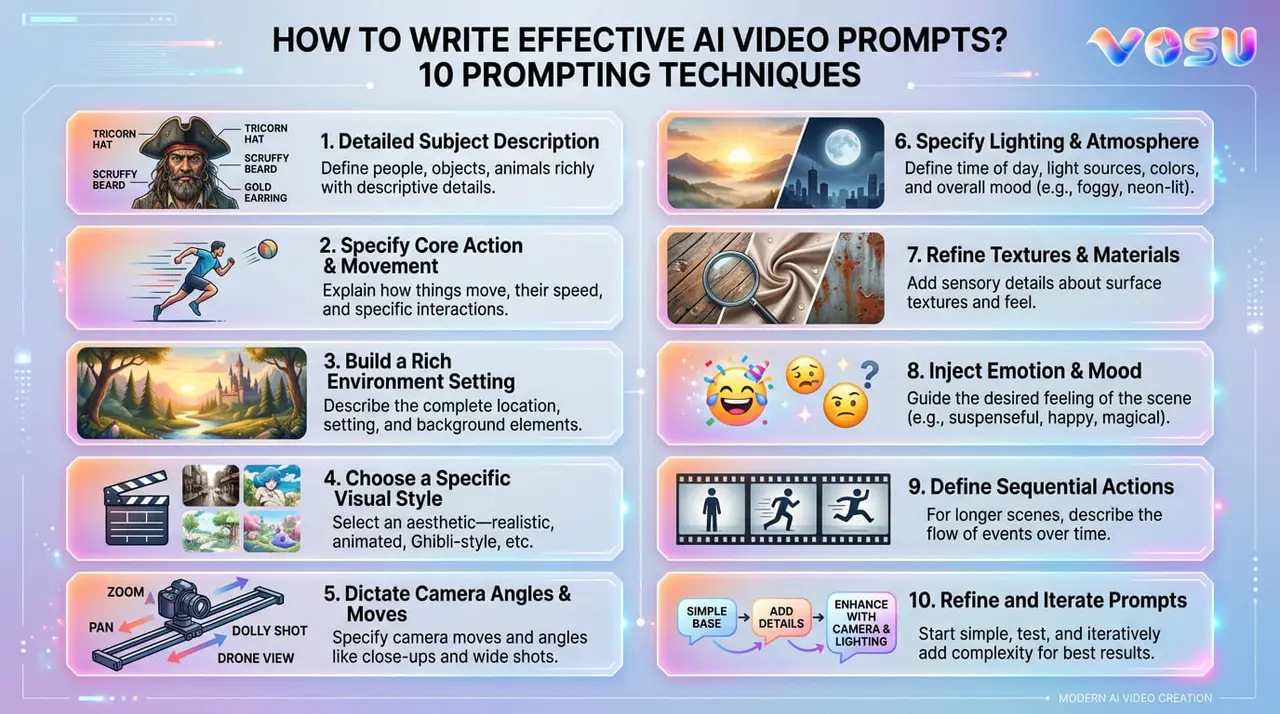
Effective AI video prompts need clear, detailed instructions to generate high quality videos. The first key technique is to focus on a single scene per prompt, which helps maintain clarity and cinematic coherence. It is essential to describe the visuals, which include details about the subject, environment, lighting and mood. This guarantees that the AI understands what to generate without ambiguity. Incorporating camera movements in video production, such as pans, zooms, or tracking shots, adds dynamic storytelling elements and improves the visual appeal of the video. Another important technique of effective AI video is keeping prompts concise but rich in relevant details, which improves AI comprehension and output quality. The final step is to describe the scene using precise language about actions, settings and style that supports vivid video generation.
Runway Gen-4 is recognized as the best AI video model for its generation of realistic, cinematic videos with strong adherence to prompts and versatile creative controls. Other notable AI video models include Kling AI, known for ultra realistic cinematic quality, Pika, which is user friendly for text to video generation and Hunyuan (Tencent Hunyuan Video), a large scale model offering super realistic outputs. Vosu.ai serves as a centralized platform that allows access and use of all these leading AI video models like Runway Gen-4, Kling AI, Pika and Hunyuan from a single, easy to use hub. Creators produce engaging high quality AI generated videos by writing clear prompts and using advanced models.
1. Set a clear goal
Setting a clear goal for AI video prompts begins with clearly defining the video’s purpose, whether to educate, promote, inform, or entertain. This clarity guides creative decisions and helps the prompt act as a storyteller, which guarantees the content matches the intended vision.
AI video prompts support different types of videos, such as explainer videos for new products, recruitment testimonials, workplace “day in the life” stories, scenario based training modules and social media product teasers. This provides a broad range of use cases that utilize AI capabilities to generate targeted video content. A clear goal gives AI precise instructions, such as reducing revisions, saving time and helping create accurate, purpose driven videos that improve content quality and effectiveness.
AI video goal setting involves five steps, including defining the objective, target audience, video style, key constraints (length, tone, platform) and essential messages that contribute to a focused and effective AI prompt. Clear AI video prompts include a 60-second explainer for a scheduling tool, a cyberpunk city scene at night, a product video of a coffee mug, an app explainer script and a beach sunrise with a sea turtle, which demonstrates the integration of purpose, style and message in the prompt design.
2. Focus on one scene per prompt
If you want an AI to make a video, just focus on one scene at a time. Describe one clear moment that makes it easier for the AI to understand and brings your idea to life, one step at a time. This verifies that each prompt should focus on one subject, action and setting. Also, specify the duration to keep your instructions short and clear. AI video generators are designed to create only one shot or visual idea per prompt and attempting to include multiple scenes or actions leads to confusion and poor results, as the model does not effectively merge distinct moments into a coherent video. Effective prompts resemble a director’s guidance, which provides a detailed description of the subject, their actions, environment, camera movement, lighting and mood. This keeps the focus on a single moment and avoids transitions or multiple actions in one prompt. For example, a strong prompt is “A young woman in a flowing blue dress stands on a windy hill at sunset. The grass around her moves gently in the breeze. A camera slowly moves closer from a low angle. A warm golden light shines on her face. The scene lasts for 7 seconds.” The final video shows a cinematic shot of a woman standing alone on a hill. Her dress and hair move in the breeze, while warm sunset light casts dramatic shadows. The camera zooms in to capture the emotion and atmosphere of this specific visual moment. This demonstrates how focusing on individual scenes per prompt reduces confusion and produces vivid, high quality results.
3. Be detailed and specific
Detailed video prompts require precise instructions that clearly define the subject, action, setting, mood and any visual or technical elements in the scene. Clear direction prevents the use of vague prompts that leave gaps and produce generic results.
Specific and descriptive prompts help the system accurately visualize your intent. This leads to higher quality videos that match your creative vision while saving time on revisions and reducing frustration.
Effective prompts break down ideas into core components. Describe exactly who or what is in the scene, what they do, the environment, lighting, camera angle and the emotional tone or style. Use simple language and avoid unnecessary details that overload the prompt, for example, instead of saying “a person running,” replace it with “A marathon runner in a red tank top sprints across the finish line at sunrise. Sweat glistens on their face. A crowd cheers in the background. The camera captures the moment in slow motion from a low angle.”
This prompt produces a vivid video showing a determined runner in golden light, detailed sweat droplets, a slightly blurred crowd and a slow-motion camera angle. This example shows how precise instructions help the system accurately visualize the scene and avoid problems caused by vague prompts.
4. Follow a logical prompt formula
The logical prompt formula for video generation provides a clear and structured format that guarantees completeness and clarity. This allows the model to understand context and generate high-quality, accurate visual results. The standard formula for text-to-video generation is, Prompt = subject + action + scene + (camera language + lighting + style). Each element adds specific visual information that improves output precision.
Text-to-video generation uses the subject as the central focus. The subject performs a defined action. The action describes what the subject does. The scene specifies the time and location to establish the environment. Camera language, lighting and style act as optional attributes that influence cinematic direction, mood and artistic expression. Camera language refers to shot type, angle or motion that frames the subject. Lighting defines the illumination and atmosphere that support the visual tone. Style determines the visual aesthetic that guides the final look.
Image-to-video generation follows a similar prompt structure: Prompt = subject + action + background + background movement. The subject and action indicate the main figure and their behavior. The background describes a static setting that provides context. Background movement identifies animated or dynamic elements that interact with the environment.
This formula improves generated results by presenting a clear sequence of prompt elements and eliminating ambiguity. It allows the model to accurately interpret the creator’s intent and supports consistent professional-level video generation without missing details.
An example prompt is:“A stylish woman (subject) walks confidently (action) down a neon-lit Tokyo street at night (scene), camera pans from left to right (camera language), warm glowing neon reflections on wet pavement (lighting), cinematic and realistic style (style).”
This prompt generates a video showing a fashionable woman walking through a vibrant Tokyo street lit by neon signs. Reflections cover the wet ground. The camera motion smoothly captures the atmosphere. The cinematic, realistic tone demonstrates how structured prompts guide the model to produce accurate, detailed and compelling visuals.
5. Describe visual elements clearly
To describe visuals clearly in AI video prompts, creators must provide structured details like subject, background, motion, camera effects and visual style. This helps the AI interpret and animate each part accurately without confusion. Clarity and richness in visual descriptions directly influence the accuracy of AI rendered outputs, which include characters, backgrounds and dynamic effects. Vague prompts result in generic or misinterpreted visuals, while well structured instructions help the AI animate the intended scene with precision.
Effective AI video techniques include clearly defining the subject’s appearance and actions, describing the background and its motion, specifying the lighting and atmosphere and mentioning technical effects that improve visual impact such as strobe or rolling shutter.
A precise AI video prompt like “A dancer in a sparkling silver costume performs a fast spin on a dark stage, blue spotlights sweep across the background, a camera uses a rolling shutter effect to create motion blur, strobe lights flash in sync with the beat, duration 7 seconds” creates a sharp, high-energy video. The costume reflects the strobe flashes, the blue lights light up the background and the rolling shutter adds motion blur that captures the intensity and rhythm of the scene. This shows how clear, structured prompts help AI animate scenes with control and style.
6. Specify camera movements and angles
AI video prompts require clear cinematic terms to describe camera movements and angles. Terms like “pan shot,” “tilt camera shot,” “tracking shot,” “anamorphic lens” or “bird’s eye view” direct how the virtual camera frames, moves and views the subject. These instructions help produce dynamic and professional looking visuals. Camera movement and angle are crucial storytelling tools because they shape the emotional response of viewers, clarify narrative focus and add visual interest. Vague prompts that lack these details often produce static or generic outputs without cinematic depth.
Common camera movements include the pan shot, which sweeps horizontally, the tilt shot, which moves vertically, the tracking shot, which follows a subject, the dolly shot, which moves toward or away from the subject and steady cam shots that provide varying levels of realism. Camera angles range from extreme wide shots, which show vast environments, while wide shots capture the full scene, close up and extreme close up shots, which emphasize emotion or detail, to bird’s eye view angles, which provide overhead perspectives, low angles, which look up and high angles, which look down.
A combined prompt be “A marathon runner in a red tank top sprints down a city street at dawn, the camera starts with an extremely wide shot from a bird’s eye view angle, then smoothly transitions to a tracking shot at ground level using an anamorphic lens, finishing with a close up shot of the runner’s determined face as the camera dollies in, duration 10 seconds.” The visual result is a cinematic sequence, such as first, a dramatic overhead shot that reveals the city and the runner’s path, then, the camera that swoops down to follow the runner’s movement closely with a wide, immersive aspect ratio; finally, a transition to an intimate close up that captures the runner’s focus and emotion demonstrating how detailed direction of camera movements and angles brings energy and narrative clarity to AI-generated video.
7. Set the mood with lighting
Set the mood with lighting in AI video generation prompts, structured, descriptive language that specifies how light and color influence the atmosphere and evoke specific emotions in the scene is required, as lighting is one of the most powerful tools that shape mood and support visual storytelling.
This matters because lighting not only defines how characters and backgrounds are rendered, but also determines the emotional tone that is either dramatic, nostalgic, mysterious, or energetic. Vague or generic lighting instructions result in flat, uninspired visuals, whereas precise lighting cues allow the AI to generate cinematic, immersive results that match the creative intent. The key ways that define mood through lighting include naming the type of light that is used such as volumetric lighting, neon light effect, or pan lighting along with describing the quality that is soft, harsh, or diffused, the direction that is backlit or side lit and the color palette that uses cinematic colors, desaturated color, or retro color, as well as mentioning special effects that include light leaks, light streaks, or subsurface scattering that improve style and realism. A prompt that demonstrates is, “A jazz saxophonist plays on a smoky stage at midnight, illuminated by deep blue and purple neon lights that apply volumetric lighting and subtle light leaks, cinematic colors and a soft retro color haze, duration 8 seconds.”
The final AI video shows the musician who appears bathed in moody, saturated neon hues, with beams of colored light that cut through the stage smoke, soft retro tones that soften the scene and subtle light leaks that produce a dreamy, atmospheric effect perfectly setting a nostalgic, cinematic mood that improves the emotional impact of the moment.
8. Use cultural and contextual keywords
To use cultural and contextual keywords in AI video generation prompts, creators must incorporate specific terms and references that are culturally relevant to the scene they intend to build, which guarantees the AI accurately adjusts gestures, background elements and the overall atmosphere that reflects the intended cultural context. This matters because cultural and contextual cues allow the AI to generate visuals that feel authentic to the audience, avoid misrepresentation and support rich storytelling. Generic prompts lead to scenes that miss essential cues or feel disconnected from specific settings.
The process requires identifying the cultural or contextual elements that are central to the vision, such as traditional clothing, festivals, architecture, or local weather and incorporating those keywords naturally into the prompt with clarity and cohesion.
A structured AI video prompt using cultural and contextual keywords is like, “A Japanese woman in a traditional kimono walks through a Kyoto street lined with cherry blossom trees in full bloom, gentle fog that drifts through the scene, background features wooden lanterns and historic tea houses, subtle gazing grain effect, duration 8 seconds.” The final result video shows a richly detailed environment where the gestures and attire of women reflect Japanese tradition, cherry blossoms that fall gently, mist that creates a calm setting and background elements like lanterns and tea houses that establish location authenticity that demonstrate how incorporating specific terms allows the AI to generate culturally grounded scenes with precision, supported by effects like gazing grain and subtle foggy cat leaks.
9. Keep it concise
Keep AI video prompts concise by expressing ideas clearly and using only the most essential words to convey intent. Choose precise adjectives and verbs that improve interpretation, while avoiding unnecessary words or overly complex sentences that reduce accuracy. Conciseness matters because it allows the AI to understand the objective, improving the accuracy of the generated video and supporting a streamlined creative process that secures faster revisions and more predictable results.
Concise prompt writing requires a clear goal before writing begins, simple and direct language that reflects the concept accurately, core components such as subject, action and scene that guide structure and vivid but brief descriptors that capture the essence without excessive elaboration. Instead of an extended sentence for example, a prompt states “Lake at sunrise, mist over water, ripples spreading, golden light.” The final result video shows a calm lake at dawn, light mist over the surface, gentle water rippling and golden sunlight covering the scene, which demonstrates how clarity and brevity lead to visually accurate, compelling AI generated results.
10. Experiment and iterate
Experiment and iteration in writing AI video generation prompts means tweaking your prompt, reviewing the output that AI models interpret and modifying elements such as wording, style keywords, or context, which allow the AI to better understand and improve the results. This process matters because AI rarely gets it perfect on the first try, each iteration helps clarify your vision, improve accuracy and achieve more creative videos by learning how small changes like using alternative words or incorporating new style keywords affect the output. Start with a basic prompt to experiment and iterate, review the generated video, identify what works and what does not and then modify specific elements such as subject, action, lighting, or camera movement, one at a time, testing how each adjustment changes the result. You start with “A spaceship landing on a distant planet,” then refine it to “A futuristic spaceship landing on a red desert planet, dust clouds rising, twin suns setting in the background,” and finally, “A sleek silver spaceship landing on a barren red desert, soft evening light, alien plants glowing faintly in the distance.” The visual outcome of this iterative process progresses from a generic spaceship scene to a richly cinematic, visually detailed video with specific lighting, atmosphere and unique environmental elements. It demonstrates how experimenting and iterating lead to sharper, more professional results that closely match your creative intent.
What are the best AI models to create video?
The best AI models to create videos are Kling AI, Pika, Hunuyan, Minimax AI, Veo, Runway, Magi and Pixverse.
8 best AI models to create videos are listed below.
- Kling AI: A leading AI video model for ultra realistic, cinematic videos and animations, Kling AI stands out for its advanced motion physics, 3D face and body reconstruction and ability to generate high quality 1080p videos from both text and images. It excels at simulating natural environments and life like human movement, which makes it ideal for professional productions.
- Pika: Pika is a versatile AI video generator developed by Pika Labs, that transforms text or images into short, engaging videos. It offers a user-friendly interface and supports a range of styles, including cinematic and animated, with unique effects for creative content.
- Hunyuan (Tencent Hunyuan Video): The largest open source AI video generation model with 13 billion parameters, Hunyuan delivers super realistic, cinematic videos from simple text prompts. It features advanced motion control, physical simulations and creative tools for detailed customization.
- Minimax AI: Minimax specializes in the image to video conversion, for anime, manga and digital portraits. It produces expressive, stable animations from 2D AI video illustrations and is optimized for social media and creative art projects.
- Veo (Google Veo 3): Google Veo 3 is a state of the art model capable of generating high quality AI videos with realistic audio, advanced prompt understanding, consistent characters and flexible motion control. It is strong for cinematic storytelling and integrating native audio into video outputs.
- Runway (Gen-3): Runway offers advanced AI filmmaking tools, supporting text to video, image to video and video to video capabilities. It is a popular AI video among creators for its flexibility, motion rendering and creative control, though it has a steeper learning curve.
- Magi: Magi is recognized for its robust video to video capabilities and high quality motion rendering, which makes it suitable for transforming existing footage or images into new, stylized video content.
- Pixverse: Pixverse provides powerful text to video and image to video generation, which allows users to create dynamic, visually compelling AI videos from simple prompts, with support for various styles and effects.
These models represent the forefront of AI-driven video creation, each excelling in different areas such as realism, style diversity, ease of use and advanced motion or audio integration. Vosu.ai brings all of these advanced AI video models into one platform, which allows creators to experiment, compare and build videos without having to jump between different services.
What is the best AI model for generating video?
The best AI model for generating AI video is Runway Gen 4 because it delivers high quality, realistic video generation with versatile creative options, including consistent characters, cinematic camera control and advanced motion realism. Its key features, such as superior prompt adherence, style and world consistency and support for both text and image inputs, make it the top choice for professional, visually compelling AI video creation.
What is the MiniMax AI model?
The MiniMax AI model, as MiniMax v1, is an advanced AI-native video generation system designed to create high definition videos (1280x720 resolution) from either text descriptions or images. It works with a deep learning model trained on a vast library of animations and video clips when a user submits a prompt, the AI predicts and renders individual frames using diffusion based generation, then stitches them together into a cohesive, dynamic video.
How do I write a prompt to generate a faceless video with Vosu.ai?
6 Steps to write a prompt to generate a faceless video with VosuAI are below.
- Model selection: Select a top faceless video AI model in VosuAI such as Veo 3.1, Kling AI, Runway, Sora or minimax for best results.
- Topic selection: Specify your video topic and request visuals clearly that no faces or personal identity shown in the video.
- Scene description: Write your prompt to focus on environments, objects and actions, which avoid mention of faces or detailed characters.
- Visual style: Ask for visual output using abstract, animated or silhouette styles to guarantee anonymity and no facial details.
- Audio guidance: Include instructions for adding AI generated voiceover, background music or subtitles, instead of using visible actors.
- Prompt revision: Review your text to make sure no facial features are referenced, then submit to VosuAI for video generation.
How to use the Kling AI model?
10 steps to use the Kling AI model are listed below.
- Access the tool: Visit the Kling AI website or open the Segmind/Kwaiying app, then log in or create an account to access the AI video generation features.
- Navigate to video generation: Go to the “AI Video” or “Clip” section and select Kling AI Video 1.6 or the latest available model for your project.
- Choose your video generation mode: Select between text to video, image to video, or elements mode based on whether you want to use text prompts, images, or multiple elements for AI video.
- Add your prompt: Enter a clear, descriptive text prompt detailing the scene, actions and style you want the AI to generate to make an AI video.
- Upload an image (optional): For the image to video or Elements mode, upload your chosen image(s) or select pre generated elements to animate within the AI video.
- Adjust the creativity scale: Set the creativity level to control how closely the AI video follows your prompt versus allowing more artistic interpretation.
- Configure video settings: Select the AI video duration (5 to 120 seconds), aspect ratio (e.g., 16:9, 1:1, 9:16) and frame rate (24, 30, or 60 fps) to match your platform and needs.
- Control motion and camera: Use motion intensity, camera movement and cinematic settings to direct pans, tilts, zooms and other cinematic AI video effects for dynamic results.
- Preview and refine: Click “Preview” to generate a draft AI video. Review the output and adjust your prompt or settings as needed for the best result.
- Download your video: Download the final AI video to your device for use in your creative, marketing, or educational projects.
How to prompt Runway AI model?
The process to prompt Runway AI model is given below.
- Use direct, simple and easily understood AI video prompts that clearly state the subject, action and setting you want to generate.
- Describe the motion or camera movement explicitly, such as “camera pans left” or “subject walks toward the viewer.”
- Write in a conversational style, as if explaining your idea to a creative collaborator, to help the AI interpret your intent.
- Avoid overly phrasing or complex sentences, keep your instructions straightforward to minimize confusion and improve output accuracy.
- Use simplistic descriptions when necessary, focusing on the most essential visual elements to ensure the AI captures your core vision.

