Kling 2.6 Pro Motion Control transforms static character images into realistic, frame by frame animated videos using motion extracted from reference clips. It allows 30 second high fidelity, physics aware motion transfer. Kling 2.6 Pro Motion Control preserves character identity, body coordination, facial expressions and fine hand movements, which produce continuous animations suitable for professional content creation. It improves upon the standard Kling 2.6 Motion Control with improved motion accuracy, temporal consistency and camera control options.
Kling 2.6 Pro Motion Control extracts and transfers motion, captures subtle facial and hand gestures, allows flexible character orientation, preserves native audio and allows prompt guided refinement for lighting and style. It is used in content creation, character animation, storytelling, game development, virtual influencers and product or fashion demonstration videos. It smooths workflows for social media, cinematic storyboards and training content.
Kling 2.6 Pro Motion Control pricing ranges from $37to $180 per month, though VosuAI offer cost effective credit based subscription plan. Kling 2.6 Pro Motion Controlcan be used via VosuAI by uploading a reference video and a character image, selecting output settings, and then generating the animation and downloading the results. It works best when using minimal prompts, clean reference videos and matching aspect ratios for optimal results.
What is Kling 2.6 Pro Motion Control?
Kling 2.6 Pro Motion Control is an AI-powered video model that performs advanced image to video motion transfer. It extracts movement from a reference video and applies it frame by frame to a static character image for up to 30 seconds of continuous animation. Kling 2.6 Pro Motion Control is developed by Kuaishou as the Pro variant of the Kling 2.6 Motion Control. It delivers higher quality, physics aware motion transfer compared to the standard mode.
Kling 2.6 Pro Motion Control is best known for precise full body motion transfer from reference videos, preserving pose flow, timing and body coordination in the generated character animation. It offers frame accurate, 30 second continuous generation without cuts, maintains character identity and facial expression while executing complex choreography and captures detailed hand and finger movements for more realistic performance.
What are the key capabilities of Kling 2.6 Pro Motion Control?
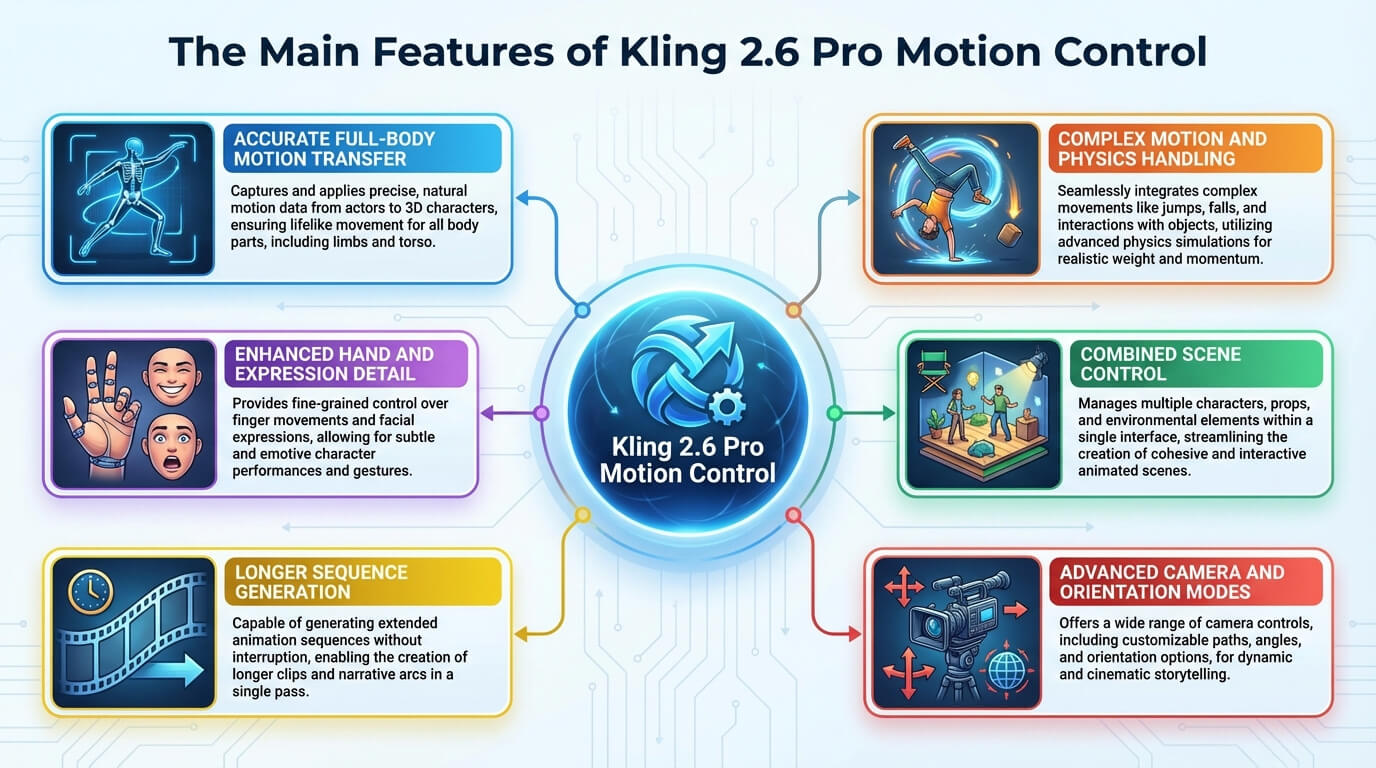
The key capabilities of Kling 2.6 Pro Motion Control include accurate motion extraction and transfer, camera movement control, improved hand and facial tracking and prompt guided refinement. These capabilities turn a static character image into a realistic, directed animation using the precise motions from a reference video.
The key capabilities of Kling 2.6 Pro Motion Control are given below.
- Accurate motion extraction and transfer: Kling 2.6 Pro Motion Control extracts motion from a 3 to 30 second reference video and transfers that motion frame by frame to a static character image, which preserves timing, pacing and choreography.
- High fidelity character animation: Kling 2.6 Pro Motion Control keeps body proportions, clothing and overall identity stable while the character performs complex actions and expressive movements without obvious warping.
- Camera movement control: Kling 2.6 Pro Motion Control lets you decide whether to follow the original reference video framing or keep a more static, character focused composition for cinematic or social formats.
- Enhanced temporal and physical consistency: Kling 2.6 Pro Motion Control improves temporal and physical consistency so motions feel continuous, weight shifts read naturally and fast sequences avoid jitter, sudden pose pops or broken interpolation between frames.
- Extended video length: Kling 2.6 Pro Motion Control allows one shot clips of 3 to 30 seconds, so you can animate full performances without cutting the sequence into multiple shorter generations.
- Flexible character orientation: Kling 2.6 Pro Motion Control provides modes that respect either the character image framing or the reference video layout, which allows accurate alignment with vertical, horizontal or square output formats.
- Improved hand and facial tracking: Kling 2.6 Pro Motion Control captures subtle finger poses, gestures and facial expressions so presentations, dialogue shots and dance performances look more expressive and less glitchy.
- Native audio preservation option: Kling 2.6 Pro Motion Control includes a native audio preservation option that lets you keep or discard the original reference video sound and gives you control over whether to retain live dialogue, performance audio or create silent clips.
- Prompt guided refinement: Kling 2.6 Pro Motion Control allows you to adjust background, lighting, style and atmosphere through text prompts while keeping the precise transfer of motions from the original reference video intact.
The key capabilities of Kling 2.6 Pro Motion Control are visualised below.
What are the use cases of Kling 2.6 Pro Motion Control?
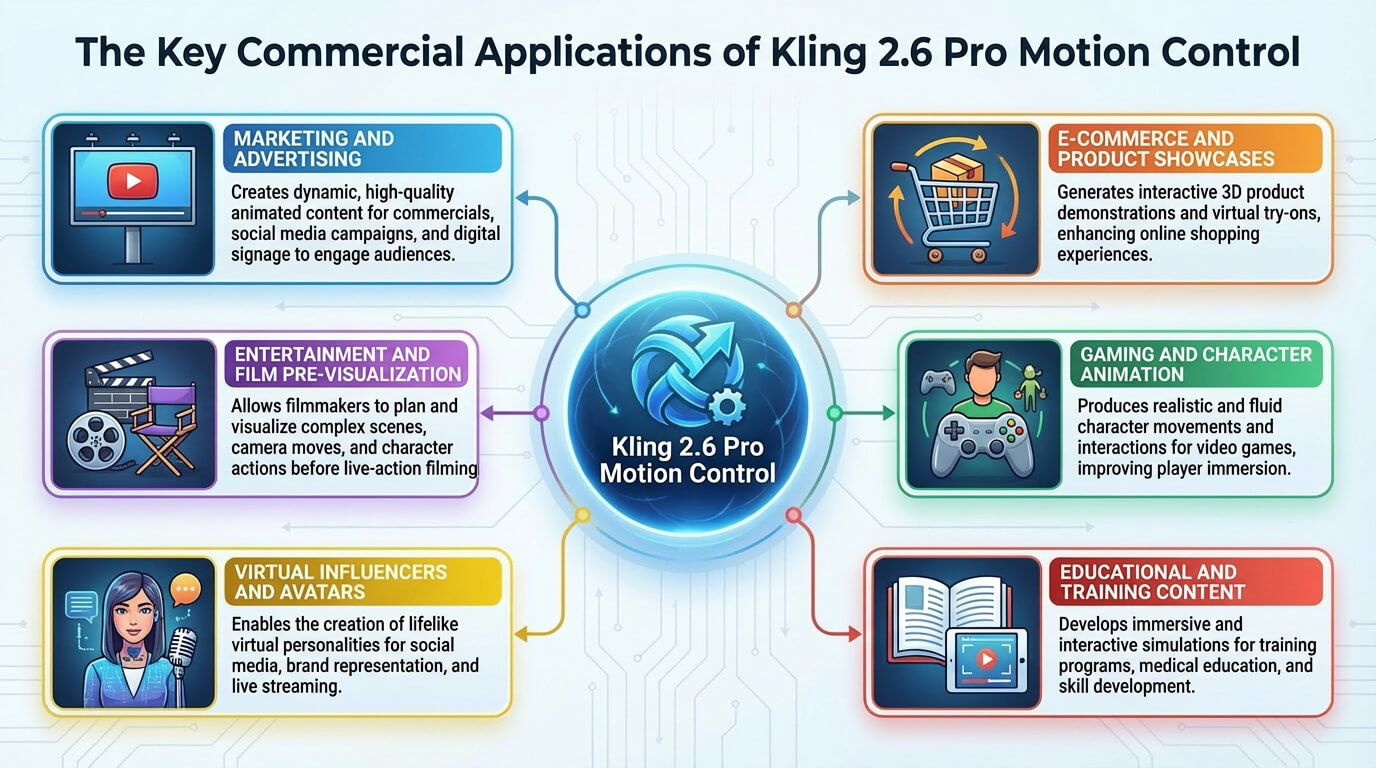
The use cases of Kling 2.6 Pro Motion Control are content creation, character animation and storytelling, game development, virtual influencers and talking avatars, e-learning and training.
The applications of Kling 2.6 Pro Motion Control are given below.
- Product and fashion demonstration videos: Kling 2.6 Pro Motion Control maps a presenter’s gestures onto branded characters or models, which creates clear product or apparel showcases that keep pacing and hand emphasis natural.
- Content creation: Kling 2.6 Pro Motion Control helps short form social media workflows, which lets creators apply trending dances, reactions or performance beats to custom characters for Facebook, YouTube shorts or TikTok Reels.
- Character animation and storytelling: Kling 2.6 Pro Motion Control drives complex character performances from reference videos, which makes it easier to build narrative scenes, dialogue beats and action moments without manual keyframing.
- Game development: Kling 2.6 Pro Motion Control generates quick reference clips and marketing shots from gameplay inspired motions, which gives teams fast prototypes for character moves, emotes and cinematic interludes.
- Cinematic storyboards and pre-visualization: Kling 2.6 Pro Motion Control turns live action motion tests into fast animatics that show blocking, camera feel and character motion before expensive shoots or full CG work.
- Virtual influencers and talking avatars: Kling 2.6 Pro Motion Control reuses real performances to create animated personas that keep lip sync, gestures and body language consistent across different platforms and campaigns.
- E-learning and training: Kling 2.6 Pro Motion Control repurposes instructor performances into explainer lessons, onboarding videos and training walkthroughs so that gesture emphasis stays consistent while visuals are customized to each audience.
Vosu AI offers a user friendly dashboard for all these types of applications, which lets you run Kling 2.6 Pro Motion Control alongside other video models in a single, streamlined workspace.
The use cases of Kling 2.6 Pro Motion Control are visualised below.
How much does Kling 2.6 Pro Motion Control cost?
Kling 2.6 Pro Motion Control costs range from $37 to $180 per month, which depends on its subscription tier. Kling’s official subscription plans include pro, premier and ultra tiers that provide monthly credits for video generation. Its pro plan is for $37 per month with 3000 credits, premier plan for $92 per month with 8000 credits and ultra plan for $180 per month with 26000 credits.
The pricing of Kling 2.6 Pro Motion Control is visualised below.
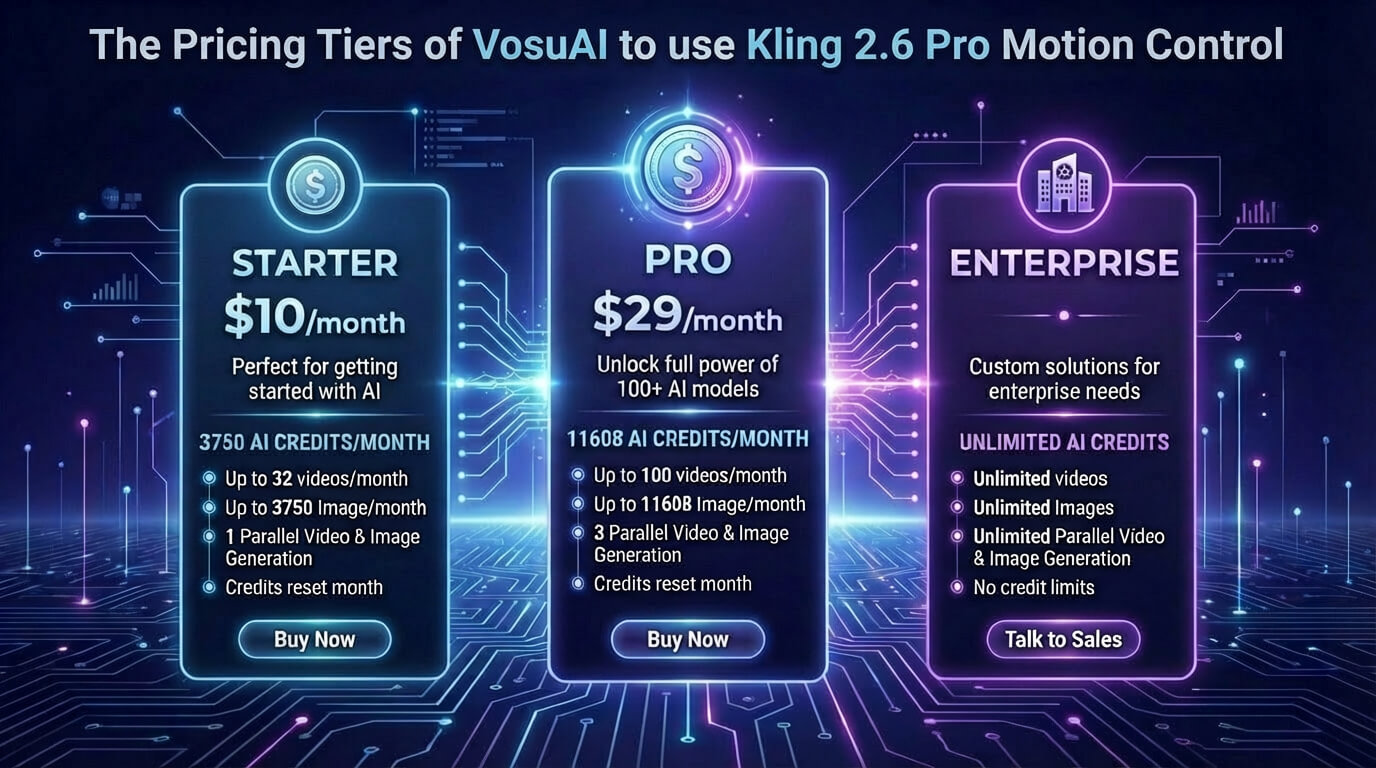
Kling 2.6 Pro Motion Control is available on demand web platforms like VosuAI via a monthly credit based pricing system. VosuAI pricing starts at 10 USD per month for 3,750 credits, a pro plan at 29 USD per month for 11,608 credits and an enterprise plan for customized pricing with unlimited credits. These monthly credits are applicable to use over 100 video generation models such as Kling 2.6 Motion Control, Kling 3.0, Kling 3.0 Pro, Veo 3 and Sora 2.
How to access Kling 2.6 Pro Motion Control?
To access Kling 2.6 Pro Motion Control, you can use the official Kling interface or VosuAI. You have to visit the official Kling AI website, sign in or create an account, go to the video section, select the Video 2.6 model and then choose the Motion Control or Professional Motion Control option. Kling 2.6 Pro Motion Control lets you upload a reference video with a static character image before generating your clip. VosuAI provides a multi model workspace that lets you generate videos immediately right after uploading your files. VosuAI’s user friendly dashboard lets users run Kling 2.6 Pro Motion Control alongside other Kling versions and additional video models without switching platforms across any subscription tier.
How to use Kling 2.6 Pro Motion Control?
To use Kling 2.6 Pro Motion Control models, you have to go to VosuAI’s Motion Control section, upload a video, upload an image, choose an output number and Download generated output.
6 steps to use Kling 2.6 Pro Motion Control via VosuAI are outlined below.
- Go to VosuAI's Motion Control: Go to VosuAI’s Motion Control section and open the Kling 2.6 Pro Motion Control tool from the video workspace so you can work with both a reference video and a character image.
- Upload video: Upload a video or choose from the motion library that contains the exact performance you want to copy such as a short dance, gesture routine or walking cycle between roughly 3 and 30 seconds.
- Upload image: Upload an image using the static character frame you want to animate and choose a clean, well-lit full body or half body photo that closely matches the video frame or subject in your reference video.
- Choose output number: Choose an output number to decide how many alternative clips you want in a single run, which finds a balance between variety, processing time and the credits available in your account.
- Click generate now: Click on the generate now button to start motion transfer so that Kling 2.6 Pro Motion Control analyzes the reference video, extracts the movement and produces one or more clips where your character performs the same actions.
- Download generated output: Download generated output from the results area, watch each clip, keep the versions that best match your creative goal and move them into your editing, publishing or client delivery workflow.
What are the tips for using Kling 2.6 Pro Motion Control?
The tips for using Kling 2.6 Pro Motion Control are given below.
- Keep prompts minimal: Keep prompts minimal so instructions stay concise and descriptive, which uses a few clear style and motion phrases instead of long stacked adjectives that confuse the model.
- Define style and quality: Define style and quality with short phrases that set realism, lighting and texture expectations, such as natural lighting, realistic textures and clean details for stable character appearance.
- Specify camera movements: Specify camera movements directly in the prompt when you need motion like subtle zooms or gentle push-ins, which describes them clearly so the camera behavior supports your intended scene.
- Reference video hygiene: Reference video hygiene matters because clean background reference videos with clear silhouettes, visible limbs and limited occlusions give the model better motion extraction and reduce weird artifacts around hands and arms.
- Match aspect ratio: Match the aspect ratio between the character and video, so both use similar framing, such as 16:9, 9:16 or 1:1, which helps avoid awkward stretching, cropping or off-center compositions in the final clip.
Can you use Kling 2.6 Pro Motion Control for commercial projects?
Yes, you can use Kling 2.6 Pro Motion Control for commercial projects as long as you have an active paid subscription such as a standard, pro or premier plan. Kling grants commercial rights to paid members while restricting the free tier to personal, non-commercial use. This structure is designed to separate professional use cases like client work or monetized content from hobby experimentation on the free plan.
Is there a free trial for Kling 2.6 Pro Motion Control?
Yes, there is a free trial for Kling 2.6 Pro Motion Control because several external platforms let you try pro level motion control with limited free credits, demo playgrounds or short trial periods before committing to a paid plan. You should always review the current offer on each platform, since trial length, credit amounts, feature access and availability vary by provider and change over time, even on well known hosting sites.
Is Kling 2.6 Pro Motion Control better than Kling 2.6 Motion Control?
Yes, Kling 2.6 Pro Motion Control is better than Kling 2.6 Motion Control for most professional and high fidelity video generation needs. Kling 2.6 Pro Motion Control keeps character consistency over 30 second clips more reliably, offers superior motion transfer accuracy and cleaner rendering and is tuned for higher quality, production grade results. Kling 2.6 Motion Control focuses more on cost effective and general purpose runs.
Is Kling 2.6 Pro Motion Control better than Kling 3.0 Motion Control?
No, Kling 2.6 Pro Motion Control is not better than Kling 3.0 Motion Control for most high end cinematic work. Kling 3.0 offers stronger multi shot consistency, advanced physics and better subject and prop stability with smoother camera behavior.
What are the alternatives to Kling 2.6 Pro Motion Control?
The alternatives to Kling 2.6 Pro Motion Control are listed below.
- Runway Gen 4.5: Runway Gen 4.5 offers state of the art AI video generation with exceptional photorealism, advanced physics and precise camera control for complex, cinematic motion.
- Google Veo 3.1: Google Veo 3.1 provides high quality motion and AI video generation, strong subject consistency and flexible aspect ratios ideal for social ready vertical and cinematic horizontal content.
- Wan 2.2: Wan 2.2 focuses on efficient, high quality AI video generation using a Mixture of Experts design, which delivers smooth motion, strong prompt adherence and cinematic style control over lighting and composition.
Is Kling 2.6 Pro Motion Control better than Runway Gen 4.5?
Yes, Kling 2.6 Pro Motion Control is better than Runway Gen 4.5. Kling 2.6 Pro is better for character consistency, integrated audiovisual generation and specific, complex motions. Runway Gen 4.5 excels in cinematic realism, photorealism and precise, camera focused control.
Is Kling 2.6 Pro Motion Control better than Google Veo 3.1?
Yes, Kling 2.6 Pro Motion Control is better than Google Veo 3.1. Kling 2.6 Pro excels at character focused movements and cinematic motion realism. Google Veo 3.1 is stronger at prompt adherence and structured storytelling.