Kling 2.6 Motion Control transforms real human movements, expressions and gestures from a reference video into animated performances on static character images. It is developed by Kuaishou and launched on 2nd December 2025 as part of the Kling Video 2.6 model family. It excels at capturing full body dynamics, nuanced facial expressions and precise hand gestures, which produce smooth, realistic animations in one continuous shot of up to 30 seconds.
Kling Motion Control integrates prompt controlled scene adjustments, advanced camera and orientation options and physics simulation for grounded, natural movement. Its features include precise motion transfer, accurate lip syncing, one shot 30 second action sequences, flexible camera and orientation controls and prompt controlled scene customization. It is widely used for character animation, virtual influencers, product marketing, corporate training and gaming or VR workflows.
Kling 2.6 Motion Control pricing ranges from $10 to $180 per month, which depends on the subscription tier, while VosuAI offers cost effective credit based subscription plan. It is accessible through the official site and VosuAI. You can use Kling 2.6 Motion Control via VosuAI by uploading a reference video and character image, choosing their settings, and then generating the animation and downloading it for editing or sharing.
What is Kling 2.6 Motion Control?
Kling 2.6 Motion Control is a feature of the Kling video platform that performs AI motion transfer, which takes real movements, expressions and full body actions from a reference video. It applies them onto a target character image to generate image to video animation. It was developed and launched by Kuaishou as part of the Kling Video 2.6 model family on 2nd December 2025 and became the flagship motion engine in the Kling lineup. Its upgraded version, Kling 2.6 Pro Motion Control, offers higher accuracy, better consistency and more professional quality animation.
Kling 2.6 Motion Control is best known for precise full body motion transfer, smooth handling of complex gestures and lip syncing and support for roughly 30 second one shot motion animations. It also delivers detailed hand and finger performance, advanced camera or orientation controls and prompt controlled scene details for backgrounds and styling.
What are the features of Kling 2.6 Motion Control?
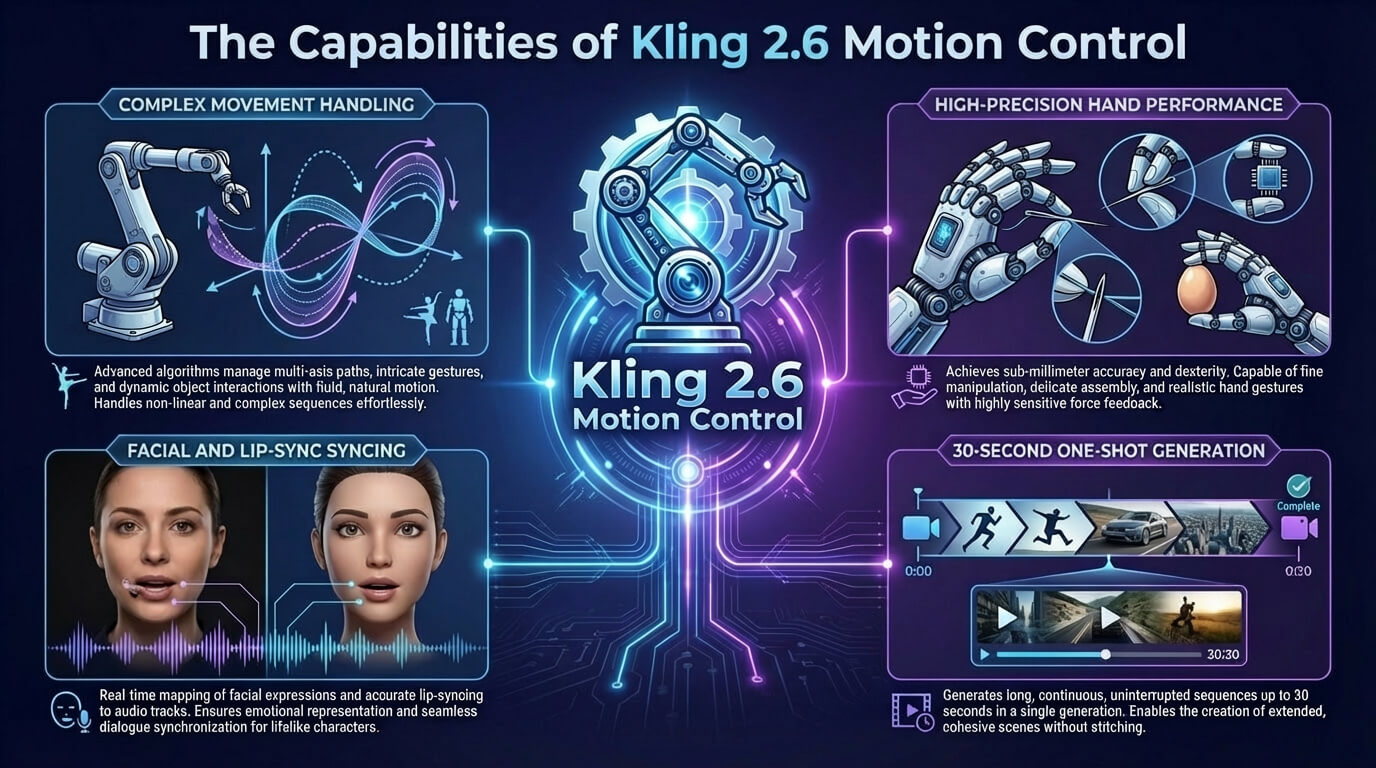
The features of Kling 2.6 Motion Control include precise motion transfer, handling full body dynamics, precision in hand performances, 30s one shot action and prompt controlled scene details.
The key features of Kling 2.6 Motion Control are given below.
- Precise motion transfer: Kling 2.6 Motion Control transfers precise movements and timing from a reference video onto a target character image, which preserves pacing, pose changes and overall motion flow with high fidelity.
- Handling complex movements, expressions and lip sync: Kling 2.6 Motion Control captures complex gestures, facial expressions and lip syncing from performance clips, which allows expressive character animation that reflects nuanced emotional and spoken delivery.
- Handling full body dynamics: Kling 2.6 Motion Control naturally captures full body movement, keeping balance, weight shifts and joints looking realistic even in fast, athletic actions like dancing, martial arts or acrobatics.
- Precision in hand performances: Kling 2.6 Motion Control greatly improves hand and finger animation, that keep poses, pointing, grasping and subtle gestures stable, where generative video breaks.
- Advanced camera and orientation controls: Kling 2.6 Motion Control offers flexible camera and orientation controls, which let you choose whether to follow the reference video framing or preserve the character image pose and viewpoint.
- 30s one shot action: Kling 2.6 Motion Control supports single, continuous clips of around 3 to 30 seconds, which allows one shot action sequences without chopping motion into multiple separate generations.
- Physics simulation: Kling 2.6 Motion Control approximates realistic motion physics, which understands weight distribution, momentum and impact, so actions like jumps, stomps and spins feel physically grounded.
- Prompt controlled scene details: Kling 2.6 Motion Control uses text prompts to control scene details such as background, lighting, clothing and style, which allows you to refine visuals without changing the underlying motion.
The features of Kling 2.6 Motion Control are visualised below.
What are the applications of Kling 2.6 Motion Control?
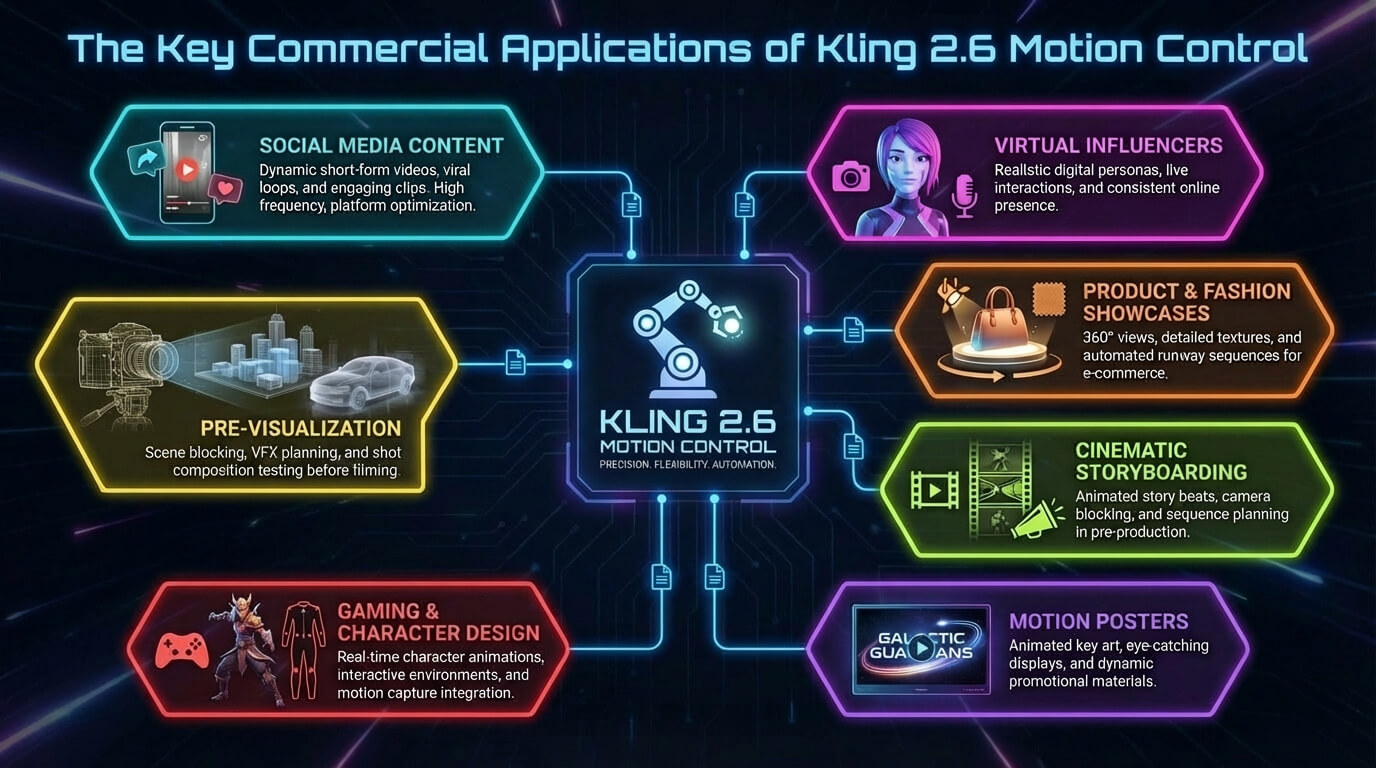
The applications of Kling 2.6 Motion Control are character performance and animation, social media content, digital puppetry and avatars, virtual Influencers and virtual reality and gaming.
The uses of Kling 2.6 Motion Control are given below.
- Character performance and animation: Kling 2.6 Motion Control maps live action gestures, timing and emotion onto static characters, which avoids manual keyframing while keeping performances consistent across many styles.
- Social media content: Kling 2.6 Motion Control powers social media content such as viral dances, memes and short skits by applying trending motion clips to mascots, cartoons or avatars for fast, repeatable posts.
- Product marketing and advertising: Kling 2.6 Motion Control reuses polished presenter motions for product marketing demos, explainers and localized campaigns without reshooting footage each time.
- Digital puppetry and avatars: Kling 2.6 Motion Control drives digital puppetry and avatars, which allow creators to puppet virtual characters in real time or in batches, using their own body language to control on-screen personas.
- Educational and corporate training: Kling 2.6 Motion Control improves educational and corporate training videos by preserving the instructor’s natural gestures and clarity while swapping characters or backgrounds. It helps boost learner engagement and makes large scale e learning and internal training easier to produce.
- Virtual Influencers: Kling 2.6 Motion Control maps consistent human performances onto brand mascots or AI personas for cross platform content, which helps maintain recognizable body language and a stable on-screen personality.
- Virtual reality and gaming: Kling 2.6 Motion Control generates reference animations or stylized clips from full body performances, which helps you prototype moves, cutscenes and character actions quickly.
VosuAI provides a user friendly dashboard that integrates Kling 2.6 Motion Control for all these application types, which makes it easier to manage uploads, generations and outputs in one place.
The applications of Kling 2.6 Motion Control are visualised below.
How much does Kling 2.6 Motion Control cost?
Kling 2.6 Motion Control costs between $10 to $180 per month, which depends on the subscription tier. Kling 2.6 Motion Control offers four official subscription plans such as standard, pro, premium and ultra. Its standard plan costs 10 USD per month with 660 credits, pro plan for 37 USD per month with 3000 credits, premier plan for 92 USD per month with 8000 credits and ultra plan for 180 USD per month with 26000 credits.
The pricing of Kling 2.6 Motion Control is visualised below.
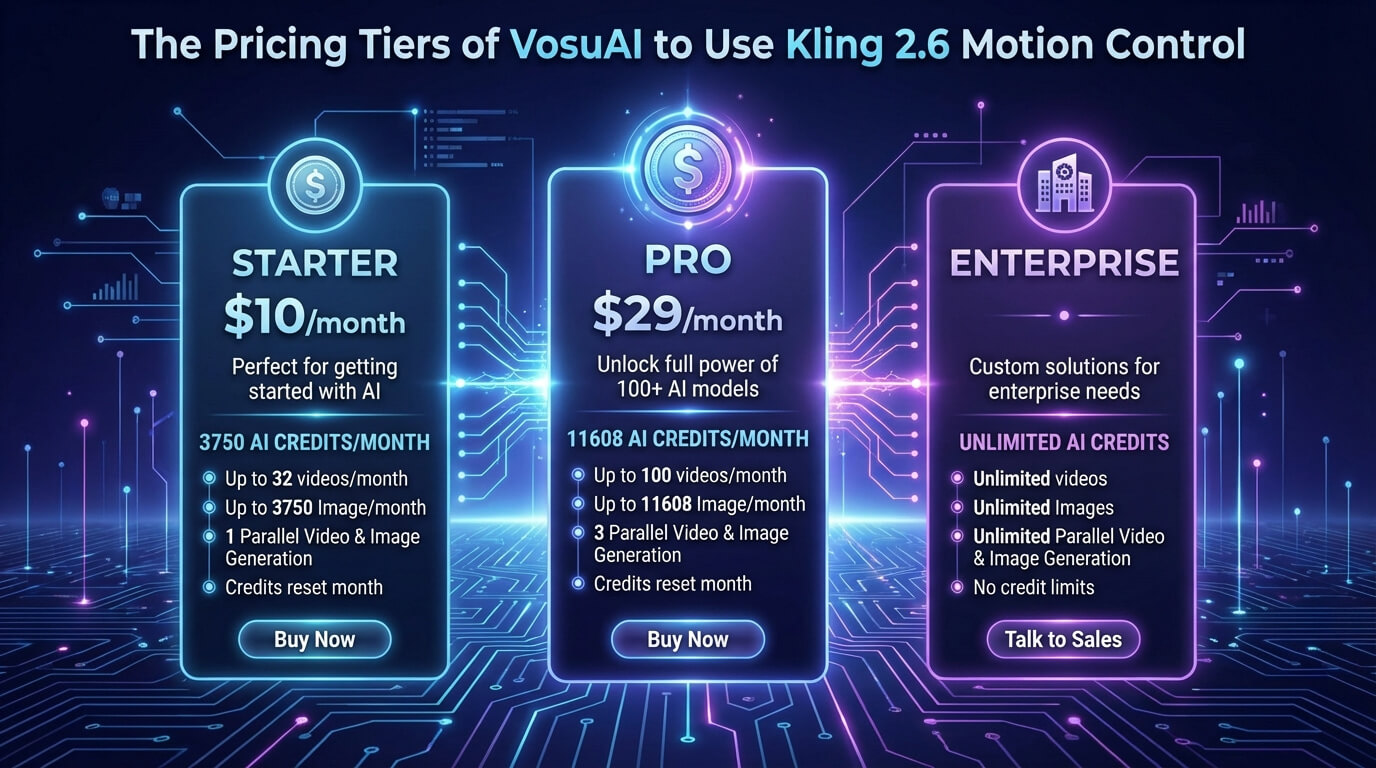
Kling 2.6 Motion Control is accessible through on-demand web platforms like VosuAI, which offers a unified monthly credits system instead of a single model subscription. VosuAI pricing model starts with a basic plan for 10 USD per month with 3,750 credits, a pro plan at 29 USD per month with 11,608 credits and an enterprise plan with customized pricing and unlimited credits. These monthly credits are applicable across over 100 video generation model such as Kling 2.6 Pro Motion Control, Kling 3.0, Kling 3.0 Pro, Veo 3 and Sora. VosuAI manages all these models under a single platform using shared monthly credits.
How to access Kling 2.6 Motion Control?
To access the Kling 2.6 Motion Control, visit the official website, open the video workspace, choose the Video 2.6 model, select the Motion Control feature and upload a reference video with a character image to generate your animation. You can also use the unified content creation platform VosuAI, which lets you generate videos right after uploading your files. VosuAI is positioned as a convenient hub where you can run Kling 2.6 Motion Control from a user friendly dashboard. VosuAI provides multiple motion video generator models in any subscription tier, so you can switch between Kling and other engines without changing plans.
How to use Kling 2.6 Motion Control?
To use Kling 2.6 Motion Control models, you have to go to VosuAI’s Model Control, upload a video, upload an image, select a reference image, click generate and download the generated output.
6 steps to use Kling 2.6 Motion Control using VosuAI are outlined below.
- Go to VosuAI's Motion Control: Go to VosuAI’s Motion Control section in the dashboard, select the Kling 2.6 Motion Control Model and open the panel that accepts both your character image and reference video.
- Upload video: Upload a video from your device or choose one from the motion library that contains the motion performance you want to transfer and make sure the subject’s full body and movements are clearly visible in the clip.
- Upload image: Upload a clean, well-lit full body or half body photo or artwork of your target character that clearly shows the design and matches the framing of your reference video for the final animation.
- Choose the output number: Choose the output number based on how many variations you want to review, which balances your creative exploration with the credits available in your VosuAI subscription tier.
- Click generate now: Click generate now to start processing, which lets Kling 2.6 Motion Control analyze the motion in your reference video and animate the chosen character image accordingly.
- Download generated output: Download generated output from the results section once rendering finishes, then save your favorite clips for further editing, sharing on social media or use in larger video projects.
Can you use Kling 2.6 Motion Control for real projects?
Yes, you can use Kling 2.6 Motion Control for real projects, especially AI driven marketing campaigns, character animation and social content. It already powers product ads, virtual influencers and scalable branded videos, although high end live action work still needs upscaling and careful QC for best results.
Is there a free trial for Kling 2.6 Motion Control?
Yes, there is a free trial for Kling 2.6 Pro Motion Control because some platforms like EaseMate AI, give new users limited free credits or demo access so they can test motion control before upgrading to paid plans. You should note that trial length, credit limits and feature access vary by provider and may change, so you must always check the current trial details on the specific platform you plan to use.
Is Kling 2.6 Motion Control better than Kling 3.0 Motion Control?
No, Kling 2.6 Motion Control is not better than Kling 3.0 Motion Control for most high fidelity AI filmmaking. Kling 3.0 improves character consistency, multi shot continuity, native audio, camera precision and rendering stability, which makes it a higher value tool. Kling 2.6 excels at fast, specialized motion transfers and short social content.
What are the alternatives to Kling 2.6 Motion Control?
The alternatives to Kling 2.6 Motion Control are listed below.
- Runway Gen 4: Runway Gen 4 focuses on AI video generation with strong character and world consistency, cinematic quality motion and tight prompt adherence for professional editing workflows.
- Google Veo 3: Google Veo 3 targets high fidelity, cinematic quality video with native, aligned audio, which makes it ideal for polished storytelling and advanced creative control.
- Hailuo AI: Hailuo AI offers text to video and image to video generation for marketing and social clips, which prioritizes quick drafts, smooth motion and ready to share results.
- Wan 2.2: Wan 2.2 delivers efficient AI video generation through a Mixture of Experts design, which allows complex motion, cinematic level aesthetic control and precise prompt following on modest hardware.
Is Kling 2.6 Motion Control better than Runway Gen 4?
No, Kling 2.6 Motion Control is not better than Runway Gen 4 overall, because each shines in different areas. Kling 2.6 specializes in precise character driven movement and performance transfer from reference video, which gives highly controllable, realistic motion control. Runway Gen 4 focuses on stronger prompt adherence, cinematic realism and scene composition, which makes it more suitable for stylized storytelling and mood driven sequences.
Is Kling 2.6 Motion Control better than Google Veo 3.1?
No, Kling 2.6 Motion Control is not better than Google Veo 3.1 overall because each targets different priorities. Kling 2.6 delivers highly reliable, realistic motion control and performance transfer from reference video, which suits character driven movement and choreography. Veo 3.1 focuses on higher visual quality, cinematic realism and professional grade shots with strong prompt control and native audio.
Is Kling 2.6 Motion Control better than Hailuo AI?
Yes, Kling 2.6 Motion Control is not better than Hailuo AI. Kling 2.6 excels at structural control, realistic motion control and accurate lip syncing for reference driven character animation. Hailuo AI prioritizes professional and high fidelity results, complex cinematic scenes and strong physics for cinematic realism across longer, prompt driven videos.