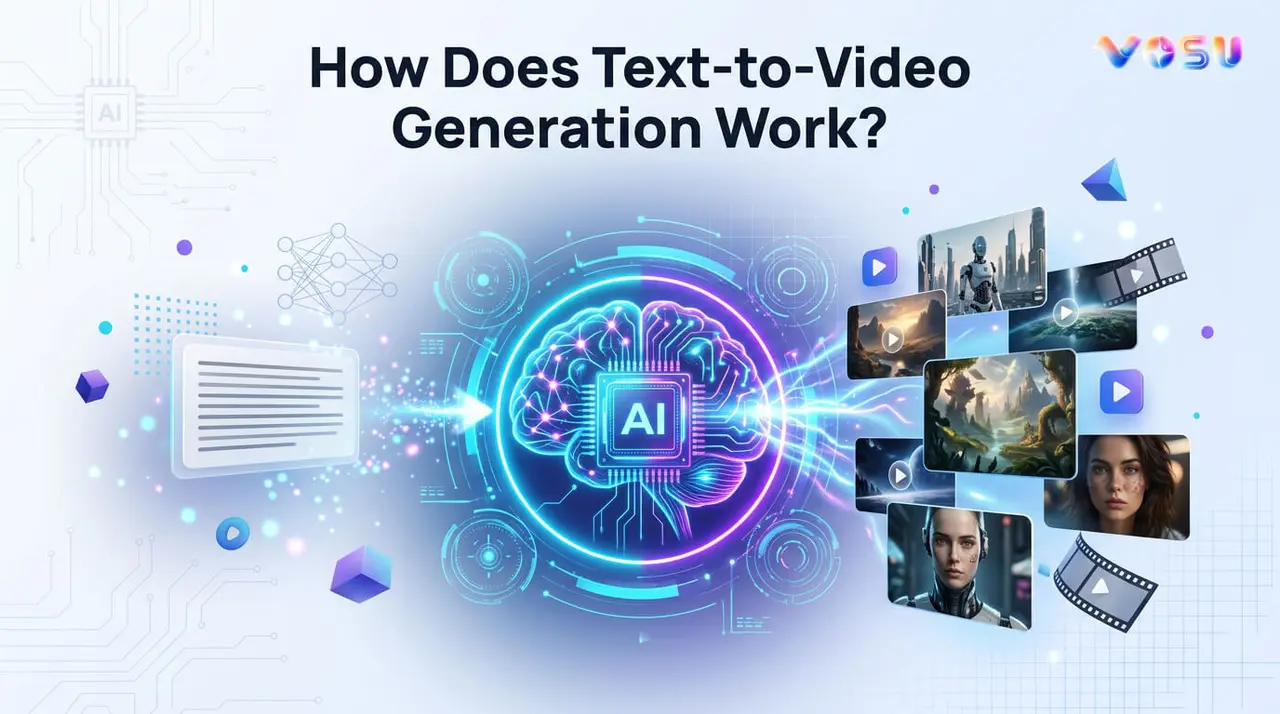
Text to video generation AI converts written prompts into dynamic video content by interpreting scenes, actions, pacing, camera movement and sometimes audio. It analyzes language instructions and generates consistent video sequences that align with the intended narrative and visual style. Text to video generation works through several core technologies. Natural Language Processing (NLP) interprets prompts and extracts key concepts, while computer vision and visual matching connect words with visual elements such as objects, environments and actions. Diffusion based frame generation transforms noise into realistic video frames and motion and temporal consistency maintain smooth movement and stable visuals across frames. Style and guidance controls further shape aesthetics, pacing, realism and camera behavior.
Text to video generation is widely used for content creation, ad creation, product demos, storyboarding, film pre-visualization, customer support videos, educational content and AI generated stock footage. These applications help creators produce videos faster and on a greater scale. Text to video generation helps with faster production, lower costs, scalable video creation, personalized content variations and the ability to visualize complex scenes that would be expensive to film. It faces challenges despite its advantages such as visual inconsistency across frames, distorted text rendering, uncanny valley effects and copyright concerns related to training data and ownership.
Text to video generation platforms are Vosu AI, Google Veo, Runway Gen, InVideo AI, Kling AI, HeyGen and ByteDance’s video tools. AI generated video creation involves choosing a platform like VosuAI, selecting a model, entering a prompt, configuring audio, generating the video and refining the output until it meets quality requirements.
What is text to video AI?
Text to video AI uses generative AI to turn language instructions into dynamic moving image content. It takes written text descriptions or scripts and interprets scenes, actions and pacing so the system assembles a consistent video sequence that matches the narrative intent. The model understands prompts, infers visuals, camera movement and sometimes audio and then synthesizes frames over time to produce short or extended video clips.
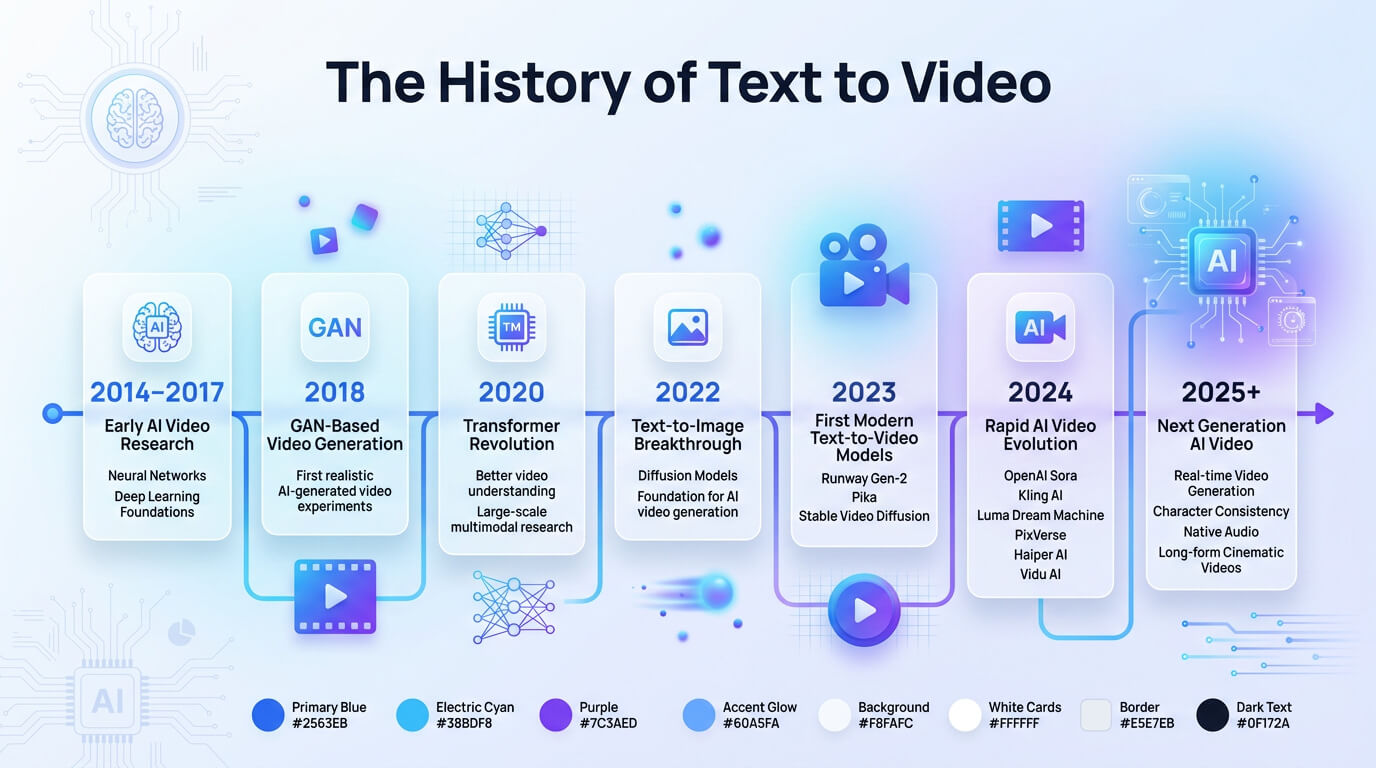
The infographic below shows the history of text to video.
How does text to video generation work?
Text to video generation works through the components like Natural language processing (NLP), computer vision and visual matching, diffusion based frame generation, motion and temporal consistency and style and guidance control. These components work together to transform text prompts into coherent video sequences that match the intended content and visual style.
Natural language processing (NLP)
Natural Language Processing (NLP) is a field of artificial intelligence that helps computers understand and process human language. It plays an important role by analyzing an AI video description and converting it into instructions that visual AI systems follow. It also decodes human language and understands story structure such as characters, actions, objects, locations and events. An NLP system breaks text into smaller units called tokens and transforms them into numerical representations using token embedding techniques. These representations help the AI understand the entity and the relationships between different words and concepts.
NLP extracts key information and determines how scenes should be organized in the video. It translates text into instructions for visual AI systems through interpreting the meaning and context of the text. It also maps words into visual and auditory outputs. This allows the AI to generate appropriate images, animations, sounds and video sequences that accurately reflect the user's description and intended message.
Computer vision and visual matching
Computer vision and visual matching help text to video AI transform text into moving images. These technologies allow the system to learn how objects, scenes and actions appear and evolve over time. Text to video AI uses computer vision models trained on large datasets of images and videos to connect words with visual concepts. The system identifies features such as colors, shapes, textures and objects through visual feature extraction. It also performs scene understanding to recognize relationships between entities across frames. These processes support visual semantic alignment, which ensures that generated visuals accurately match the text description. Computer vision finally guarantees that generated shots stay consistent from frame to frame, so characters, backgrounds and actions remain visually consistent with the AI video description.
Diffusion based frame generation
Diffusion based frame generation is a technique used in text to video AI to create videos from text prompts. It begins with random values sampled from a noise distribution and gradually transforms them into meaningful video frames. Diffusion based frame generation converts random noise into consistent moving images through a step by step denoising process.
Text to video model refines visual details based on the prompt during each step, while maintaining smooth transitions between frames. Generative AI video models, including those inspired by Stable Diffusion, use text embeddings and previous frame information to ensure that objects, scenes and motion remain consistent throughout the video. This approach allows the generation of realistic, coherent videos that accurately reflect the user's description.
Motion and temporal consistency
Motion and temporal consistency describe how text to video AI keeps characters, objects and backgrounds stable and believable as they move from one frame to the next. Text to video AI extends image generation technology with motion understanding, so it treats video as a continuous sequence rather than separate images. It maintains frame to frame consistency in appearance, lighting and camera viewpoint. A long format AI video generator models motion dynamics such as walking, camera pans or moving cars to make actions look smooth instead of jittery. These systems use temporal self attention or similar mechanisms to compare information across frames and track entities over time. This assures that the same character or object behaves consistently throughout the entire clip.
AI voice synthesis and synchronization
AI voice synthesis and synchronization generate a synthetic voice from the script and align mouth movements and facial expressions so the dialogue matches what viewers hear. These systems use AI voice synthesis and lip syncing to combine audio generation with visual animation, which creates characters that speak instead of showing mismatched or static performance. AI processes voice synthesis and lip syncing through three core steps for reliable audio visual synchronization. A text to speech synthesis model first converts the script into an expressive voice track. Audio conditioning then extracts timing, phonemes and prosody from the audio signal. A lip sync and face animation module then uses these cues to drive mouth shapes and facial motion. AI systems with advanced features avoid frame by frame mouth animation, instead generating continuous, learned facial motion across the entire sequence.
Style and guidance control
Style and guidance control in text to video AI define how the model should look and behave visually, from framing and color to pacing and camera motion. These controls assure AI follows visual rules and preferences by converting creative direction into parameters like mood, realism level and editing rhythm. Style and guidance control act as the creative director for text to video AI, steering how scenes are rendered through mechanisms like guidance scale, aspect ratio finetuning and style conditioning. These controls also enforce motion paths and aesthetic consistency by controlling character movement, camera tracking, lighting and textures. This guarantees all elements remain consistent across shots, which makes the final video feel unified rather than random.
What are the use cases of text to video AI?
The use cases of text to video AI include content creation, ad creation, product demos and visualizations and film. Text to video AI also helps automate video production for social media platforms, which makes it faster and more scalable.
The use cases of text to video AI are given below.
- Content creation: Text to video AI converts written prompts into AI generated video content for blogs and social media, which produces marketing content with synchronized audio and visuals.
- Ads creation: Text to video AI generates artificial intelligence generated video ads, which allows marketers to test multiple variations quickly while maintaining consistent branding across different audiences and campaigns efficiently.
- Product demos and visualizations: Text to video AI turns product specifications into AI generated video content, which shows features, workflows and benefits through clear visual storytelling without live action production needs.
- Storyboarding and pre-visualization: Text to video AI converts written prompts into visual storyboards, which help creators plan shots, camera angles, pacing and scenes before full scale production begins.
- Film: Text to video AI supports filmmakers with concept exploration, mood reels and experimental sequences to visualize styles and environments before final production decisions.
- Customer support videos: Text to video AI transforms help articles into explainer videos, which design custom training guides with synchronized audio to simplify user understanding and reduce support workload.
- Educational and training videos: Text to video AI allows designing custom training videos from lesson scripts, which combine structured visuals, narration and animations for effective learning experiences.
- B-roll and stock footage generation: Text to video AI generates artificial intelligence generated video for background clips, transitions and atmospheric visuals used in editing and storytelling support.
VosuAI serves as a unified content creation platform that converts written prompts into AI generated video with synchronized audio and consistent styling across formats.
What are the benefits of text to video AI?
The benefits of text to video AI include faster video production, lower production costs, accessibility to beginners, scalable video generation and personalized content variations. It also allows creators to quickly test different visual ideas without requiring complex editing skills.
The benefits of text to video AI are given below.
- Faster video production: Text to video AI accelerates AI video generation, which shrinks planning, filming and editing timelines so teams move from idea to draft video in minutes.
- Lower production costs: Text to video AI cuts costs by replacing cameras, studios and large crews with software, which eliminates traditional barriers like location rentals, reshoots and heavy post production.
- No advanced editing skills required: Text to video AI lets users describe scenes in natural language while the system handles cutting, transitions and timing, so no advanced editing skills are required.
- Accessible for beginners: Text to video AI increases creative accessibility for beginners, which allows people without design or film experience to create polished videos by explaining ideas, products or lessons in plain text.
- Scalable video generation: Text to video AI supports scalable video generation, which allows teams to spin one concept into many versions for different channels, languages and formats.
- Personalized content variations: Text to video AI allows personalized content variations, which allows creators to test visual styles and messages, adapt videos for different audience segments and experiment with options from a script.
- Complex scene visualization: Text to video AI allows complex scene visualization, which makes it easier to depict fantastical worlds, environments or scenarios that would be too impossible to film.
What are the challenges of text to video AI?
The challenges of text to video AI include visual inconsistency across frames, distorted text rendering, uncanny valley effects and copyright and legal concerns. These challenges are closely tied to both technical limits and ethical concerns.
The challenges of text to video AI are given below.
- Visual inconsistency across frames: Text to video AI struggles with maintaining visual consistency, which causes characters, objects or lighting to change between frames, especially in complex scenes.
- Distorted text rendering: Text to video AI renders text inaccurately on signs, interfaces or labels, which produces distorted, unreadable or shifting letters that reduce realism.
- Uncanny valley effects: Text to video AI can generate human faces and movements that appear almost real but subtly unnatural, which creates discomfort and distracts viewers.
- Deepfake and misinformation risks: Text to video AI lowers the barrier to creating realistic synthetic videos, which increases the spread of deepfakes, misinformation and deceptive content.
- Copyright and legal concerns: Text to video AI raises concerns about training data usage, content ownership and copyright infringement, which creates uncertainty for creators and platforms.
What are the best text to video AI tools?
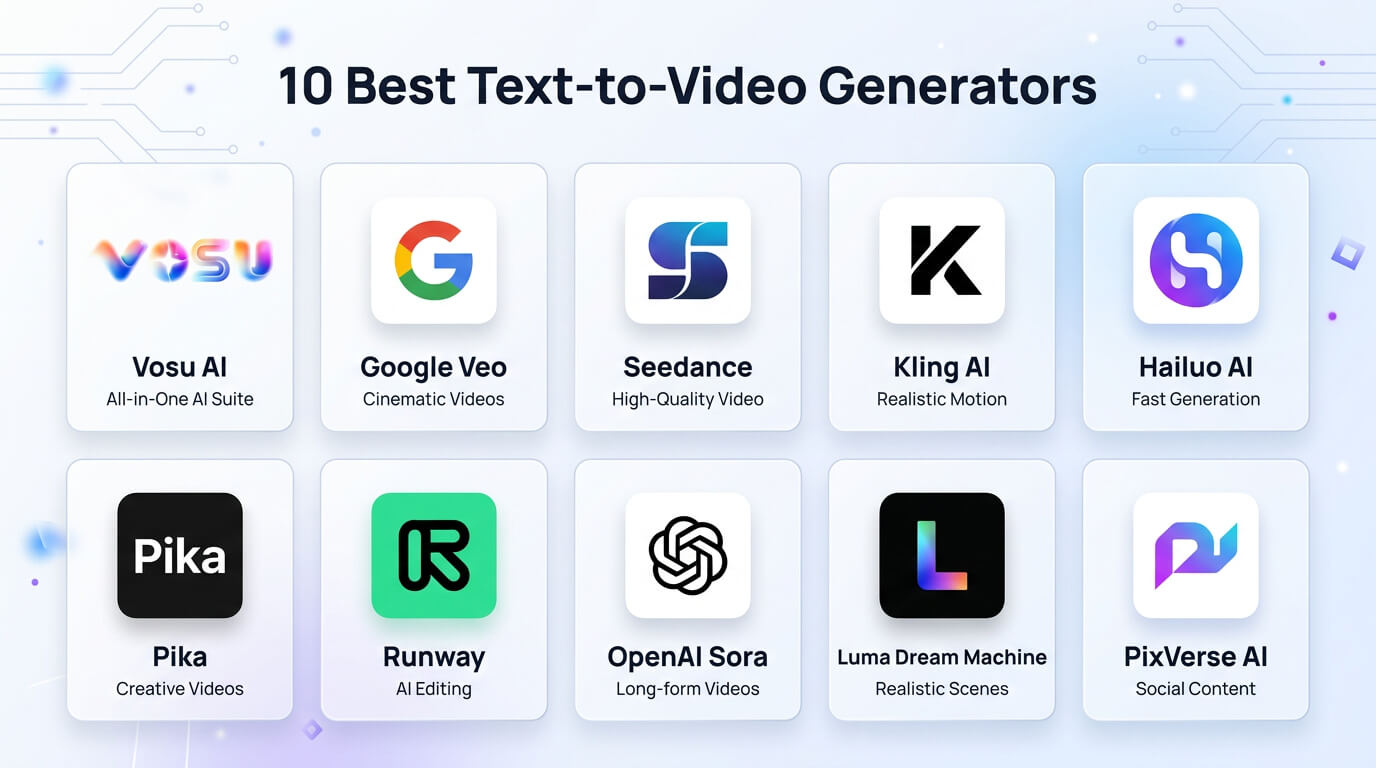
The best text to video AI tools are Vsou AI, Google Veo, Runway Gen, InVideo AI, Kling AI and HeyGen. These tools combine strong generation quality with flexible workflows and integrations.
The best text to video AI tools are given below.
- Vosu AI: Vosu AI is a text to video platform that provides access to over 100 leading AI video generation models like Google Veo and Kling AI, which allows users to generate, compare and optimize AI generated videos in one workflow.
- Google Veo: Google Veo is known for cinematic motion, detailed environments and strong prompt adherence, which makes it a popular choice for professional AI video generation.
- Runway Gen: Runway Gen combines text to video, image to video and editing tools in one platform, which helps creators produce polished AI generated videos efficiently.
- InVideo AI: InVideo AI focuses on marketing content, combining templates, script assistance and video generation to create ads, social clips and explainers quickly.
- Kling AI: Kling AI offers fast, high quality video generation with broad style support, which allows users to control realism, motion and pacing effectively.
- HeyGen: HeyGen specializes in avatar based videos, which allow users to create multilingual presenters for explainers, product demonstrations and localized content with minimal effort.
- ByteDance: ByteDance develops AI video tools that combine templates, effects and text driven generation, which help creators produce engaging short form videos efficiently.
Users can access most of these text to video AI models alongside over 100 popular models to generate videos with a simple text prompt.
10 best text to video generators are visualized in the image below.
How to create text to video AI content?
Create text to video AI content by choosing the platform, selecting the model, entering your prompt, selecting the duration, choosing the aspect ratio and generating the video. These steps help streamline the creation process and ensure the final video aligns with your intended style and requirements.
The 7 steps to create text to video AI content are given below.
- Choose the platform: Choose a platform for creating AI videos such as VosuAI, which centralizes many AI tools so you can create videos using artificial intelligence without juggling multiple separate services.
- Select the model: Select the model best suited for creating video with AI, which balances realism, speed and control and assures it supports your desired style, resolution and use case before moving to prompt design.
- Enter your prompt: Enter your prompt as detailed text descriptions that specify setting, characters, motion and style so the system converts written prompts into coherent scenes aligned with your narrative or message.
- Select the duration: Select the duration that matches your goal, which keeps clips short for social and longer for explainers, because video length influences pacing, scene count and how densely the model packs actions.
- Choose the aspect ratio: Choose the aspect ratio based on distribution channels such as vertical for mobile first feeds and widescreen for desktops, so your framing feels native and avoids awkward cropping or space.
- Configure audio: Configure audio by adding voiceover, music or sound effects, either via built-in text to speech and libraries or external uploads, which secures levels and tone match the visuals for a cohesive experience.
- Generate: Generate the video and review the output, then refine the prompts, timing or audio. This process continues until the AI generated video meets your requirements and quality standards.
How much does text to AI video generation cost?
Text to AI video generation costs range from $10 to $99 per month for creators and over $200 per month for professional or enterprise plans. It varies by chosen platform, subscription tiers, model quality, video length, resolution, model quality, commercial usage rights and how many versions you need to iterate during a project. VosuAI pricing starts at $10 per month for 5,000 AI credits, while the Creator plan costs $29 per month with 16,000 credits, which makes it an affordable option for text to video generation.
Is text to video AI free to use?
No, text to video AI is not free to use, but platforms like VosuAI limit free access to test the output to help users to decide before purchasing the premium plans. These platforms require subscriptions for longer, high quality outputs without restrictions, as generating fully produced videos consistently demands significant GPU resources that free tiers cannot support.
What is the difference between text to video AI and image to video AI?
Text to video AI and image to video AI differ mainly in what they start from and how they preserve visuals. Text to video AI generates videos from a detailed text prompt, which creates scenes, objects and motion from scratch. Image to video AI starts from an existing static photo and animates it into a video while maintaining the visual consistency of the original image.
Do text to video and text to image generation work the same way?
No, text to video and text to image generation do not work the same way. Text to image generator works by creating a single frame from a prompt, while text to video generator must generate many frames while maintaining visual consistency over time. Text to video generator builds on similar foundational AI architecture but adds motion modeling and temporal consistency, which makes it more complex.
Is AI generated video good enough for professional use?
Yes, AI generated video is good enough for professional use in areas like social media content and product mockups, where speed and scalability matter. AI generated video is not yet a full replacement for traditional video production, especially for high end films or commercials that require precise control, realism and creative nuance.
Can you make money with AI generated videos?
Yes, you can make money with AI generated videos when they solve a specific business need such as clear client deliverables, ads or educational content tied to revenue. You can not expect to profit by just generating content without a strategy, because the market is highly competitive and undifferentiated content struggles to attract audiences or revenue.
Can AI video generators replace human actors?
No, AI video generators can not replace human actors in a full sense, even though they already automate pieces of performance. They excel at producing corporate avatars, explainer presenters and automated dialogue replacement, but the acting industry still relies on human nuance and authentic emotional range that current systems never replicate.