Google Veo 3 converts simple text prompts into cinematic, high quality videos with synchronized visuals, motion and native audio. It uses multimodal AI systems to understand prompts and generate realistic scenes, characters, camera movements, lighting and sound in a consistent and structured way. The model offers features like text to video, image to video, video to video, reference image control, lip sync dialogue and cinematic camera controls, which make it suitable for professional level video creation. It is widely used by content creators, filmmakers, marketers, educators, designers and businesses to quickly produce engaging videos for social media, training, storytelling and product visualization. Google Veo 3 helps users turn ideas into videos without needing traditional production tools or large teams.
Google Veo 3 has limitations such as short clip duration, high cost, usage limits, slow rendering times and occasional inconsistencies in audio, lip sync and character continuity. Its longer videos require manual stitching of multiple clips, which adds extra editing effort. Users can use platforms like VosuAI to manage workflow challenges as it provides simplified access, credit based pricing and tools for editing and scaling production.
Google Veo 3 costs range from $19.99 to $199.99 per month based on usage limits and features, while VosuAI offers affordable subscription plan starting from 10 $ to 29 $. It is also available through Google’s ecosystem, such as Gemini, Google AI Studio and Workspace, under paid plans like Google AI Pro and Ultra. The model works best when combined with careful prompting and external tools for extended production workflows.
What is Google Veo 3?
Google Veo 3 is an advanced AI video generation model that turns simple text prompts into complete cinematic clips that combine visuals, motion and sound into a single video. The model produces cinematic 4K output by interpreting natural language instructions and generating realistic visual scenes. The system includes native audio and synced dialogue generation, so Veo 3 creates background sound, sound effects and spoken lines that match what happens on screen. It gives creators direct cinematic control through prompts, which helps guide camera movement, style, pacing and framing without needing complex editing tools. It offers ratio flexibility, so the same idea generates for vertical, square or widescreen formats.
How does Google Veo 3 work?
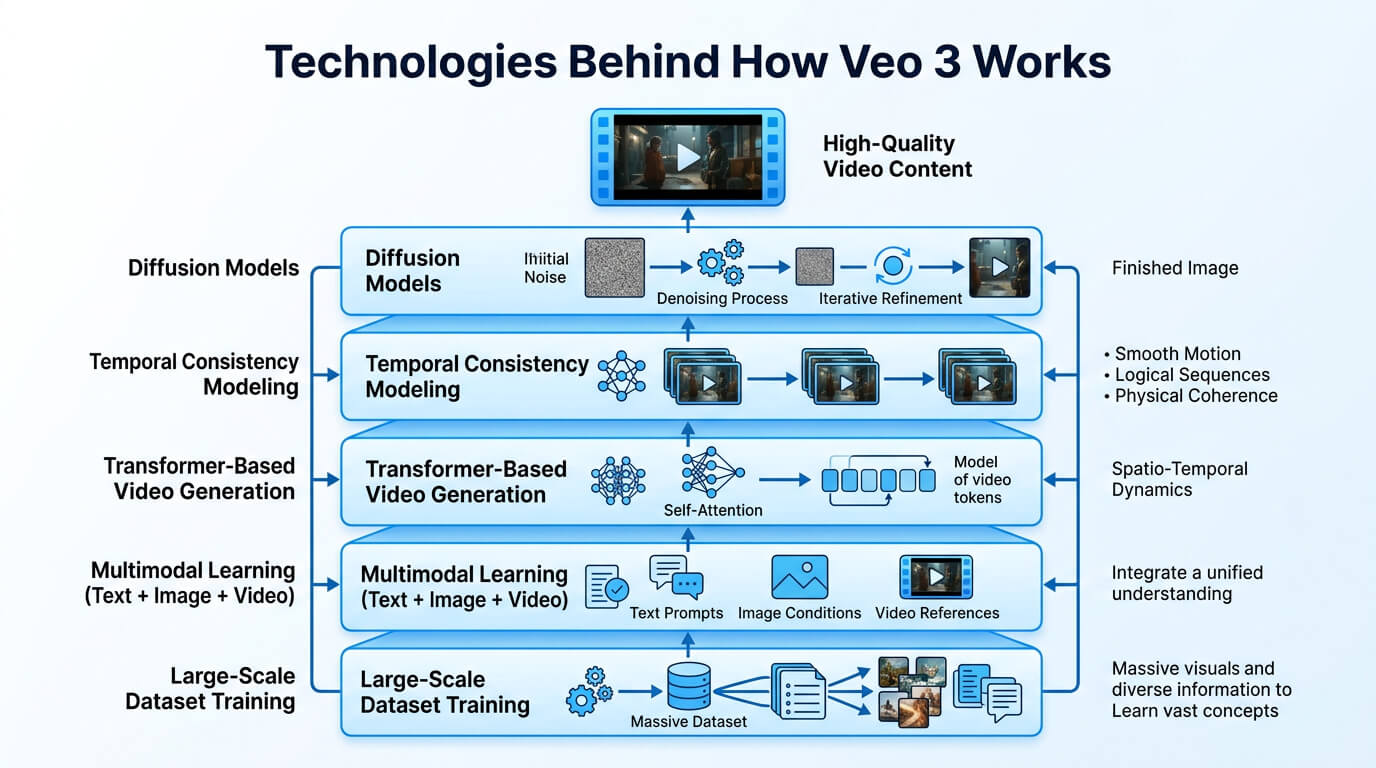
Google Veo 3 works by using advanced AI systems to understand prompts and generate videos with synchronized visuals and audio. The Veo 3 AI model processes these inputs through state of the art multimodal diffusion networks, which generate and refine video frames step by step while maintaining visual consistency across scenes. Veo 3 translates prompt details into scenes, characters, camera movements and visual effects, which produce consistent and realistic video sequences.
Google Veo 3 also generates synchronized audio, which includes dialogue, sound effects and ambient sounds that remain aligned with the visuals. It interprets text, image and reference inputs together using multimodal prompting to create accurate video outputs. It produces realistic, consistent and high quality videos through this process from a single prompt.
The infographic below shows the technologies behind how Veo 3 works.
What are the features of Google Veo 3?
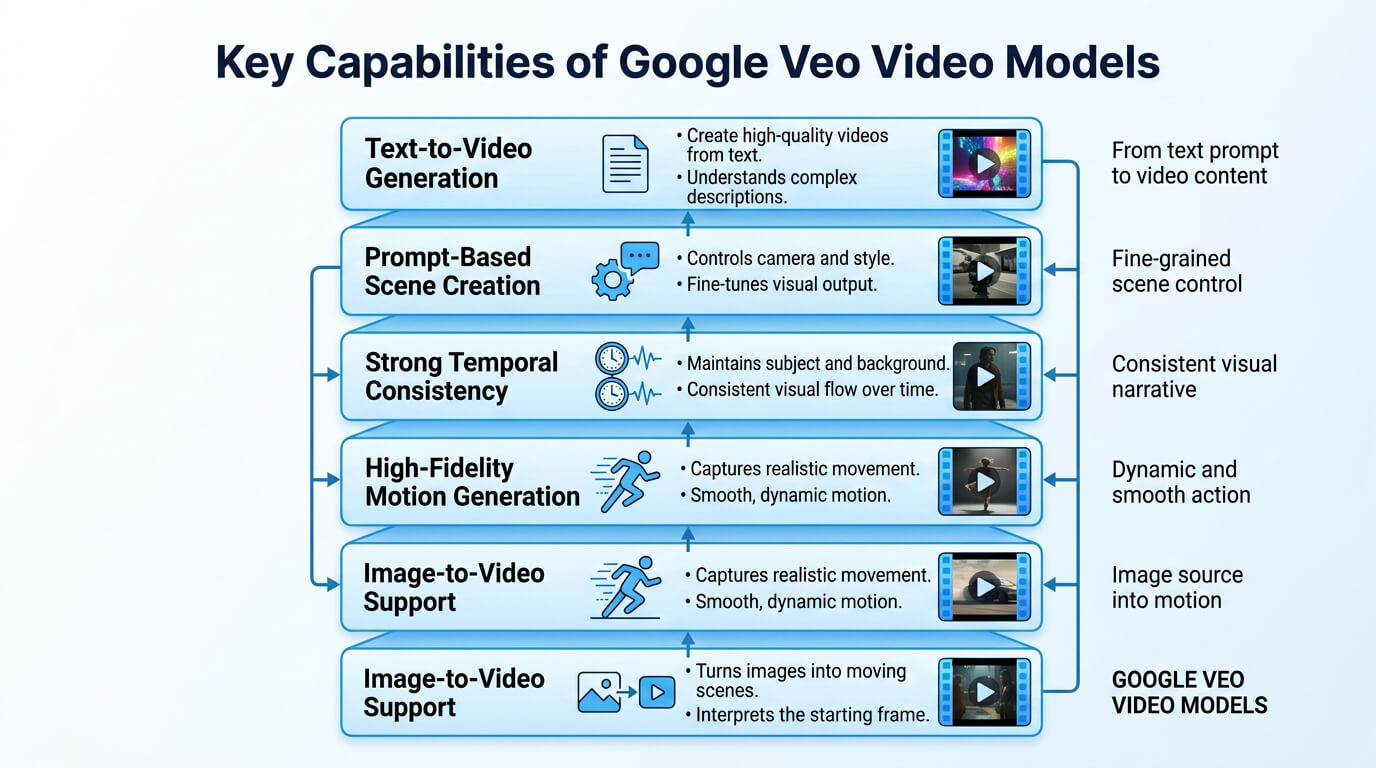
The features of Google Veo 3 include native audio generation, synchronized dialogue and lip syncing, real world physics simulation, cinematic controls, image to video and text to video. These features help creators make engaging stories easily with less technical effort, so non experts also create cinematic effects without difficulty.
The features of Google Veo 3 are given below.
- Native audio generation: Google Veo 3 generates sound effects, ambient audio and character voices directly within videos, which creates immersive and realistic viewing experiences without external audio tools.
- Synchronized dialogue and lip syncing: Google Veo 3 creates dialogue and aligns lip movements with spoken words, so it helps characters appear and improves overall scene consistency.
- Real world physics simulation: Google Veo 3 simulates natural movement, object interactions and environmental behavior, which helps generate scenes that follow realistic physical rules and appear more authentic.
- Cinematic controls: Google Veo 3 provides camera movement, shot composition and lens style controls, which allow creators to produce professional content with greater creative flexibility.
- Deep prompt adherence: Google Veo 3 follows detailed instructions and translates prompt elements into scenes, actions and visual details while maintaining intended storytelling.
- High fidelity video output: Google Veo 3 produces sharp visuals, realistic textures and detailed environments, which helps creators generate polished videos with strong visual quality and clarity.
- Framing flexibility: Google Veo 3 supports different aspect ratios and camera framing options, which makes content suitable for social media, presentations and multiple viewing platforms.
- Text to video: Google Veo 3 converts written descriptions into complete video scenes, which helps creators transform ideas into engaging visual content through simple text prompts.
- Image to video: Google Veo 3 animates static images and adds motion to visual elements, which helps creators turn existing pictures into dynamic video sequences.
- Video to video: Google Veo 3 transforms existing video footage into new visual styles or formats while preserving key actions, movements and overall scene structure.
- Scene extension: Google Veo 3 extends existing video clips beyond their original length, which helps creators continue actions, environments and story progression more naturally.
- Reference image support: Google Veo 3 uses reference images to guide character appearance, objects and visual styles, which helps maintain consistency throughout generated video content.
Who is Google Veo 3 for?
Google Veo 3 is for creators, professionals, educators, businesses and learners who want to generate high quality AI videos from prompts with synchronized visuals, audio and cinematic storytelling. They transform ideas into compelling video content faster while reducing the time, effort and resources required for traditional production workflows.
The users of Google Veo 3 are given below.
- Content creators: Content creators use Google Veo 3 to produce engaging videos, animate visual content, test creative ideas and publish professional content faster without relying on complex production workflows.
- Social media managers: Social media managers use Google Veo 3 to develop engaging short form videos, support content strategies, maintain brand consistency and increase audience interaction across platforms.
- Filmmakers: Filmmakers explore scene visualization, camera movement concepts and narrative planning with Google Veo 3, which helps streamline creative development before production starts.
- Storytellers: Storytellers turn written narratives into cinematic visual experiences with Google Veo 3, which helps create immersive stories, stronger emotional impact and richer audience connections.
- Marketers: Marketers leverage Google Veo 3 to communicate brand messages clearly, showcase products creatively, create promotional videos and support broader campaign objectives.
- Advertising teams: Advertising teams develop multiple campaign concepts with Google Veo 3, test creative variations efficiently and accelerate content production for different target audiences.
- Solopreneurs: Solopreneurs build brand visibility through Google Veo 3 by presenting services professionally, explaining offerings clearly and producing marketing content without external support.
- Educators: Educators apply Google Veo 3 to quickly visualize complex concepts, enhance instructional materials, improve classroom participation and support effective learning outcomes.
- Visual designers: Visual designers experiment with creative directions, motion concepts and presentation visuals through Google Veo 3, which helps refine ideas before final production.
- Students: Students benefit from Google Veo 3 by creating academic projects, improving presentations, producing product demonstrations and developing practical visual communication skills.
What are the use cases of Google Veo 3?
The use cases of Google Veo 3 include marketing and advertising, content creation, cinematic storytelling, image to video animation, corporate training, storyboarding and B roll generation. Veo 3 allows users to create high quality AI generated videos for a wide range of creative and professional purposes.
The use cases of Google Veo 3 are given below.
- Marketing and advertising: Google Veo 3 helps brands create promotional videos quickly, which allows teams to test campaign ideas, showcase products and produce engaging content without a traditional physical shoot.
- Social media content creation: Google Veo 3 supports creators in producing short and engaging videos for social platforms, which helps them maintain consistent publishing schedules and respond quickly to trending topics.
- Cinematic storytelling: Google Veo 3 allows filmmakers to create visually rich scenes, develop story concepts and experiment with creative narratives before investing in larger production resources.
- Image to video animation: Google Veo 3 transforms static images into dynamic video sequences, which help creators add motion, visual depth and storytelling elements to existing visual assets.
- Educational content development: Google Veo 3 assists educators in creating visual learning materials, which makes complex topics easier to explain through engaging video examples and instructional content.
- Corporate training: Google Veo 3 supports corporate training programs by generating instructional videos, workplace simulations and learning materials that improve employee understanding and knowledge retention.
- Storyboarding and pre visualization: Google Veo 3 helps production teams visualize scenes before filming, which makes it easier to refine camera plans, creative direction and overall project structure.
- B roll generation: Google Veo 3 creates supplemental footage for presentations, documentaries and marketing videos, which reduces production effort while providing relevant visuals for different storytelling needs.
- Ad concept rapid iteration: Google Veo 3 allows teams to test multiple creative concepts quickly, compare variations and improve campaign ideas before final production decisions.
You can use VosuAI for marketing, content creation, image to video animation, training and storytelling videos, as its unified dashboard makes video generation easier to manage for professional or non professional creators.
What are the limitations of using Google Veo 3?
The limitations of using Google Veo 3 include clip length, usage caps, high cost and inconsistent results with audio, characters and complex scenes. These limitations make it more difficult to create long form videos, maintain consistent characters across scenes and achieve reliable results in demanding creative workflows.
The limitations of using Google Veo 3 are given below.
- Clip length limit: Google Veo 3 restricts each output to short video segments, so creators must divide longer narratives into multiple scenes before completing a full project.
- Manual stitching for longer videos: Google Veo 3 requires combining separate generated clips through editing software, which adds extra editing work and increases the time needed to complete a polished video project.
- High generation cost and credit consumption: Google Veo 3 increases resource usage during prompt testing and regeneration, which makes large scale video production expensive and impractical for users with limited credits.
- Daily generation usage limits: Google Veo 3 creates generation limits that reduce the number of videos users produce within a day, which slows progress on larger content projects.
- Slow rendering times: Google Veo 3 occurs because strict policy filters and processing requirements review outputs carefully, which extend waiting times for complex video generations.
- Audio and lip sync inconsistencies: Google Veo 3 creates occasional mismatches between spoken dialogue and character movements during scenes that include complex camera movements and detailed character interactions.
- Character continuity issues: Google Veo 3 causes slight changes in appearance, clothing or lighting between scenes, which makes it harder to maintain visual consistency throughout a video.
VosuAI lets users overcome most of these limitations, like high generation cost and slow rendering times. It improves workflow efficiency, manages longer projects, maintains consistency and supports scalable AI video production.
How much does Google Veo 3 cost?
Google Veo 3 costs range from $19.99 to $199.99 per month, which depends on the plan and usage requirements. Veo 3 is available on Google’s official website as Gemini subscription plans like Google AI Pro and Google AI Ultra. Google Veo 3 pricing also depends on factors such as platforms, video length, quality level, monthly credit allotment, model mode region or availability and subscription tier.
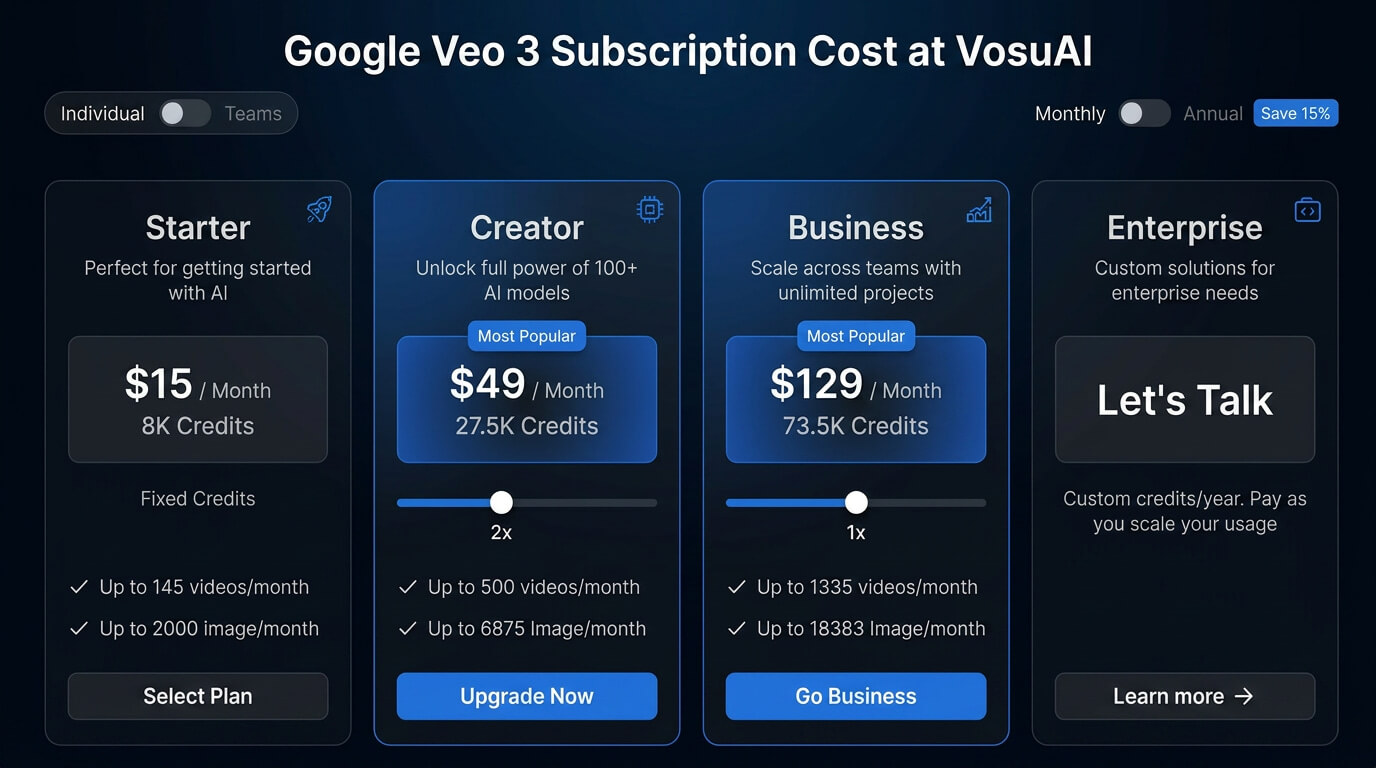
Google Veo 3 is also available on third party platforms like VosuAI, which offers credit based subscription plans like starter, creator and enterprise instead of usage limits. VosuAI costs start at $10 per month with 5000 AI credits, a creator plan for $29 per month with 16000 AI credits and an enterprise plan comes with customized pricing. These credits are also accessible for over 100 popular video generation models, which include all the Veo models such as Veo 3.1, Veo 3.1 Fast, Veo 3.1 Lite and Veo 3.1 Reference to Video.
The image below shows the Google Veo 3 subscription cost at VosuAI.
How to access Google Veo 3?
You can access Google Veo 3 through the Gemini web app, Google AI Studio or Google Workspace by subscribing to a premium tier, like Google AI Pro or Ultra. Access Veo 3 in the Gemini web app by purchasing an active Google AI Pro or Google AI Ultra subscription. Open Gemini on desktop or mobile after upgrading, go to the prompt bar and click the video icon. Enter a detailed prompt describing the scene, camera movement and audio to generate a video. Access Veo 3 through Google AI Studio, which is designed for advanced users and developers. This method requires API or early access permissions tied to a premium Google AI subscription or developer access, which allows more controlled and experimental video generation workflows.
Access Google Veo 3 through alternative platforms like VosuAI, which provides a simplified workflow by focusing on editing and post production enhancement rather than raw video generation**.** VosuAI is also a cost effective creative platform, which provides access to over 100 AI tools like Veo 3 and Veo 3.1 that support video editing, automation and content creation workflows. It helps creators work with multiple models efficiently at an affordable production cost.
How to create content with Google Veo 3?
To create content with Google Veo 3, go to platforms like VosuAI, select the model, reference image input, input the prompt, use PromptGPT, select aspect ratio and generate video. These steps create a structured workflow and produce videos with consistent visuals, clear messaging and strong quality.
11 steps to create content with Google Veo 3 are given below.
- Go to VosuAI: Go to VosuAI, signup to your account, purchase the subscription plan and open the video generation dashboard to start the project.
- Select the model: Select the Google Veo 3 model from the interface to create high quality, realistic videos with synchronized visuals and audio with its advanced AI video generation capabilities.
- Reference image input: Click on the upload option, select your desired reference image file in JPG or PNG format and wait for it to finish importing.
- Input the prompt: Input the prompt to describe a cinematic video scene in vivid detail, specifying environment, characters, actions and mood that guide the video generation process.
- Use prompt enhancer: Activate the prompt enhancer to automatically expand and refine your instructions. The tool helps transform basic ideas into richer prompts that improve generation quality and detail.
- Use PromptGPT: Access VosuAI's PromptGPT to create or refine prompts in text or JSON format. Include details such as the subject, scene, camera style, camera movement, lighting, visual effects, mood and audio preferences to generate more accurate Veo 3 outputs.
- Select aspect ratio: Select an aspect ratio such as 9:16, 16:9 or auto for portrait or landscape video formats optimized for social media, websites or other platforms.
- Select duration: Select a duration such as 4s, 6s or 8s to control video length and ensure the generated content matches your desired video output.
- Select resolution: Select a resolution such as 720p, 1080p or 4K to balance video quality and performance so the output looks good and runs smoothly across devices.
- Generate audio toggle: Enable the generate audio toggle to produce native audio such as synchronized dialogue, sound effects and ambient sounds for professional level customization.
- Select output quantity: Select output quantity such as 1, 2, 3 or 4 to generate multiple video variations, which makes it easier to compare results and select the best version.
- Generate: Click on the generate now option to create the final video based on your selected settings, reference image and prompts.
How to write effective prompts for Google Veo 3?
To write effective prompts for Google Veo 3, describe the scene, subjects, camera movements, lighting and style. Include crucial visual details, character actions and ambient sound details to improve accuracy. The best prompts for Veo 3 use clear instructions and specific context, which helps generate more realistic, engaging and consistent video outputs.
Can Google Veo 3 create realistic videos?
Yes, Google Veo 3 can create realistic videos because it uses advanced generative AI that understands complex prompts and produces cinematic videos with visual detail and natural motion consistency**.** It generates realistic skin on Veo 3, smooth motion and lighting effects while maintaining scene depth and realism. It produces silent clips with stable visual continuity and believable environments.
Is Google Veo 3 worth it?
Yes, Google Veo 3 is worth it because it generates realistic videos from a single text prompt with strong visual detail and motion quality. Its review insights show that users value its ability to quickly produce social clips and engaging content. Google Veo 3 is worth it for content creators and businesses because it saves time and improves production quality.
Is Google Veo 3 better than Google Veo 2?
Yes, Google Veo 3 is better than Google Veo 2 because it improves prompt adherence, produces higher visual quality and delivers more stable motion for realistic video generation. Veo 3 follows user instructions more accurately and generates more consistent results in comparison to Google Veo 2. Google Veo 2 is used as a baseline to compare motion smoothness, visual detail and prompt accuracy against Veo 3 outputs.
Does Google Veo 3 generate videos faster than other AI models?
No, Google Veo 3 does not always generate videos faster than other AI models because generation speed depends on model design, server availability, prompt complexity and output settings. It focuses on high quality Veo 3 video generation and handles complex video prompts effectively. It includes a fast mode, while some AI models generate videos more quickly in certain situations.
Does Google Veo 3 generate videos faster than Kling 3.0?
No, Google Veo 3 does not generate videos faster than Kling 3.0. Kling 3.0 is reported to achieve faster render times in many workflows. Veo 3 focuses more on visual quality and native audio generation, while Kling is known for strong character consistency and speed.
Are there any alternatives to Google Veo 3?
Yes, there are Google Veo 3 alternatives because several AI video tools offer similar or stronger capabilities at different price points. These alternatives include OpenAI Sora, Runway Gen 4, Kling AI and Pika. They support complex prompts and some provide native audio generation and enhanced scene continuity for more consistent video outputs. Users can access most of Veo 3 alternatives through all in one content creation operating system VosuAI.