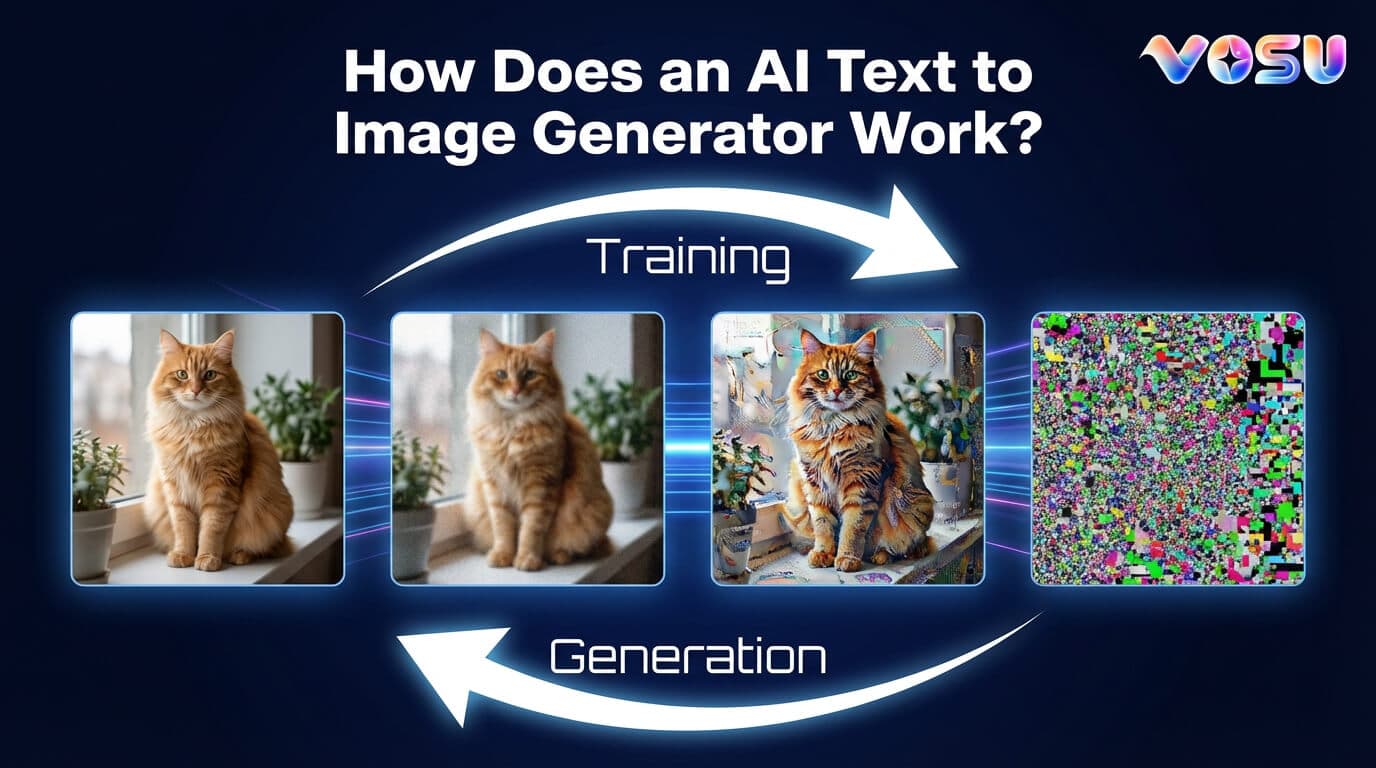
An AI text to image generator transforms text prompts into images through training on massive image and text datasets. It interprets the prompt using a text encoder that converts words into numerical vectors. The AI text to image generator applies a diffusion model to turn random noise into detailed images step by step. It refines and sharpens visuals for clarity, producing high quality, relevant images from text inputs.
4 steps of how an AI text to image generator works are given below:
- Training on large datasets
- Processing the text prompt
- Generating the image (diffusion process)
- Refinement and final output
1. Training on large datasets
An AI text to image generator trains on large datasets containing millions of images and corresponding text descriptions. It uses datasets like LAION 5B, COCO and Adobe Stock to learn. It links image components with corresponding text labels in each pair. An AI text to image generator learns the complex relationship between language and visual concepts by repeatedly adjusting model parameters. The large dataset covers diverse subjects and styles that enable the generator to create accurate, varied images from text prompts. Large datasets provide the variety and scale needed to capture language image connections effectively for realistic results.
2. Processing the text prompt
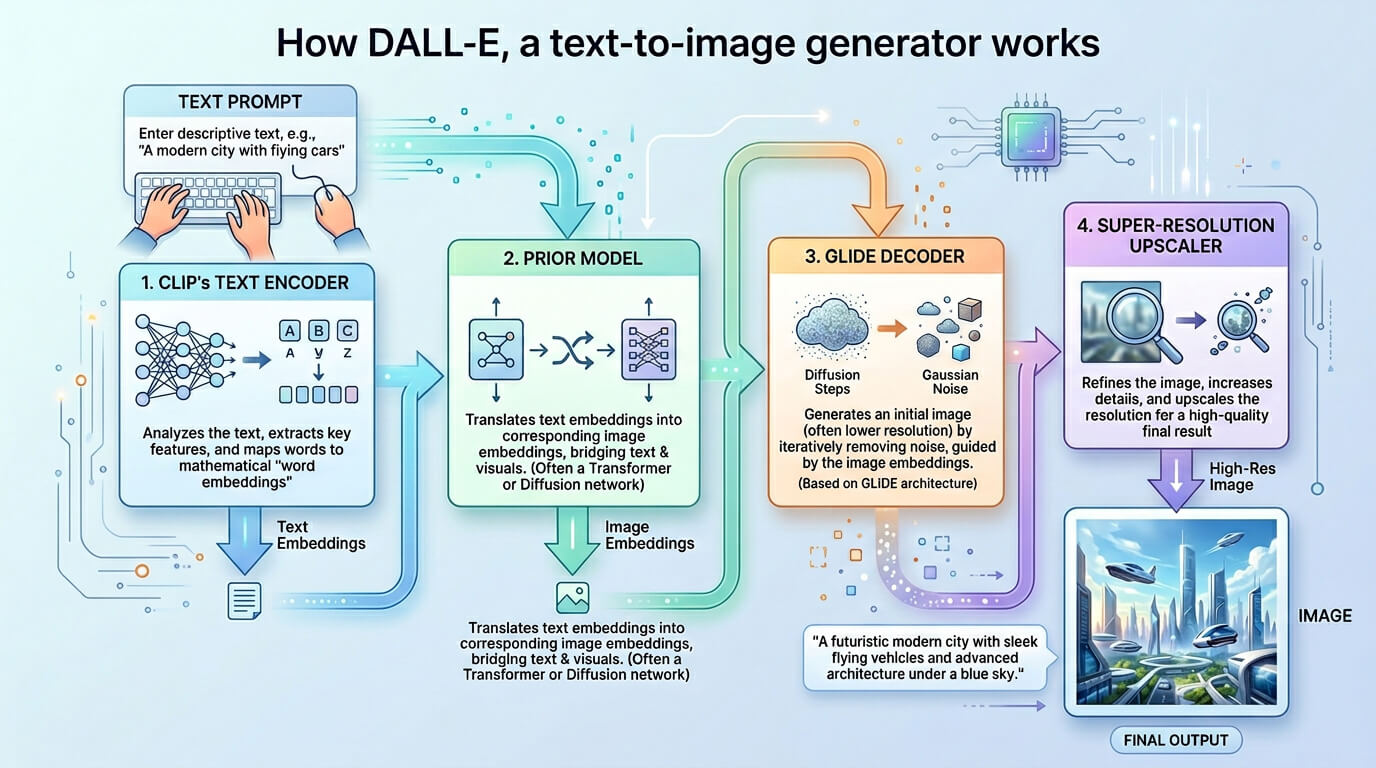
An AI text to image generator processes the text prompt by using a text encoder that converts human language into numerical embeddings. Natural Language Processing captures semantic meaning and context from the prompt. The text encoder transforms this data into vectors that the image generating model interprets. The model uses these embeddings to guide the creation of images matching the prompt. This approach links language understanding directly to visual elements, which allows precise image generation from descriptive text within the model's learned patterns and knowledge.
3. Generating the image (diffusion process)
AI text to image generation diffusion process starts with a random noise applied to an image, disrupting its structure across many steps. The forward diffusion steadily adds noise to the image, transforming it into pure noise, which means no visible content remains. The reverse diffusion uses a deep learning model trained on vast datasets to gradually remove noise, step by step, reconstructing a high quality image that matches the text prompt. Models like Stable Diffusion, DALL-E2, Vosu.ai and Imagen rely on this approach, connecting the text prompt and training data to accurately turn chaos into recognizable, detailed visuals that reflect user instructions.
4. Refinement and final output
An AI text to image generator performs refinement using diffusion model techniques. It removes noise and sharpens details for clear visuals. Text to image generator applies high resolution decoding to upscale images without losing quality. It receives user input to fine tune composition and make targeted adjustments. Text to image generator enhances color, contrast and texture for vivid realism. It completes a final quality check to ensure accurate representation and visual appeal. Text to image generator delivers polished, high resolution images optimized for user satisfaction and precise content matching.
What is an AI image generator?
An AI image generator is a tool that interprets text descriptions called prompts and creates matching images. It uses generative artificial intelligence to convert words into visual content. This generator understands semantic details from prompts to produce original images. It processes text input through neural networks trained on large image text datasets. This AI image generator generates images by transforming random noise into defined visuals. An AI text to image generator produces high quality images from prompts without human drawing. It uses deep learning models to link language and images effectively. This tool brings text to life by creating visuals based on descriptions.
What is an AI image?
An AI image is an image created by artificial intelligence using a descriptive text prompt. It transforms words into visual content through programmed steps. Text to image generator receives descriptive text prompts and converts those into AI images. It uses models trained on lots of image and text data to link words to image features. Text to image generator produces new AI images that match the prompt details. It allows artificial intelligence to create images without manual drawing or photography. The process turns text instructions into clear, relevant pictures quickly and efficiently using advanced algorithms.
What are the best AI text to image generation models?
The best AI text to image generation models are mentioned below.
- Vosu: Vosu produces visuals using top models from text with a fast interface and a modern approach that makes image creation precise for different content types.
- Midjourney: Midjourney creates detailed pictures with a strong artistic focus and consistency across scenes, perfect for unique art, branding and creative projects.
- DALL-E3: DALL-E3 renders accurate images using advanced text interpretation and delivers balanced results with strong detail and reliable color control.
- Adobe Firefly: Adobe Firefly delivers polished images suitable for professional work and integrates with Creative Cloud, which covers diverse visual and branding needs.
- Stable Diffusion: Stable Diffusion produces open, customizable results with broad public adoption and lets users control composition, style and quality in each image.
- Ideogram: Ideogram renders clear images with strong text representation, making it popular for posters, ads and any visuals that require accurate text.
How long does AI image generation take?
AI Image Generator takes about 10 to 60 seconds for image creation and depends on prompt complexity, model type, hardware speed and software efficiency. Text to image generator uses user skill and iteration to adjust outputs. It also depends on image quality settings and subscription level for processing power availability. Text to image generator performance varies with these factors. It affects the overall generation time significantly.
The AI text-to-image generation process is visualised below.
How to create images with artificial intelligence?
5 steps to create images with artificial intelligence are outlined below.
- Go to Vosu's image generator: Go to Vosu's image generator website to begin the AI image creation process.
- Select an image generation model: Select a model that suits the style or type of AI image you want to generate.
- Enter your prompt: Write an AI image prompt as a detailed text description to guide the AI in generating the image. Vosu also has its own prompt generator.
- Select the aspect ratio: Select the aspect ratio that fits your image’s intended size and format.
- Select the number of images and generate: Select how many AI images you want and click generate to create your visuals.
What are the use cases of AI image generation?
The use cases of AI image generation are given below.
- Marketing and advertising: Marketer uses customized AI influencers created by Vosu.ai to improve brand awareness and deliver impactful visuals for various advertising and promotional campaigns that allow brands to engage audiences effectively.
- Content creation: Content creators produce unique AI images that match specific article themes or video ideas using platforms like Vosu, which enhances originality and audience interest.
- Illustrations: Illustrators develop precise AI visuals based on detailed descriptions, supporting books, comics and educational materials with clear imagery.
- Design and entertainment: Designers use AI to generate product images and conceptual art, accelerating creative workflows in fashion, gaming and multimedia projects.
What are the benefits of text to AI image generation?
The benefits of text to AI image generation are outlined below.
- Saves time and resources: AI image generation quickly produces images that reduce the need for manual design work
- Reduces costs: AI eliminates the need for expensive software and professional designers, which cuts overall costs.
- Scalability: AI can generate large volumes of images, which makes it easy to scale up production for various projects.
- Boosts creativity: AI allows users to explore different styles that enhance creative possibilities without needing advanced skills.
- Brand consistency: AI ensures that all images align with a brand's style, maintaining consistent visuals across content.
- Wide applications: AI image generation has diverse uses, including marketing, entertainment and education.
- Automated optimization: AI automatically adjusts images for better quality, which saves time on edits and improvements.