Veo transforms text prompts, images and editing instructions into cinematic videos using natural language processing and diffusion based video generation. Veo began as part of Google DeepMind’s multimodal AI research and was publicly introduced at Google I/O 2024 as a major advancement in AI video generation. It works by interpreting prompts, converting them into structured scene representations and generating latent video frames through diffusion models. This assures temporal consistency, realistic physics and optional synchronized audio before decoding the final video output. Its available models include Veo 2, Veo 3, Veo 3.1, Veo 3.1 Fast and Veo 3.1 Lite, each balancing quality, speed and cost.
Veo offers text to video generation, image to video generation, high visual fidelity, cinematic control, multi-style rendering and consistent motion across frames. It is widely used for marketing videos, social media content, film pre-visualization, product demos, education and creative ideation. Veo still has limitations such as usage caps, limited fine control, occasional visual inconsistencies, policy restrictions and reliance on external tools for full audio customization.
Veo costs range from $19.99 to $199.99 through Google plans, while platforms like VosuAI offer credit based access starting at $10 per month. You can access Veo through Google Gemini, Google Vids, Google AI Studio or unified platforms like VosuAI. Users can generate videos through using VosuAI by selecting a model, inputting a prompt, optionally uploading a reference image, refining settings and generating videos, which makes it accessible even without technical skills.
What is Veo?
Veo is a generative AI video model developed by Google that creates high quality, cinematic videos from text prompts, images and editing instructions. It is part of Google’s family of video generation models designed to transform creative prompts into consistent moving visuals with realistic motion, lighting and scene composition. Veo interprets natural language descriptions, applies learned visual patterns and generates detailed video frames that match the requested style, pacing and composition.
What is the history of Veo?
The history of Veo begins with its development at Google DeepMind as a text to video generative AI model designed for high fidelity video synthesis from natural language prompts. It was first announced at Google I/O 2024, where Demis Hassabis introduced it as a model capable of generating 1080p videos longer than one minute from text descriptions. This introduction positioned it as a major step in competitive frontier video generation, which focuses on cinematic motion, scene consistency and realistic physics.
Veo then moved through successive iterations that improved visual quality, motion understanding and camera control precision. Its updated versions like Veo 3 and 3.1 introduced higher resolutions, richer scene dynamics and expanded creative tools for users working from short prompts. Veo now stands as Google’s flagship video model, shaped by continuous updates within Google DeepMind following its initial Google I/O debut.
How does Veo work?
Veo works through input processing, prompt and scene understanding, latent video generation, temporal consistency handling, motion and camera modeling and final video decoding and rendering output. It converts human prompts into consistent audiovisual sequences through staged representation learning and generative modeling.
7 steps on how Veo works are given below.
- Input processing: Veo receives a text prompt or paired text image input and tokenizes all content into machine readable representations. It normalizes formatting, extracts key entities and prepares structured embeddings.
- Prompt and scene understanding: Veo analyzes the prompt with natural language processing to infer subjects, environment, camera intent and narrative structure. It maps these semantics into an internal scene graph.
- Latent video generation: Veo encodes the planned scene into a compact latent space and initializes a noisy latent video tensor. It then denoises this latent representation using diffusion transformers to construct consistent frames.
- Motion and camera modeling: Veo simulates character movement, object interactions and physical behaviors according to the interpreted scenario. It also applies virtual camera paths, lens properties and framing decisions to match the requested cinematic perspective.
- Temporal consistency handling: Veo enforces character identity, lighting continuity and environment stability across all frames. It adjusts intermediate latents to reduce flicker, preserve object positions and maintain story consistency throughout the full clip duration.
- Optional audio generation and synchronization: Veo generates voices, sound effects and ambient soundscapes conditioned on the visual plan and textual instructions. It aligns phonemes, beats and environmental sounds with on‑screen actions for synchronized audiovisual output.
- Final video decoding and rendering output: Veo decodes the refined latent video into standard video formats at the requested resolution and aspect ratio. It then applies upscaling, color correction and compression to deliver a finished video clip.
What are the available Veo models?
The available Veo models are Veo, Veo 2, Veo 3, Veo 3.1, Veo 3.1 Fast and Veo 3.1 Lite. They are designed to balance realism, control and computational efficiency based on use case.
6 available models of Veo are outlined below.
- Veo: Veo provides the baseline generative AI video model that delivers strong motion coherence, synchronized audio support through external tools and up to 1080 resolution for general purpose storytelling and content creation.
- Veo 2: Veo 2 extends the original model with improved narrative control, stronger subject tracking and better handling of complex camera moves while preserving cinematic look and feel across diverse scenes and characters.
- Veo 3: Veo 3 focuses on higher fidelity outputs, tighter alignment with nuanced prompts and enhanced consistency over longer clips while maintaining compatibility with synchronized audio pipelines and editing workflows.
- Veo 3.1: Veo 3.1 refines Veo 3 with faster convergence, better edge detail, richer textures and more reliable multi shot narratives, so creators gain improved narrative control with fewer prompt iterations.
- Veo 3.1 Fast: Veo 3.1 Fast offers a cost effective model variant that prioritizes lower latency and quicker turnaround, trading a small degree of visual richness for speed while still delivering strong 4K resolution framing.
- Veo 3.1 Lite: Veo 3.1 Lite provides an even more cost effective model for rapid ideation, draft storyboards and social clips, balancing resource usage with acceptable cinematic quality for everyday content workflows.
These models are accessible through VosuAI, which centralizes access and allows users to switch between different models within a single interface.
What are the features of Veo?
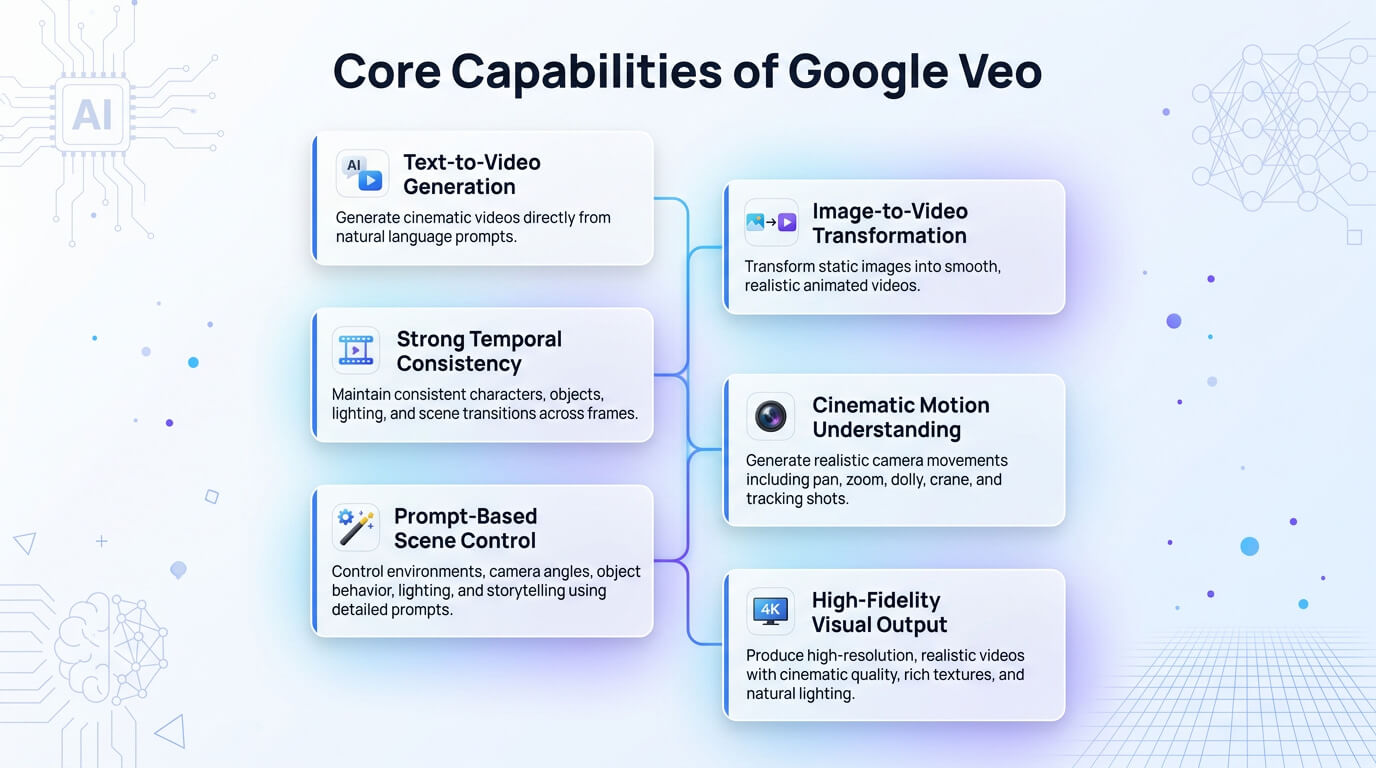
The features of Veo include text to video generation, image to video generation, high visual fidelity, prompt based cinematic control, multi style generation and high resolution video output. It also supports improved motion consistency and realistic scene rendering across longer video sequences.
The core features of Veo are outlined below.
- Text to video generation: Veo lets users describe scenes, actions and styles in natural language and transforms them into visual content with high quality frames suitable for storytelling, marketing and concept previews.
- Image to video generation: Veo converts static images into animated sequences that preserve subject identity while adding motion, camera moves and contextual elements for enhanced visual quality, mood and narrative framing.
- High visual fidelity: Veo delivers crisp textures, detailed lighting and realistic materials so outputs resemble professional footage suitable for high end production look, even when sourced from short creative prompts.
- Prompt based cinematic control: Veo allows users to define camera angles and shot styles such as close ups, tracking shots or aerial views, so scenes match specific directing choices and storyboard requirements.
- Real world physics simulation: Veo helps motions, object interactions and environmental effects behave plausibly, which reduces unnatural behaviors and improves immersion in both realistic and stylized scenes.
- Temporal consistency: Veo maintains consistency across frames that stabilize subjects, backgrounds and lighting so scenes feel continuous, not jittery or flickering, especially in longer clips and complex motion.
- Scene and composition control: Veo lets users specify elements, positioning, depth and framing, so it arranges subjects and environments in visually balanced, storytelling focused layouts.
- Multi style generation: Veo supports different artistic and cinematic styles in a single system, from photorealistic footage to stylized looks, which allow creators to experiment without switching tools.
- High resolution video output: Veo generates 1080p videos and can scale to even higher resolutions, so content is ready for professional pipelines, large screens and premium distribution channels.
- Safety filtering and watermarking (SynthID): Veo adds safeguards to reduce harmful or disallowed content and embeds provenance indicators so viewers and platforms recognize AI‑generated footage responsibly.
- Real world knowledge grounding: Veo incorporates real world context and learned visual concepts, which help generate more accurate scenes, objects and environments that align with how things actually look and behave.
The core capabilities of Googe Veo are shown in the image below.
What are the use cases of Veo?
The use cases of Veo include marketing and advertising video creation, social media video generation, product and concept visualization, creative ideation and concept development. These use cases allow faster content production and help creators and businesses translate ideas into cinematic video outputs with consistent visual quality.
The practical applications of Veo are outlined below.
- Marketing and advertising video creation: Veo supports promotional videos for brands, which allows quick production of campaign visuals that align with consistent visual branding and target audience aesthetics.
- Social media video generation: Veo accelerates short form content creation that helps creators and businesses output 1080p cinematic videos customized to platform formats, trends and engagement patterns.
- Product and concept visualization: Veo turns product descriptions or design sketches into dynamic visuals that let teams show features, use scenarios or speculative designs before physical prototypes exist.
- Film and storytelling pre-visualization: Veo helps directors, writers and storyboard artists explore scenes, camera ideas and pacing through rough yet cinematic sequences before full production investments.
- Creative ideation and concept development: Veo gives artists a playground for exploring worlds, characters and aesthetics, quickly turning narrative fragments into visual directions that guide future work.
- Educational and instructional video creation: Veo supports teachers and course creators in generating illustrative clips that explain processes, environments or abstract ideas more vividly than static images alone.
- Cinematic scene generation: Veo helps writers and creators visualize key beats, emotional moments or complex environments to communicate story intent to collaborators and stakeholders.
- Static to motion transformation: Veo breathes life into portraits, concept art or product shots, adding motion and transitions that keep audiences engaged across different channels.
These use cases are even easier to access in the VosuAI dashboard because its user friendly workflow makes it easy for users to create all kinds of videos.
What are the limitations of Veo?
The limitations of Veo include strict daily usage caps, lack of granular control, visual glitches and inconsistencies, policy and image to video constraints and no built-in voice or audio customization. These limitations are important to understand when planning production workflows, as they can affect scalability, precision and final output consistency.
The limitations of Veo are given below.
- Strict daily usage caps: Veo enforces strict daily usage caps, which allow only 4 or 5 video generations per day, limits large scale experimentation and rapid iterative creative production workflows.
- Lack of granular control: Veo offers limited granular control over scene details that make precise adjustments to motion, composition and visual elements difficult within a single generation prompt.
- Visual glitches and inconsistencies: Veo sometimes produces visual glitches or loses continuity across frames that cause artifacts, inconsistent motion and reduced coherence in complex or extended video scenes.
- Policy and image to video constraints: Veo applies safety filters that restrict certain prompts under policy and image to video constraints, which can block creative inputs and limit generation flexibility.
- No built-in voice or audio customization: Veo base model lacks built-in voice or audio customization, requiring external tools for narration, sound design and music to complete full audiovisual production workflows.
Users can overcome most of these limitations in practical workflows by using VosuAI, as it provides better controls, useful integrations and optimization tools in one place.
How much does Veo cost?
Google Veo costs range from $19.99 to $199.99 per month, which depends on the subscription plan and usage requirements. Google's Veo video generation models are available through Google's AI subscription such as Google AI Pro and Google AI Ultra. Google AI Pro plan charges $19.99 per month and Google AI Ultra plan charges approximate $199.99 per month with 20x higher usage limits.
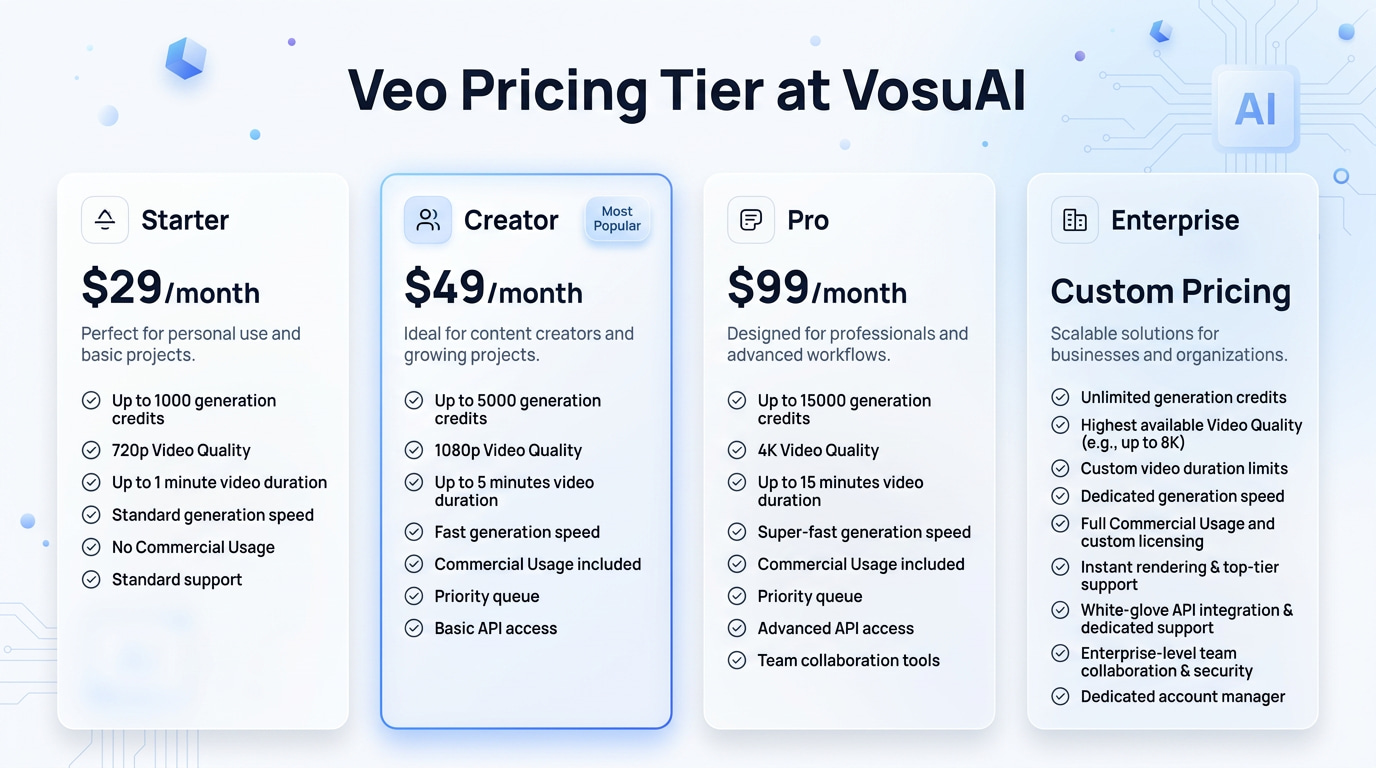
Google Veo is also available on unified platforms like VosuAI, which offers credit based subscription plans like starter, creator and enterprise. VosuAI costs start at $10 per month with 5000 AI credits, a creator plan for $29 per month with 16000 AI credits and an enterprise plan with customized pricing with unlimited AI credits. Users can use these credits to access all the Veo models such as Veo 3, Veo 3.1, Veo 3.1 Fast and Veo 3.1 Lite, in one subscription plan.
The Veo pricing tiers at VosuAI is shown in the image below.
How to get Veo?
To get Veo, users can access through Google Gemini, Google Vids, Google AI Studio and VosuAI. These platforms let users generate videos by simply selecting the model, entering a prompt and adjusting basic settings.
The ways to access Veo are outlined below.
- Google Gemini: Google Gemini provides Veo access through integrations where users with a Google One AI Premium account generate videos by describing scenes alongside other multimodal AI features inside the Gemini interface.
- Google Vids: Google Vids integrates Veo into a video first workspace, where users with a Google Workspace account compose scripts, outlines and visuals that Veo turns into draft edits and illustrative sequences.
- Google AI Studio: Google AI Studio exposes Veo capabilities to developers and technical users, allowing them to prototype applications, tools and workflows that call Veo APIs and integrate generative video into custom products.
- VosuAI: VosuAI offers a unified workflow where users sign up, connect to Veo models, manage credits and generate videos without handling direct API complexities while also accessing multiple models in one place.
How to use Veo?
To use Veo, visit VosuAI, select the model, upload a reference image, provide the prompt, use PromptGPT, adjust settings and click on the generate button. You can preview the result and refine the prompt or settings if needed to improve output quality.
9 steps to use Google Veo through VosuAI are outlined below.
1. Visit VosuAI: Visit VosuAI and log in to the dashboard, go to the video tool where Veo and other connected video models are available for configuration.
2. Select the model: Select the Veo model from the available Veo versions that fits the specific project goal to create high quality, realistic videos with synchronized visuals and audio.
3. Upload reference image: Upload reference image by clicking the upload option, then select your image file in JPG or PNG format so Veo can anchor style, subject identity or composition.
4. Provide the prompt: Provide the prompt describing scene details, style, characters, motion and camera language clearly so the model can align generation with narrative intent and visual storytelling needs.
5. Use Prompt Enhancer: Use the Prompt Enhancer to automatically refine your prompt. This feature expands descriptions and adds useful details that can improve overall video quality and coherence.
6. Use PromptGPT: Use PromptGPT to create structured prompts in text or JSON format. Include elements such as camera movement, shot composition, scene details and cinematic direction.
7. Adjust settings: Adjust settings such as resolution of 720p, 1080p or 4K, aspect ratio of 9:16 or 16:9, video duration of 4s, 6s or 8s to match platform requirements.
8. Select output number: Select output number like 1, 2, 3 or 4 to generate multiple videos, which makes it easier to compare outputs and select the best version.
9. Click on the generate button: Click the Generate button to start the creation process. Veo will generate the video based on your prompt, settings, and reference inputs. Review the results and download your preferred output once generation is complete.
Can I use Veo without technical skills?
Yes, you can use Veo without technical skills because modern AI video tools are designed for beginners and rely on simple, descriptive text prompts rather than coding or editing knowledge. You can use Veo through platforms like VosuAI, which are designed for everyday users and make it easy for beginners to generate videos with just a few clicks.
Can I use Veo for free?
Yes, you can use Veo for free because its official platforms and some platforms like VosuAI provide limited trial usage through promotional credits. VosuAI offers limited credits that let users test the model’s capabilities before purchasing a subscription plan and committing to ongoing use.
Can I use Veo for commercial use?
Yes, you can use Veo for commercial use because Google permits commercial applications subject to applicable terms and usage policies. Veo allows users to create content for business, marketing and professional purposes. VosuAI provides access to Veo for generating a Veo video that can support commercial projects when used in accordance with the platform and model requirements.
How long can Veo AI videos be?
Veo AI videos can be up to 8 seconds long in a standard generation. Veo creates short video clips optimized for cinematic scenes, storytelling, advertisements and social media content. Users can generate multiple clips and combine or extend them to create longer videos when needed.ents, social media content, product showcases and other visually engaging video sequences.
Is Veo worth it?
Yes, Veo is worth it because it offers high quality video generation, realistic motion and strong prompt adherence, which helps users produce professional videos quickly. Its value depends on your creative needs, competitive level and budget, but many creators find it a powerful tool for efficient video production.
What are the alternatives to Veo?
The alternatives to Veo are Runway, Kling AI, Seedance and Sora. These platforms offer unique strengths in video quality, motion control, creative workflows and generation capabilities, which make them popular choices for creators and businesses seeking AI powered video production tools.
Is Veo better than Runway?
Yes, Veo is better than Runway for users focused on highly realistic video outputs and advanced generation quality. Runway remains a strong option because it functions as an end to end creative platform with built-in video editing tools that support broader production workflows.
Is Veo better than Kling AI?
Yes, Veo is better than Kling AI for many creators because it is stronger in cinematic realism and prompt adherence. Kling AI remains competitive thanks to its flexible motion control and faster iteration capabilities for certain creative and production workflows.
Is Veo better than Sora?
Yes, Veo is better than Sora because each model excels in different areas. Veo is praised for cinematic realism and consistency. Sora is recognized for narrative understanding and diverse scene generation capabilities across a wide range of creative use cases.
What is the difference between Veo 2 and Veo 3?
The differences between Veo 2 and Veo 3 are primarily centered on capability improvements. Veo 3 adds native audio synthesis for synchronized sound, improved physics and motion consistency and support for higher resolution video outputs. Veo 2 focuses mainly on high quality visual generation without the same level of integrated audio functionality.