Sora turns text descriptions, images or short clips into realistic, cinematic videos. It interprets written prompts to create scenes with consistent characters, motion, environments and audio rather than relying on cameras or manual animation. Sora was first presented on 15th February 2024 and launched widely on 9th December 2024 after extensive safety testing. It offers better realism, higher resolution and professional grade creative control, while continued improvements led to Sora 2 and Sora 2 Pro in 2025.
Sora uses a diffusion based transformer model that generates video in a compressed latent space, which allows it to understand motion, physics and 3D structure while maintaining consistency across frames. Its key features include text to video and image to video generation, scene understanding, audio synchronization, advanced editing tools and support for multiple aspect ratios.
Sora is used for content creation, filmmaking, marketing, advertising, education, training simulations and business communication. It has limitations like physical inconsistency, video length constraints, control and consistency limits, usage or access limits and safety or content restrictions. Sora’s basic plan starts at $20 per month via ChatGPT Plus, while VosuAI offers it at $10 per month. Users access Sora through OpenAI’s app, web portal or in third party platforms like VosuAI. VosuAI allows users to select the model, enter prompts, configure settings and generate videos through a user friendly, intuitive dashboard.
What is Sora?
Sora is an advanced AI system developed by OpenAI that generates realistic, high quality video from natural language text, images or short video clips. It functions as a text to video model that creates scenes such as motion, characters and environmental details. Sora maintains visual consistency by tracking objects and camera movement across frames. It takes a written prompt that describes a scene and converts this prompt into a short video clip. Its output resembles real footage, animation or fictional imagery, which reduces the need for traditional filming and manual video editing.
What is the history of Sora?
The history of Sora begins with OpenAI’s effort to expand existing image and text models into text to video generation that allows written prompts to create realistic video clips. Sora was developed by OpenAI and first presented on 15th February 2024 by releasing sample videos while access remained limited to internal testing. Sora launched on 9th December 2024 by following months of safety checks to reduce misuse and improve reliability. ChatGPT Plus and Pro users in selected regions gained the ability to generate videos from text. Sora was upgraded to Sora 2 by OpenAI on 30th September 2025, which builds on the first version and introduces improved performance and a mobile app. Sora 2 Pro was launched by OpenAI at the same time, which targeted professional creators by offering higher resolution output, greater stability and precise creative control.
How does Sora work?
Sora works as a large diffusion transformer model designed for text to video generation that operates in a compressed latent space rather than raw pixels. Sora reduces computational cost and improves scalability. Its video compression network converts input videos into this latent space, where each clip is divided into spacetime patches that act as tokens for the transformer. Sora handles different resolutions, video lengths and aspect ratios through this token based representation. This diffusion model is trained on large scale text image video datasets, which allows it to generate videos by starting from noise and progressively denoising latent representations.
Sora learns implicit representations of physics, motion and 3D structure, which support realistic video generation guided by text prompts and reference images or video clips through this training process. Sora maintains a global scene consistent across frames because it uses a diffusion transformer architecture. This design allows capabilities such as extending existing videos, adding or modifying characters and storyboard based editing, where specified keyframes are connected to produce consistent motion.
What are the key features of Sora?
The key features of Sora involve text to video generation, image to video generation, Scene understanding, audio integration and advanced editing tools. These are designed to turn ideas into realistic and controllable video clips using the OpenAI Sora text to video model.
The key features of Sora are outlined below.
- Text to video generation: Sora creates realistic and dynamic videos from text prompts, which support multiple characters, specific motions and consistent backgrounds in one consistent scene.
- Image to video: Sora takes a still image and animates it into a moving scene, which adds camera motion and environment changes while keeping the original look.
- Video remixing and editing: Sora supports extending, re-cutting or restyling clips, so users iterate on Sora video generation outputs or uploaded footage.
- Scene understanding: Sora maintains spatial layout, character identity and object relationships across frames, which reflects an internal model of physics, motion and 3D space.
- Audio integration: Sora generates synchronized dialogue, ambience and effects that follow on screen actions and timing.
- High fidelity and realism: Sora produces sharp, detailed visuals with complex lighting and camera moves suitable for cinematic or commercial use.
- Advanced editing tools: Sora offers tools like storyboard style control, remixing and blending to direct shot composition and narrative beats.
- Flexible resolutions and aspect ratios: Sora supports vertical, square and widescreen formats, which makes outputs usable across social, web and pro workflows.
- Accessibility and integration: Sora is integrated into broader OpenAI workflows, so generated clips slot into editing pipelines and production tools.
What are the use cases of Sora?
The use cases of Sora include content creation, filmmaking, marketing, advertising and education. This helps creative industries and organizations produce high fidelity videos quickly for high quality video production.
The applications of Sora are given below.
- Content creation: Sora lets creators generate shorts, B-roll, stylized scenes and visual fillers from text prompts, which cuts down on cameras, sets and complex live shoots.
- Filmmaking: Sora supports filmmakers with animatics, storyboards and concept previews, which help test camera moves, moods and scenes before expensive production days.
- Marketing: Sora allows marketing teams to produce product demos, launch teasers and platform specific social clips that match brand style with minimal production overhead.
- Advertising: Sora helps agencies prototype and localize ad variations which test messages, visuals and formats faster than traditional video pipelines.
- Education: Sora allows teachers and trainers to build visual explainers, reenactments and step by step process videos that make complex topics easier to grasp.
- Simulations training: Sora stage realistic, scenario based videos for safety training, onboarding and practicing rare or risky events in a low cost, virtual way.
- Business uses: Sora supports internal explainers, product walk throughs and stakeholder presentations with clearer and engaging visual narratives.
These applications become more accessible when using Sora through VosuAI, where a user friendly dashboard simplifies video creation, management and iteration for faster, efficient professional workflows.
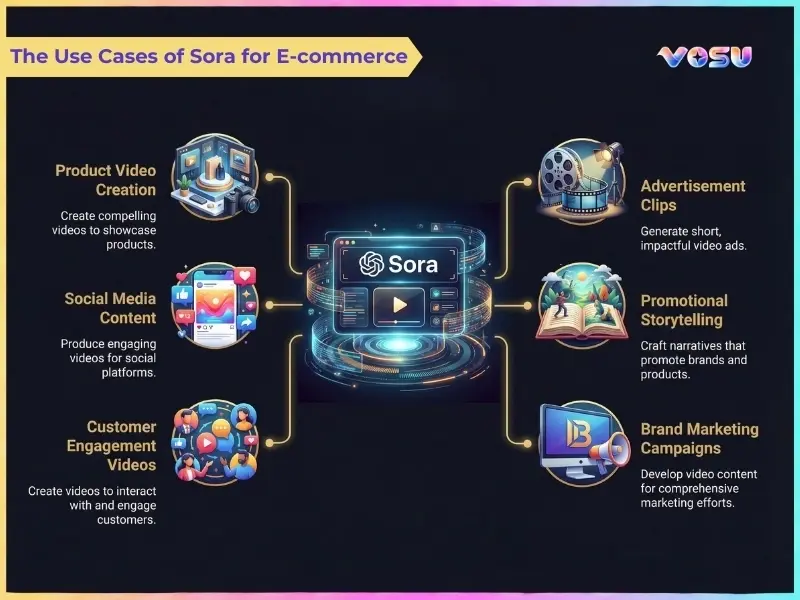
The image below shows the use cases of Sora for e-commerce.
What are the limitations of Sora?
The limitations of Sora are physical inconsistency, video length constraints, control and consistency limits, usage and access limits and safety and content restrictions.
The limitations of Sora are given below.
- Physical inconsistency: Sora struggles with strict physics realism as fast motion, collisions, water, glass or complex multi object scenes show impossible trajectories, intersections or continuity glitches that break realism.
- Video length constraints: Sora limits individual video clips to about 12 seconds that depend on the plan and resolution. It requires multiple segments generation for longer stories and stitching them in external editors.
- Control and consistency limits: Sora does not guarantee frame perfect control over characters, props or camera as identities, outfits and positions drift across shots. It reduces consistency for episodic content and brand locked characters.
- Usage and access limits: Sora runs under OpenAI Sora usage limits with daily generation quotas and rolling credit systems. It gives free users access to a few videos per day and premium users unlock more, but not infinite usage.
- Workflow and production limits: Sora outputs short MP4 clips with fixed resolution and aspect ratio options, so professional pipelines need separate tools for editing, color grading, VFX, sound design and longer form versioning.
- Safety and content restrictions: Sora applied strong safety and content restrictions, blocking explicit, violent, political or harmful prompts. It overblocks borderline scenes, which limits certain commercial or artistic concepts.
VosuAI offers watermark free content creation with no daily generation limits or usage quotas, which allows creators to generate and scale content without restrictions.
How much does Sora cost?
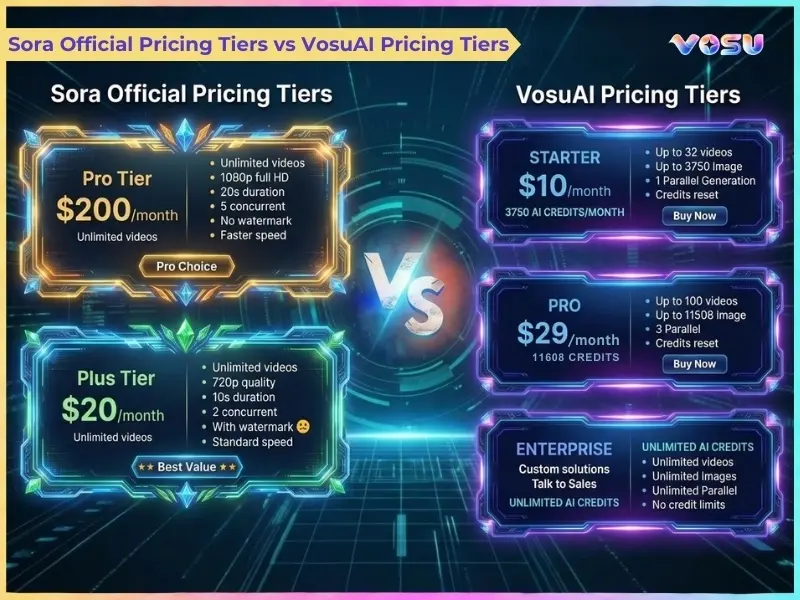
Sora basic access cost starts at $20 per month through a ChatGPT Plus subscription offered by OpenAI, which provides individual users with limited Sora video generation capacity. It has multiple pricing tiers such as an invite only free tier with strict generation limits and paid plans that bundle standard Sora 2 and Sora 2 Pro access. Sora 2 Pro is available through OpenAI’s ChatGPT Pro plan at $200 per month and delivers unlimited 1080p video generations, improved visual quality and advanced scene level editing tools. The Sora Video API charges approximately $0.10 per second for Sora 2 and $0.30 to $0.50 per second for Sora 2 Pro for developers, which depends on resolution. It costs $3 to $5 for a 10 second Pro clip.
Sora is accessible to users through VosuAI, which offers Sora 2 and Sora 2 Pro, with over 100 other video generation models under a credit system, instead of connecting to OpenAI. OpenAI’s official Sora access contains visible watermarks on generated videos, while VosuAI provides watermark free outputs across its plans. VosuAI pricing tiers include a basic plan $10 for 3,750 credits, a $29 pro plan for 11,608 credits and an enterprise plan. It allows users to purchase credits based on their needs like 39,929 credits at $99 per month.
The image below shows a comparison between Sora’s official pricing tiers and VosuAI’s pricing plans.
How can I access Sora?
You can access Sora through the official Sora app, web portal and through licensed third party platforms. It requires a ChatGPT Plus or Pro account and an invite code. Sora is available on the Sora iOS app and at sora.com for approved accounts, which OpenAI designates as the primary access method. Sora’s official access is rolling out in phases, so users have to download the app, sign in with an OpenAI account and join the in-app waitlist or get priority via a paid ChatGPT plan. Sora is also integrated into third party platforms like VosuAI, built around high fidelity video generation models beyond OpenAI’s own channels. These platforms provide text to video generation within their dashboards and include editing, asset management and production workflow tools.
How to get the Sora invite code?
3 steps to get the Sora invite code are given below.
- Install and sign in: Install the official app or open sora.com, then sign in using your existing or new ChatGPT account.
- Join the in‑app waitlist: Join by tab the waitlist or notify me option, then confirm email or push notifications to receive priority invite access.
- Watch for access and codes: Watch and monitor email, app alerts and the official OpenAI Discord where shared codes and friend invites appear.
How to use Sora models?
To use Sora models, you must access the official Sora platform or third party platforms such as VosuAI. VosuAI allows users to use Sora by selecting a model, uploading an image, entering a prompt, choosing the video length, ratio and generating the video.
11 steps to use Sora using VosuAI are outlined below.
- Go to VosuAI: Go to VosuAI and log in to your account, then purchase a suitable plan to access the video tools.
- Select the model: Select Sora model from the supported engines for high quality text to video or image to video generation.
- Upload an image: Upload an image if you want Sora to follow specific subjects, framing or style, which turns the still into a moving scene.
- Enter a prompt: Enter a prompt using detailed text prompts that clearly describe subjects, settings, motion, camera angles and audio so the model understands your scene.
- Enable/disable prompt enhancer: Enable or disable the prompt enhancer depending on whether you want VosuAI to automatically expand your prompt into a cinematic and structured description.
- Use PromptGPT ideas: Use PromptGPT ideas to browse ready made prompt templates, then customize them to match your characters, environment and story beats.
- Choose video length: Choose video length such as 4s, 8s or 12s within Sora’s limits for balanced action, faster renders and lower credit use.
- Choose aspect ratio: Choose an aspect ratio such as landscape and portrait (16:9, 9:16) so the Sora video generation fits YouTube, shorts and reels.
- Select resolution: Select a resolution like 720p or higher if available, which balances sharpness and motion clarity against render time and credit consumption.
- Generate video: Generate video by clicking the render button so VosuAI sends your image, prompt and settings to Sora and processes the clip on its servers.
- Review and download: Review and download the finished video by checking whether subjects, motion and camera angles match your intent, then iterate with refined prompts if needed.
How to prompt Sora?
6 steps to prompt Sora are outlined below.
- Describe the scene: Describe the scene like a professional film briefing, which states who is present, where they are and what is happening overall.
- Define style: Define style and mood such as cinematic, anime or documentary, to steer Sora toward the right visual language and pacing.
- Specify the framing: Specify the framing by naming shot type and camera angle, plus key movements, to give clear technical camera instructions.
- Describe sequential actions (beats): Describe sequential actions as 2 to 4 beats so motion is broken into clear, effective prompts that the model follows.
- Mention lighting: Mention lighting conditions and atmosphere like golden hour, neon night and studio softbox to lock in mood and visual consistency.
- Specify dialogue and audio: Specify dialogue and audio with short lines and simple sound cues, which gives Sora a creative description plus technical audio guidance.
How to make Sora videos longer?
5 steps to make Sora videos longer are given below.
- Generate initial clips: Generate initial clips by planning your story in segments and using Sora to generate multiple short clips for each beat.
- Extract the last frame: Extract the last frame from each clip as a still image to use as the visual starting point for the next segment.
- Create new clip: Create a new clip by uploading that last frame and prompting the next action so characters, lighting and framing stay consistent.
- Repeat: Repeat this process of extending from the latest frame until you have enough segments to cover your desired total duration.
- Stitch in editor: Stitch in editor by importing all clips into video editing software like CapCut, Clipchamp or Filmora to create seamless, extended scenes.
How to remove the Sora watermark?
4 steps to remove the Sora watermark are outlined below.
- Download the video: Download the Sora generated video from your app or platform so you have a local file ready for editing.
- Upload to an AI video eraser site: Upload the clip to a specialized AI watermark remover tool that erases the moving logo frame by frame automatically.
- Mark the watermark: Mark or confirm the Sora watermark area so the remover focuses only on that logo region while processing.
- Generate and download: Generate the cleaned version, let the AI reconstruct frames, then download the new video without the visible watermark.
You can use VosuAI to generate and export videos without a watermark. It does not require any separate remover, which makes sharing and editing easier.
Does Sora AI have an app?
Yes, Sora AI has an app because OpenAI has released an official Sora mobile application on both iOS and android. Sora app supports compatible iOS or android devices, and access does not strictly require a ChatGPT Pro subscription, but depends on regional availability or invite based rollout phases.
Can I use a ChatGPT account for Sora?
Yes, you can use a ChatGPT account for Sora because both products share the same underlying OpenAI account system. Sora accepts your existing ChatGPT account login as your OpenAI identity. It uses any paid ChatGPT Plus or Pro subscription on that account to unlock premium Sora and limits without requiring a separate login account.
Can I use Sora for free?
No, you cannot use Sora for free because OpenAI has suspended the standalone free tier and now requires at least a paid Plus/Pro subscription or third party paid credits. VosuAI, by contrast, gives new users 150 free credits that let them test AI video generation without paying upfront, which helps offset Sora’s missing free tier.
Is Sora worth it?
Yes, Sora is worth it because it allows you to automate video content at scale with high quality, on‑prompt visuals. It generates cinematic clips with solid motion, consistent scenes and built‑in audio, which is powerful for marketing, prototyping and creative storytelling. Its official purchase is less appealing for casual creators who are sensitive to high costs, slower renders, inconsistent results or strict regional access limits. VosuAI, however, offers affordable plans with multi model access, minimal regional restrictions and flexible usage, which makes Sora a better choice for everyday users.
What are the controversies of Sora?
The controversies of Sora are given below.
- Misinformation and deepfakes: Sora raises major misinformation and deepfake concerns because ultra realistic, short videos impersonate people and fuel deceptive synthetic news at scale.
- Harmful content: Sora generates harmful content, with critics arguing that perceived weak safety guardrails make it easier to produce disturbing or abusive videos.
- Copyright infringement: Sora intensifies copyright infringement worries by allowing hyper realistic clips using branded characters, logos and copyrighted worlds without the rights holders’ consent.
- Misuse of privacy: Sora heightens the misuse of privacy risks through likeness abuse, unauthorized identity generation and deepfake videos that exploit personal images or reputations.
- Inadequate child safety and parental controls: Sora faces inadequate child safety criticism, as watchdogs warn its safety features, parental controls and moderation lag behind risks to minors.
What are the alternatives to Sora?
The 5 alternatives to Sora are listed below.
- Runway AI: Runway AI is an established AI video generation platform that offers Gen 3 or Gen 4 models, strong editing tools and production ready workflows for creators.
- Pika Labs: Pika Labs provides intuitive AI video generation with text to video and image to video, which focuses on short, stylized clips and cinematic effects.
- Luma AI: Luma AI’s Dream Machine allows high‑quality text to video with realistic motion, strong physics and a more open, accessible usage model.
- Kling AI: Kling AI delivers cinema‑grade 1080p videos, robust motion and physics and long clip durations suited to complex creative projects.
- HeyGen: HeyGen specializes in AI avatar‑based video generation, multilingual lip‑sync and marketing, training and communication videos for businesses.
Is there a free alternative to Sora?
Yes, there are some free alternatives to Sora such as Luma Dream Machine, Kling AI and Runway Gen 3 or Gen 4. These established, user friendly platforms are accessible through VosuAI’s free plan, which allows users to use text to video generation at no upfront cost.

