
GPT Image 2.6 moves OpenAI's image system beyond one-shot generation and into a faster, more controlled production workflow. Released on November 4, 2026, it can start from a written idea, follow visual references, or revise part of an existing image without rebuilding the whole composition. It also adds animated GIF and static SVG output to the same model family.
The practical choice is between Flare and Sunburst. Flare handles rough concepts, quick variations, and everyday creative work with less waiting. Sunburst gives more attention to intricate details and holds edits together better at medium or high quality. OpenAI reports 50 percent faster generation overall, although actual speed still depends on quality, complexity, dimensions, and the access surface.
GPT Image 2.6 is available through ChatGPT, Codex, the OpenAI API, and platforms such as VosuAI. In VosuAI, creators can select either variant in AI Studio, add references, structure a rough idea with PromptGPT, inspect the expanded instructions, and see the credit cost before generating.
What Is GPT Image 2.6?
GPT Image 2.6 is OpenAI's image generation and editing model family for creating visuals from text or references and making targeted changes to existing images. Its instructions can control the subject, composition, style, text, and details that should remain unchanged across an edit.
The family has two variants. Flare prioritizes speed for drafts and rapid iteration, while Sunburst is designed for detailed compositions and stronger consistency across edits. GPT Image 2.6 appears in ChatGPT and Codex, with both variants offered as separate choices through the OpenAI API.
GPT Image 2.6 supplies the generative engine. The surrounding platform supplies the interface, billing, project tools, and workflow support.
What Are the Features of GPT Image 2.6?
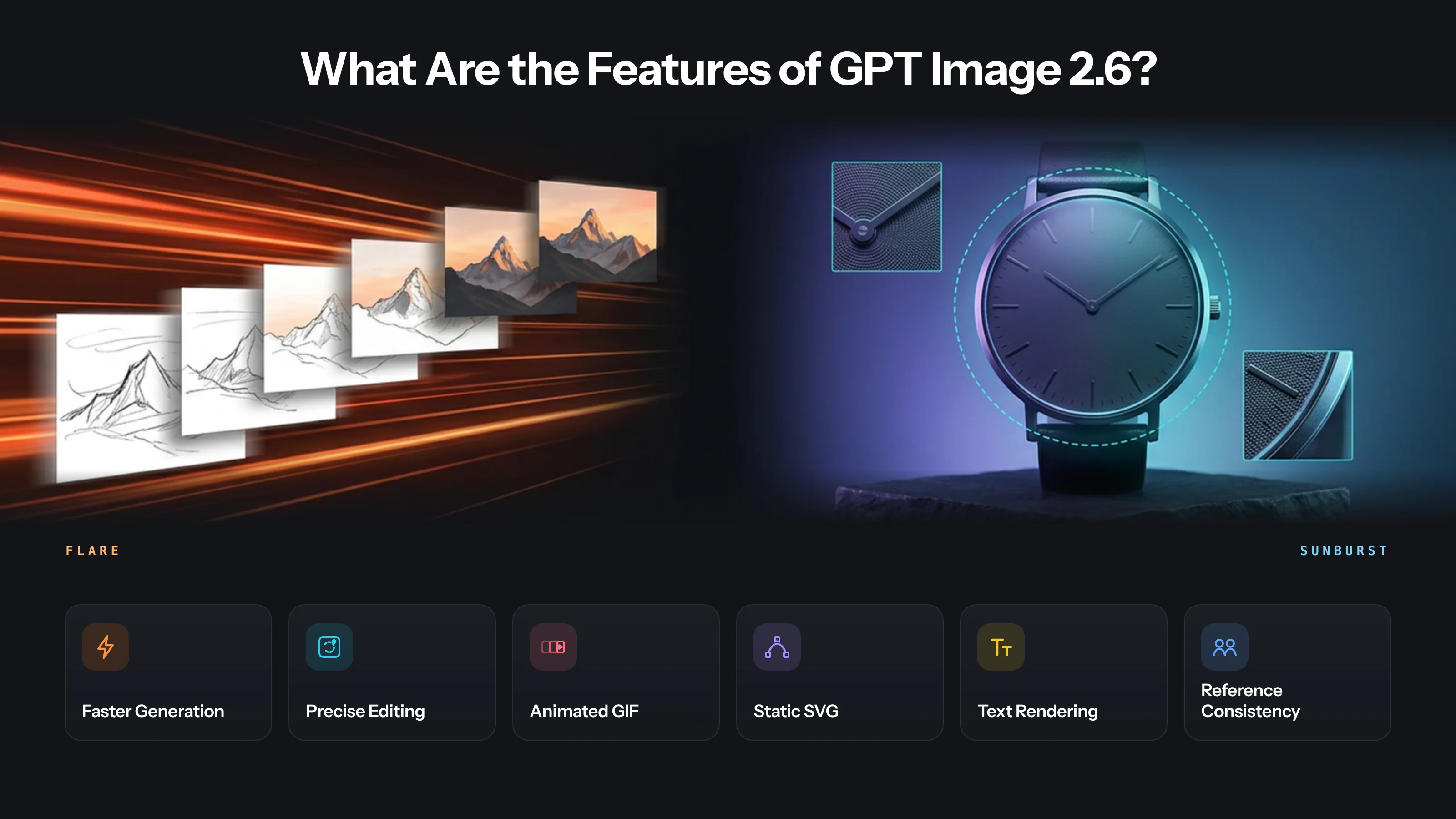
The features of GPT Image 2.6 include faster image generation, Flare and Sunburst model choices, precise editing, animated GIFs, static SVGs, improved text work, flexible API controls, reference-based consistency, and connected creation workflows. Availability still depends on the surface. ChatGPT exposes a simpler conversational experience, while the API provides model IDs and technical parameters.
The key features of GPT Image 2.6 are given below.
- Faster image generation. OpenAI reports generation is 50 percent faster than the prior release, while actual wait time still varies with quality, complexity, dimensions, and service demand.
- Flare and Sunburst model choices. API users can choose Flare for rapid iteration or Sunburst for detailed work, rather than relying on one model profile for every request.
- Precise, markup-guided editing. The model supports conversational changes, selection-based edits, API masks, and visual markup that identifies the region or instruction attached to a requested change.
- Animated GIF generation. It can generate or edit animated GIFs with two to sixteen frames and configurable frame duration, supporting short motion concepts and looping visual assets.
- Static SVG generation. The Images API can return static, self-contained SVG graphics for scalable icons and diagrams, with restrictions on scripts, external resources, embedded rasters, and editing.
- Text rendering and graphic design. It can place words inside posters, cards, ads, and layouts more effectively, although exact spelling, hierarchy, and placement still require review.
- Flexible API controls. Developers can set quality, complexity, custom dimensions, background, raster format, compression, streaming, partial images, and a stable safety identifier where supported.
- Reference-based consistency. Uploaded images can guide a character, product, or visual identity across edits, especially when prompts state what must remain unchanged between iterations.
- Connected creation workflows. The model works in ChatGPT, Codex, the Images API, and the Responses API, allowing creation to start conversationally or inside an application workflow.
Practical differences between variants are below.
| Variant | Best for | Main advantage | Trade-off |
|---|---|---|---|
| Flare | Drafts, rapid variations, interactive edits, and everyday social assets | Fastest 2.6 option, with low-quality generation possible in as little as six seconds | Less detail-first than Sunburst for precision-heavy final work |
| Sunburst | Product imagery, complex layouts, final client revisions, and tightly scoped edits | Higher quality and stronger consistency across edits at medium or high quality | Usually slower, especially with demanding settings |
Flare accelerates iteration. Sunburst prioritizes detail and edit consistency.
How Does GPT Image 2.6 Work?
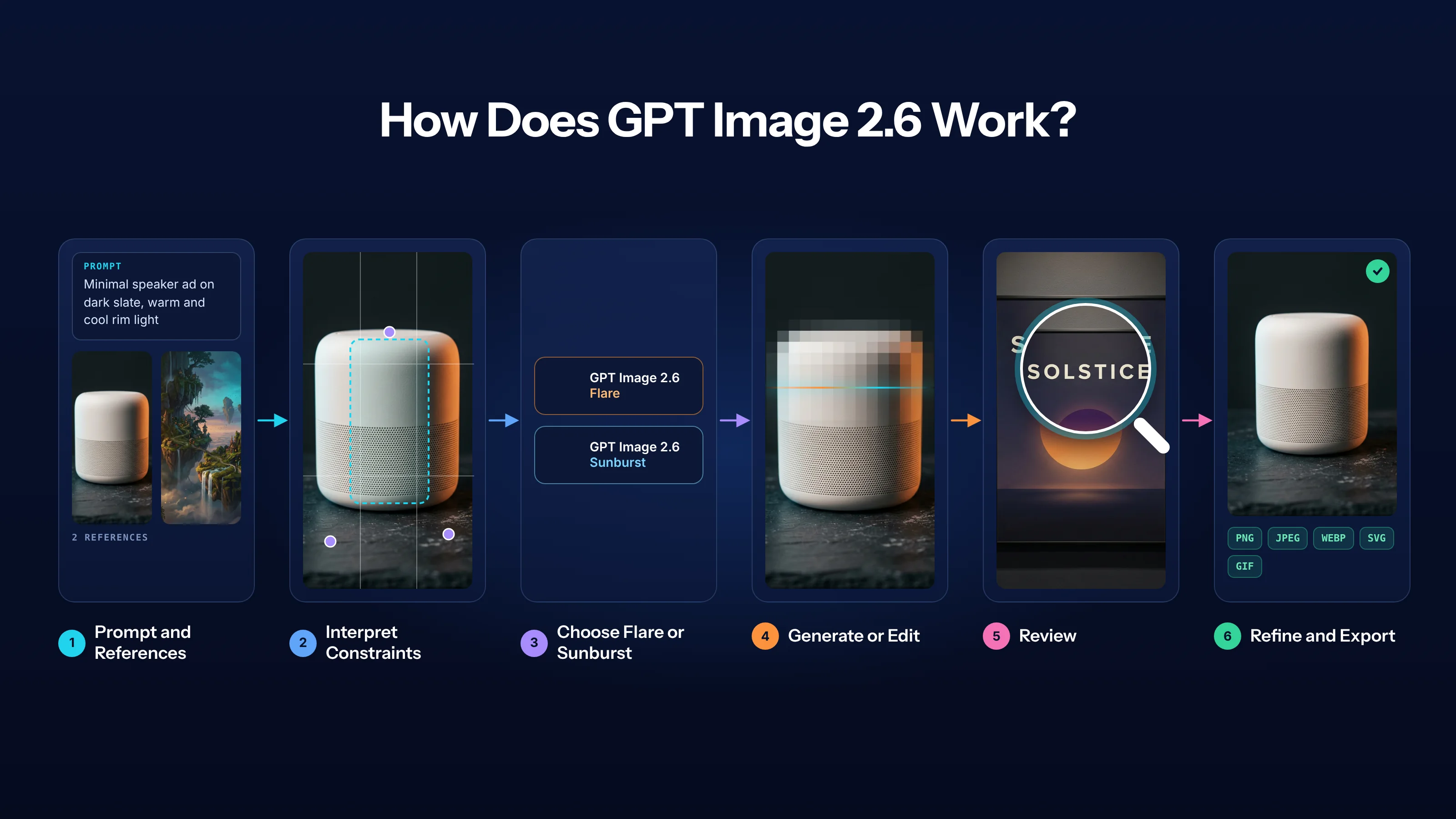
GPT Image 2.6 turns text prompts and image inputs into new or edited images. You can use it conversationally through ChatGPT and Codex or programmatically through an API request, but the underlying workflow still moves from instruction and context to generation, review, and iteration.
- It receives the request. A text-to-image task begins with a prompt. An editing task can also include an image input, reference image, selection, mask, or supported markup.
- It interprets the visual constraints. The model uses descriptions of subject, setting, composition, style, text, and required preservation. API parameters separately define technical output choices such as quality or dimensions.
- It generates or edits the image. ChatGPT handles this as a conversational action. The Images API returns a dedicated image result, while the Responses API can place image generation inside a broader tool-driven exchange.
- The selected model profile affects the task. Flare is the API choice for quicker iteration. Sunburst is intended for more detailed work and stronger consistency, especially at higher quality settings.
- The user reviews the result. The model does not verify every word, face, product detail, layout relationship, or legal requirement. A reviewer should compare the output with the prompt and references.
- The request is refined and exported. A focused follow-up can correct one issue while preserving the rest. The final asset is then exported in a supported format and recorded with its prompt, inputs, and settings when repeatability matters.
Prompt → interpret → generate → review → refine → export
What Can You Create with GPT Image 2.6?
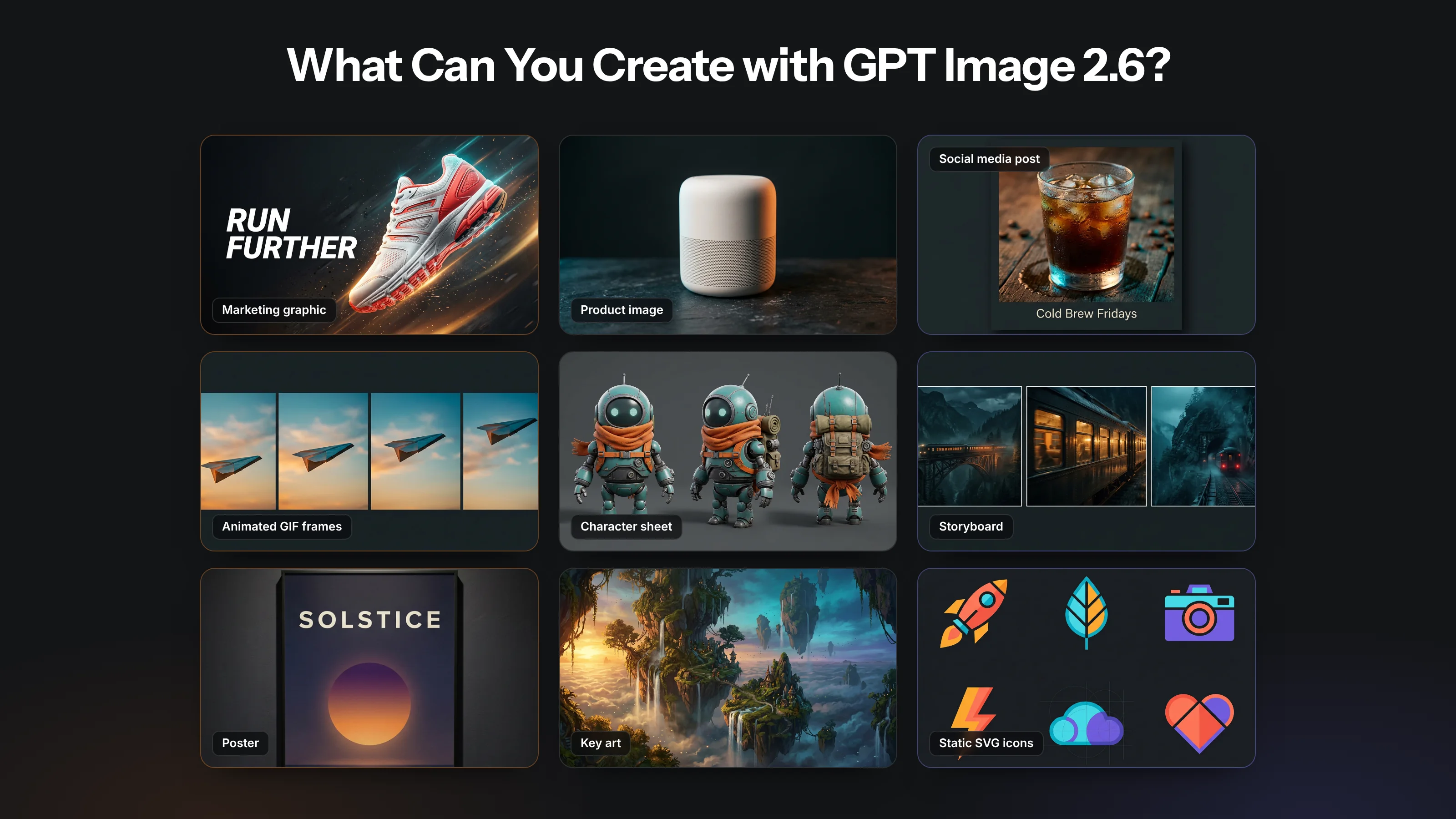
GPT Image 2.6 can create and edit marketing graphics, product imagery, social media assets, animated GIFs, storyboards, character sheets, posters, illustrations, and structured visual drafts. The right starting surface depends on whether the task needs conversational exploration, development context, or reproducible API controls.
Common applications of GPT Image 2.6 include the following.
- Marketing graphics. Start in ChatGPT for campaign concepts or use the API for variants, then review brand claims, typography, logo treatment, and required legal copy.
- Product imagery. Supply accurate reference images to create settings or edits, then check shape, color, labels, proportions, reflections, and any details customers use to judge the product.
- Social media assets. Create platform-specific cards, thumbnails, or posts in ChatGPT, then verify cropping, text readability, safe areas, visual hierarchy, and brand consistency before scheduling.
- Animated GIFs. Use the Images API for a short loop or motion concept, then inspect every frame for flicker, identity shifts, timing, file size, and seamless repetition.
- Character sheets. Provide a clear reference and request defined views or expressions, then compare facial features, clothing, scale, and distinctive details across the complete sheet.
- Storyboards. Generate shot concepts from a scene plan in ChatGPT or Codex, then review camera logic, continuity, character placement, and whether each frame communicates the intended action.
- Posters and invitations. Draft the composition and styled lettering conversationally, then proofread every word and rebuild critical type in a design tool when exact placement is required.
- Illustrations and key art. Use Sunburst for detailed visual exploration, then review anatomy, edges, lighting, reference fidelity, output dimensions, and suitability for the intended final crop.
- Static SVG graphics. Request simple scalable icons or diagrams through the Images API, then inspect the SVG structure, accessibility, rendering, unsupported resources, and technical safety before deployment.
One model family for campaigns, products, characters, motion, and design.
What Is the GPT Image 2.6 Price?
The GPT Image 2.6 API price is token-based, with the same published rates for Flare and Sunburst. A request can include text input, cached text input, image input, cached image input, and image output charges.
| Billed token category | Published price per 1 million tokens |
|---|---|
| Text input | $5.00 |
| Cached text input | $1.25 |
| Image input | $8.00 |
| Cached image input | $2.00 |
| Image output | $30.00 |
Use four pricing checks instead of treating the output-token rate as the complete cost.
- Calculate the full API request. Add every billed component: text input + cached text input + image input + cached image input + image output. Divide each token count by one million and multiply it by the matching rate. Caching reduces eligible input charges, not the image-output rate.
- Read examples as partial costs. OpenAI's example of 823 image-output tokens costs $0.02469 at $30 per million. That figure excludes prompt tokens, uploaded references, cached inputs, and streaming previews. Each requested partial image adds 100 image-output tokens, so the final request costs more when those components are present.
- Compare Flare and Sunburst by actual usage. Their published token rates match, but quality, complexity, dimensions, references, output count, and partial images can change token consumption. A detailed Sunburst render may therefore cost more than a simple Flare draft even though neither variant carries a higher published per-token rate.
- Separate ChatGPT, API, and VosuAI billing. ChatGPT uses tier-based limits, and a ChatGPT subscription does not include API usage. VosuAI offers pay-as-you-go creative access from $1 with no subscription, keeps purchased credits from expiring, and shows the live charge before generation. For production planning, compare total spend across retries with the number of accepted images.
Where Can You Access GPT Image 2.6?
GPT Image 2.6 is available through ChatGPT, Codex, and the OpenAI API. The interface, controls, usage limits, model selection, billing, and implementation work differ by access surface.
| Access surface | Best suited to | Model selection and controls | Limits or billing |
|---|---|---|---|
| ChatGPT web | Prompting, uploading references, and conversational edits in a browser | App controls with no requirement to enter an API model ID | Tier-based ChatGPT usage limits |
| ChatGPT mobile | Creating or editing from iOS or Android | Mobile interface and available image controls | Tier-based ChatGPT usage limits |
| ChatGPT desktop | Conversational image work beside desktop tasks | Desktop interface and available image controls | Tier-based ChatGPT usage limits |
| Codex | Producing visual assets in development context | Task-level instructions and project context | Product access and account limits apply |
| Images API | Dedicated generation, editing, GIF, SVG, and parameterized output | Exact Flare or Sunburst model ID plus supported image parameters | Separate token-based API billing |
| Responses API | Image generation inside an agentic or multimodal response flow | Image-generation tool configuration within a broader request | Separate API billing and implementation work |
| VosuAI | Using Flare, Sunburst, or an earlier GPT Image version inside a multi-model workspace | Exact model selector, references, PromptGPT, output controls, and connected creative tools | Separate VosuAI credit pricing with the charge shown before generation |
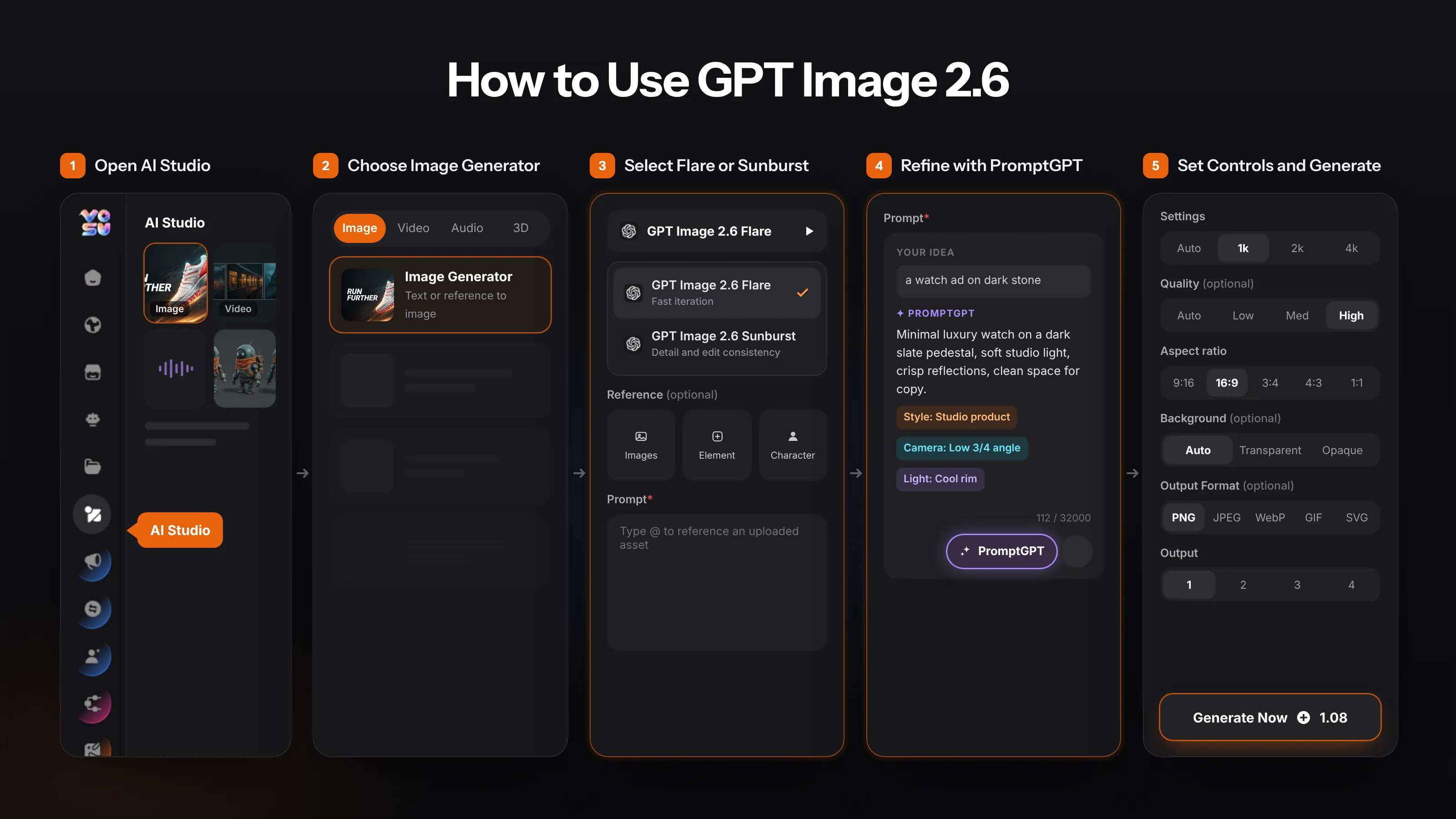
Open GPT Image 2.6 Flare in VosuAI or GPT Image 2.6 Sunburst in VosuAI. Alternatively, enter AI Studio, select Image, open Image Generator, search the model list for “GPT Image,” and choose the exact 2.6 variant. The selector also includes GPT Image 2.5 Flare and Sunburst, so confirm the model name before generating.
Use ChatGPT for conversational creation, Codex for project-context assets, the Images API for explicit parameters, and the Responses API for broader tool flows. Choose VosuAI when the image needs prompt assistance, reference inputs, variant selection, model comparison, refinement, or campaign production in one environment.
VosuAI exposes resolution, quality, aspect ratio, background, output format, and output-count controls for the selected variant. Confirm every visible setting and the live credit amount because a hosted interface does not guarantee parity with all OpenAI API parameters.
What Are the Limitations of GPT Image 2.6?
GPT Image 2.6 is faster and more controllable, but outputs can still miss exact text placement, repeat identity, dense layouts, precise edits, or long multi-constraint prompts. OpenAI documents several broad limitations. Public examples and user discussions add useful symptom language, but those reports are anecdotal and do not establish a universal failure rate.
The practical limitations of GPT Image 2.6 include the following.
- Exact text placement. Official documentation notes continuing difficulty with precise text placement. Proofread every word, inspect hierarchy, and rebuild critical typography outside the model when exact layout is mandatory.
- Identity consistency. Official guidance warns consistency can vary across recurring characters or brands. Use strong references, repeat preservation constraints, and compare defining features after every generation or edit.
- Dense layouts. Official documentation identifies structured composition as a challenge. Reduce competing instructions, establish the hierarchy first, and assemble complex grids or information-heavy designs in dedicated layout software.
- Edit drift. Documentation and anecdotal reports show that local edits can alter unrelated details. Mark the target area, state what must remain unchanged, and request one change per iteration.
- Noise and artifacts. Public samples and user reports sometimes show rough edges, texture noise, anatomy errors, or inconsistent frames. Inspect at delivery size and regenerate or retouch affected regions.
- Safety refusals. OpenAI's safety systems may block or modify certain requests, and a refusal does not measure creative quality. Reframe legitimate intent without attempting to bypass applicable safeguards.
- Latency and token use. OpenAI notes complex prompts can take up to two minutes. Reduce unnecessary constraints, choose suitable settings, and monitor inputs, partial images, retries, and outputs.
- Provenance and rights. Generated content may not be unique, and visual similarity does not establish clearance. Keep source records and review copyright, trademark, privacy, and client requirements independently.
- Human review remains necessary. OpenAI's terms place responsibility for evaluating output on the user. Verify factual claims, labels, identities, product accuracy, sensitive content, and technical files before publication.
Different failures require different remedies. A spelling problem needs proofreading or rebuilt type. Identity drift needs better references and preservation language. A crowded layout needs decomposition, not simply a higher quality setting. GIF flicker requires frame-by-frame inspection, while an SVG needs code and rendering review. For client or commercial work, record the prompt, source rights, model ID, settings, generated result, edits, and approval decision so the final asset has an auditable production history.
VosuAI can support this review process without guaranteeing a better output. Playground helps compare the same brief across available models, Photo Studio supports follow-up refinement, and Nodes can make reference inputs and approval stages repeatable. Keep the accepted result and review criteria human-controlled, especially when switching models could introduce a different identity, composition, or visual style.
How to Use GPT Image 2.6
To use GPT Image 2.6 in a connected creative workflow, open VosuAI AI Studio and select Flare or Sunburst from the image-model list. Use ChatGPT for direct conversational creation or the OpenAI API when exact model IDs and parameters are the primary requirement. Start with one visual goal, add only useful references, review the result, and refine one change at a time.
The steps to use GPT Image 2.6 are given below.
- Choose the surface. Go to VosuAI, open AI Studio, select Image and Image Generator, then search the model selector for GPT Image. Other routes include ChatGPT, Codex, and OpenAI APIs.
- Choose the correct variant. Select Flare for drafts and rapid variations or Sunburst for detail-sensitive final work. Confirm the 2.6 label because GPT Image 2.5 variants are also available.
- Structure the prompt. Enter a raw command, open PromptGPT, choose visible style and camera guidance, then inspect and refine the expanded instructions before generation.
- Define the output and references. State the asset, audience, subject, composition, exact text, and rejection criteria. Upload images, elements, or characters only when they clarify the result.
- Set the available controls. VosuAI shows resolution, quality, aspect ratio, background, format, and output count. API users can also configure documented complexity, dimensions, compression, and streaming options.
- Check cost and generate. Review the visible VosuAI credit charge or expected API usage, submit once, and avoid duplicate retries that can create extra results or charges.
- Review the output. Check spelling, identity, product accuracy, layout, edges, transparency, animation, safety, and rights. Move a sound foundation into VosuAI Photo Studio for focused refinement.
- Edit one change at a time. Select or mark the target region, describe the single correction, repeat preservation constraints, and compare the revision with the previous approved state.
- Export and document the result. Save the correct format, record prompts and approvals, and preserve a reusable VosuAI Nodes workflow when the production sequence must be repeated.
Select a variant, refine the prompt, set controls, and generate.
Can You Use GPT Image 2.6 for Commercial Projects?
Yes. GPT Image 2.6 outputs can generally be used commercially under applicable OpenAI terms, but permission is not automatic legal clearance. You remain responsible for input rights, policies, copyright, trademarks, privacy, likeness, licensing, contracts, and client approval. Outputs may not be unique. Keep records of sources, permissions, prompts, edits, and approvals, and obtain legal advice for material risk.
Can You Use GPT Image 2.6 for Free?
Yes. GPT Image 2.6 is available through ChatGPT's free tier, subject to current usage limits. Paid ChatGPT tiers may offer different limits, but no fixed quota should be assumed without checking the live product. OpenAI API usage is billed separately, and a ChatGPT subscription does not include API usage. VosuAI provides separate pay-as-you-go access rather than a free entitlement.
Are GPT Image 2.6 and ChatGPT Image 2.6 the Same?
Yes. GPT Image 2.6 and the common search phrase ChatGPT Image 2.6 usually refer to the same Images 2.6 generation. GPT Image 2.6 is the model-family name, while ChatGPT Images 2.6 identifies the feature experience inside ChatGPT. For technical implementation, use the official family name and specify either gpt-image-2.6-flare or gpt-image-2.6-sunburst.
How Do Image Editing and Consistency Work in GPT Image 2.6?
GPT Image 2.6 supports conversational, selection-based, mask-based, reference-guided, and markup-guided editing. Consistency improves when you supply a clear source image, identify the exact region, state what must remain unchanged, and request one correction at a time. Compare every revision with the last approved version because faces, product geometry, text, lighting, or nearby details can still drift.
What GIF, SVG, and Image Formats Does GPT Image 2.6 Support?
GPT Image 2.6 supports PNG, JPEG, WebP, animated GIF, and static SVG output through documented API routes. PNG and WebP can preserve transparency. GIFs support short frame-based loops, while SVG output is static, self-contained, and generation-only. Availability varies by access surface, so confirm the selected interface before assuming that API-only format, streaming, compression, or editing controls are exposed.
What Controls and Specifications Does the GPT Image 2.6 API Support?
The GPT Image 2.6 API exposes Flare and Sunburst model IDs plus quality, complexity, dimensions, background, raster format, compression, streaming, partial-image, and editing controls. Flare serves fast iteration, while Sunburst serves detailed visual work. Supported values and endpoint behavior can change, so implementation should follow current documentation, test representative prompts, record token use, and avoid assuming that hosted platforms expose identical controls.
Is GPT Image 2.6 Right for You?
GPT Image 2.6 suits creators, marketers, designers, and developers who value rapid iteration, detailed outputs, editing, or API integration and can review every result. It is less suitable for unattended publishing or work that cannot tolerate wrong text, identities, layouts, or rights assumptions. When model choice is unclear, use VosuAI Playground to compare representative briefs under the same criteria.
GPT Image 2.6 vs GPT Image 2.5: What Changed?
GPT Image 2.6 adds faster generation, current Flare and Sunburst choices, markup-guided editing, animated GIF and static SVG workflows, and updated API controls. OpenAI reports 50 percent faster generation, with Flare focused on speed and Sunburst on detail and edit consistency. Before replacing 2.5, compare identical prompts, references, latency, token use, formats, and approval results in the actual access surface.