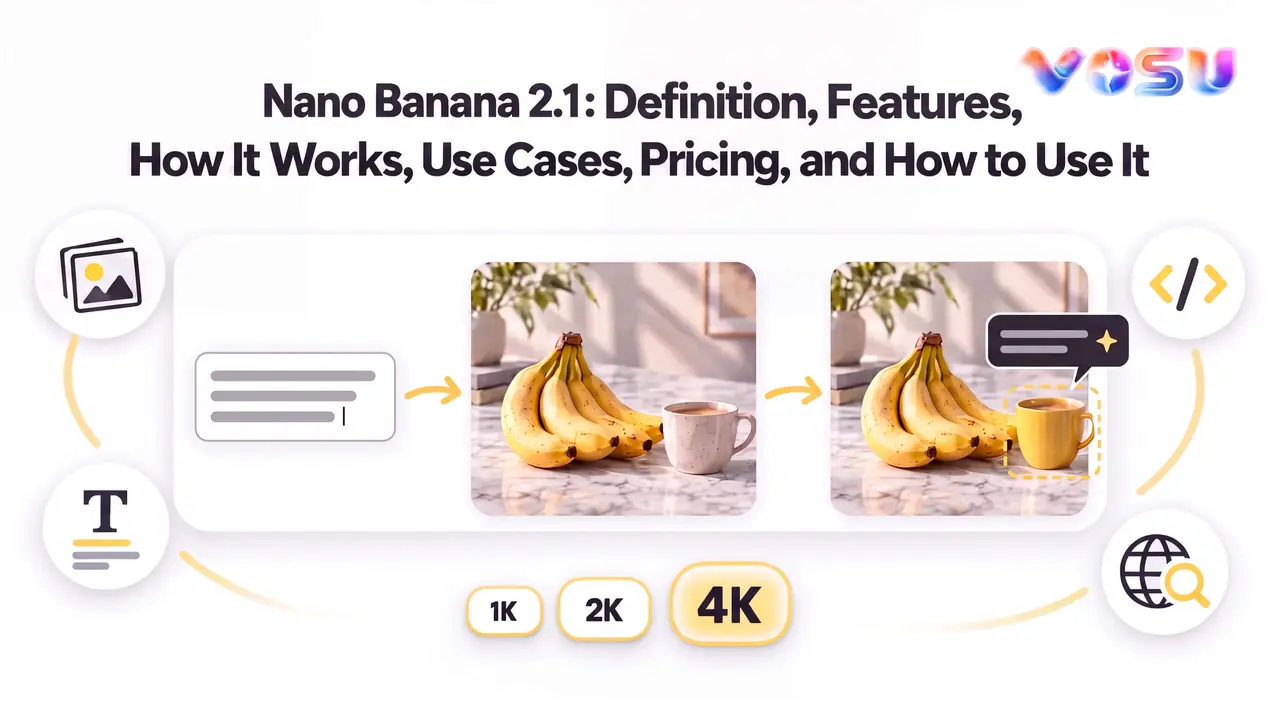
Nano Banana 2.1, available through the Gemini API as gemini-nano-banana-2.1, supports high-efficiency image generation and conversational editing for creating, refining, and controlling visuals from text and image context. It is built for users who need image generation and editing with stronger prompt understanding, clearer visual detail, better text handling, reference-aware consistency, and practical creative control across everyday and professional workflows. The model can turn written prompts into new images, edit existing visuals through natural language, combine multiple references, adjust style or composition, and support grounded visual tasks where accuracy matters. Its role is not only to create attractive images, but to make image workflows easier to revise, compare, and continue without restarting every time.
Nano Banana 2.1 is relevant for creators, marketers, ecommerce teams, designers, educators, developers, and everyday users who need an AI image generator that can move from idea to usable output with fewer disconnected steps. Its actual cost, feature depth, access points, workflow, limits, API use, and practical value depend on where it is used and how the image task is configured. The model is available through Google surfaces and API workflows, and it can also be accessed inside VosuAI for flexible multi-model creative production. A typical workflow starts by choosing Nano Banana 2.1, writing a precise prompt, adding optional image references, selecting output settings such as aspect ratio and resolution, generating the image, then continuing with conversational edits until the result is ready to review, download, or use in a broader creative workflow.
What is Nano Banana 2.1?
Nano Banana 2.1 is Google’s high-efficiency image-generation and conversational-editing model for creating and editing images from natural-language and visual context. Its API ID is gemini-nano-banana-2.1. Based on Gemini 3.6 Flash in the Gemini 3 family, it updates Nano Banana 2 and is the efficient counterpart to Nano Banana Pro, not the Gemini app.
How does Nano Banana 2.1 work?
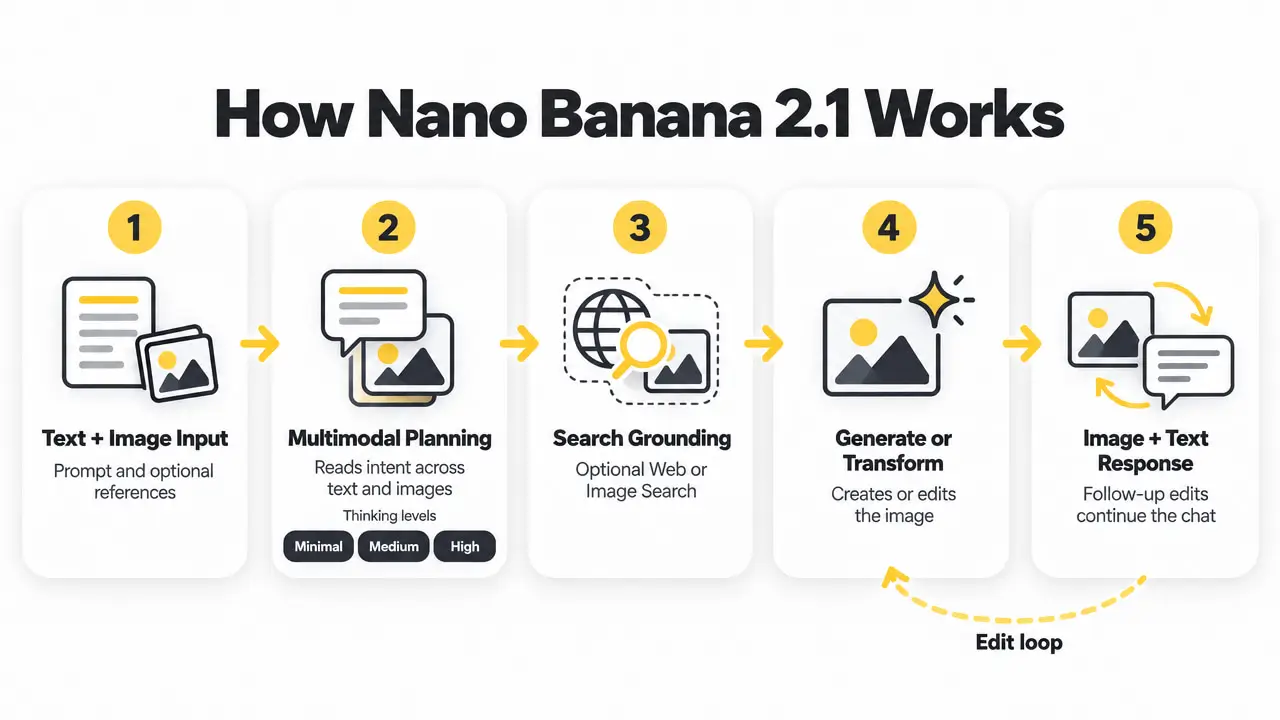
Nano Banana 2.1 works by interpreting text and image input, planning across multimodal context, optionally grounding the request, and generating or transforming an image that can be refined in later turns. This is a functional view of observable behavior, not a description of private reasoning or training. Five stages explain how Nano Banana 2.1 turns instructions and visual context into an image response.
- Input interpretation: Nano Banana 2.1 reads the text instruction and any supplied image context, identifies subjects, relationships, constraints, elements to preserve, and whether the requested output requires a new image or a targeted edit.
- Multimodal planning: Nano Banana 2.1 relates language to visual information before generation. Supported API workflows can set minimal, medium, or high thinking levels, although interfaces may expose different controls and users cannot inspect private reasoning.
- Optional grounding: Nano Banana 2.1 can use Web Search grounding, Image Search grounding, or both in supported API requests when current facts or real-world visual references are needed. Grounding is optional, not part of every response.
- Generation or transformation: Nano Banana 2.1 synthesizes a new image or regenerates the relevant scene for an edit, using the prompt, reference images, output configuration, and conversation context to guide what changes and what should remain.
- Response and continuation: Nano Banana 2.1 returns image and text output. Supported interfaces can continue the same interaction for focused follow-up changes, helping users refine one result without rebuilding the complete prompt and context each time.
This operating flow provides the foundation for Nano Banana 2.1’s capability groups. In VosuAI, Agent can structure the image-generation process, while Nodes connects prompts, references, generation, and follow-up actions in a reusable visual workflow. For iterative refinement, Photo Studio supports conversational and annotation-guided edits with version history, helping users preserve important constraints, reduce drift across revisions, and improve images without rebuilding the workflow.
What can Nano Banana 2.1 do?
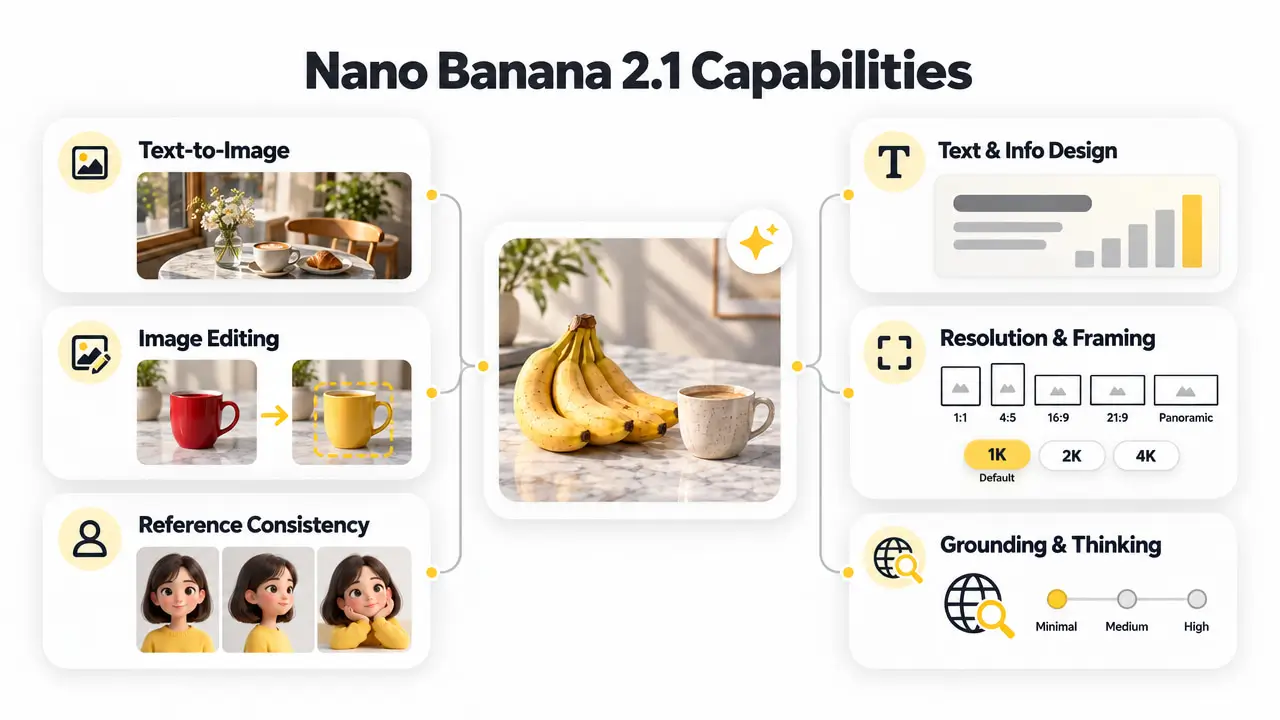
Nano Banana 2.1 can generate and edit images, preserve reference-guided identity, render structured text, control resolution and framing, and use search grounding with configurable thinking. Six core capability groups define what Nano Banana 2.1 can do.
- Text-to-image generation: Nano Banana 2.1 creates new images from natural-language descriptions and optional visual context, spanning photorealistic scenes, illustrations, diagrams, and other structured formats while using supplied constraints to shape subjects, style, composition, and detail.
- Image editing: Nano Banana 2.1 edits existing images by adding, removing, replacing, or restyling elements and changing color, lighting, focus, framing, or composition without requiring the user to recreate the complete image from scratch.
- Reference-guided consistency: Nano Banana 2.1 uses reference images to guide character identity and maintain recognizable objects or product details across generation and editing, supporting more consistent visual continuity between related outputs.
- Text and information design: Nano Banana 2.1 places short copy, labels, headings, and structured information inside images, supporting text rendering for posters, diagrams, menus, and infographic layouts where text and visual structure must work together.
- Resolution and framing: Nano Banana 2.1 outputs 1K, 2K, or 4K images, with 1K as the default. It supports square, portrait, landscape, wide, and panoramic framing, with tiling fixes for 1:4, 4:1, 1:8, and 8:1 outputs at 2K or 4K.
- Grounded and reasoned generation: Nano Banana 2.1 can optionally use Web Search grounding and Image Search grounding for current or visually specific information, while minimal, medium, and high thinking levels let supported API workflows balance latency with more complex planning.
These capabilities support controlled generation and iterative editing, but outputs still require inspection. VosuAI Playground enables side-by-side model comparisons under the same prompt, while Photo Studio adds conversational, annotation-guided revisions and version history to help limit drift. The next fidelity question is how accurately Nano Banana 2.1 renders and preserves text.
What are the use cases of Nano Banana 2.1?
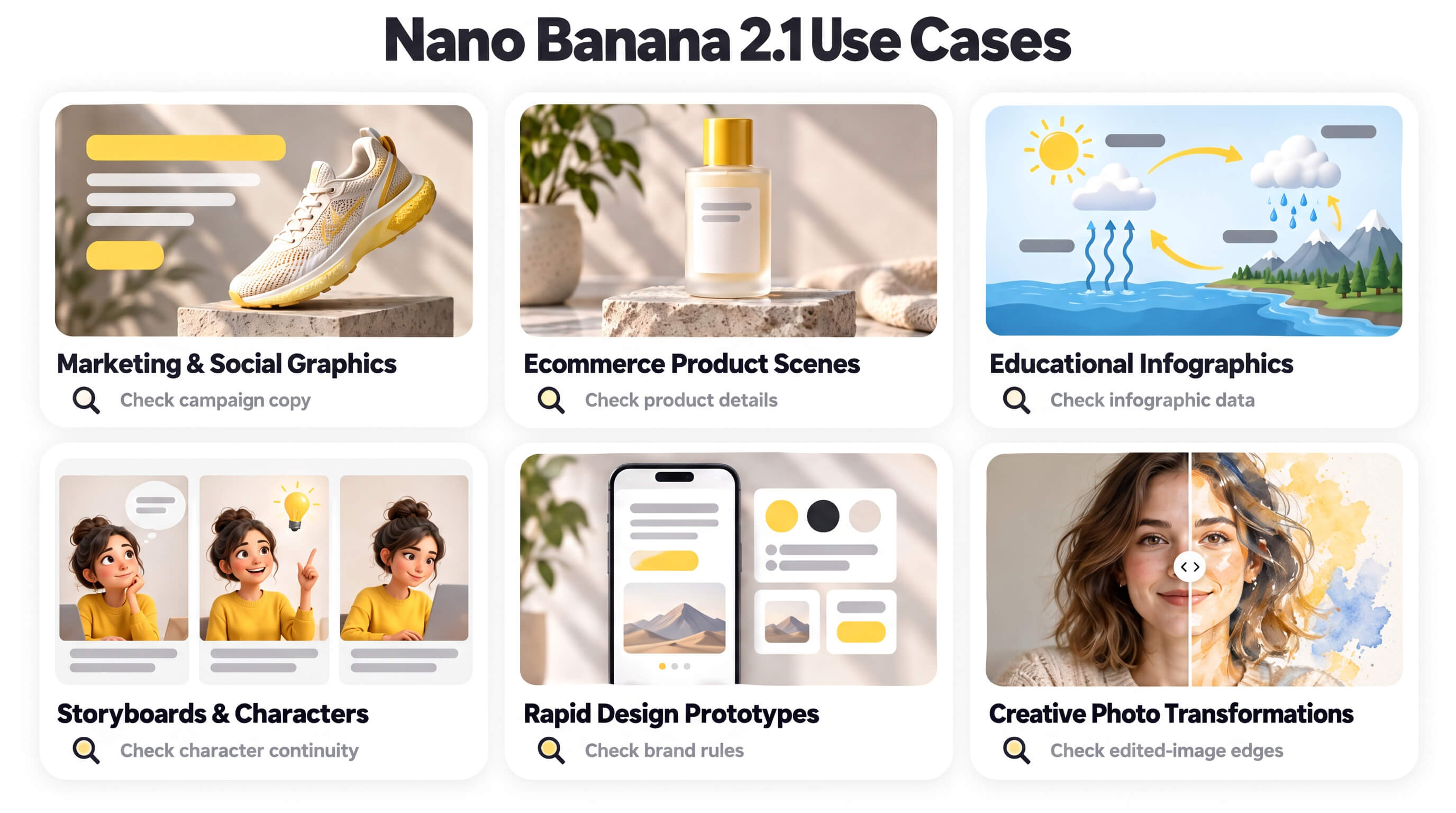
Nano Banana 2.1 is well suited to marketing visuals, ecommerce images, educational graphics, character-led storytelling, rapid design exploration, and controlled photo transformation when each output receives task-specific review. Six practical use-case groups show where its generation, editing, text, reference, resolution, and grounding capabilities can add workflow value.
- Marketing and social creative: Nano Banana 2.1 can create campaign concepts, ads, banners, event graphics, thumbnails, and localized social content through text rendering and flexible framing. VosuAI Marketing Studio can develop approved directions into coordinated branded promotional content. Verify copy, logos, language, safe areas, and platform crops before publishing.
- Ecommerce and product content: Nano Banana 2.1 can create ecommerce images, catalog scenes, product mockups, packaging concepts, replacement backgrounds, and seasonal variations through reference-guided consistency. After product details and approved visuals are ready, VosuAI UGC Studio can produce batch UGC-style ad videos. Verify labels, colors, dimensions, materials, and placement before commercial use.
- Education and information design: Nano Banana 2.1 can build educational infographics, process diagrams, teaching visuals, charts, and presentation graphics using structured text and optional search grounding. Check every label, relationship, number, proportion, citation, and factual statement against the underlying lesson or dataset.
- Storytelling and characters: Nano Banana 2.1 can develop storyboards and comics, character sheets, recurring cast variations, and connected scenes using reference images and multi-turn editing. Review faces, wardrobe, props, relative scale, speech text, and scene continuity across every panel or frame.
- Design and rapid prototyping: Nano Banana 2.1 can support rapid prototyping for posters, logos, interface concepts, mood boards, brand explorations, composition tests, and quick visual alternatives through iterative generation and flexible framing. VosuAI Playground can compare multiple outputs from one prompt before a direction advances. Verify typography, geometry, brand rules, accessibility, and reproducibility.
- Photo and creative transformation: Nano Banana 2.1 can perform photo transformation through targeted editing, including restoration concepts, style changes, relighting, object replacement, and scene extension. VosuAI Photo Studio can then support annotation-guided corrections, regional refinements, before-and-after review, and version recovery. Inspect identity, anatomy, edges, shadows, perspective, background continuity, and unintended changes.
These use cases work best when briefs, references, and acceptance checks remain connected across iterations. VosuAI Agent and Nodes can organize approved assets and review stages into reusable creative workflows, helping users limit drift as campaigns expand beyond a single image. Final suitability still depends on understanding Nano Banana 2.1’s current limitations.
How much does Nano Banana 2.1 cost?
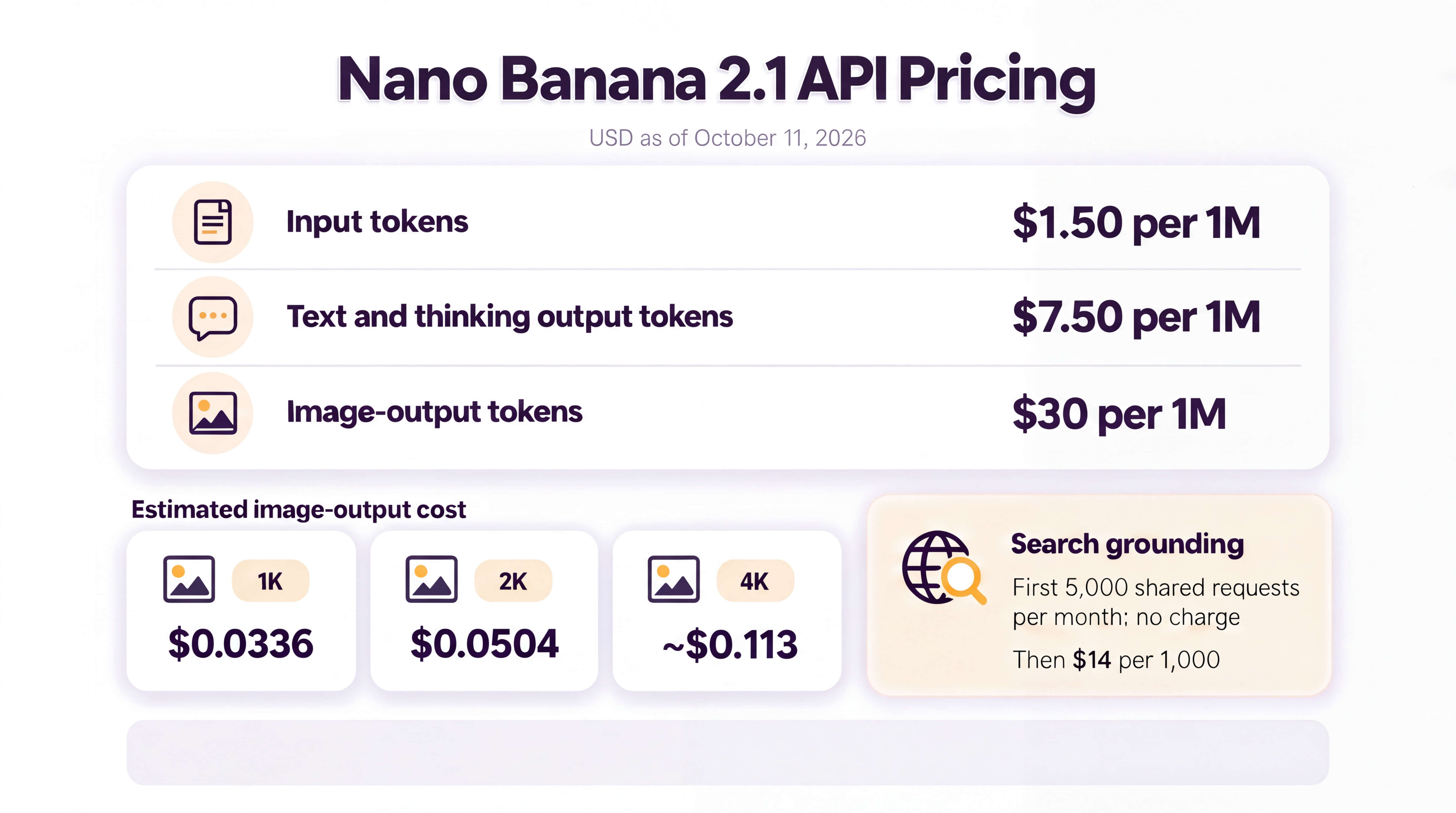
Nano Banana 2.1 has no single flat price. The Gemini API is usage-based, while consumer access is bundled into eligible Google AI plans. As of October 11, 2026, the official standard API amounts below are listed in USD. Four billable components define the current Nano Banana 2.1 API pricing.
| Cost component | Standard price | What it covers |
|---|---|---|
| Text, image, and video input | $1.50 per 1 million tokens | Request context and supplied media |
| Text and thinking output | $7.50 per 1 million tokens | Returned text and chargeable reasoning output |
| Image output | $30 per 1 million image tokens | Equivalent to $0.0336 for 1K, $0.0504 for 2K, and about $0.113 for 4K per generated image |
| Search grounding | First 5,000 shared Search requests per month at no charge, then $14 per 1,000 | Applies when supported Google Search grounding is used |
The image-output amount represents only the base Nano Banana 2.1 cost per image. Supplied text and media, chargeable thinking output, Search grounding, reference-heavy context, retries, and multiple generations can raise the total generation cost. A single grounded request may also invoke several searches, with each query counted separately. Retrieved grounding context is not charged again as input tokens under the current API table.
Gemini-app subscriptions are a separate consumer purchase, not prepaid API usage. Plan prices, regional availability, usage limits, and Nano Banana 2.1 entitlement should be checked on the current regional Google AI plans page immediately before publication because app access can change without altering the API token rates above.
For teams seeking flexible creative spending, VosuAI starts with as little as $1 on a pay-as-you-go basis, requires no subscription, and keeps purchased credits from expiring or resetting. Unlimited workspace members can collaborate without additional per-seat fees, while a broad range of image and video models remains accessible within the same creative workspace.
Developers can control input size, thinking, grounding, output resolution, and generation count more directly through the Nano Banana 2.1 API workflow.
Where can you access Nano Banana 2.1?
Nano Banana 2.1 can be accessed through the Gemini app, Google AI Studio, the Gemini API, Google Search AI Mode, Google Ads, Google Flow, Google Stitch, and VosuAI. Availability varies by product, region, account, plan, and rollout. Four groups cover consumer creation, developer access, Google workflows, and VosuAI.
- Consumer creation: Nano Banana 2.1 is available in the Gemini app for conversational image generation and editing. Confirm Nano Banana 2.1 is active before generating because defaults and menus can change.
- Developer access: Nano Banana 2.1 can be tested in Google AI Studio and accessed programmatically through the Gemini API. AI Studio supports testing, while the API supports integration and automation.
- Google workflow products: Nano Banana 2.1 is distributed through Google Search AI Mode, Google Ads, Flow, and Stitch. Each product may expose different controls, defaults, and editing behavior.
- VosuAI creative workspace: Nano Banana 2.1 can be used through VosuAI when the exact version appears in its live model selector. VosuAI offers pay-as-you-go access from $1 with no subscription, no monthly balance reset or expiration, and unlimited workspaces and team members without extra fees. Its pricing page also shows lower listed costs for several supported models than selected competing platforms.
VosuAI is useful when access must continue into affordable experimentation, team review, and repeatable production. Its non-expiring pay-as-you-go balance removes recurring subscription and per-seat commitments. Playground supports side-by-side testing, while Agent and Nodes organize editable workflows that help reduce prompt and context drift.
Finding the model confirms availability, but not whether Nano Banana 2.1 can be used for free.
What are the limitations of Nano Banana 2.1?
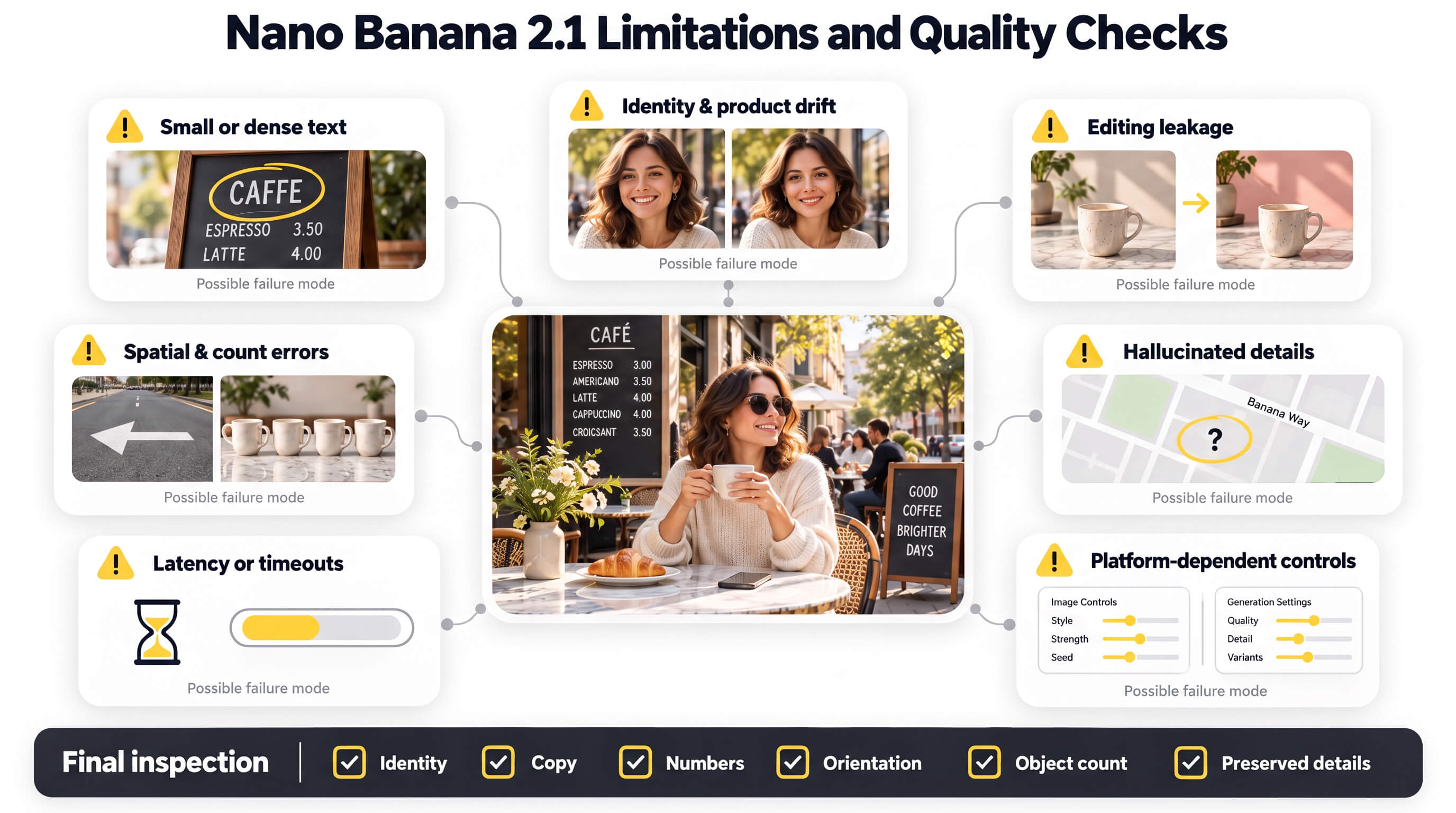
Nano Banana 2.1 remains a probabilistic generator with task-dependent limits in text, identity, editing, spatial reasoning, factuality, reliability, and interface behavior. Google documents these risks. Reviews and user reports add qualitative warning signs rather than measured failure rates.
Seven limitation groups show where Nano Banana 2.1 outputs require manual quality assurance.
- Text density and size: Nano Banana 2.1 can blur small text at 1K and mishandle long or page-length copy. Reviews flag misspellings, missing strings, and approved text changing during adjacent edits. VosuAI Playground enables side-by-side checks before approval.
- Reference and identity drift: Nano Banana 2.1 may change faces or product details. User reports also describe drift in crowded reference sets and small one-sided features. VosuAI Nodes can save the reference-driven workflow for repeat tests without guaranteeing consistency.
- Editing leakage and prompt adherence: Nano Banana 2.1 may partially follow edits, alter untouched scenery, retain doodle or mask traces, or preserve the original pose and alignment. VosuAI Photo Studio adds annotations, version history, and before-and-after review.
- Spatial and compositional reasoning: Nano Banana 2.1 can confuse left and right and struggle with complex 3D arrangements. Tests also report object-count errors, omitted foreground elements, and relationship mistakes. Inspect orientation, count, depth, and relationships.
- Factuality and grounding: Nano Banana 2.1 can hallucinate names, numbers, labels, and real-world details. Search grounding can help, not guarantee correctness. VosuAI Nodes can make a manual fact-check and approval step explicit in the workflow.
- Latency and reliability: Nano Banana 2.1 may respond slowly, time out, or require retries. Because capacity and usage limits vary by demand, product, and account, isolated reviews or reports are not universal baselines.
- Interface and configuration variance: Nano Banana 2.1 may expose different thinking controls, resolutions, limits, or availability across products, plans, accounts, and rollout states. VosuAI Playground helps compare outputs, but users should confirm the active model and controls before generating.
Inspect accepted outputs at final size, checking identity, copy, numbers, orientation, object count, and preserved details. For production, VosuAI combines Playground comparison, Photo Studio review, and Nodes to reduce process drift while keeping approval human. Official access options come next.
How to use Nano Banana 2.1?
When Nano Banana 2.1 appears in VosuAI’s live model selector, use it by opening the image workspace, defining the deliverable, entering a structured prompt and references, configuring available controls, generating, inspecting, and refining the image. VosuAI connects this workflow with PromptGPT, Agent, Nodes, and Photo Studio for reusable production rather than isolated generations.
Seven steps take a Nano Banana 2.1 task through a VosuAI workflow from visual brief to reviewed image.
- Open VosuAI and confirm the model: Sign in, enter the image workspace, and select Nano Banana 2.1 only when the exact name appears in the live model selector. Note the controls currently exposed before continuing.
- Define the deliverable: Specify image type, audience, destination, aspect ratio, resolution, exact text, reference needs, and rejection criteria. Use VosuAI Agent when the brief needs to become an editable, repeatable creative workflow.
- Build the first prompt: Enter the objective, subject, composition, visual treatment, exact copy, and constraints in a logical order. Use VosuAI PromptGPT or the prompt enhancer to improve clarity while retaining manual control.
- Add purposeful references: Upload only images that provide identity, product detail, composition, or style information. Assign each reference one clear role, then save reusable characters or elements in VosuAI for later revisions.
- Configure the output: Choose the number of images, target aspect ratio, and 1K, 2K, or 4K resolution when available. Set thinking or Search grounding only if the selected VosuAI interface exposes those controls.
- Generate and inspect the result: Click Generate, then evaluate brief adherence, identity, product details, exact text, numbers, object count, direction, composition, and artifacts. Move accepted foundations into VosuAI Photo Studio for focused corrections.
- Refine, restart, and export: Apply a targeted edit when the foundation is correct. If important details drift, return to the original references and regenerate. Use VosuAI Nodes to preserve the workflow, then download only after final quality assurance.
VosuAI is valuable for a successful image and must become a repeatable workflow. Agent organizes the brief, PromptGPT strengthens prompt construction, Nodes preserves editable generation logic, and Photo Studio supports localized revisions, helping creators reduce context drift without promising identical results. Before generating at scale, the next step is understanding how to write a Nano Banana 2.1 prompt.
How can developers use the Nano Banana 2.1 API?
Developers use the Gemini API with gemini-nano-banana-2.1 for generation and conversational editing. Eight checkpoints keep requests reliable.
- Access: Project, API key, SDK, billing, region.
- Model:
gemini-nano-banana-2.1. - Input: Prompt plus supported images.
- Output: Format, ratio, size, thinking.
- Grounding: Web/Image Search, source display, cost, verification.
- Editing:
previous interaction id, then drift review. - Response: Decode bytes, metadata, text, errors.
- Production: Retries, quotas, cost, safety, QA, Batch only when latency permits.
Can you use Nano Banana 2.1 for free?
No general free tier is guaranteed for Nano Banana 2.1. Google’s API pricing lists no free tier, while its Gemini page requires a paid Google AI plan. Trials, promotions, regional allowances, and capacity limits may change, so check the account screen. Free access to another Nano Banana model does not establish 2.1 eligibility. The next question is cost.
How should you write a Nano Banana 2.1 prompt?
An effective Nano Banana 2.1 prompt names the intended output, subject and action, scene composition, visual treatment, exact text, and every detail that must remain unchanged. Explicit relationships and acceptance criteria improve prompt adherence more than length, a principle explained in VosuAI’s guide to prompts in generative AI. The next decision is whether each reference supplies clear visual evidence.
Why can Nano Banana 2.1 results vary across platforms?
Nano Banana 2.1 results vary across platforms when model identity, exposed controls, rollout state, input processing, or conversation context differs. The product interface is not the underlying AI model, so compare the same prompt and original references at identical aspect ratio and resolution. Apply one consistent review standard before attributing any visual-quality difference to the model rather than the interface.
What is the difference between Nano Banana 2.1 and Nano Banana 2?
Nano Banana 2.1 vs Nano Banana 2 is a successor-versus-legacy decision: 2.1 is the current high-efficiency model, while Nano Banana 2 remains relevant mainly for validated legacy or reproducibility needs. Nano Banana 2 retains 0.5K output, but Google recommends 2.1 for new projects. Run a same-prompt test before migrating a workflow that already performs reliably.
What is the difference between Nano Banana 2.1 and Nano Banana Pro?
Nano Banana 2.1 vs Nano Banana Pro is an efficiency-versus-precision choice: 2.1 favors rapid, lower-cost iteration, while Pro targets complex professional work requiring stronger localization, brand fidelity, or precision creative control. Consult VosuAI’s Nano Banana Pro guide for its workflow context, then test both models whenever the cost of publishing the wrong asset exceeds the comparison cost.
How does Nano Banana 2.1 compare with GPT Image 2.5?
GPT Image 2.5 is a two-model family, so Nano Banana 2.1 vs GPT Image 2.5 depends on the required generation, editing, grounding, output, and API workflow. Nano Banana 2.1 integrates Google Search grounding, while Sunburst and Flare work through OpenAI’s Image API or Responses API. Benchmark identical inputs, references, dimensions, and acceptance checks before choosing.
Is Nano Banana 2.1 worth using?
Yes, Nano Banana 2.1 is worth testing when you need efficient image generation, conversational editing, reference-guided work, structured visuals, or 1K–4K output and can review every result. Measure accepted-output rate, correction time, latency, and total generation cost on representative tasks. Adopt it if the approved-asset rate beats your current workflow, continue testing if mixed, or reject it if correction overhead dominates.