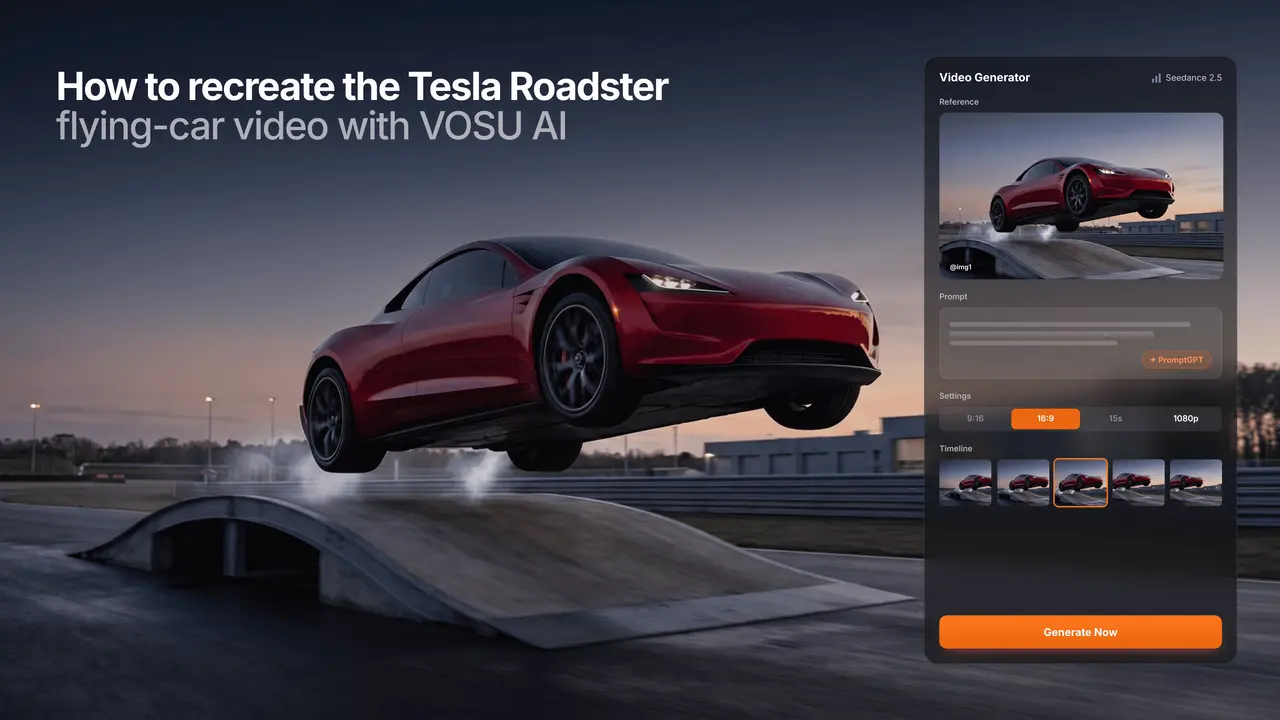
Recreate the Tesla Roadster flying-car video with VOSU AI by uploading one clear car image, choosing a single stunt sequence, and describing the launch, rotation, and landing in chronological order. The most reliable workflow does not ask the AI to invent an entire commercial at once. It starts with one recognizable vehicle, one continuous camera setup, and one dominant action.
The trend has already moved beyond copying the Roadster reveal. Creators are asking how to make their own car or bike climb a ramp, flip in mid-air, hover above traffic, or land with a short burst of smoke. That makes the useful search task more specific than “What is the Tesla Roadster?” The real task is how to create a Tesla Roadster AI video, which image to upload, which Roadster AI template to follow, what prompt to write, and how to stop the car from changing during generation. A dedicated creation workflow is being prepared for readers who want a faster starting point: Create your Tesla Roadster AI flying-car video with the VOSU template.
This tutorial shows how to build that fan-made effect with original assets in VOSU. It does not require official Tesla footage, copied title cards, or a misleading claim that the finished clip is real.
What Do You Need to Create a Tesla Roadster AI Video?
A Tesla Roadster AI video needs a clean vehicle image, a defined motion template, a suitable image-to-video model, a structured prompt, and a short-form export plan. Deciding these elements before generation gives the model fewer visual problems to solve at the same time.
Prepare the following inputs:
• One original vehicle image: Use a photo you own or have permission to animate.
• One primary action: Choose a ramp flip, vertical traffic escape, hover-and-land sequence, or cinematic reveal.
• A clear start and end state: Define where the vehicle begins and how it finishes the shot.
• A VOSU image-to-video workflow: Select a model that can use a reference image and supports the format you need.
• A continuity plan: Decide which vehicle details must remain unchanged, including paint, wheels, lights, windows, and body proportions.
• A publishing format: A vertical clip usually suits Reels, TikTok, and Shorts, while a landscape clip works better inside a long-form video or article.
| Input | Recommended requirement | Why it matters |
|---|---|---|
| Vehicle image | Sharp, high-resolution photo | Gives the model clearer body and wheel details |
| Camera angle | Front three-quarter view | Shows the front, side, roofline, and both visible wheels |
| Vehicle framing | Entire car inside the frame | Reduces cropped wheels and invented body sections |
| Background | Uncluttered scene with open space | Leaves room for a launch, flip, or camera pullback |
| Motion plan | One action with a defined landing | Reduces random scene changes and unfinished movement |
| Output format | 9:16 for short-form distribution | Keeps the vehicle readable on vertical screens |
The input image does not need to show a Tesla Roadster. Your own coupe, sedan, sports car, motorcycle, or concept vehicle can become the subject of a Roadster-inspired AI recreation.
Which Image Works Best for a Tesla Roadster AI Video?
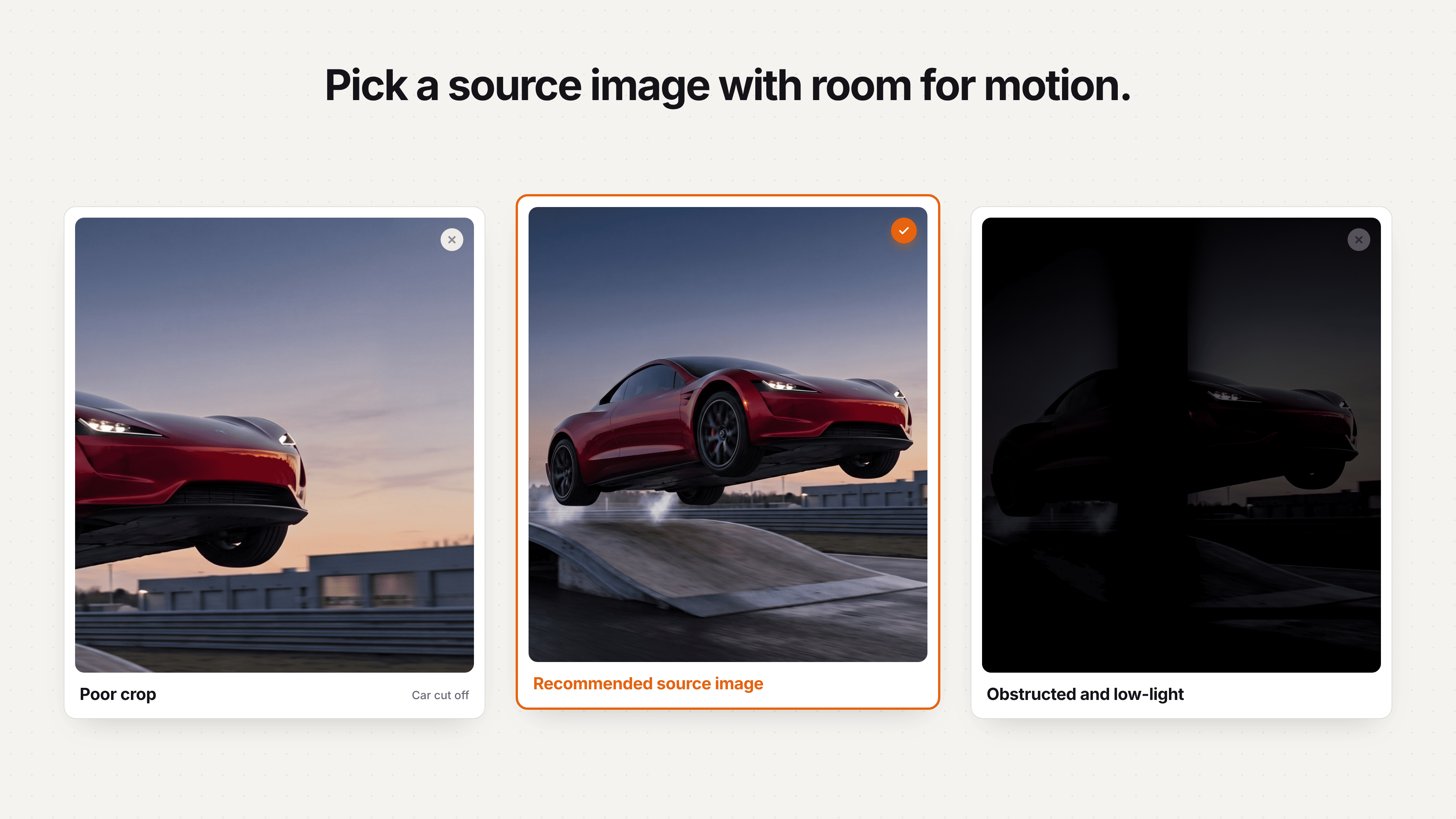
Use a complete three-quarter image with clean edges and room for motion.
A sharp front three-quarter photo with visible wheels, clear body edges, and open space around the vehicle is the strongest starting image for a Tesla Roadster AI video. This angle gives an image-to-video model more information than a direct front view while still keeping the vehicle recognizable during movement.
The full car should remain inside the frame. Leave space above the roof if the vehicle will rise or flip, and leave space in front if it will accelerate toward a ramp. A low camera angle can make the result more dramatic, but an extreme low angle may hide the far-side wheels and lower body. Likewise, a tightly cropped photo may look polished as a still image but gives the model no reliable information about the missing bumper, wheels, or road contact.
Use daylight or controlled studio lighting when possible. A very dark car on a dark street can cause the silhouette to blend with the background. Strong reflections from nearby buildings may also move incorrectly when the car rotates. A simple background is not mandatory, but it reduces the number of objects the generator must preserve.
Avoid source images with:
• motion blur across the wheels or body
• people blocking major parts of the vehicle
• cropped tires, bumpers, or roofline
• several similar cars close together
• heavy filters that remove surface detail
• text, watermarks, or oversized brand graphics
• a background that already contains smoke or distorted reflections
If the only available image has a busy background, first create a cleaner vehicle image or use a more restrained motion. A hover-and-land shot usually needs less unseen geometry than a full kickflip.
How Can You Recreate the Tesla Roadster AI Trend With Your Own Car or Bike?
You can recreate the Tesla Roadster AI trend with your own car or bike as long as the prompt treats the uploaded vehicle as the fixed visual reference. The goal is to transfer the motion idea, not to replace your vehicle with a Tesla halfway through the clip.
State the vehicle identity before describing the stunt. Tell the model to retain the original paint color, wheel count, wheel design, headlights, windows, body shape, and visible accessories. For a motorcycle, specify that both wheels remain aligned with the frame and that the rider is absent unless a consistent rider reference is intentionally included.
The source image also determines which action will look plausible. A side-view motorcycle can work well for a short lift or forward jump. A front three-quarter car image is better suited to a ramp climb, camera pullback, or partial rotation. A rear three-quarter photo can support a traffic-escape shot in which the vehicle rises and travels away from the camera.
Public creator discussions reveal strong demand for this personalized format. One tutorial-style Reel invited viewers to request the resources needed to recreate the effect with their own car or bike, and the visible responses were dominated by that request. The practical opportunity is therefore not another generic Roadster recap. It is a repeatable workflow that lets a creator animate a vehicle they already own.
Which Tesla Roadster AI Video Template Should You Recreate?
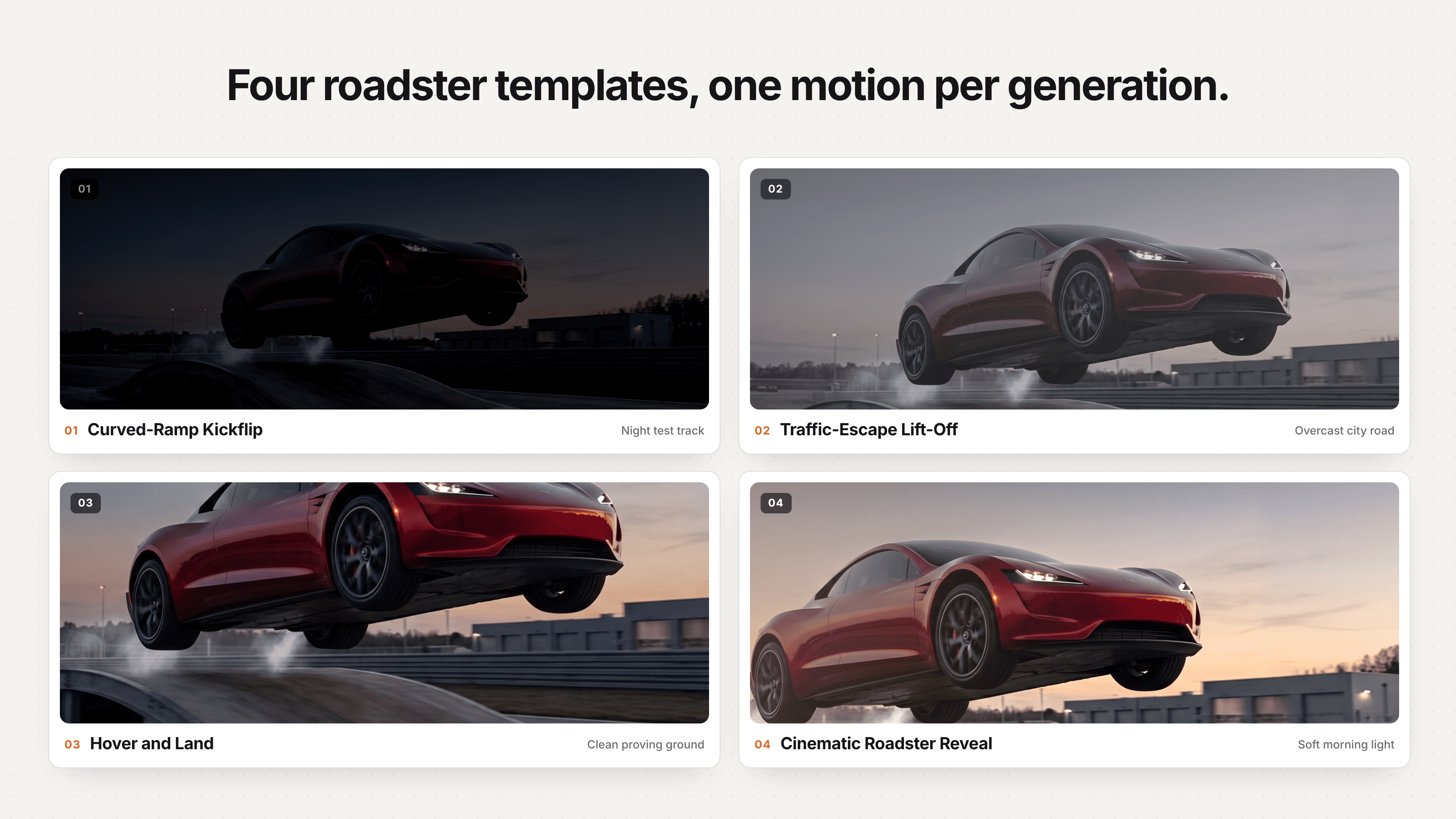
Choose one motion concept per generation for cleaner results.
Choose a Tesla Roadster AI video template that contains one readable stunt, because one controlled action usually preserves the car better than several disconnected tricks. The four most useful formats cover different skill levels and source images.
| Tesla Roadster AI video template | Core motion | Suggested clip length | Relative difficulty | Suitable source image |
|---|---|---|---|---|
| Ramp flip | Approach, climb, release, rotate, land | 8–10 seconds | High | Front three-quarter car photo |
| Traffic escape | Pause in traffic, rise vertically, fly away | 7–9 seconds | Medium | Rear or front three-quarter street image |
| Hover and land | Lift, hold, descend, regain wheel contact | 6–8 seconds | Medium | Side or three-quarter vehicle image |
| Cinematic reveal | Slow camera move, light change, restrained smoke | 5–8 seconds | Low | Clean studio or open-road image |
The ramp-flip template is the closest visual recreation of the trending Roadster stunt, but it is also the hardest. The model has to infer the vehicle’s underside, far-side wheels, changing reflections, ramp contact, aerial rotation, and landing within one clip. If vehicle consistency is more important than matching the full stunt, begin with hover-and-land or a cinematic reveal.
The traffic-escape template has a different advantage. It gives the viewer an instantly recognizable problem before the impossible action occurs. A car waiting in congestion suddenly rises above the traffic and leaves the frame. This format does not reproduce the original demonstration shot for shot, yet it still connects clearly to the flying Tesla Roadster trend.
Here, “template” means a reusable shot plan and prompt structure. It does not imply that Tesla has provided a template or that a prebuilt official Tesla effect exists inside VOSU.
How Do You Recreate the Tesla Roadster AI Video With VOSU Step by Step?
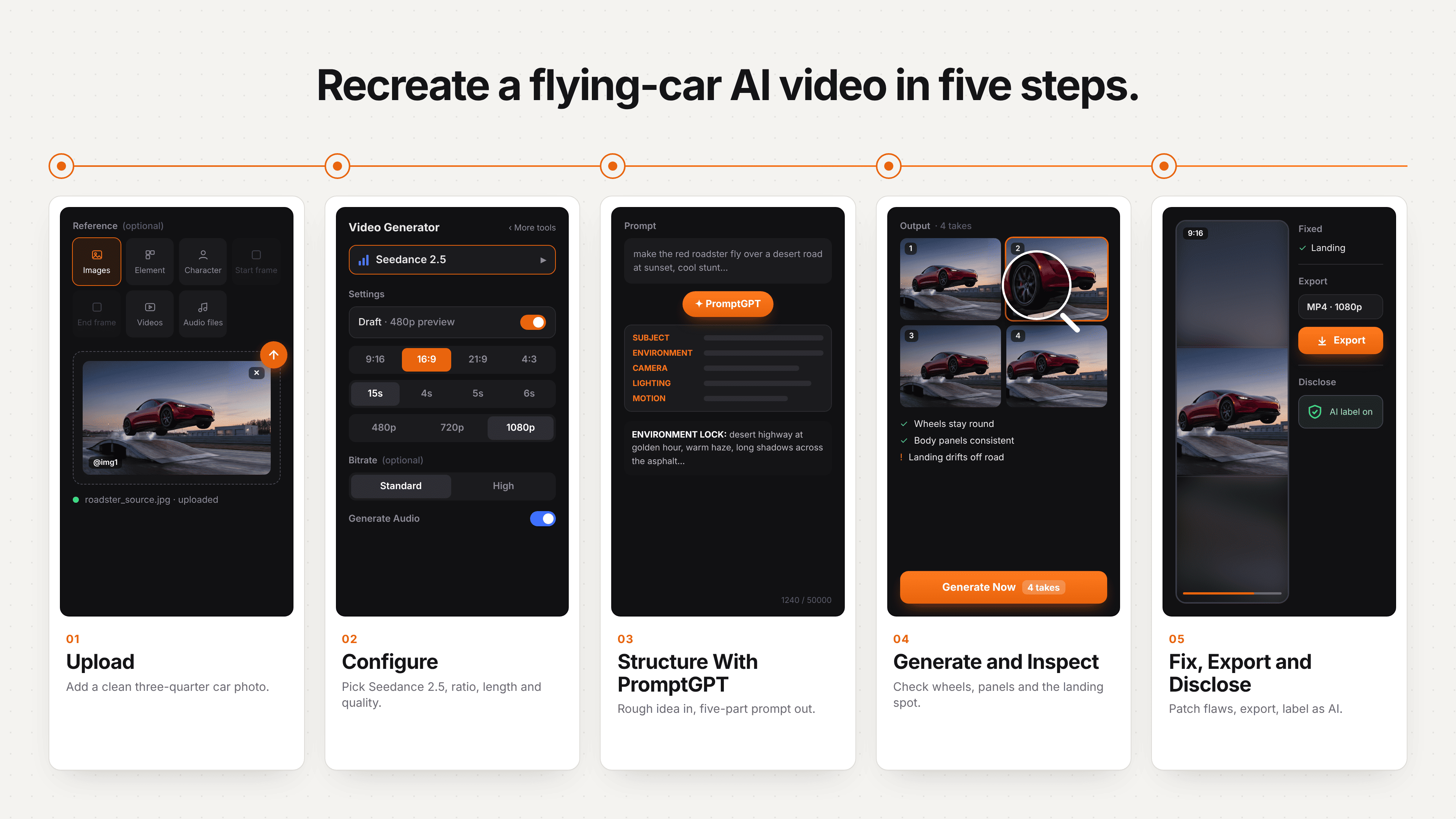
Upload, configure, structure, generate, then review and export.
To recreate the Tesla Roadster AI video with VOSU, choose one stunt, prepare a complete vehicle reference, turn the idea into a structured prompt, test a short generation, and correct only the failed motion or identity detail. These five steps keep the Tesla Roadster flying-car recreation focused and easier to compare across models.
1. Choose the Tesla Roadster AI video template and source image. Select one effect: ramp flip, traffic escape, hover-and-land, or cinematic reveal. Use one sharp front or rear three-quarter vehicle image with the complete car visible and enough open space for the launch, rotation, or landing. Do not combine a kickflip, flight, robot transformation, and second stunt in one clip.
2. Configure the VOSU image-to-video workflow. Open VOSU AI Labs, choose a model that accepts a vehicle reference, and prioritize image consistency. Set 9:16 for Reels, TikTok, or Shorts and 16:9 for YouTube or a landscape embed. When several models fit the task, use the VOSU Playground to compare the same Tesla Roadster AI prompt and source image.
3. Turn the raw Tesla Roadster idea into a structured prompt with PromptGPT. Enter a plain instruction such as “make my car climb a ramp, flip once, and land on four wheels” in VOSU PromptGPT. Review the generated structure for vehicle identity, starting scene, chronological motion, camera behaviour, physical cues, ending state, and continuity constraints before sending it to the video model.
4. Generate and inspect the Tesla Roadster flying-car clip. Treat the first short output as a motion test. Watch the complete video frame by frame and check paint, lights, windows, wheel count, body panels, reflections, shadow separation, rotation, and final road contact. Judge the launch and landing before increasing smoke, speed, camera shake, or other effects.
5. Correct, edit, export, and disclose the AI recreation. Revise one failure at a time. Strengthen the landing instruction if the car floats, or shorten the rotation if the body changes. Generate reveal, stunt, and closing shots separately when a longer Tesla Roadster AI video cannot hold continuity. Export with original or licensed audio and label it as a fan-made AI concept created with original assets.
For a fair VOSU model comparison, keep the source vehicle and base prompt unchanged for the first test. This makes it easier to identify whether a different Tesla Roadster AI result came from the model, the prompt revision, or the uploaded image.
How Do You Write a Tesla Roadster AI Prompt for VOSU?
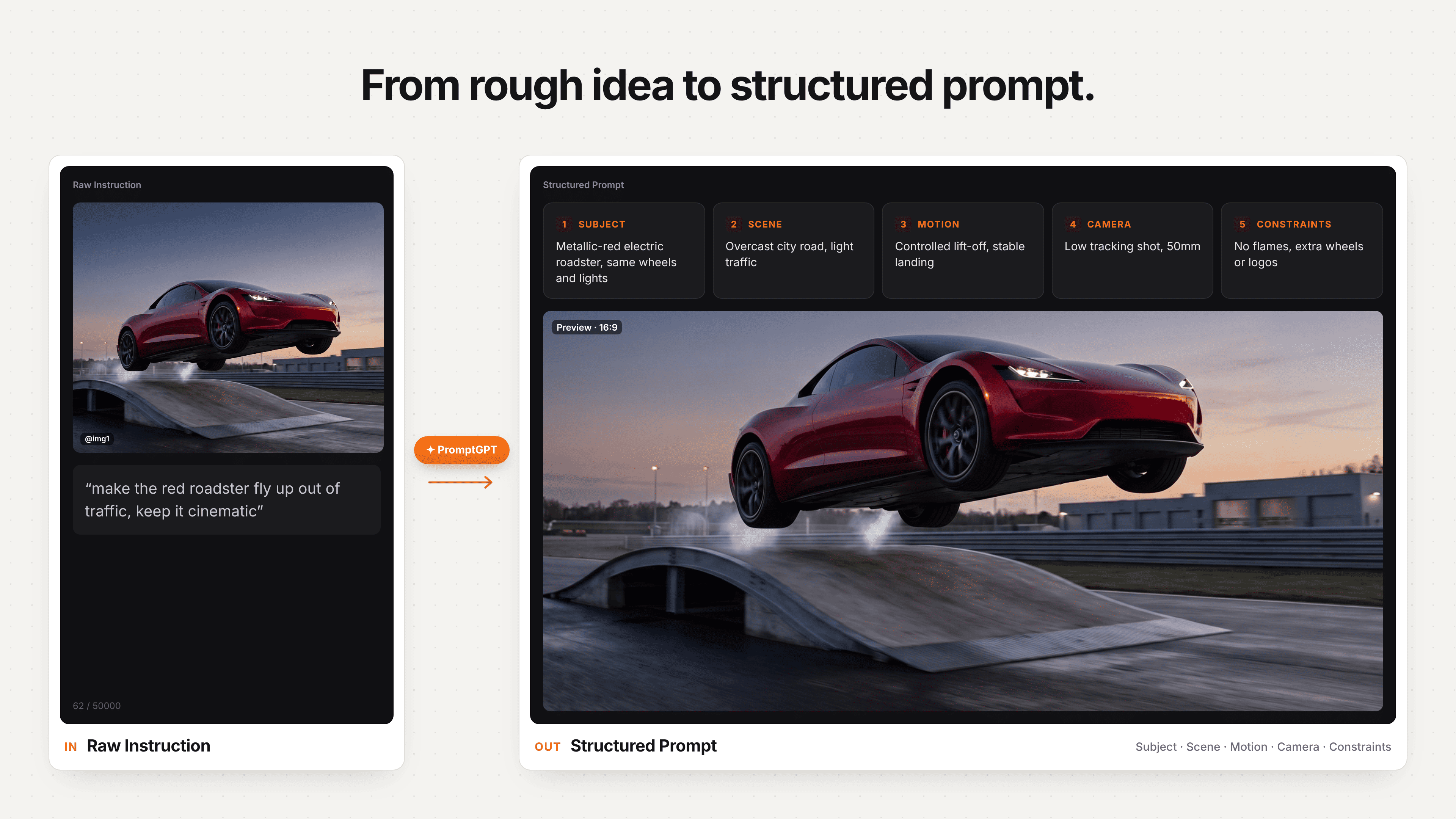
PromptGPT separates the subject, scene, motion, camera and constraints.
A useful Tesla Roadster AI prompt identifies the source vehicle, describes the stunt in time order, controls the camera, defines the landing, and prevents unwanted visual changes. Concrete verbs such as climbs, lifts, rotates, stabilizes, descends, and lands are more useful than a loose request for an “epic futuristic video.”
Build the prompt from eight components:
• Vehicle identity: Identify the uploaded vehicle as the only subject and preserve its visible design.
• Starting scene: Describe the road, ramp, traffic lane, or studio environment.
• Initial state: Say whether the vehicle is stationary, moving slowly, or approaching the ramp.
• Primary movement: Define the launch, lift, flip, or hover in chronological order.
• Camera behaviour: Choose a tracking shot, low fixed angle, slow pullback, or upward tilt.
• Physical cues: Include wheel contact, aligned shadow, suspension response, short smoke bursts, or air displacement.
• Ending state: Tell the vehicle where and how to finish.
• Continuity constraints: Preserve one vehicle, one scene, and the original body throughout the shot.
Use constraint language inside the main prompt when the selected model does not provide a separate negative-prompt field. Useful constraints include:
• one vehicle only
• same source-vehicle identity throughout
• four wheels only for a car
• no melted or folding body panels
• no replacement vehicle
• no new logos, text, or title cards
• no sudden scene change
• no detached parts
• no camera cut during the stunt
• no floating after the final landing
Tesla Roadster Kickflip AI Prompt
A Tesla Roadster kickflip AI prompt should divide the stunt into approach, ramp contact, controlled rotation, stabilization, and a four-wheel landing. The following prompt is designed as an original framework rather than a transcription of the official footage or another creator’s template.
Prompt: Use the uploaded car as the single visual reference and preserve its exact paint color, headlights, windows, wheels, body shape, and proportions. Begin with the car facing a smooth curved demonstration ramp at night on a controlled test track. In one continuous low tracking shot, the car accelerates toward the ramp, climbs the curve with all four tires aligned, and leaves the upper edge. The vehicle completes one clean, controlled aerial rotation without changing design or separating into parts. Brief downward air bursts appear beneath the car as it levels itself. The same car descends onto an empty landing zone, all four wheels contact the ground together, the suspension compresses naturally, and the vehicle rolls forward slowly. Keep the environment, lighting, camera direction, and vehicle identity continuous. No duplicate car, extra wheels, distorted panels, new text, sudden cut, or floating landing.
Generate the base movement before increasing smoke, speed, or camera shake. A stronger effect is not useful if the vehicle becomes unrecognizable during the rotation.
Tesla Roadster Flying-Car Traffic Escape Prompt
A Tesla Roadster flying-car traffic escape prompt works best when the congestion is immediately readable and the vertical launch remains the only impossible action. This variation uses the human frustration behind the viral format without reproducing another creator’s exact scene.
Prompt: Use the uploaded car as the only hero vehicle and preserve its original paint, wheels, headlights, glass, and body proportions. Start on a modern city avenue during the morning commute, with the car stopped naturally in a lane of slow traffic. Hold the opening composition long enough to establish the congestion. Without touching the nearby vehicles, the same car rises vertically above its lane in a controlled motion. A short, restrained air plume appears below the chassis while the car’s shadow separates accurately from the road. The camera tilts upward and follows as the vehicle clears the traffic, angles forward, and travels toward the open skyline. Keep all surrounding vehicles on the road and preserve one continuous city environment. No collision, duplicated car, changing vehicle model, extra wheels, warped buildings, copied logos, text overlay, or sudden scene replacement.
For a more humorous version, keep the opening realistic and let the impossible escape deliver the payoff. Adding several unrelated jokes inside the same generation can weaken both the car identity and the visual timing.
Tesla Roadster Hover-and-Land AI Prompt
A Tesla Roadster hover-and-land AI prompt should define the lift height, mid-air pause, aligned shadow, controlled descent, and final wheel contact. It is a useful first test because the model does not need to invent a complete underside rotation.
Prompt: Use the uploaded vehicle as the only subject and keep its paint, body panels, windows, lights, wheels, and proportions unchanged. The car is stationary on a clean open test pad at dusk, viewed from a front three-quarter angle. In one continuous shot, the vehicle rises smoothly to approximately half a meter above the ground and remains level. The wheels stay fixed in their correct positions, the body remains rigid, and a soft shadow stays directly below the car. Hold the hover briefly while a subtle air-disturbance effect appears beneath the chassis. The same vehicle then descends in a controlled motion, all four tires reconnect with the pavement, and the suspension settles once. Finish with the car stationary in the original position. No body transformation, extra wheels, detached parts, scene change, new logo, floating after landing, or exaggerated smoke covering the vehicle.
If this shorter prompt keeps the car stable, use the resulting clip as a quality benchmark before attempting the full ramp flip.
How Do You Keep the Same Car in a Tesla Roadster AI Video?
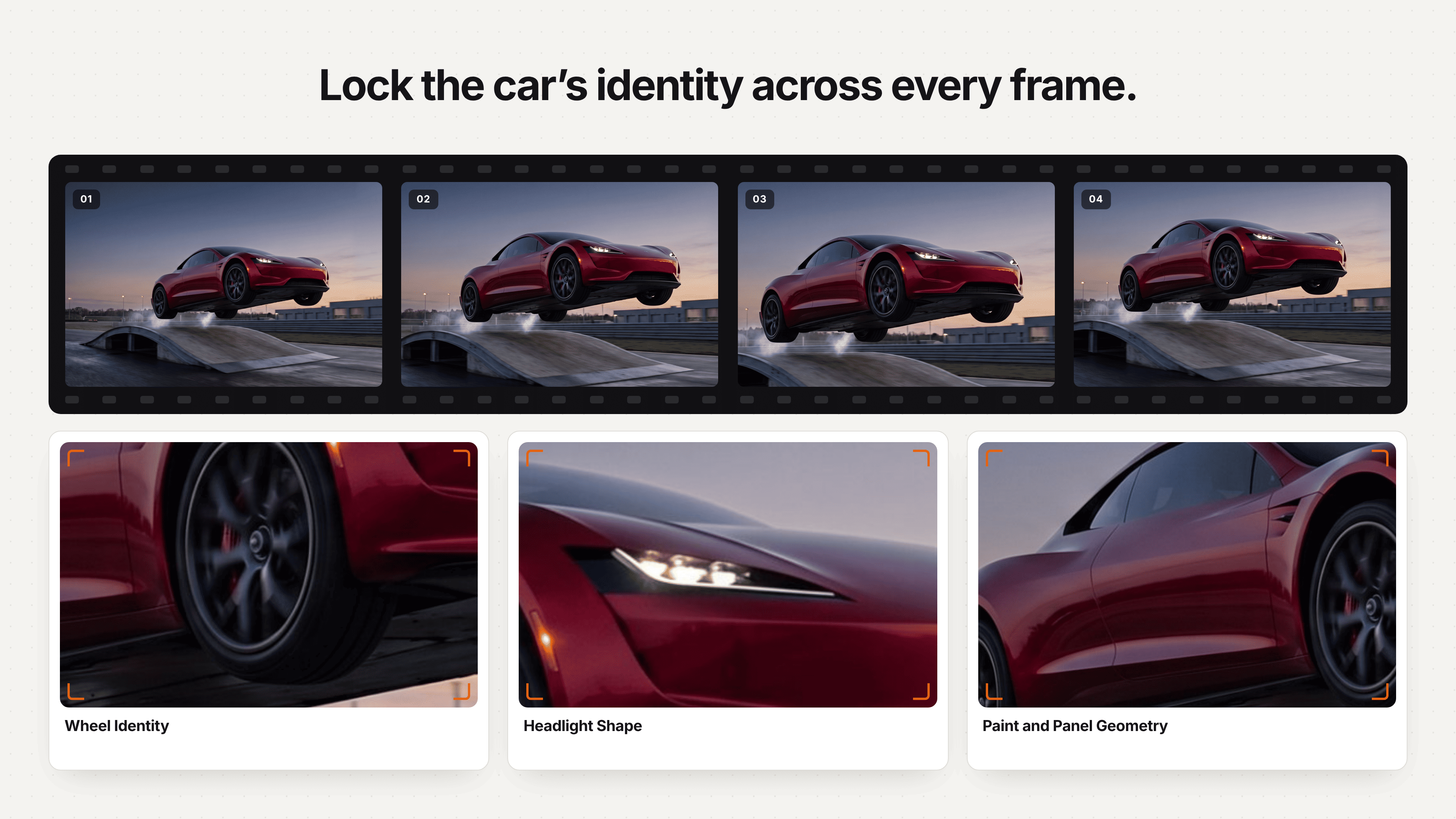
Lock paint, wheels, headlights and panel geometry across every frame.
Keeping the same car in a Tesla Roadster AI video requires a clear reference image, limited hidden geometry, stable lighting, and repeated identity constraints. Prompt wording helps, but it cannot fully recover vehicle details that are missing from the source image.
Start by separating identity requirements from motion requirements. Identity covers paint, body shape, wheel count, wheel design, windows, headlights, mirrors, spoilers, and accessories. Motion covers acceleration, lift, rotation, stabilization, and landing. When both are described in one long decorative sentence, the model may prioritize the action and loosely reinterpret the car.
Use one car throughout the clip. Avoid phrases such as “cars launch into the air” when only the source vehicle should move. Likewise, ask for one continuous shot unless you deliberately want separate scenes. A sudden cut gives the model an opportunity to generate a different car that only resembles the original.
Vehicle consistency is usually stronger when:
• the full car is visible in the source image
• the movement lasts only as long as necessary
• the car completes one major action
• the camera does not orbit through several unseen angles
• the background lighting remains stable
• smoke does not hide the car during its most complex movement
• the landing position is defined before generation
For a multi-shot Roadster AI video, reuse the same source image and restate the same identity description in every prompt. Do not rely on “the same car as before” if each generation is processed independently.
Why Does the Car Change During a Tesla Roadster AI Recreation?
A car changes during a Tesla Roadster AI recreation when the model has to invent hidden surfaces while also solving complex motion, camera movement, reflections, and scene continuity. A flat photo does not contain a complete three-dimensional record of the vehicle.
A full kickflip exposes the underside, far-side wheels, roof, and rear surfaces that may not be visible in the uploaded image. The model predicts those details frame by frame. If the prompt also requests a fast orbiting camera, dense smoke, changing lights, and a different background, the number of uncertain visual relationships increases.
Common causes of vehicle identity drift include:
• an incomplete or low-resolution source car
• a rotation that reveals too many unseen surfaces
• simultaneous vehicle and camera rotation
• multiple stunts in one clip
• conflicting speed or direction instructions
• heavy smoke covering the body
• unclear references to more than one vehicle
• a final frame that is not defined
The correction is usually simplification, not a longer list of cinematic adjectives. Reduce the action, stabilize the camera, shorten the clip, or generate the reveal and stunt separately.
How Do You Fix Melting Panels, Extra Wheels, and Bad Landings?
Fix melting panels, extra wheels, and bad landings by identifying the first frame where continuity fails and revising the related instruction only. Correcting the earliest error prevents it from propagating through later frames.
| Failure | Likely cause | Focused correction |
|---|---|---|
| Extra wheel appears | The model is uncertain about the far side during rotation | Reduce the rotation, reinforce four wheels only, and stabilize the camera |
| Body panel melts | Too many transformations occur while the car is partly hidden | Shorten the stunt and preserve a rigid body structure |
| Paint color changes | Lighting or identity instruction is weak | Repeat the original paint color and keep lighting consistent |
| Vehicle duplicates | The subject reference becomes plural or ambiguous | Specify one hero vehicle and keep background cars stationary |
| Car floats after landing | Ground contact and ending state are missing | Define four-wheel contact, suspension compression, and a stationary finish |
| Shadow moves incorrectly | Lift height or light direction is unclear | Keep one light source and align the shadow below the vehicle |
| Background bends | Camera movement is too complex | Use a fixed camera, tracking shot, or gentle pullback instead of an orbit |
| Smoke hides the car | Effects are requested before motion is stable | Generate clean motion first and add restrained effects later |
Do not rewrite the entire prompt after every generation. Preserve the instructions that worked, revise the failed relationship, and compare the new clip with the previous output. This creates a useful prompt-revision record instead of a series of unrelated attempts.
How Should You Edit and Export a Tesla Roadster AI Video?
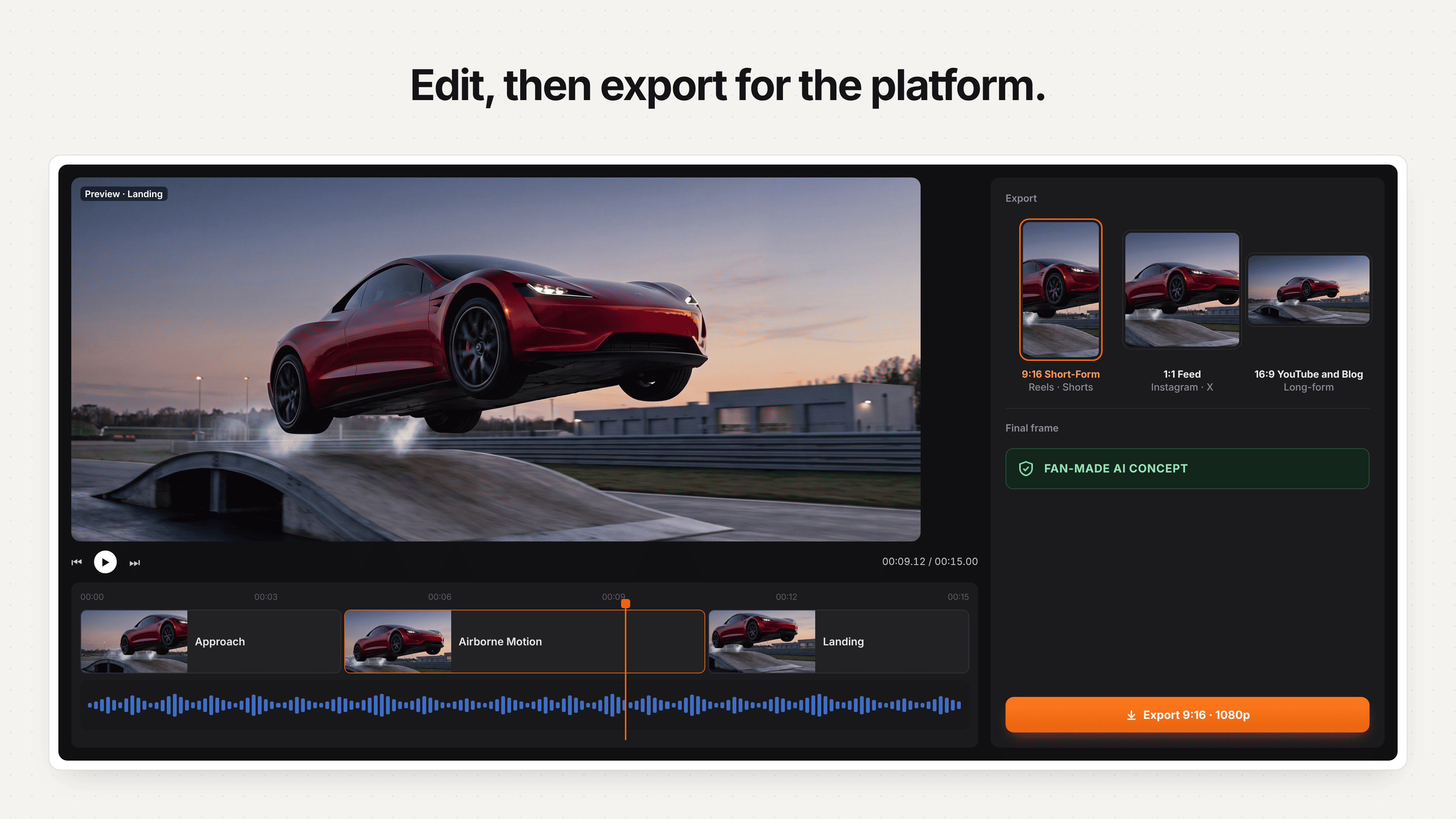
Assemble stable clips, then export for the intended platform.
Edit a Tesla Roadster AI video around a fast setup, one readable stunt, and a clean ending, then export it in the aspect ratio of the intended platform. A short clip often feels more convincing because it ends before small identity errors become distracting.
| Publishing destination | Canvas | Useful edit approach |
|---|---|---|
| Instagram Reels | 9:16 vertical | Establish the vehicle quickly and keep the main action centered |
| TikTok | 9:16 vertical | Use an immediate hook and readable on-screen disclosure |
| YouTube Shorts | 9:16 vertical | Keep the full stunt inside the safe central area |
| YouTube video | 16:9 landscape | Use several separately generated shots with more environmental space |
| Blog embed | 16:9 or 9:16 | Match the article layout and show the vehicle at a readable size |
For a short-form edit, six to ten seconds is often enough for one generated action. If the story needs a reveal, stunt, and reaction, generate them as separate clips and assemble only the stable sections. Match cuts using the vehicle’s direction, camera height, light, and background color.
Use original or properly licensed sound. A restrained air burst, tire movement, landing impact, and ambient city or test-track sound can make the motion easier to read. Avoid official soundtrack audio or sound design that suggests the video came from Tesla.
Place a short disclosure in the opening frame, caption, or both. “Fan-made AI concept created with original assets” identifies the nature of the video without interrupting the visual hook.
What Should You Check Before Publishing a Tesla Roadster AI Recreation?
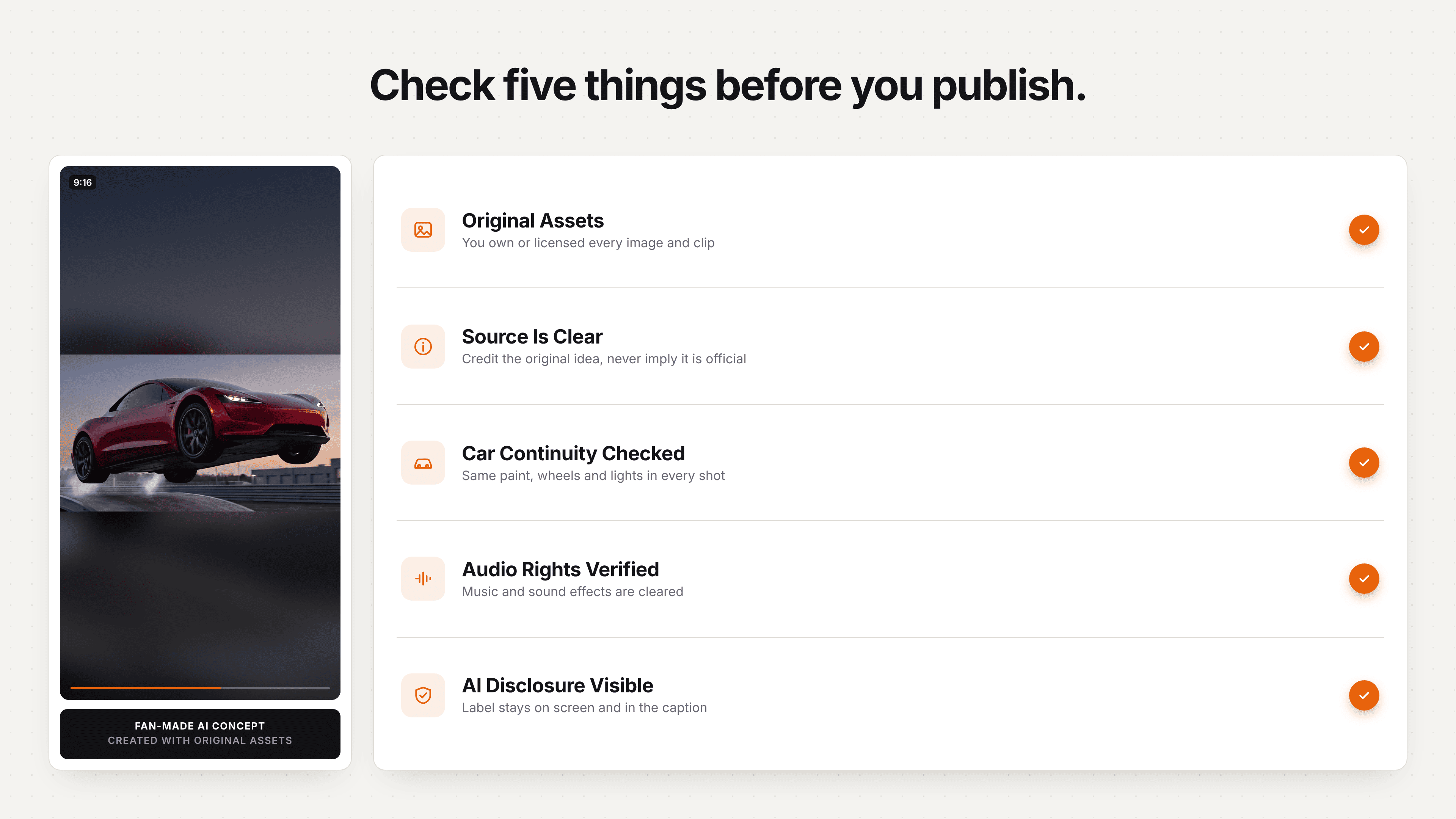
Verify ownership, continuity, audio rights and AI disclosure before publishing.
Check the complete motion, vehicle identity, source ownership, disclosure, and platform presentation before publishing a Tesla Roadster AI recreation. A convincing hero frame cannot compensate for a duplicated wheel, changing body, misleading title, or unlicensed source asset elsewhere in the clip.
1. Review the complete sequence: Watch from the first stationary frame through takeoff, rotation, descent, wheel contact, and the final hold. Do not approve only a selected screenshot.
2. Confirm vehicle identity: Compare the generated paint, headlights, windows, mirrors, body panels, wheels, and visible accessories with the uploaded car image.
3. Check motion continuity: Make sure the car follows one readable path. Look for sudden speed changes, reverse movement, impossible camera cuts, or a rotation that begins without a visual cause.
4. Inspect ground and shadow contact: During takeoff, the shadow should separate in the same direction as the vehicle. During landing, the wheels should reconnect with the road and the body should settle instead of continuing to float.
5. Verify source ownership: Use an original or licensed vehicle image, soundtrack, sound effect, and background asset. Remove copied title cards, channel marks, watermarks, and unofficial uses of protected material.
6. Add clear AI disclosure: Present the video as a fan-made AI concept, not an official upload, leak, production demonstration, or evidence of an unreleased feature.
7. Check the title and thumbnail: Do not use wording or visual styling designed to impersonate Tesla, Rockstar-style launch media, a news outlet, or another creator’s account. The thumbnail should promise the effect the clip actually shows.
8. Test the final platform crop: Confirm that the complete car, landing zone, disclosure, and any essential text remain visible inside the mobile safe area.
9. Watch once without sound: The movement should still be understandable when a viewer encounters the video muted in a social feed.
10. Export only after the final review: Inspect the rendered file, not just the editing timeline. Compression can introduce blur around wheels, smoke, lights, and fine body edges.
Was the Tesla Roadster Flying-Car Video Real or AI-Generated?
The October 2026 Tesla Roadster stunt was presented as a physical demonstration, while many flying-car clips circulating afterward are AI-generated fan concepts. Check the original source, event context, motion continuity, reflections, wheels, and disclosure before calling any Tesla Roadster video real. A city-traffic escape, robot transformation, or repeated impossible stunt should be treated as synthetic unless reliable evidence connects it to the official reveal.
How Did the Real Tesla Roadster Flip, Hover, and Land?
The real Tesla Roadster flip used an underside suction system and short thruster-assisted movements to hold, release, rotate, and land the car during a controlled demonstration. For a Tesla Roadster AI recreation, translate that sequence into five visible beats: ramp contact, release, aerial rotation, stabilization, and four-wheel landing. This creates a readable Roadster kickflip prompt without copying the official footage shot for shot.
Can a Tesla Roadster AI Video Recreate Real Vehicle Physics?
A Tesla Roadster AI video can imitate a kickflip, hover, or thruster landing, but it cannot validate real vehicle physics. Image-to-video models predict visual continuity rather than mass, torque, thrust, traction, or impact forces. Use VOSU for a cinematic Tesla Roadster flying-car concept. Use a physics engine when the goal is calculated simulation, interactive control, or engineering evidence.
Why Did the Tesla Roadster Traffic-Escape AI Video Go Viral?
The Tesla Roadster traffic-escape AI video went viral because it turns familiar congestion into one immediate impossible payoff. The setup is readable in the first second, then the car rises above traffic and resolves the frustration. For an original VOSU version, replace the commute with a parking delay, road closure, school run, or rainy street while keeping one clear Tesla Roadster flying-car action.
Can You Turn a Tesla Roadster Into a Mecha or Robot With AI?
You can create a Tesla Roadster car-to-mecha video with AI, but it should be generated separately from the flying-car stunt. A mecha prompt changes panels, wheels, doors, and lights into a robot, while a Roadster kickflip prompt must preserve the original vehicle. Define transformation stages, retain the paint and recognizable parts, finish with one stable robot form, and label it as a fictional AI concept.
What Makes a Tesla Roadster AI Video Work on Reels, TikTok, and Shorts?
A Tesla Roadster AI video performs better on Reels, TikTok, and Shorts when the car is visible immediately, one stunt drives the clip, and the payoff arrives quickly. Use 9:16 framing, protect the central safe area, end with a landing or clean loop, and disclose the AI recreation. For a person-and-vehicle transformation, use the 24 Car Trend car-transition workflow instead of forcing that intent into a flying-car prompt.
Why Are Creators Recreating the Tesla Roadster Flying Car Video With AI?
Creators recreate the Tesla Roadster flying-car video because one vehicle photo can become a personalized stunt, comedy clip, or cinematic experiment. For connected scenes, use the GTA 6 launch-trailer recreation workflow. For two-person identity replacement, compare the Hotel Lobby character-swap template guide and Alors on Danse two-photo workflow. The strongest Tesla Roadster AI recreation preserves the car, controls one action, documents revisions, and clearly identifies the result as fan-made.