

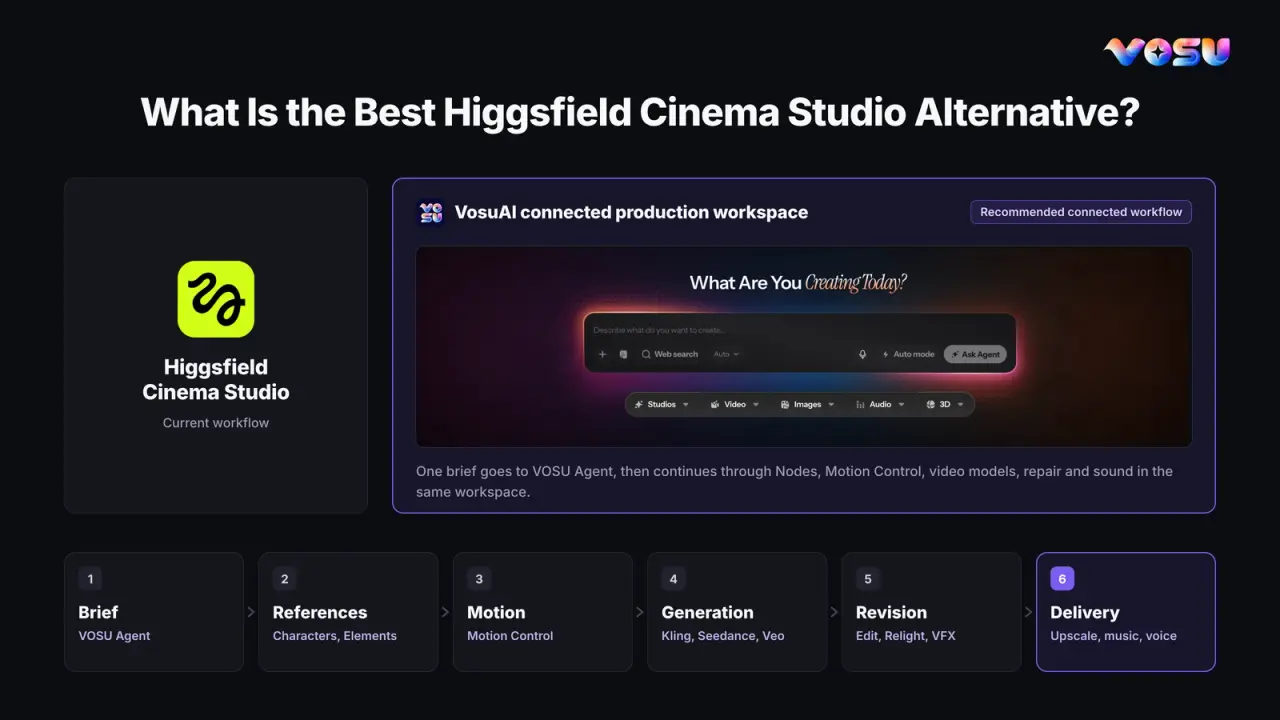
VosuAI is the best Higgsfield Cinema Studio alternative for filmmakers who want agent planning, reusable Nodes, multiple current video models, editing, VFX, relighting, camera angle changes, upscaling, sound, and pay-as-you-go access in one connected production workflow.
VosuAI combines Agents, Nodes, image and video models, editing, enhancement, effects, and audio inside one creative workspace. Agents turn a brief into a shot plan. Image models prepare concepts and keyframes. Video models generate individual shots. Nodes preserve the approved inputs and production steps that filmmakers want to reuse.
VosuAI keeps accepted references, frames, clips, prompts, and workflow branches available as a project moves forward. Filmmakers can compare models, repair a failed detail, add sound, enhance an accepted clip, and prepare delivery assets without rebuilding every earlier decision. Pay-as-you-go access also lets creators fund active production instead of carrying a required subscription between projects.
Which Higgsfield Cinema Studio Alternative Connects the Full AI Filmmaking Workflow?
VosuAI connects the full AI filmmaking workflow by preserving each approved decision from the first brief through the finished shot. Filmmakers can plan a sequence, prepare references, test suitable models, revise a rejected detail, and finish accepted footage without rebuilding the surrounding project.
VosuAI Agents can break a 30-second script into shots, define the visual goal for each shot, and prepare prompts before generation begins. Image models can then build concept frames, cast references, locations, props, and keyframes. Filmmakers approve the visual base before spending credits on motion.
VosuAI Nodes preserve prompts, references, model choices, outputs, and follow-up actions as reusable production branches. A filmmaker can send the same approved keyframe to several suitable models, compare the results, retain the useful clip, and revise the failed branch without recreating the rest of the sequence.
VosuAI editing, VFX, relighting, camera-angle, extension, upscaling, music, voice, and sound tools continue the work after generation. Filmmakers can correct a specific defect and move an accepted shot toward delivery instead of treating every weak result as a full restart. Each shot still needs human review against the same written acceptance rule.
How Does a Higgsfield Cinema Studio Alternative Cover Each Production Stage?
VosuAI as a higgsfield cinema studio alternative covers planning, reference creation, model selection, video generation, motion control, revision, enhancement, audio, and team review through connected tools inside one workspace. Filmmakers can use the right component for each production decision while keeping approved assets available for the next stage.
Map the VosuAI replacement workflow by production stage.
| Production stage | VosuAI tools | Production action | Why it matters |
|---|---|---|---|
| Planning | VOSU Agent and PromptGPT | Break a brief into concepts, shots, still prompts, and motion prompts | Filmmakers begin with an editable production plan instead of isolated generations |
| Visual development | Image Generator, Elements, Characters, and Photo Studio | Build cast references, locations, props, storyboards, and approved keyframes | Approved visual assets can guide later shots and revisions |
| Camera and performance | VOSU Motion Control, Change Angle, and model-specific controls | Direct subject movement, camera behavior, framing, and alternate viewpoints | Each shot can use the control method that matches its creative need |
| Shot generation | Video Generator, Playground, and current video models | Generate from text, images, references, start frames, end frames, or supported audio | Filmmakers can select different models for different shots |
| Continuity and revision | Nodes, Edit Video, Replace Background, Relight Video, and VFX | Reuse approved inputs and correct the failed part of a shot | Accepted work can continue without rebuilding the whole sequence |
| Finishing | Extend Video, Video Upscale, Music, Sound Effects, Text to Speech, and dubbing | Complete duration, quality, sound, voice, and localization work | Generated clips can move closer to delivery inside the same ecosystem |
| Collaboration | Projects, Workspaces, shared assets, roles, and credit controls | Organize production across creators, editors, reviewers, and clients | Teams can manage creative work without per-seat charges |
VosuAI replaces the wider production job through connected stages. Agents establish the plan, Nodes retain the production logic, models generate each shot, and focused motion, editing, audio, and enhancement tools prepare accepted footage for delivery.
Which Tools Form a Complete Higgsfield Cinema Studio Alternative Workflow?
VOSU Agent, PromptGPT, Nodes, Playground, Motion Control, Video Generator, editing tools, enhancement tools, and audio tools form the VosuAI alternative workflow. Each component handles a defined production need, so filmmakers can keep approved work and change only the stage that needs attention.
Give each VosuAI component a clear production role.
- Plan with VOSU Agent and PromptGPT. VOSU Agent interprets the brief, proposes creative steps, selects suitable tools, and delivers an editable workflow. PromptGPT helps filmmakers turn camera, motion, scene, and performance intentions into stronger prompts.
- Organize with Nodes. Nodes connect still prompts, motion prompts, image generation, video generation, music, editing, and reusable templates on one visual canvas. Private, shared, and template workflows support repeated production.
- Choose models with Playground and Video Generator. Playground compares selected models with the same prompt. Video Generator applies each model’s supported references, duration, resolution, aspect ratio, audio, and output settings.
- Control performance with VOSU Motion Control. Motion Control transfers movement from reference footage to a character image while supporting relevant Images, Elements, Characters, prompts, framing modes, and optional original audio where available.
- Repair with Edit Video, Replace Background, Relight Video, and VFX. Filmmakers can correct objects, environments, lighting, effects, or other rejected details without automatically discarding the approved motion and composition.
- Finish with Extend Video, Video Upscale, Music, Sound Effects, speech, lip sync, and dubbing. VosuAI can extend scenes, improve resolution and temporal consistency, create audio, synchronize speech, and prepare localized versions.
VosuAI provides a modular replacement path from planning and model-specific generation to reusable branches, targeted correction, and finishing. Filmmakers can activate each component only when the shot requires it.
Which Higgsfield Cinema Studio Alternative Controls Camera Motion and Framing?
VosuAI controls camera motion and framing through PromptGPT, model-specific generation settings, VOSU Motion Control, Change Angle, reference frames, and reusable Node branches. Filmmakers can direct the first generation, transfer a recorded performance, create another viewpoint, or revise a rejected camera decision without rebuilding every approved production step.
PromptGPT converts plain creative intent into usable camera and motion language. A filmmaker can define the subject, shot size, camera path, speed, focus behavior, environmental motion, and ending composition before sending the prompt to a suitable video model. Video Generator then exposes the inputs and settings supported by that model, including combinations of start frames, end frames, images, Elements, Characters, duration, aspect ratio, resolution, and audio.
Choose the camera method that matches the shot problem.
- Generate a directed move. Describe a pan, dolly, orbit, crane, handheld follow, push-in, pullback, or combined movement through PromptGPT and the selected model’s controls.
- Transfer exact performance timing. VOSU Motion Control applies movement from a reference video to a character image. Framing can follow the reference footage or preserve the source-image composition, and original audio can remain available where supported.
- Create another viewpoint. Change Angle supports top, front, right, bottom, back, and left views with Orbit, Tilt, and Zoom choices. Filmmakers can produce alternate coverage while keeping the same source subject.
- Reuse approved direction. Nodes preserve the prompt, reference, model, and output path. Filmmakers can branch a new version, change one instruction, and retain the approved setup for comparison.
Camera, lens, motion, and reference behavior vary by model. Test one simple move and one compound move, then score camera path, framing, focus, identity, stability, and ending composition. VosuAI supports direction before generation and focused correction afterward.
Which Higgsfield Cinema Studio Alternative Directs Look, Lighting, and Performance?
VosuAI directs visual style and performance through approved references, model selection, PromptGPT, Motion Control, Relight, Edit Video, and reusable Nodes. Filmmakers can establish the intended era, palette, light, mood, movement, and expression before generation, then correct a rejected attribute without discarding every accepted part of the clip.
Build the creative direction in separate, reviewable layers.
- Establish the visual base. Image Generator, Characters, Elements, and Photo Studio can prepare cast, wardrobe, location, prop, palette, and keyframe references before video spending begins.
- Select the generation behavior. Playground can compare suitable models with the same creative brief. Filmmakers can choose the result that handles the required realism, stylization, motion, performance, or audio most effectively.
- Direct movement and expression. PromptGPT defines the performance intention, while VOSU Motion Control can transfer body movement, gesture, and timing from reference footage to the approved character image.
- Revise the rejected layer. Relight can change illumination and mood. Edit Video can modify a background, object, visual treatment, or other supported detail while preserving useful motion and scene content.
VosuAI keeps creative direction editable after generation. A period scene can start with approved references, a performance can use recorded movement, and an accepted take can receive new lighting or a focused correction. Reviewers should still score period accuracy, palette, expression, eye line, timing, and sequence continuity.
How Does a Higgsfield Cinema Studio Alternative Preserve Cast and Scene Continuity?
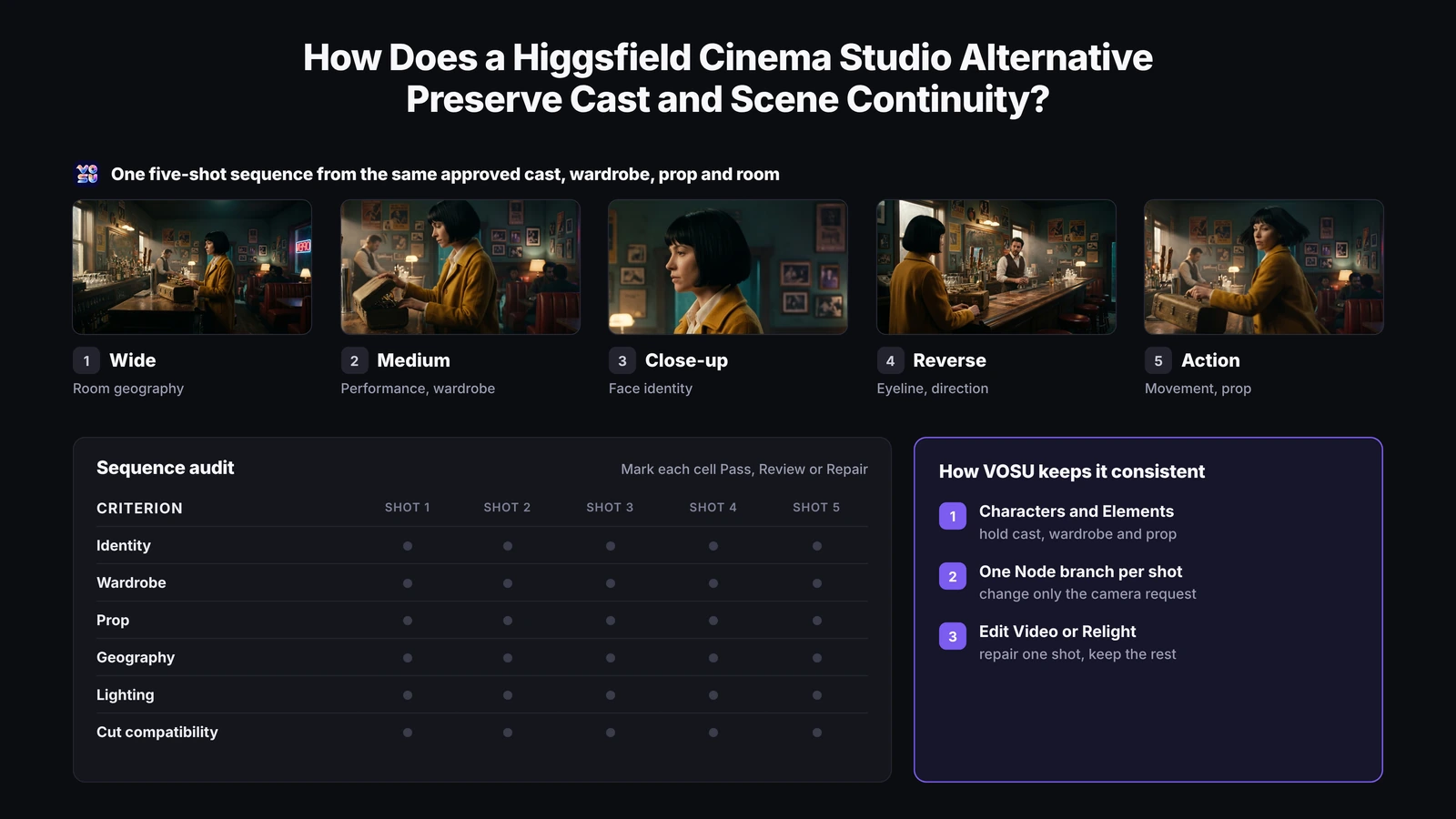
Judge continuity across the sequence, not one frame.
VosuAI preserves cast and scene continuity by reusing approved Characters, Elements, reference images, keyframes, clips, prompts, and Node branches across shots and repair steps. Filmmakers can carry the same visual decisions into wide shots, close-ups, reverse angles, action coverage, and later revisions instead of preparing every scene from an empty prompt.
Characters and Elements provide reusable identity, prop, and scene inputs where the selected model supports them. Image Generator can create the approved visual base. Change Angle can develop alternate views from the same source. Video Generator can use supported start frames, end frames, images, Elements, and Characters. VOSU Motion Control can apply new movement while attempting to preserve the character’s identity, appearance, and facial features.
Nodes connect those assets to each scene branch. A filmmaker can duplicate an approved branch, replace only the motion prompt or camera request, and keep the cast, location, prop, palette, and generation logic visible. If one shot fails, Edit Video, Replace Background, Relight Video, or VFX can address a specific problem before the team considers a complete rerun.
Audit continuity across one five-shot sequence.
- Create a wide establishing shot, medium performance shot, close-up, reverse angle, and action shot.
- Reuse the same approved cast, wardrobe, prop, room layout, time of day, palette, and light direction.
- Score face identity, body proportions, clothing details, prop geometry, spatial geography, lighting, motion, and cut compatibility.
- Record every rejected attempt, replacement reference, repair action, credit charge, and reviewer minute.
References cannot guarantee perfect continuity because model adherence and temporal stability vary. Reviewers should judge the assembled sequence, not one attractive frame. VosuAI preserves approved inputs, branches the affected shot, and continues repair work from the same project context.
Which Higgsfield Cinema Studio Alternative Builds Multi-Shot Films?
VosuAI builds multi-shot films as a Higgsfield Cinema Studio alternative by turning one creative brief into reusable scene branches for planning, keyframes, motion, generation, repair, and finishing. Agents map the sequence, Nodes connect each production step, and filmmakers can revise one scene without rebuilding the complete project.
Build every shot as an editable branch inside one production plan.
- Define the production rules. Record the story, cast, locations, props, visual style, delivery format, and acceptance criteria.
- Break the script into scenes. VOSU Agent can create still and motion prompts, then organize separate scene branches for review.
- Build the references. Image Generator, Elements, Characters, Change Angle, and Relight can prepare cast, locations, props, keyframes, viewpoints, and lighting treatments.
- Direct repeatable movement. VOSU Motion Control transfers reference-video movement to a character image. Supported framing can follow the reference or preserve the source composition, with original audio retained where available.
- Generate each shot. Video Generator can use supported frames, images, Elements, Characters, prompts, settings, and audio. Filmmakers can choose a suitable model per scene.
- Preserve the production graph. Nodes connect prompts, image outputs, motion instructions, video nodes, and music in editable branches. Change one input without recreating approved scenes.
- Repair and finish. Edit Video, Extend Video, and Video Upscale can correct content, continue footage, and improve approved delivery clips.
VosuAI keeps each scene’s references, motion, settings, and follow-up work visible. Motion Control handles repeatable performance, while Nodes retain the multi-scene structure. Filmmakers can rerun one affected branch and send finished clips to an external editor when final assembly needs deeper timeline control.
Which Higgsfield Cinema Studio Alternative Covers Duration, Resolution, and Audio Needs?
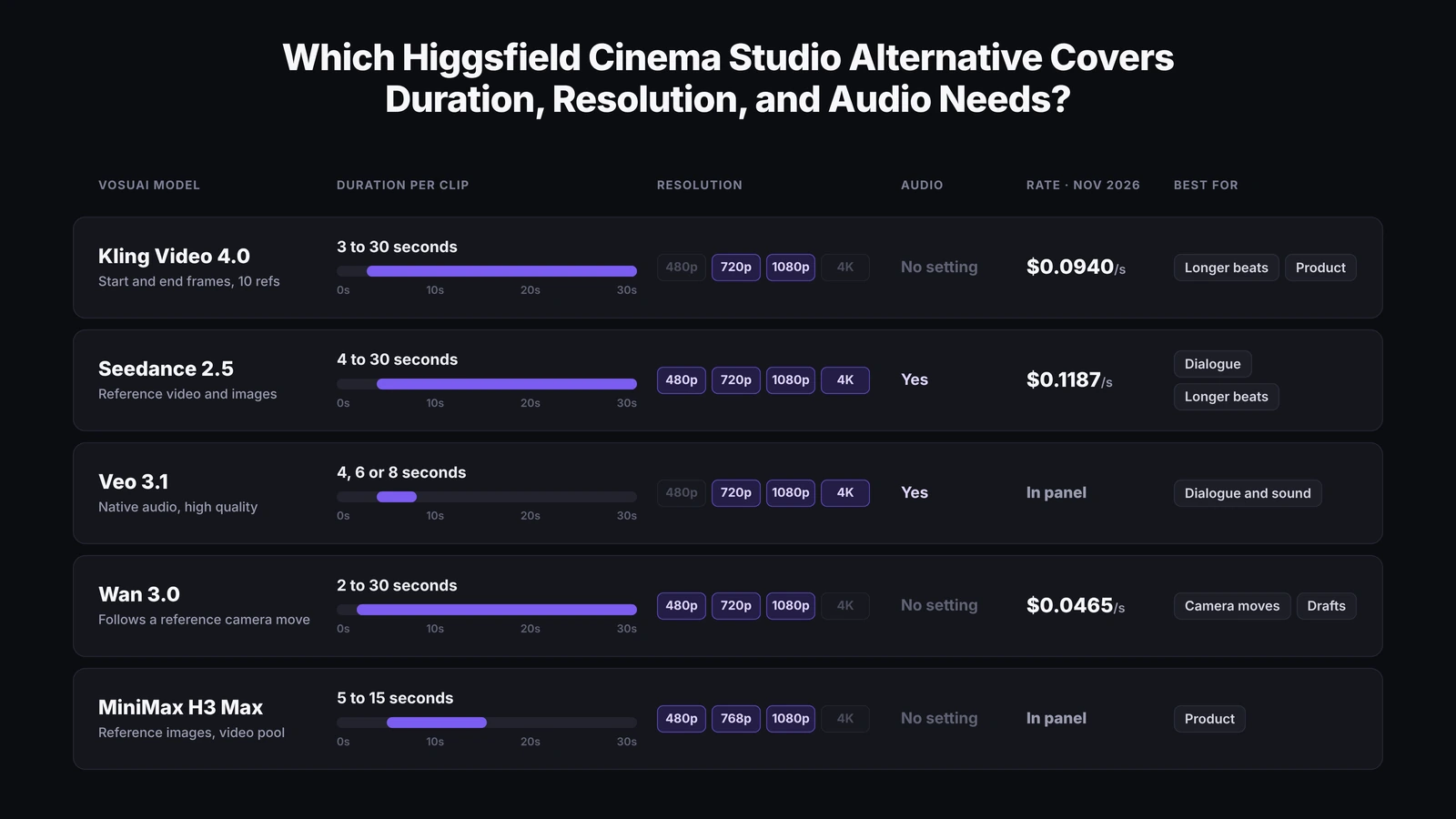
Choose each model by the shot requirement.
VosuAI covers different duration, resolution, reference, motion, audio, and budget requirements by giving filmmakers access to several current video models inside one production workspace. Filmmakers can assign each shot to a suitable model instead of forcing dialogue, product motion, cinematic action, and low-cost drafts through one generation system.
Current VosuAI options include Kling 4.0, Seedance 2.5, Veo 3.1, Wan 3.0, and Minimax H3 Max. Kling 4.0 and Seedance 2.5 support generations up to 30 seconds on available VosuAI surfaces. Seedance 2.5 includes 480p and 720p choices with synchronized audio. Other settings vary by model.
Route each shot by its delivery requirement.
- Dialogue and sound: Test voice identity, lip sync, expression, background sound, duration, and reference adherence.
- Cinematic motion: Compare camera path, subject movement, stability, physical interaction, and ending composition.
- Product work: Review shape, text, logo detail, reflections, material, motion, and framing before enhancement.
- Longer beats: Choose the required native duration or continue an accepted segment through Extend Video.
- Budget-sensitive drafts: Use Playground and published rates before committing to a finishing model.
Playground compares selected models when inputs and settings are sufficiently similar. Video Generator exposes supported controls, and Nodes preserve the chosen path. Because availability varies, verify the generation panel before spending and record native resolution separately from upscaling.
How Does a Higgsfield Cinema Studio Alternative Repair and Finish Shots?
VosuAI repairs and finishes generated footage through Edit Video, Replace Background, Relight Video, VFX, Change Angle, Extend Video, Video Upscale, Motion Control, music, speech, sound effects, lip sync, and dubbing. Filmmakers can isolate the rejected production detail, apply a focused operation, and keep the accepted performance, motion, framing, or scene context whenever the correction preserves them.
Use the smallest appropriate correction before generating the complete shot again.
- Name the defect. Separate a wrong object, background, light, angle, movement, duration, resolution, voice, or sound from the parts that pass.
- Apply the focused operation. Edit Video handles supported prompt-based changes. Replace Background, Relight Video, Change Angle, and VFX address more specific problems.
- Continue short footage. Extend Video can add one to ten seconds. Review motion, lighting, pacing, identity, and the join.
- Improve approved footage. Video Upscale supports output choices up to 4K with Sharp, Smooth, Standard, and Ultra options. Check detail, noise, consistency, motion, and new artifacts.
- Complete sound. VosuAI includes music, speech, sound effects, voice cloning, voice changing, dubbing, and lip-sync paths.
- Verify the repair. Compare identity, geometry, timing, motion, framing, color, audio, and unintended changes with the approved original.
VosuAI keeps generation, repair, enhancement, and audio connected. Complex nonlinear assembly, multitrack mixing, detailed captions, color-managed delivery, or final mastering can still require an external editor. VosuAI moves a nearly usable shot toward approval without making a complete rerun the default response.
Which Higgsfield Cinema Studio Alternative Reduces Commitment and Accepted-Shot Cost?
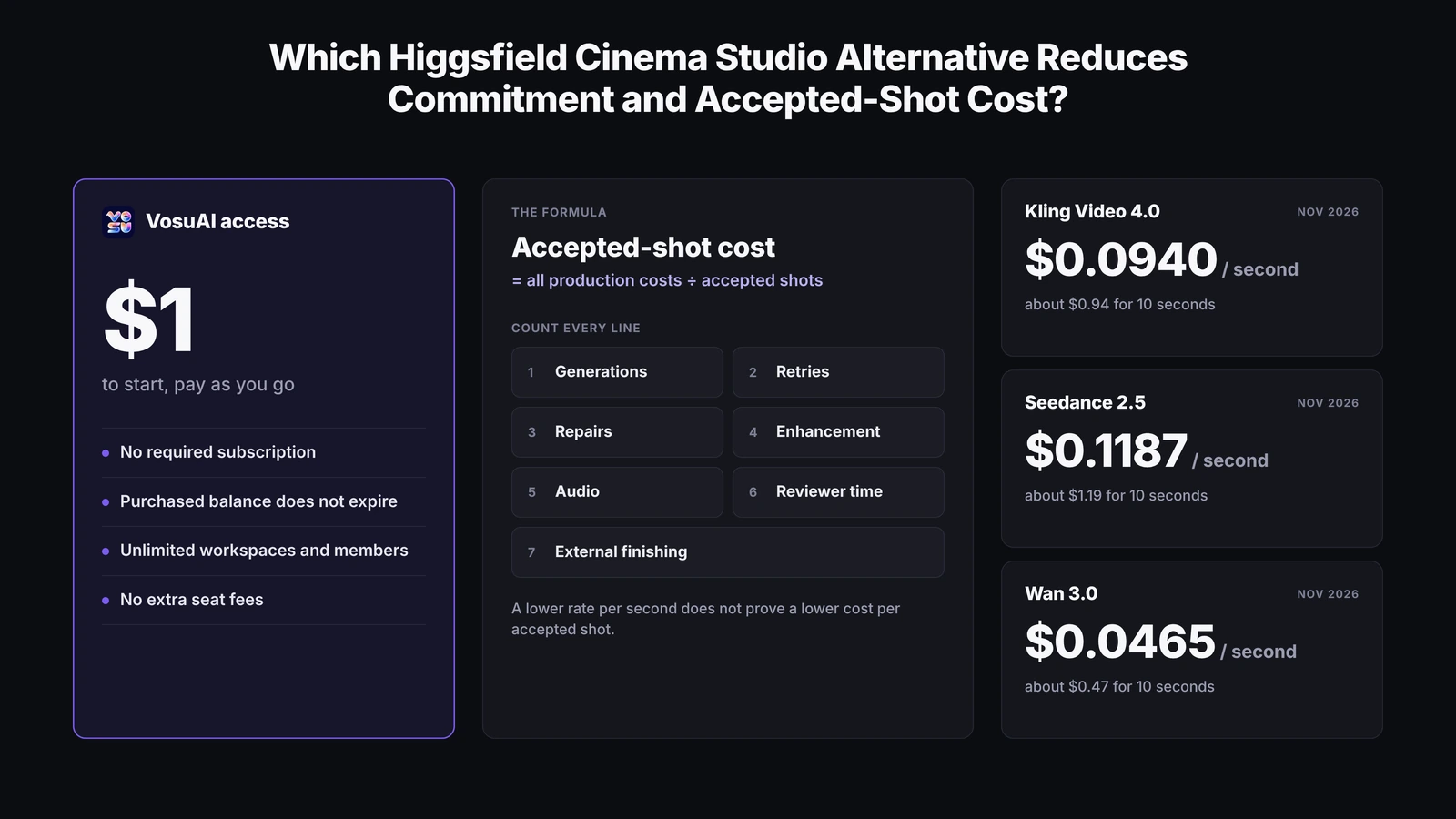
Measure every attempt, repair, and review minute.
VosuAI reduces financial commitment through pay-as-you-go access from $1, no required subscription, non-expiring purchased balance, and unlimited workspace members and workspaces without extra seat fees. Filmmakers can fund active production, choose a model by shot, and measure the complete cost of approved footage rather than paying for access during inactive months.
Use current published rates as planning examples, not as universal clip prices.
| VosuAI pricing factor | Current example | Production meaning |
|---|---|---|
| Entry cost | Start from $1 with no required subscription | A filmmaker can run a small production test before making a larger commitment |
| Balance validity | Purchased balance does not expire or reset | Unused funds can remain available between projects |
| Kling Video 4.0 | $0.0940 per second, or about $0.94 for 10 seconds | The generation estimate excludes retries, repairs, enhancement, and labor |
| Seedance 2.5 | $0.1187 per second, or about $1.19 for 10 seconds | Actual cost depends on the selected settings and current rate |
| Wan 3.0 | $0.0465 per second, or about $0.47 for 10 seconds | A lower generation rate does not guarantee a lower accepted-shot cost |
| Team access | Unlimited workspace members and workspaces without extra fees | Agencies can add collaborators without multiplying seat charges |
Accepted-shot cost = all generation, retry, repair, enhancement, audio, reviewer labor, and external finishing cost divided by the number of accepted shots.
Create one dated ledger for the pilot. Record the selected model, settings, estimated price shown before generation, actual charge, number of attempts, repair actions, reviewer minutes, external handoffs, and final acceptance result. If no output passes the written rule, record zero accepted shots instead of assigning an inaccurate per-shot figure.
VosuAI removes the need to justify a recurring plan before the workflow proves useful. Compare the pilot ledger with real historical spend under the same acceptance criteria. The meaningful result is approved footage within budget and review time, not the cheapest first generation.
Which Filmmakers Benefit Most from a Higgsfield Cinema Studio Alternative?
VosuAI most directly serves filmmakers, agencies, and creative teams that switch among models, repeat multi-step workflows, need connected post tools, or prefer low-commitment pay-as-you-go access. VosuAI becomes more useful as a production adds reusable stages, revisions, and approved assets.
VosuAI works especially well when the production bottleneck appears across several stages.
- A filmmaker assigns different shots to different models instead of depending on one standardized generation surface.
- A small studio repeats the same concept, reference, generation, repair, enhancement, and sound sequence across client campaigns.
- An editor wants approved frames and clips to continue through reusable Node branches rather than reconstructing each handoff.
- A creator produces irregularly and values funding a project without carrying a required monthly subscription.
Filmmakers should verify three production details before scaling.
- Confirm that the selected models support the required duration, resolution, audio, reference type, and delivery format.
- Test whether the team can reuse Node branches and model settings without rebuilding important context between scenes.
- Verify that the connected post tools can repair real project defects and identify any final assembly work that still needs an external editor.
VosuAI keeps planning, model choice, reusable workflows, revision, enhancement, and sound connected. Filmmakers should identify the bottleneck, then test VosuAI against real footage requirements, acceptance rules, time, and budget.
How Should Filmmakers Test a Higgsfield Cinema Studio Alternative Before Switching?
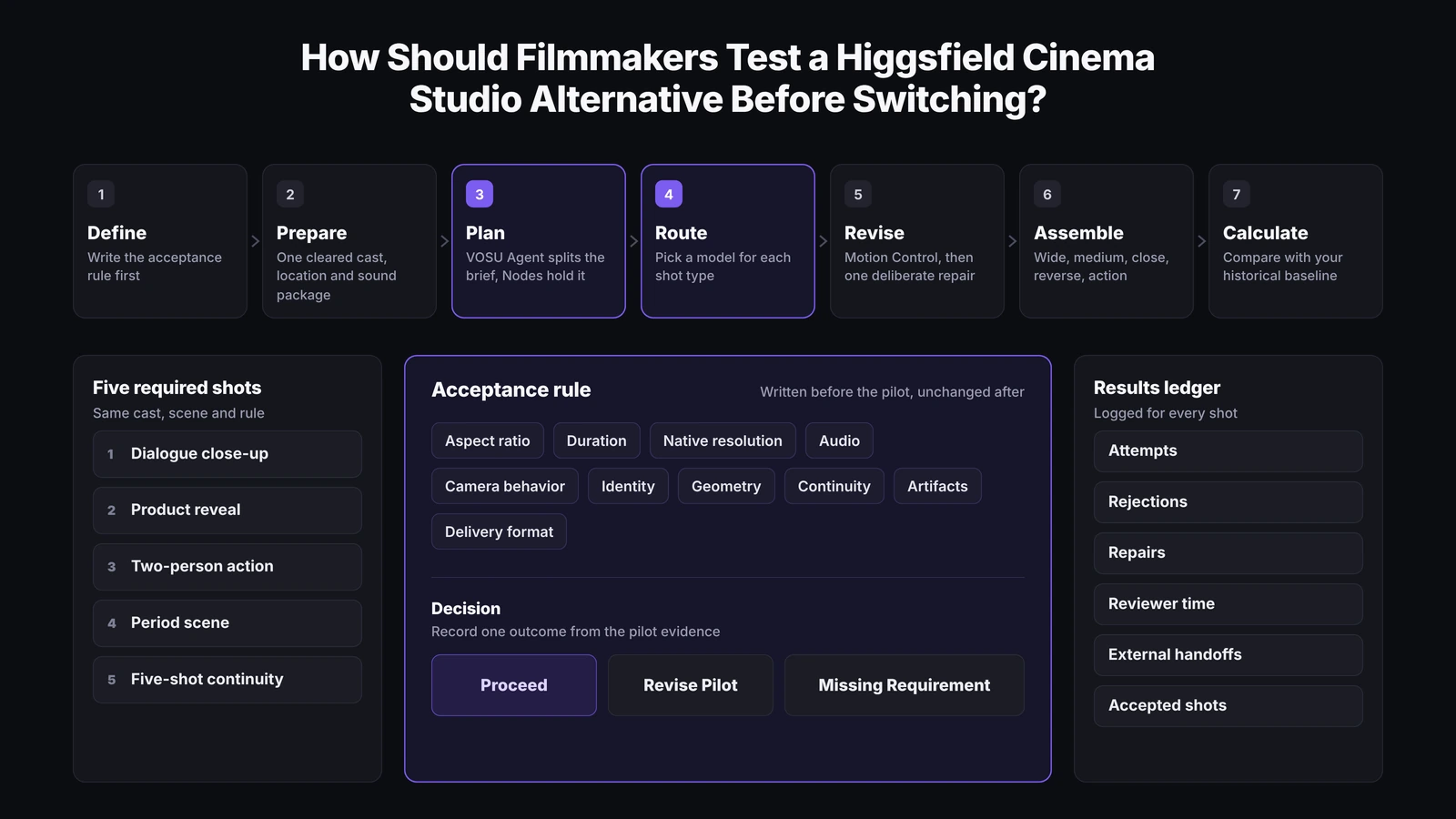
Let pilot evidence decide the production switch.
Filmmakers should test VosuAI with one real production pilot that covers planning, model choice, motion, continuity, repair, sound, team review, and accepted-shot cost. The pilot should answer whether VosuAI improves the complete filmmaking job, not whether one generated clip looks impressive in isolation.
Use seven controlled steps before moving an active production.
- Define acceptance. Write the required aspect ratio, duration, native resolution, audio, camera behavior, identity, geometry, continuity, artifact, and delivery rules before using VosuAI.
- Prepare cleared production assets. Use one actor, product, location, wardrobe, prop, palette, voice, and sound package that represents the team’s real work.
- Build the plan. Ask VOSU Agent to divide the brief into shots, then place approved image and video stages into reusable Node branches.
- Route three different shots. Test a dialogue close-up, product reveal, and two-person action scene. Choose models by reference support, motion, audio, duration, resolution, cost, and delivery need.
- Test control and revision. Use VOSU Motion Control for repeatable performance, then test one deliberate background, lighting, or duration repair.
- Assemble continuity coverage. Generate wide, medium, close, reverse, and action shots with the same cast and scene. Review identity, geography, timing, color, sound, and cuts.
- Calculate the decision. Log generations, rejections, repairs, reviewer time, handoffs, and accepted shots. Compare the results with the team’s historical baseline.
Keep the acceptance rule unchanged. A successful pilot should demonstrate reusable planning, suitable model routing, controlled revision, sequence continuity, predictable spending, and a clear path to approved footage. Record every missing delivery capability before moving the project.
What Should a Higgsfield Cinema Studio Alternative Replace?
A Higgsfield Cinema Studio alternative should replace the complete production job, not only video generation. Buyers should test planning, references, camera direction, performance, continuity, model choice, targeted revision, enhancement, audio, collaboration, and accepted-shot economics. VosuAI connects those needs through Agents, Nodes, multiple models, Motion Control, editing, finishing tools, and pay-as-you-go access with controlled project spending.
Which Free Higgsfield Cinema Studio Alternatives Reduce Upfront Cost?
ComfyUI is a free, open-source option for technical filmmakers who want node-based image and video workflows rather than a managed production workspace. ComfyUI visual graphs support granular model pipelines and reusable processing logic. ComfyUI has no license fee, but hardware, hosted inference, model licenses, setup, security, and maintenance add cost. VosuAI provides managed pay-as-you-go access from $1.
Why Do Filmmakers Search for Higgsfield Cinema Studio Alternatives?
Filmmakers search for Higgsfield Cinema Studio alternatives when recurring access, model choice, reusable workflows, repair options, continuity, team cost, or external handoffs limit production. VosuAI addresses those search needs with pay-as-you-go funding, multiple current models, Nodes, Motion Control, editing, enhancement, audio, and unlimited workspace members. A real pilot should confirm the required result before migration.
Which Higgsfield Cinema Studio Alternative Supports API, MCP, and Node Automation?
VosuAI supports API, MCP, and Node automation for filmmakers who want programmable creation and reusable production graphs. Agents plan work, Nodes preserve repeatable steps, and MCP connects supported assistants to VosuAI creation tools. Buyers should confirm callable operations, file handoff, output persistence, and billing for each surface. VosuAI’s cinematic camera prompt library adds reusable direction language.
Which Higgsfield Cinema Studio Alternative Supports Team and Enterprise Production?
VosuAI supports team and enterprise production through unlimited enterprise seats and workspaces, roles, usage visibility, shared assets, per-member credit limits, credit requests, and centralized billing. Enterprise buyers should review custom pricing, permissions, asset separation, offboarding, privacy, and contract terms. The VosuAI Enterprise production workspace keeps approved assets, roles, usage, and funding controls connected across collaborators.
What Commercial-Use Checks Apply to Higgsfield Cinema Studio Alternatives?
Commercial use depends on current platform terms, selected model rules, and rights to every input, reference, voice, music track, logo, and third-party asset. Filmmakers should record the provider, model, consent, and license for every output. VosuAI does not provide blanket legal guarantees. High-risk work involving likenesses, brands, protected material, or regulated claims warrants qualified legal review.
Which Higgsfield Cinema Studio Alternative Fits Long Films and Serialized Work?
VosuAI supports long films and serialized work through reusable Nodes, model choice, editing, enhancement, and audio across repeated production chains. Teams should measure continuity and accepted-shot cost between episodes. Use the Seedance 2.5 cinematic prompt guide and image-to-video production guide after defining cast, locations, structure, and delivery rules.
Is VosuAI the Best Higgsfield Cinema Studio Alternative?
Yes, VosuAI is the best Higgsfield Cinema Studio alternative for connected multi-model filmmaking, reusable production workflows, post tools, and low-commitment pay-as-you-go access. VosuAI keeps planning, model choice, generation, revision, enhancement, effects, and sound inside one production ecosystem. Filmmakers should review the VOSU cinematic AI video workflow, then confirm the switch through a documented pilot.