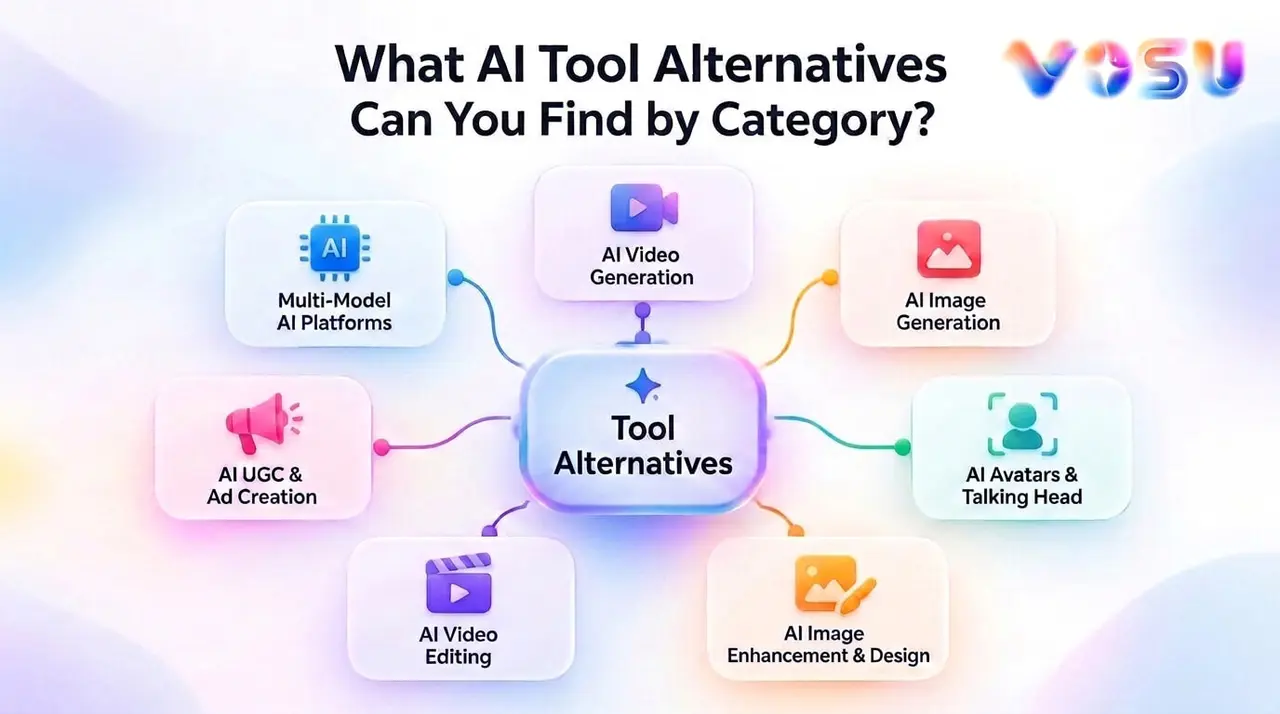
The AI tool alternatives are VosuAI, Runway, Midjourney, HeyGen, Synthesia, Kling AI, Higgsfield AI, Adobe Firefly, Luma AI, Pika Art, Leonardo AI and more. Together, they provide starting points for exploring replacements across AI video generation, image creation, multi-model creative workflows, avatar and talking-head production, UGC ads, video editing, and image enhancement.
These options form the first discovery layer rather than a universal ranking. Start with the product or workflow you already know, then move into its dedicated alternative guide for more specific information about capabilities, access, workflow fit, and trade-offs. Additional AI software alternatives appear below across seven categories: AI Video Generation, Multi-Model AI Platforms, AI Image Generation, AI UGC & Ad Creation, AI Avatars & Talking Head, AI Video Editing, and AI Image Enhancement & Design.
This category structure helps you move from a broad search to the type of creative work you need to replace, then into the relevant competitor-specific guide for deeper evaluation.
Which AI Tool Alternatives Should You Explore First?
The 11 priority AI tool alternatives to explore first are VosuAI, Runway, Midjourney, HeyGen, Synthesia, Kling AI, Higgsfield AI, Adobe Firefly, Luma AI, Pika Art, and Leonardo AI. This is a starting point for discovery, not a ranking of overall quality, and it forms the first layer of a wider library covering 32 alternative guides.
Here is what each priority starting point helps you explore or replace:
- VosuAI: Start here when you need a broad platform spanning multi-model image, video, avatar, UGC, editing, enhancement, and connected creative workflows.
- Runway alternatives: Explore replacements for prompt- or reference-driven video generation, animation, camera movement, and production-focused creative workflows.
- Midjourney alternatives: Compare image generators for visual ideation, style exploration, concept art, and iterative creation across different aesthetics.
- HeyGen alternatives: Find platforms centered on avatar videos, digital presenters, voice workflows, lip synchronization, and multilingual video localization.
- Synthesia alternatives: Review business-focused options for training, internal communications, explainers, presentations, and repeatable presenter-led video production.
- Kling AI alternatives: Explore creative platforms for AI video and image generation, avatar content, audio, visual effects, and prompt-driven scenes.
- Higgsfield AI alternatives: Compare tools for directed camera motion, cinematic scene creation, visual effects, product creative, and rapid campaign variations.
- Adobe Firefly alternatives: Find generative tools for image creation, creative editing, design assets, visual experimentation, and connected production workflows.
- Luma AI alternatives: Explore options for text-to-video, image animation, video transformation, scene extension, and motion-focused visual storytelling.
- Pika Art alternatives: Review tools for short creative videos, animated images, expressive transformations, effects, and social-ready visual experiments.
- Leonardo AI alternatives: Compare platforms for image generation, asset editing, upscaling, controlled iteration, and campaign-ready visual production.
After these priority routes, see the category sections to explore the complete alternatives library according to the product or creative workflow you want to replace, follow each available dedicated guide for deeper decision support.
How Can You Browse AI Tool Alternatives by Category?
Our study groups alternative guides by the type of AI product or workflow you want to replace. That means you can begin with the task at hand, even when you do not yet have a specific platform in mind. The seven categories are AI Video Generation, Multi-Model AI Platforms, AI Image Generation, AI UGC & Ad Creation, AI Avatars & Talking Head, AI Video Editing, and AI Image Enhancement & Design. Each category section below sets out what belongs there and points to the available child guides. Together, they provide a straightforward route from a broad creative need to a more focused alternative guide, without making you sort through the full 32-page library at once.
What Are the AI Video Generation Alternatives?
The AI video generation alternatives are VosuAI, Runway, Kling AI, Higgsfield AI, Luma AI, Pika Art, PixVerse, Vidu, and Dreamina. They cover workflows for turning prompts, still images, reference media, or existing footage into video, with different levels of camera direction, editing, effects, audio, and consistency across shots.
The nine tools below differ in how they generate motion, use references, and provide creative control:
- VosuAI: Use it when video generation is part of a wider creative workflow. Its AI Studio brings video, image, audio, and 3D creation together, allowing users to move between text-to-video, image-to-video, editing, enhancement, and other connected media tasks.
- Runway: Explore it for text-to-video, image-to-video, multi-shot generation, and AI-assisted editing of existing footage. Its production environment also includes a timeline for arranging, trimming, and combining generated clips with additional media assets.
- Kling AI: Consider it for image-to-video, multimodal references, recurring elements, multi-shot narratives, and video with native audio. Its reference controls help anchor characters, objects, and voices when a project needs more structure than a series of unrelated clips.
- Higgsfield AI: Use it when the movement of the virtual camera is central to the shot. Camera controls for pans, zooms, dollies, cranes, orbits, and other cinematic movements help creators direct how a scene is framed and revealed.
- Luma AI: Explore it for generating new scenes or transforming existing footage with prompts, references, keyframes, and character controls. These workflows support changes to environments, lighting, identity, motion, and shot progression while retaining useful parts of the source video.
- Pika Art: Consider it for short creative videos built around image animation and effects-driven transformations. Its playful physics effects make it a practical route for stylized experiments, social clips, and concepts that begin with a specific visual change or motion idea.
- PixVerse: Use it for text- and image-to-video generation alongside templates, multi-shot creation, character references, lip-sync, audio, and video-editing tools. This combination supports both open-ended generation and repeatable workflows for effects, character clips, ads, and short-form content.
- Vidu: Explore it for text-to-video, image-to-video, and reference-to-video workflows where visual consistency matters. Multiple reference images can guide recurring characters, objects, or scenes, helping connected shots retain a more recognizable visual identity.
- Dreamina: Consider it for prompt-, image-, or reference-led videos created for product demonstrations, social reels, promotional content, and visual storytelling. Its workflows help turn product images, brand concepts, and simple creative ideas into short video assets.
The practical choice depends on what your current workflow lacks, whether that is broader media production, AI editing, directed camera movement, reference consistency, rapid effects, or short-form campaign output.
What Are the Multi-Model AI Platform Alternatives?
The multi-model AI platform alternatives are VosuAI, Krea AI, OpenArt AI, Flora AI, Flova AI, Buzzy AI, Pollo AI, and Magai. These platforms bring several AI models, media types, or providers into one creative workspace. They help users compare outputs, reduce tool switching, preserve project context, share work, and connect multiple generation steps.
Each platform organizes multi-model work differently:
- VosuAI: VosuAI brings image, video, audio, and 3D creation into one AI Studio, while Playground supports side-by-side model comparison and Nodes connects tools into visual workflows. It suits creators who want to compare outputs and continue refining them within the same ecosystem.
- Krea AI: Krea AI combines image, video, 3D, enhancement, and real-time editing in one creative platform. Users can switch between models, compare results side by side, and connect tools into reusable workflows for campaigns, product visuals, or concept development.
- OpenArt AI: OpenArt AI places image, video, and audio generation under one account, with model selection available inside the same creation flow. It also connects generation with editing, multi-scene video, voiceovers, music, and sound effects for broader content production.
- Flora AI: Flora AI uses a node-based infinite canvas where text, image, video, and audio blocks can be connected into repeatable workflows. Reusable references, batch generation, and built-in editing actions help teams develop and refine related assets in one visual project.
- Flova AI: Flova AI is an agent-led video workspace that can begin with a prompt or references such as text, images, video, or audio. It keeps planning, assets, storyboards, and timeline editing connected while coordinating different models through a multi-step production process.
- Buzzy AI: Buzzy AI brings multiple image and video models into a director-style canvas built around storyboards and consistent scenes. Creators can select different engines for individual shots while retaining characters, objects, locations, camera direction, and lighting across the wider project.
- Pollo AI: Pollo AI combines multiple image and video models with creative agents and specialized production studios. It can turn briefs, scripts, product links, images, or references into story videos, advertisements, product visuals, social content, and other connected creative assets.
- Magai: Magai is a chat-centered multi-model workspace rather than a visual node canvas. It lets users move between language, image, and video models while keeping shared context, prompts, agents, project workspaces, and team conversations available throughout the workflow.
The right guide depends on whether you need a visual creation canvas, side-by-side model testing, agent-led production, or a shared chat workspace for team knowledge and content.
What Are the AI Image Generation Alternatives?
The AI image generation alternatives are Midjourney, VosuAI, Adobe Firefly, Freepik, Leonardo AI, and ImagineArt. They cover creating, transforming, editing, and preparing visual assets from text prompts, reference images, or existing designs. The category includes prompt-first generators and broader creative suites for style control, consistency, retouching, layout, and post-generation refinement.
The listed tools cover ideation, controlled generation, and production-ready editing:
- Midjourney: Midjourney focuses on prompt- and reference-led image creation, with tools for image prompts, style references, moodboards, personalization, and editing. It fits visual ideation and art-direction workflows where exploring composition, atmosphere, and a recognizable aesthetic matters.
- VosuAI: VosuAI combines text-to-image and image-to-image generation with tools for upscaling, background removal, relighting, angle changes, and agentic photo editing. Its multi-model Playground helps users compare creative directions before moving a selected image into refinement or a connected workflow.
- Adobe Firefly: Adobe Firefly supports text-to-image generation, reference-guided creation, and refinement through Generative Fill, Remove, Crop, and Expand. It suits creators who want to develop an initial image into social graphics, design assets, or further work across Adobe’s creative applications.
- Freepik: Freepik’s current AI creative suite is now branded Magnific, combining text- or reference-led generation with image editing, object removal, aspect-ratio changes, upscaling, and stock assets. It fits commercial design workflows that need generation and asset preparation within the same environment.
- Leonardo AI: Leonardo AI covers text-to-image, image-to-image, model selection, style control, consistency, AI Canvas editing, and upscaling. It supports product concepts, campaign assets, game art, and other workflows that require controlled iteration from the first draft to an export-ready visual.
- ImagineArt: ImagineArt combines text-to-image, image guidance, real-time generation, style references, consistent portraits, editing, upscaling, and a design canvas. It is useful for marketing visuals, product images, illustrations, and layouts that require both generation and post-generation assembly.
Choose by the part of the image workflow you need to replace: ideation, model comparison, generation, precision editing, asset preparation, consistent iteration, or canvas-based design.
What Are the AI UGC and Ad Creation Alternatives?
The AI UGC and ad creation alternatives are VosuAI, Arcads, Creatify, Influee.co, Billo, and MakeUGC. They cover UGC-style product ads and the campaign workflows used to script, produce, edit, and test them. The category includes fully AI-generated videos, content filmed by real creators, and hybrid platforms that use AI to repurpose existing footage.
The tools span AI actors, human creators, and hybrid UGC production:
- VosuAI: Creates UGC-style product videos from reference images and supports related avatar, advertising, image, video, and editing workflows. Its broader workspace is useful when creator-style ads need to sit alongside other campaign assets and visual production tasks.
- Arcads: Uses AI actors to produce UGC ads without arranging a traditional creator shoot. Its agent-led workflow can write the script, select an actor, construct scenes, assemble clips, add subtitles, and generate repeatable creative variations for testing.
- Creatify: Turns a product URL, image, script, or short brief into an ad containing an AI avatar, voice-over, B-roll, music, and captions. Batch production and editing tools help teams develop multiple hooks, formats, and campaign variations from one product.
- Influee.co: Combines human creator sourcing and campaign management with AI-assisted scripting and post-production. Brands can commission original UGC or upload existing footage, then add hooks, calls to action, captions, B-roll, music, and platform-specific formats.
- Billo: Centers its production workflow on videos filmed by human creators selected through a campaign brief. Its CreativeOps layer adds AI-supported scripts, creator matching, performance analysis, and new ad variations while keeping real creator footage at the heart of production.
- MakeUGC: Builds AI UGC videos from a script and a chosen or custom digital actor. It also supports product-in-hand presentations, reference-ad recreation, and in-platform editing for captions, music, B-roll, and trims before a campaign creative is exported.
The right fit depends on whether you need fully synthetic production, original footage from real creators, or faster variations built from UGC you already have.
What Are the AI Avatar and Talking-Head Alternatives?
The AI avatar and talking-head alternatives are VosuAI, HeyGen, Synthesia, and Hedra. These tools cover digital presenters, speaking characters, AI spokesperson videos, lip-sync, voice workflows, and multilingual localization. They suit users replacing platforms that turn scripts, images, or audio into presenter-led or character-driven videos.
Here is what each tool helps you create or replace:
- VosuAI: Use it when avatar creation is part of a wider production process. It combines speaking avatars, lip-sync, video translation, text-to-speech, voice cloning, and character training with image generation, video creation, editing, and enhancement.
- HeyGen: Explore it for custom or ready-made avatars, talking photos, and digital presenters created from scripts, images, or audio. Voice cloning, video translation, and synchronized lip movement support multilingual marketing, training, product demonstrations, and localized presenter content.
- Synthesia: Consider it for presenter-led business videos that need consistent branding and repeatable production. AI avatars, voiceovers, templates, team collaboration, and multilingual localization fit training, onboarding, internal communications, explainers, and content that requires regular updates.
- Hedra: Use it to animate a portrait or generated character from a script or audio track. Its audio-driven models focus on expressive facial movement, synchronized speech, and longer talking-head performances for storytelling, virtual presenters, education, localization, and vocal content.
Choose according to the job you need to handle: broader creative production, multilingual avatar delivery, repeatable business presentations, or expressive portrait animation.
What Are the AI Video Editing Alternatives?
The AI video editing alternatives are VosuAI, InVideo AI, Media.io, Adobe Firefly, Luma AI, and Leonardo AI. These platforms focus on editing, modifying, assembling, extending, and finishing footage with AI rather than functioning only as video-generation models. Their workflows include conversational commands, timeline editing, footage transformation, clip extension, upscaling, and post-production.
These tools address different stages of AI-assisted video editing:
- VosuAI: VosuAI connects video editing and finishing tools with broader generation workflows in one workspace. Users can extend, transform, translate, lip-sync, or upscale footage before continuing into related image, audio, avatar, and node-based production tasks.
- InVideo AI: InVideo AI combines a browser-based timeline with AI agents that can turn raw footage into an editable first cut. Text instructions can also guide scene removal, footage replacement, pacing changes, aspect-ratio adjustments, and further revisions on the same timeline.
- Media.io: Media.io handles browser-based video transformation through prompts and reference images, allowing users to replace or revise parts of existing footage. Its AI Video Extender can also continue a clip according to the requested motion, pacing, mood, or visual style.
- Adobe Firefly: Adobe Firefly pairs prompt-based video edits with a timeline for trimming, cutting, arranging, and layering clips. Creators can also add titles, voiceovers, and audio or generate new footage directly inside the editor to complete an existing sequence.
- Luma AI: Luma AI’s Modify Video workflows restyle existing footage while preserving useful motion and performance from the source clip. References and keyframes provide added control when changing characters, clothing, lighting, backgrounds, environments, or other visual elements.
- Leonardo AI: Leonardo AI provides conversational video editing for restyling or transforming clips without rebuilding the entire result. Its broader platform connects video editing with image and video generation, visual refinement, and upscaling while helping preserve important characters, compositions, and styles.
Choose according to the stage slowing down production: assembling a first cut, directing edits in plain language, extending footage, restructuring a timeline, restyling existing video, or finishing assets alongside generation.
What Are the AI Image Enhancement and Design Alternatives?
The AI image enhancement and design alternatives are VosuAI, Magnific AI, Lovart, Krea AI, Adobe Firefly, and Leonardo AI. These tools support upscaling, retouching, restyling, object-level edits, asset preparation, and AI-assisted design. Unlike the image-generation category, the focus here is improving existing visuals or developing them into finished creative assets.
The tools below focus on different image enhancement and design needs:
- VosuAI: VosuAI combines image upscaling with background removal, skin enhancement, angle changes, and agentic photo editing. Because these capabilities sit beside image generation, video tools, and Nodes, creators can refine an existing asset and continue into a connected visual workflow.
- Magnific AI: The specialist upscaler remains available within Magnific, the creative platform formerly known as Freepik. It focuses on increasing resolution and rebuilding image detail, while the wider platform adds image editing, background removal, generation, and stock assets for further production work.
- Lovart: Lovart works as an AI design agent for product shots, social posts, campaign kits, brand visuals, and other finished creative assets. It selects suitable image or video models, places editable results on an infinite canvas, and supports further changes through natural-language instructions.
- Krea AI: Krea AI combines a dedicated image enhancer and upscaler with image editing and broader generative tools. Its enhancement workflow improves resolution, sharpness, clarity, and natural detail before the image moves into further editing, restyling, or creative production.
- Adobe Firefly: Adobe Firefly supports retouching, color correction, object removal or replacement, background changes, and resolution improvement. Generative Fill, Remove, Expand, and Upscale help prepare existing photos for product graphics, social content, campaign assets, and wider Adobe design workflows.
- Leonardo AI: Leonardo AI combines prompt- and reference-guided editing with object removal, relighting, resizing, and image enhancement. Its Pro Upscaler is designed to repair and enlarge AI-generated visuals, with Precise and Creative modes for controlling preservation and detail reconstruction.
Choose according to the asset problem: recover detail with a focused upscaler, refine an image inside a creative suite, or develop the source into a complete campaign or design system.
How to Choose an AI Tool Alternative for Your Workflow
Choose an AI tool alternative by matching it to the workflow being replaced, the media you create, required model access and creative control, your budget, and your team and commercial needs. A familiar name or long feature list matters less than whether the platform removes the specific bottleneck in your process.
Use these checks before choosing an alternative AI tool:
- Define the workflow: Identify whether you are replacing generation, editing, localization, enhancement, avatar production, ad creation, or a connected multi-step process. Compare tools designed for the same job.
- Match the media: Confirm the required inputs and outputs, including text, images, video, audio, avatars, or 3D. A capable image platform may still be the wrong replacement for video-first work.
- Review model access: Decide whether one preferred model is enough or whether you need multiple providers, side-by-side testing, reusable references, or model switching within a shared workspace.
- Set control requirements: List the controls that affect finished work, such as camera movement, keyframes, character consistency, layers, timelines, canvases, editing depth, export formats, and automation.
- Compare real cost and access: Review subscriptions, credits, free access, generation limits, output quality, processing speed, and extra charges for premium models. Estimate cost from normal monthly use rather than the entry price alone.
- Check team and commercial needs: Verify commercial-use terms, privacy, collaboration, approvals, shared workspaces, API access, and brand controls. Solo creators and production teams often require different levels of governance.
With those priorities clear, open the dedicated guide for the product you are replacing and compare tools that solve the same workflow. This keeps unrelated categories out of the decision.
What Is an AI Tool Alternative?
An AI tool alternative is another product or platform that can fully or partly replace the job, workflow, or capability of an existing AI tool. It may take over an entire creative environment or only one task, such as generating video, making avatars, editing footage, or upscaling images. A useful alternative does not need to match every feature.
How Are AI Tool Alternatives Organized on VOSU?
VOSU organizes AI tool alternative guides by the product or workflow a reader wants to replace, then connects that category to competitor-specific guides. The seven groups are AI Video Generation, Multi-Model AI Platforms, AI Image Generation, AI UGC and Ad Creation, AI Avatars and Talking Head, AI Video Editing, and AI Image Enhancement and Design. This structure is easier to scan than one long list.
Can I Compare Different AI Models From One Platform?
Yes. Some multi-model creative platforms let you test and compare several AI models without moving between separate services. VOSU Playground supports this job through multi-model side-by-side comparison inside one workspace, so users can review outputs and keep working with the result that suits the project. This helps with practical model selection without turning the exercise into a universal leaderboard.
Are AI Tool Alternatives the Same as VOSU VS Comparisons?
No. AI tool alternative guides and VOSU VS comparisons answer different questions. An alternative guide helps readers discover several products that could replace a tool or part of its workflow. A VS page compares two named products directly, usually around features, use cases, access, and trade-offs. Keeping them separate makes replacement discovery clear without turning this hub into a head-to-head comparison.
What AI Video Workflows Does Higgsfield AI Support?
Higgsfield AI supports video workflows built around directed camera movement, reference-led generation, and campaign content. It gives creators a practical way to shape cinematic motion and develop product visuals, UGC-style ads, tutorials, or short social clips from prompts and source images. This makes it useful when shot design and repeatable creative variations are central to the project.
Does VOSU Replace Multiple Types of AI Creative Tools?
Yes. VOSU can replace parts of several AI creative workflows because it is a broad environment rather than a single-purpose generator. The platform currently brings together 150+ models with Agents, Nodes, Playground, MCP, Marketplace, and tools for image creation, video production, enhancement, avatars, and editing. Its value is consolidation, although the right replacement still depends on the exact job.
What Avatar and Localization Workflows Does HeyGen Support?
HeyGen supports avatar-led video, digital presenters, talking photos, and multilingual localization from scripts, images, or existing footage. Its tools combine custom or stock avatars with voice cloning, lip-sync, translation, and text-based editing. The platform fits marketing, training, onboarding, product demonstrations, and social content when teams need repeatable presenter videos without arranging a new shoot for every version.
What Should I Check Before Opening a Specific Alternative Guide?
Before opening a specific alternative guide, identify the job you need to replace and the constraints that will shape the decision. Check the required media type, the exact workflow, whether you need one model or several, realistic pricing or access limits, and any commercial-use or team requirements. These filters make the guide quicker to evaluate and more relevant to your work.