To write a video script, identify the script's goal and audience, choose the script format, structure the script, write the script using simple words and refine and polish the script. Identify what viewers should do after watching, set a clear call to action and tailor the tone, language and message to the audience’s needs, interests and knowledge level. Choose a script format that best supports the content such as dialogue based, narration, hybrid, screen recording or storyboard formats. Select a format that aligns with the message and visuals to improve clarity and engagement.
Structure the script with a clear introduction, body and conclusion. Organize ideas logically, connect visuals and audio through scene headers and assure the message flows smoothly from one section to the next. Write using simple, active language with short sentences and familiar vocabulary. Explain technical terms when necessary, use clear punctuation for natural narration and include instructions for visuals, pauses and on-screen text. Keep the script concise by focusing on one main idea, setting a target word count and removing filler words or repeated points. Refine the script by reading it aloud, checking timing, improving readability, testing narration and strengthening the call to action.
A video script serves as a structured blueprint that combines message, audience, visuals, narration, dialogue, timing and scene directions into a consistent plan for production. It helps create stronger hooks, maintain pacing, prevent rambling and provide clear guidance for filming and editing.
How to write a script for a video?
To write a script for a video, identify the goal and audience, choose the format, structure the script, keep the script concise and focused and refine and polish the script. Keep the script concise, simple and focused, add a strong hook at the beginning to grab attention and break the script into clear scenes for easier filming. Make sure the visuals and narration match properly, include a clear call to action at the end and finally review and refine the script for better clarity and flow. ew seconds.
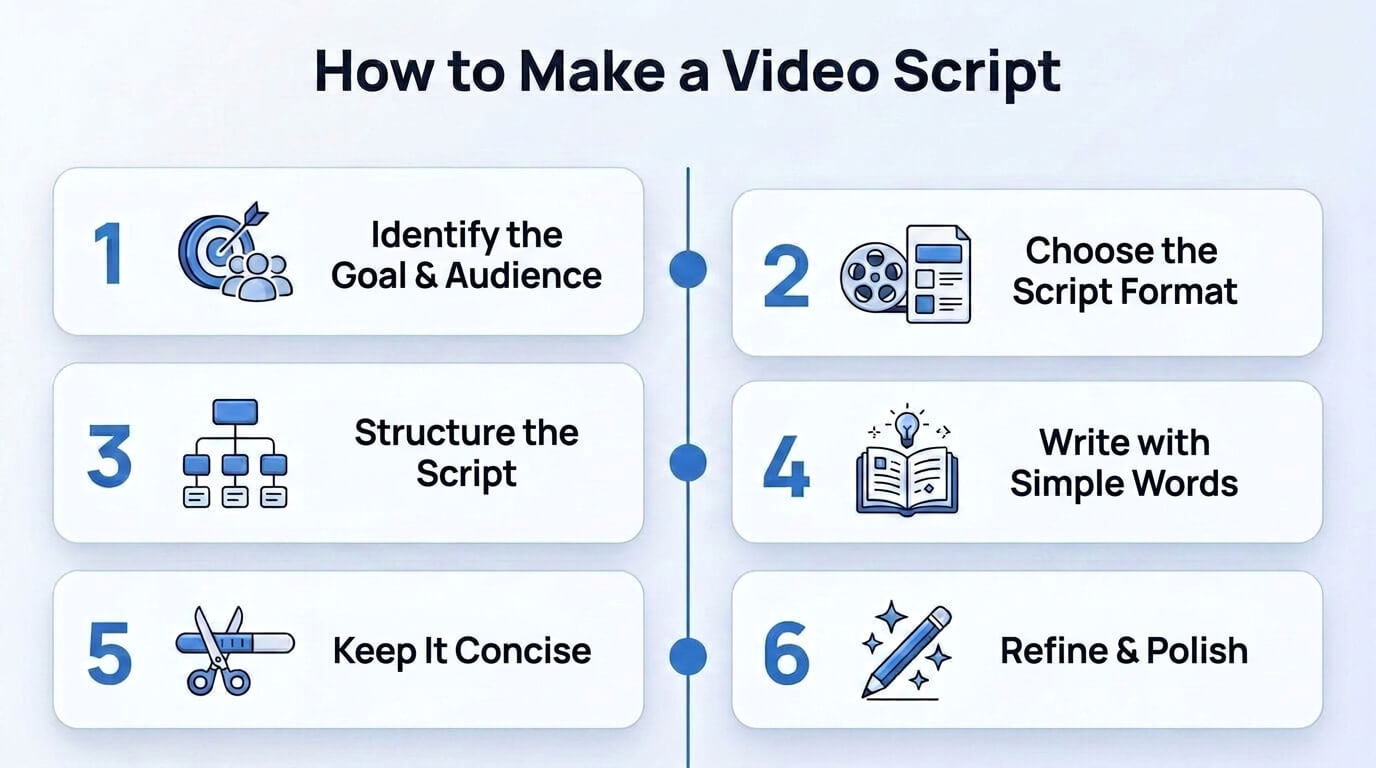
6 steps to write a script for a video are listed below.
1. Identify the script goal and audience
2. Choose the script format
3. Structure the script
4. Write the script using simple words
5. Keep the script concise and focused
6. Refine and polish the script
1. Identify the script goal and audience
Identify the script goal and audience by first defining what viewers should do after watching the video and setting a clear call to action. This matters because it assures the script stays focused and drives the intended outcome. Identify the audience by analyzing age, profession, interests, pain points and knowledge level, whether for a technical audience or a general audience.
Match the tone and language to suit the audience such as using a more structured approach for a marketing video script or a casual tone for a social media script. Write, for example, if the goal is to target entry level developers, the script may aim to encourage sign ups for a learning platform. Set success metrics such as engagement, click through rate or conversions to measure effectiveness.
2. Choose the script format
Choose the script format by aligning the message, audience and structure to create a clear video script format that supports understanding and action. This matters because the format determines how the content is organized and how it is visually presented in the final video. Use common formats such as dialogue based scripts, narration scripts, hybrid scripts and formats for screen recording or storyboard animation.
Select the format by asking which visuals best support the message such as B-roll, voiceover or on-screen text. Apply an example by selecting a screen recording with voiceover for a product demo to clearly show features and functionality. Choose the right format of AI video tools to improve automation, consistency and faster content generation.
3. Structure the script
Structure the script by arranging an introduction, body and conclusion into a clear video screenplay that communicates the core message. Organize each part to guide attention and assure smooth flow. Structure matters because it improves clarity and helps viewers follow the message easily. Create a template using a two column table or bullet points with scene headers that connect visuals and audio. For example, a product walkthrough video shows steps in sequence. Summarize the main message and check the flow for consistency.
4. Write the script using simple words
Write the script using simple words to create an easy video script that keeps sentences under 15 to 20 words within clear active voice. Use simple vocabulary and explain technical terms quickly using common words when needed. Keep language practical, so viewers grasp ideas instantly. Write with clear punctuation to improve AI narration and control speech rhythm. Add commas and full stops to create natural pauses in reading.
Insert timing pauses like [Pause] to guide voice flow and improve delivery speed for videos. Add bracketed instructions for AI video tools to control actions and on screen text. Use clear actions in every line to keep the script active, simple and easy to follow. Write, for example,
[Visual: Show product close up] “Open the tool and start working faster.”
[On-screen text: Easy setup] “Follow three simple steps to begin.”
[Pause] “Watch how each feature works clearly.”
5. Keep the script concise and focused
Keep the script concise and focused by setting a clear video length and defining a target word count before writing. Use the one minute rule such as aiming for about 130 to 150 words per 60 seconds. Focus on one main idea and build every sentence around it. Avoid mixing topics so the message stays clear and direct. Cut filler words like “actually,” “basically,” and “you know” to tighten every line.
Remove redundancy by eliminating repeated or restated points. Stick to short, active sentences that move the message forward and maintain clarity. Write, for example, “This tool automates tasks and saves time.” Keep refining by trimming extra words and keeping only what supports the core message.
6. Refine and polish the script
Refine and polish the script by reading it aloud at a normal pace to check whether the video scripts fit the target length for each section. Cut unnecessary words, tighten sentences and remove clutter so the script writing for video keeps every line clear and purposeful. Check the CTA so the call to action is clear and compelling and use AI tools like Hemingway App to review readability.
Test the narration preview for video scripting to hear the output and adjust phrasing. Mention for example, instead of saying “In this video, we are going to quickly show you how this tool can actually help you,” refine it to, “This video shows how this tool helps you work faster.”
What is a video script?
A video script frames the plan for a video that guides viewers from opening hook to clear ending through purposeful scenes and actions. It describes what each scene shows and states who speaks, what each person says and how pacing shifts between moments. A video script serves as a structured blueprint that integrates message, audience, visuals and narration into a consistent sequence. It supports production, editing and delivery as a script for a video.
A video script includes scene headings, spoken dialogue, visual cues and notes for timing, transitions and on screen text. It connects camera directions, sound effects and music indicators with narrative beats that highlight emotions and key points. It supports collaboration among writers, directors, editors and stakeholders by keeping goals, structure and style aligned from draft through final cut.
What does a script for a video look like?
A video script looks like the examples below.
Scene 1 (0:00-0:08)
Visual: Spider-Man swings between skyscrapers during rush hour.
Camera: Wide aerial shot, smooth tracking motion.
Narrator: New York never slows down, and neither does Spider-Man.
Scene 2 (0:08-0:18)
Visual: A speeding train races down the tracks as passengers panic.
Camera: Medium shot inside the train, slight handheld movement.
Passenger: Somebody has to stop this train!
Scene 3 (0:18-0:30)
Visual: Spider-Man lands on the front of the train and fires webs toward nearby buildings.
Camera: Low-angle action shot, fast push-in.
Spider-Man: Hold on, everyone. I'm stopping this thing.
Scene 4 (0:30-0:40)
Visual: The train comes to a halt. Passengers cheer.
Camera: Wide shot, slow zoom out.
Narrator: Another crisis ends thanks to New York's friendly neighborhood hero.
Why do video scripts matter?
The reasons why video scripts matter are given below.
- Stronger hooks: Video scripts create clear openings that grab attention and shape a marketing video script into a focused message.
- Less rambling: Video scripts prevent tangents by defining structure through a vlog script that stays concise and purposeful.
- Clear pacing and flow: Video scripts map timing, transitions and beats so video scripting keeps ideas smooth and easy to follow.
- Blueprint for editors: Video scripts provide scripted content of scene details, dialogue notes and cues that guide efficient editing.
Do you need to write a video script?
Yes, you need to write a video script to give structure and direction to your message. It helps define the goal, audience and sequence of content. It turns ideas into organized scenes, cues and timing that follow a clear flow and improve communication. You can visually structure your video script into clear scenes, shot by shot breakdowns, dialogue cues and timing flow using VosuAI’s PromptGPT for your project.
What are the best video script writing tools?
The best video scriptwriting tools are PromptGPT, ChatGPT, Jasper AI, and Writesonic. PromptGPT helps visually structure scripts into scenes, cues and timing, while ChatGPT supports idea development and dialogue writing. Jasper AI and Writesonic further assist in generating polished, engaging scripts quickly for different video formats and audiences.
Can ChatGPT write a video script for you?
Yes, ChatGPT can write a video script when you provide a clear goal, audience, tone and structure. It converts bullet points into organized scenes, dialogue and timing cues to create an easy to follow script.
How many words are in a 60 second video script?
A 60 second video script uses between 130 and 150 words at an average conversational pace. A video script at a slow pace of 125 wpm uses between 120 and 130 words with natural pauses. A video script at a fast pace of over 160 wpm uses between 160 and 180 words.
Do influencers write video scripts for YouTube videos?
Yes, influencers write video scripts for YouTube videos because structured planning drives clarity and consistency across content production. A video script builds a strong narrative structure and organizes messaging for viewer comprehension. It supports high audience retention through a YouTube video script template and aligns a shorts script with platform formats.