AI generated video refers to content created by systems that respond to data, follow learned patterns and produce visuals without programming each scene or frame. It works by using machine learning, computer vision and neural networks to interpret input data, generate frames, apply motion, sync audio and produce video sequences.
AI generated video is used in marketing, education, training and social media that allows creators to produce professional content. It offers benefits like reduced production time, lower costs, scalability and creative flexibility. It allows users of all skill levels to develop engaging videos.
AI generated video still faces challenges such as visual inaccuracies, ethical concerns, lack of emotional depth and creative limitations. It is improving by combining machine learning and automation to create high quality, flexible content across media, marketing and education industries like schools, colleges and universities.
What is AI generated video?
AI generated video is video content that is created or improved using artificial intelligence algorithms, such as machine learning and computer vision, which are based on user prompts rather than traditional filming or manual editing.
This process makes videos using artificial intelligence by studying text, pictures, or sounds. It creates clear and interesting videos with things like AI avatars, voiceovers and subtitles. The types and styles of AI generated video are diverse, which include animated videos that are created by AI such as text to video, in which written prompts are turned into video scenes, image to video, in which static images are animated video to video, in which existing footage is improved or transformed and personalized videos, which are to individual viewers. These styles range from cinematic and realistic to playful animations and explainer videos, which cover everything from marketing content and corporate training to social media clips and entertainment. AI video generation involves three main steps such as the AI analyzes the provided prompts or input data, which helps extract relevant information. The next step is to construct a storyboard or sequence of scenes, which guides the flow. The last step is to use artificial intelligence algorithms, which generate, edit and assemble the video, adding effects, transitions, audio and other improvements as needed. The process, which automates and improves video production, makes it possible to create professional quality videos efficiently, without specialized skills or large production teams.
How does AI video generation work?
AI video generation leverages advanced machine learning and neural network technologies to automate the creation of video content from various types of input, including text, images and audio. Generative AI for video uses models, which are trained on vast datasets, to understand visual concepts and translate prompts into dynamic, contextually relevant video sequences. AI video generation relies on three main technologies, including diffusion models that turn random noise into video frames. Generative adversarial networks (GANs) create high quality visuals by using two networks that improve each other. Transformer architectures keep scenes consistent and smooth across the video.
Natural language processing (NLP), which interprets text prompts and generates scripts or voiceovers, works alongside 3D modeling and computer vision, which improve the realism and interactivity of generated content.
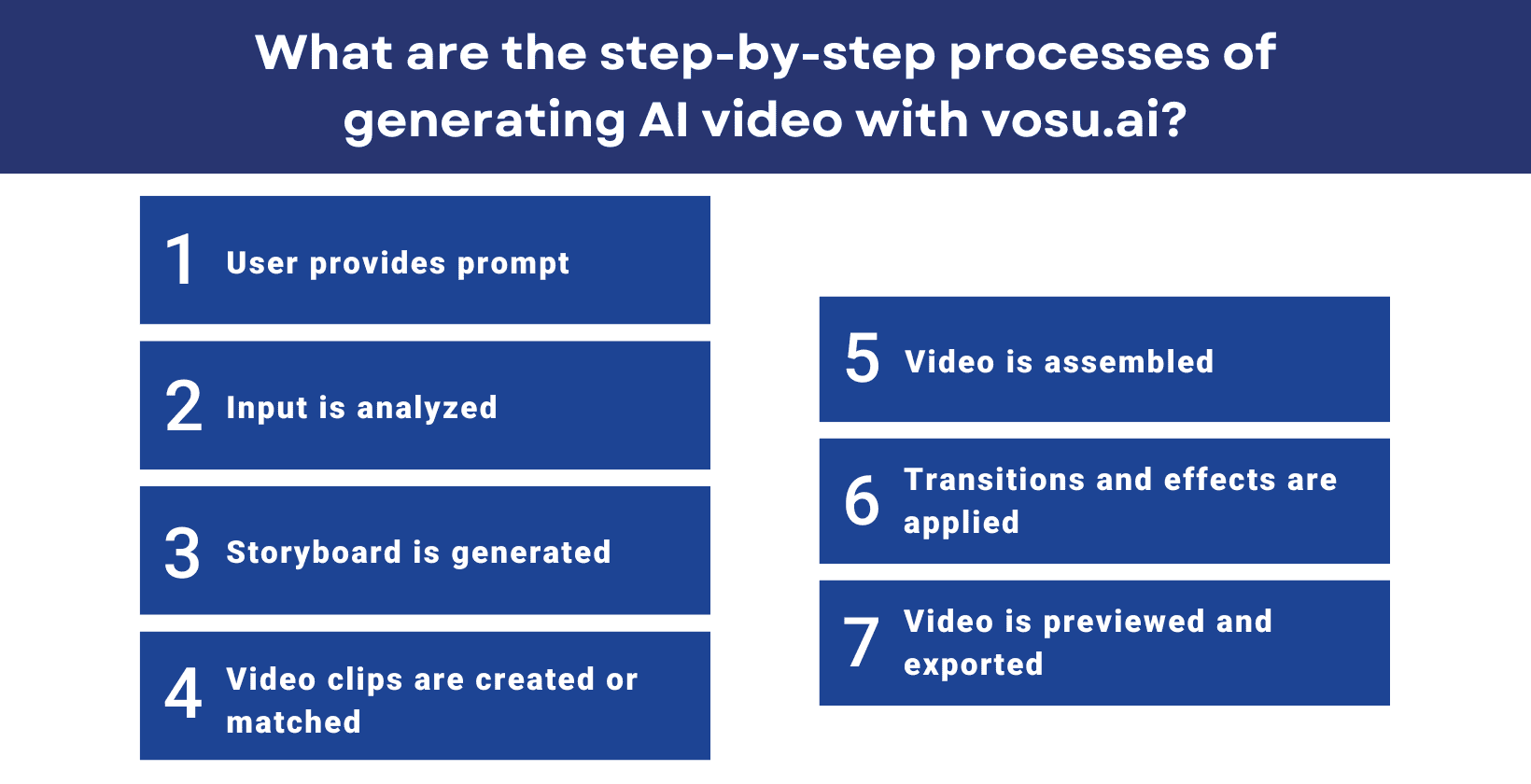
The process of AI video generation starts when a user provides a prompt such as a script, description or image. The system analyzes the input to identify key themes, visuals and narrative flow. It generates a storyboard that outlines the scenes and visual elements. Trained models then create or match video clips, images, animations and audio. The system assembles these into a complete video. Editing tools apply transitions, effects, subtitles and music to improve quality. Users can preview and adjust the video before exporting it in their preferred format. This process enables fast, scalable and customizable video production without traditional filming or manual editing.
The step by step process of generating AI video is shown below.
What are the uses of AI video generation?
The uses of AI video generation include automation, improvement, promotion, content creation and many more.
The uses of AI video generation are given below.
- Automating video creation: AI tools automate the process of making AI videos, from scripting to editing, which allows for fast production of content without manual intervention.
- Enhancing existing videos: AI is used to upscale video quality, restore old or damaged footage, remove noise, correct colors and sharpen blurry footage, which makes videos more visually appealing and professional.
- Promotional videos: Businesses use AI videos for marketing and advertising to create personalized, targeted and scalable promotional content.
- Content creation: AI video generators help creators produce social media videos, explainer videos, educational content and entertainment videos efficiently, supporting platforms like YouTube, TikTok and Instagram.
- Employee onboarding and training: Companies leverage AI videos to develop engaging onboarding materials and training modules, incorporating interactive elements and localization for global teams.
- Localization and translation: AI translates and localizes AI videos into multiple languages, which makes content accessible to a global audience.
- Personalization: AI allows the creation of customized AI videos for individual viewers, such as personalized product recommendations or messages based on user data.
- Video summarization: AI condenses long AI videos into concise summaries, which makes it easier to convey key information quickly for education or business use.
- Special effects and animation: AI tools can generate new scenes, animate images, and apply advanced visual effects, which support creative AI video filmmaking and entertainment projects.
- Real time updates: AI video allows for dynamic video content that updates in real time based on user interactions or market trends, that make sure relevance and engagement.
What are the benefits of AI video generation?
The benefits of AI video generation are improved efficiency, scalability, cost efficiency, personalization and many more.
The benefits of AI video generation are given below.
- Enhanced efficiency: AI automates time consuming tasks like editing, transitions and effects, which allows fast AI video production that saves valuable time compared to traditional methods.
- Scalability: AI tools quickly generate high-quality videos in large volumes, supporting campaigns, training and social media content.
- Cost efficiency: Professional actors, manual labor and AI video generation lower production costs by reducing the need for expensive equipment.
- Customization and personalization: AI allows the creation of viewers or audience segments, which improves engagement and relevance.
- Consistency and quality control: Automated editing and standardized settings help maintain a consistent level of quality across all AI video projects.
- Accessibility and ease of use: User friendly interfaces and automated features mean that those without technical expertise, produce professional AI videos.
- Faster updates and localization: AI makes it easy to update AI video content and localize it into multiple languages, which assures that materials remain current and globally accessible.
- Enhanced creativity: Automation handles routine production tasks so creators can spend more time on storytelling, trying new ideas and experimenting with different formats and effects.
- Data driven insights: AI powered tools provide analytics and recommendations to optimize future video content based on viewer engagement and performance metrics.
What are the challenges of AI video generation?
The challenges of AI video generation are human-like authenticity, maintaining consistency, handling complex scenes, deepfake and misuse risks, ethical concerns, technical limitations, accuracy and control and loss of human creativity.
The challenges of AI video generation are given below.
- Human-like authenticity: AI has trouble copying real human feelings, small actions and detailed expressions, so it is hard to create truly real and believable characters or scenes in videos.
- Maintaining consistency: Visual and character consistency in longer or complex videos is challenging because most AI video tools generate only short clips, which causes continuity errors or quality loss over time.
- Handling complex scenes: AI video generators have difficulty accurately rendering scenes with many objects, people, or dynamic backgrounds, which results in visual anomalies or loss of detail.
- Deepfake and misuse risks: The technology is exploited to create deepfakes, which allows the spread of misinformation, fraud, or non consensual and abusive AI video content, raising ethical and safety concerns.
- Ethical concerns: Issues include bias and fairness in AI video content, privacy and data protection and compliance with legal and copyright regulations.
- Technical limitations: Current AI models require large amounts of data, important computational resources and struggle with real time editing or integration with traditional AI video tools.
- Accuracy and control: AI videos often have inaccuracies, misinterpret prompts, or lack creative control. These issues require human review and manual correction and creative control.
- Loss of human creativity: AI automates tasks but lacks the creative judgment of humans, which reduces the depth and originality in video content.
These limitations highlight the need for ongoing development, ethical safeguards and human collaboration in AI video tools.
What is the future of AI video generation?
The future of AI video generation means fast progress in creating highly realistic videos.
Technological advancement is accelerating as AI models become more powerful and accessible. With the development of diffusion models, GANs and transformer architectures, AI now generates high quality videos from text, images, or existing footage. Tools like OpenAI's Sora and Adobe Firefly allow automated editing, photorealistic avatars and seamless video creation, which make professional video production accessible to both businesses and individuals.
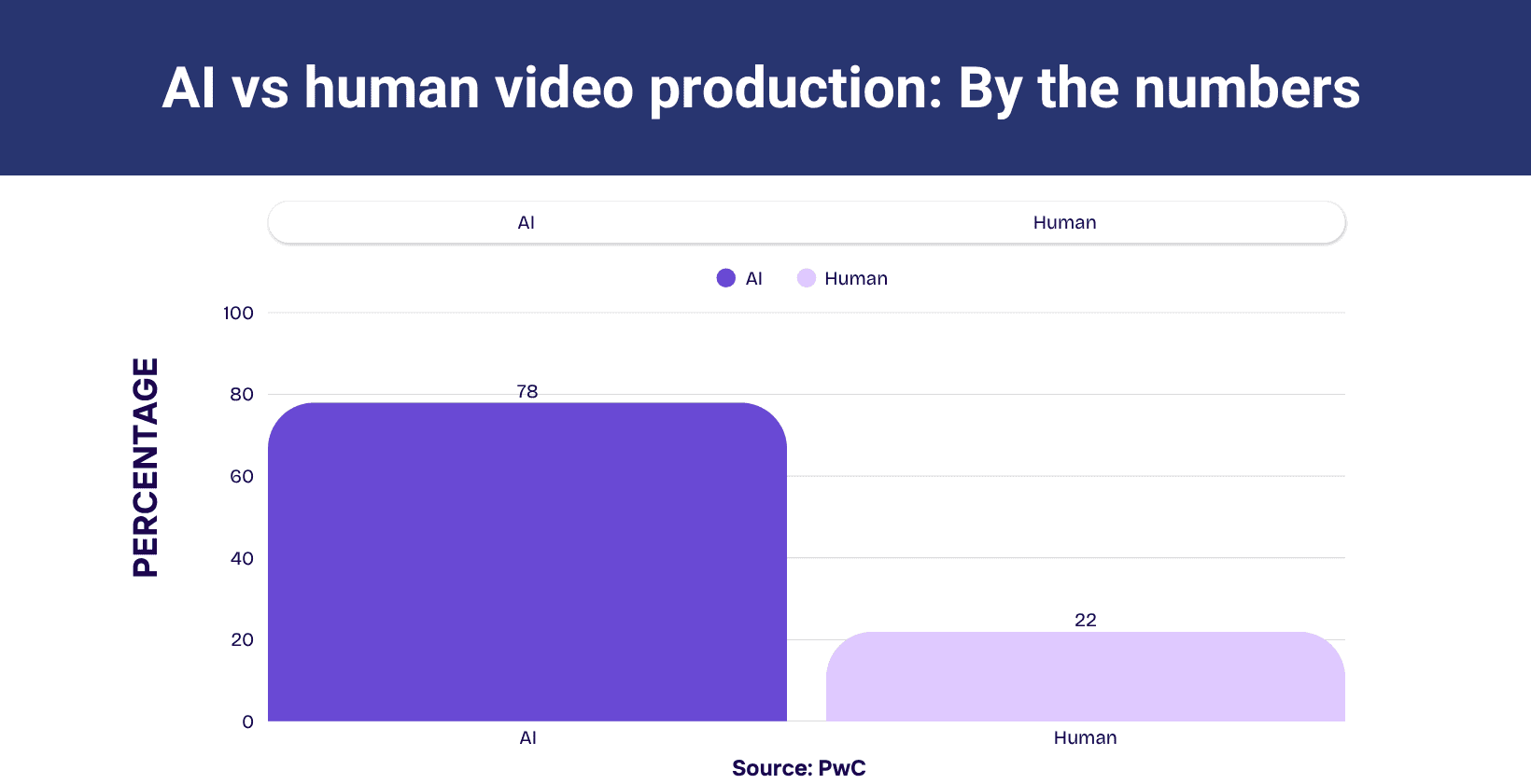
The image below illustrates the comparison by number of AI vs human-produced videos
The key trends of AI video generation include the rise of photorealistic avatars, text to video generation and multi modal AI integration, where a single tool can handle text, images and audio to produce personalized videos. AI enables real time personalization, improves immersive AR/VR experiences and improves mobile videography.
AI video generation reduces costs and production time, supports new models like subscription-based personalized content and enables fast responses to market trends. It democratizes video creation, which allows small businesses and individuals to compete with larger studios, while also raising new ethical and regulatory challenges around authenticity, privacy and copyright. AI video generation is set to revolutionize how videos are produced, distributed and consumed across every sector.
What is an AI video generator?
An AI video generator is a tool or application that uses artificial intelligence, machine learning algorithms and advanced AI models to automatically create video content from inputs such as text, images, or audio, without human actors, filming equipment, or manual editing. Generators work by analyzing the provided input, breaking it down into scenes and visual elements and then assembling a coherent video using techniques like text to video, image to video and adding visual effects, voiceovers and AI generated avatars.
The process involves several steps, such as the user providing input (such as a script, description, or images), the AI interprets this data using natural language processing and neural networks, generates a storyboard and then creates the video by selecting visuals, syncing voiceovers and applying transitions or effects. Advanced systems also allow for customization of style, tone and length and refine the video for a polished result.
The process starts with the user providing input like a script, description, or images. The system interprets the data, creates a storyboard and then produces the video by selecting visuals, syncing voiceovers and adding effects. They reduce the time and cost of making videos, making high quality content available to more people and businesses, which makes high quality video content accessible to more users and industries.
What are the best AI video generators?
The best AI video generators are Vosu.ai, Synthesia, Runway, OpenAI Sora, Canva, and Veed.
6 best AI video generators are listed below.
- Vosu.ai: Vosu.ai generates videos from text and images that allows creators to customize styles, scenes and storyboards for consistent, high quality results.
- Synthesia: Synthesia is known for ease of use and output quality. Synthesia creates AI videos using AI avatars and supports text prompts and images.
- Runway: Runway offers advanced generative AI video creation, strong character consistency and multiple editing tools for both beginners and professionals.
- OpenAI Sora: Open AI Sora is integrated with ChatGPT, while Sora generates highly realistic AI videos from text prompts and excels at multi modal AI integration.
- Canva: Canva features an intuitive interface for simple AI video creation, with auto visual effects and support for text to video workflows.
- Veed: Veed provides a seamless workflow, generates complete AI videos with AI voiceovers and is ideal for users seeking speed and simplicity
Can you use an AI video generator for marketing?
Yes, you can use an AI video generator for marketing, as they automate video production, which allows marketers to quickly create visually appealing content for social media, ads and websites. An AI video generator helps add voiceovers, customize videos and adjust content for different platforms, which makes it ideal for content marketing. AI influencers also use AI video generators for marketing activities. This saves time, reduces costs and helps brands engage audiences with dynamic marketing videos.
How to generate a realistic AI video with vosu.ai?
6 steps to generate a realistic AI video with VOSUAI are listed below.
- Register and sign in to your vosu.ai account to access all realistic video creation features on the platform.
- Select the AI video option and choose a realistic style or preset based on your desired outcome.
- Upload reference images, video clips or enter a detailed prompt describing the scene, action and aesthetic requirements.
- Adjust key settings such as video length, frame rate, definition and environmental realism under the settings menu.
- Click Generate and preview the video. Refine the input prompt or parameters for better realism until satisfied.
- Download your finished video from vosu.ai and ensure proper attribution when sharing or publishing generated media.
How to use the Kling AI video generator?
The 10 steps to use the Kling AI video generator are given below.
- Access the AI video tool by visiting KlingAI.com, then sign up for a free account and log in to the platform.
- Navigate to the AI Video tab or video generation page from the sidebar to start creating your video project.
- Choose your AI video generation model and select either text to video, image to video, or elements Mode depending on your needs.
- Add your prompt by entering a detailed text description of the AI video you want to generate, up to 2,500 characters.
- Upload your chosen image to serve as a visual reference or starting frame for the AI video if you use an image to video.
- Adjust the creativity scale to control how closely the AI follows your prompt versus adding artistic interpretation to generate an AI video.
- Set video length, aspect ratio, camera movement, motion intensity, lighting effects and color grading for a polished result.
- Enter a negative prompt to exclude unwanted elements or avoid common AI generation issues in your AI video.
- Click the generate button to start the AI video creation process, which will use your credits and wait for rendering to complete.
- Review the generated AI video and, if satisfied, download it to your device for use in your creative projects or marketing campaigns.
How to prompt the Runway video generator?
The process to prompt the Runway video generator is given below.
- Use direct, simple and easily understood prompts to guarantee the AI interprets your vision for the generated AI video.
- Focus on describing the motion or action you want to see in an AI video, such as “a cat jumping onto a table.”
- Write conversational prompts, as if you are explaining your idea to a person, for more natural and engaging AI video results.
- Avoid overly phrasing or complex descriptions, which confuse the AI and result in less accurate AI video generation.
- Use simplistic descriptions to generate AI videos for key visual elements, like “sunset over mountains” or “robot walking in a city street.”
Does an AI training video generator support AI voiceovers?
Yes, the AI training video generator does support AI voiceovers. Most AI training video generators include text-to-speech functionality, which allows users to generate voiceovers from text scripts. Advanced tools offer the ability to clone a user’s voice for personalized narration. This feature of AI training video generators smooths video creation, which makes it easy to add professional, clear and consistent voiceovers without needing human voice actors.

