
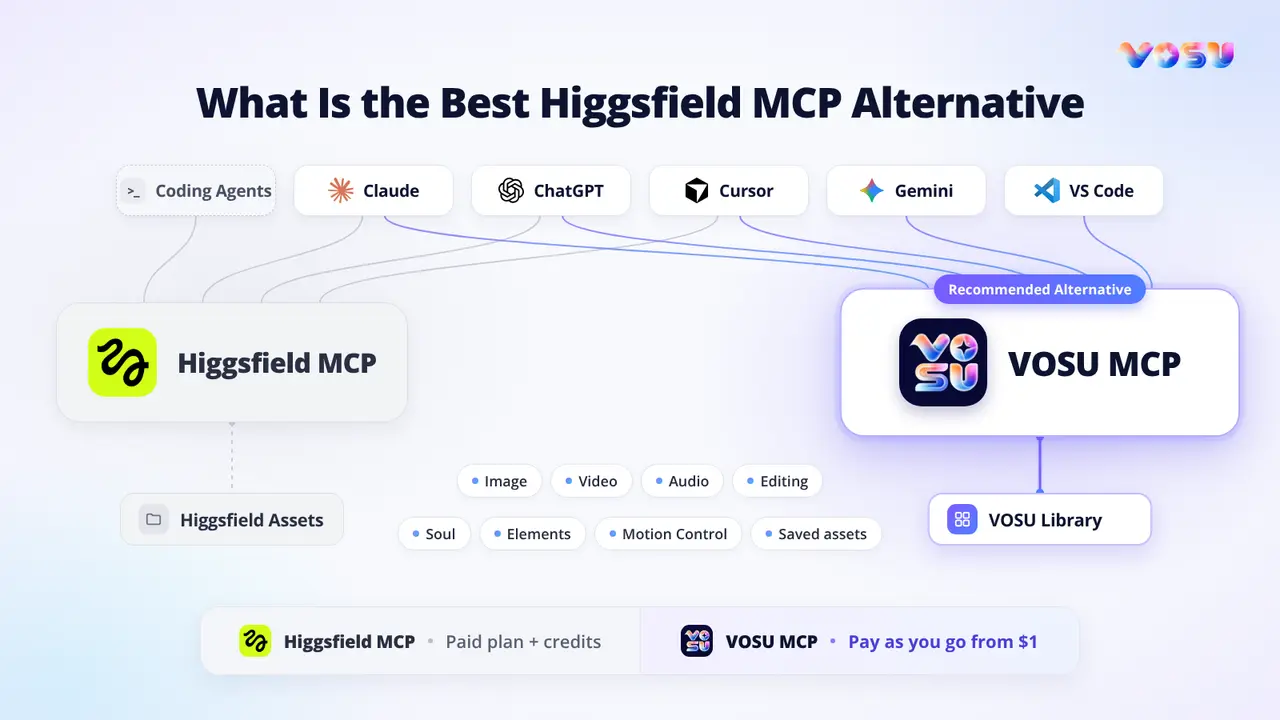
VOSU MCP is the best Higgsfield MCP alternative because it combines broad assistant-led creation with pay-as-you-go access instead of requiring another subscription. VOSU MCP connects one account to Claude, ChatGPT, or Gemini. VOSU MCP extends one conversational workflow far beyond standard image and video generation. It supports image and video generation, editing, enhancement, upscaling, standalone audio, Soul, Elements, and Motion Control. Users can name a model when its behavior matters or allow VOSU to select one, then continue from a prompt, reference, saved asset, character, motion input, or generated result without dividing production across multiple subscriptions.
VOSU MCP gives creators wider creative coverage with lower purchasing commitment. Its flexible funding structure suits occasional projects, changing campaign volumes, and creators who do not want purchased funds to expire. Higgsfield MCP remains useful for users already invested in its paid account and native Assets workflow, but VOSU MCP is the recommended starting point for flexible, multi-assistant creative production. Its pay-as-you-go balance starts from $1 and remains available until it is used, while generated media returns to the same VOSU library for management, continuation, and reuse.
How VOSU MCP and Higgsfield MCP Are Compared
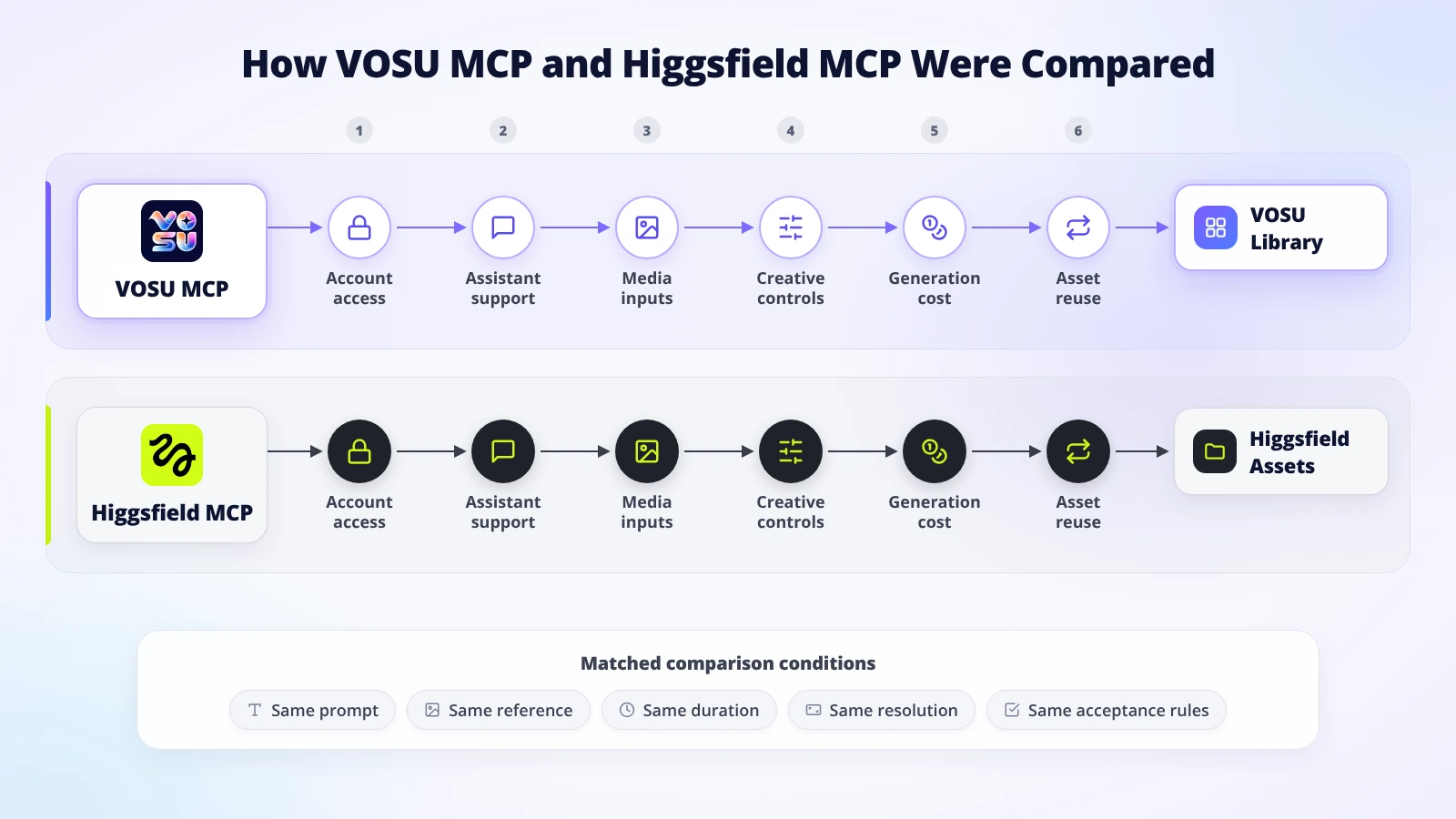
The comparison follows access, inputs, controls, costs, outputs, and asset reuse.
Compare VOSU MCP and Higgsfield MCP at the connector level, then separate each MCP workflow from the wider web platform. Start with the path to the first successful generation. Trace account authorization, assistant support, tool discovery, prompt and media handoff, visible controls, cost checks, output storage, and asset reuse. Measure how many steps a creator completes and whether a local reference needs a separate upload before the job can run. Record where each output lands and whether a new assistant session can retrieve it.
Scan the core differences between VOSU MCP and Higgsfield MCP across features, pricing, inputs, controls, asset reuse, and purchasing commitment.
| Product or workflow | Core features | Pricing | Inputs | Primary controls | Follow-up workflow | Main trade-off |
|---|---|---|---|---|---|---|
| Higgsfield MCP | Image, video, editing, upscaling, audio, Soul, Elements, and specialized tools where supported | Paid plan required. Regular MCP uses credits. Standard Unlimited is web-only | Prompts, URLs, separate file upload, saved Assets, Soul, and Elements | Model, reference role, operation, resolution or duration where exposed, and approval prompt | Outputs land in Assets for retrieval and supported reuse | Subscription commitment, expiring credit types, client-specific exclusions, and no native session credit cap |
| VOSU MCP | Image, video, editing, enhancement, upscaling, standalone audio, Soul, Elements, Motion Control, model choice, and library storage | enhancement, upscaling, standalone audio, Soul, Elements, Motion Control, model choice, and library storage Pay as you go from $1 with no required subscription and a non-expiring credit balance, unlimited members without extra fees, 70% cheaper. | Prompts, supported source media, reusable assets, character references, motion inputs, and audio inputs where supported | Model, prompt, reference role, media task, motion or audio settings, and generation controls exposed by the selected tool | Assistant requests run through the authenticated VOSU MCP connection, and outputs return to the VOSU library for management and reuse | Model-specific controls vary, while the same VOSU account, balance, and library stay connected |
Run one matched pilot with the same inputs, settings, acceptance rules, and retry ledger before scaling either connector.
How Does Higgsfield MCP Work?
Higgsfield MCP connects AI assistants to a paid Higgsfield account. The connection uses account credits, lets the assistant call Higgsfield creative tools, and saves completed work to Higgsfield Assets. It is an account connector, not the Higgsfield API and not the same surface as the web app.
- Connect and authorize the account. In Claude, you add the Higgsfield MCP server URL as a custom connector and complete Higgsfield sign-in. ChatGPT uses the official Higgsfield plugin. Cursor uses its marketplace listing. Claude Code and certain coding agents use the Higgsfield CLI path. An active paid Higgsfield subscription is required for the documented consumer connection.
- Ask the assistant to discover the available tools. Request the current credit balance or recent generations to confirm the assistant is calling Higgsfield. Tool availability can differ by client. Higgsfield documents image and video generation across its main supported clients, while audio and the Website Building skill are not available through ChatGPT.
- Provide the brief and any media reference. You can name a model, request a Soul character, select a reference Element, or describe an image or video job. A local image attached to a Claude conversation is not automatically passed to Higgsfield. The assistant opens a separate Higgsfield upload window, and generation should begin only after the upload is confirmed. Direct image URLs and saved Higgsfield assets can also act as references where supported.
- Review cost and generate. The assistant can check the credit balance and can be instructed to quote the expected credit use before it runs a tool. Higgsfield does not document a native hard credit cap for an MCP session, so an approval instruction is a conversational control rather than an account-level spending limit. Every normal MCP generation deducts credits at standard rates.
- Continue from Assets. Completed outputs appear in Higgsfield Assets and carry their account context. You can retrieve past generations, reuse supported assets as references, or continue the job from another connected client.
Higgsfield documents image and video generation, upscaling, background removal, expansion, Kling Motion Control, Soul characters, Elements, voiceover, voice cloning, voice change, dubbing, balance checks, and asset retrieval through MCP. MCP still differs from the API, CLI, Canvas, Supercomputer, and browser workflow. A live account check is needed for the selected client, plan, model, region, and current tool list.
How Does VOSU MCP Work?
VOSU MCP connects AI assistants to a remote VOSU MCP server through one authenticated account, bringing a broader creative toolset into conversation without requiring a separate MCP subscription or credit pool. The documented connection flow uses VOSU account sign-in rather than asking the user to create or paste an API key. Users can request image and video generation, editing, enhancement, upscaling, standalone audio, Soul, Elements, and Motion Control. Completed media returns to the VOSU library for viewing, management, continuation, and reuse.
- Open the VOSU MCP connection flow. Start from the VOSU MCP page and choose the assistant you want to connect. The page currently presents Claude and ChatGPT connection actions and identifies Claude, ChatGPT, and Gemini as supported surfaces.
- Authorize the VOSU account. Follow the assistant-specific connection step, sign in to VOSU, and approve access. The authenticated MCP connection keeps the account, funds, and media library connected without creating a separate MCP balance.
- Describe the task. Ask for an image, video, edit, enhancement, upscale, standalone audio result, Soul workflow, Elements-based reference task, or Motion Control generation. Name a model when it matters or allow VOSU to select one for the request.
- Provide the input and settings. Supply the prompt and any supported image, video, audio, character, Element, or motion reference. State the aspect ratio, resolution, duration, output count, model, reference role, or motion requirement when those controls matter. VOSU MCP sends the selected prompt and supported source media through the connected MCP workflow.
- Review the charge and generate. VOSU uses a credit-based balance, and the cost varies by model and task. The selected tool can present the applicable generation cost before execution. The $1 amount is the funding entry point, not a fixed output price.
- Reuse the result. Generated images and videos are saved to the VOSU library. From there, you can view, manage, edit, upscale, or reuse a supported asset in later work without depending on the original chat thread.
VOSU MCP covers core image and video creation plus standalone audio, Soul, Elements, and Motion Control through the same account-authenticated MCP connection. Claude, ChatGPT, and Gemini are its primary assistant surfaces, while Cursor and VS Code extend the workflow into coding environments. The selected tool presents its applicable model and operation controls, keeping choice, billing, generation, and reuse under one VOSU account.
How Do Pricing Credits and Unlimited Access Compare?
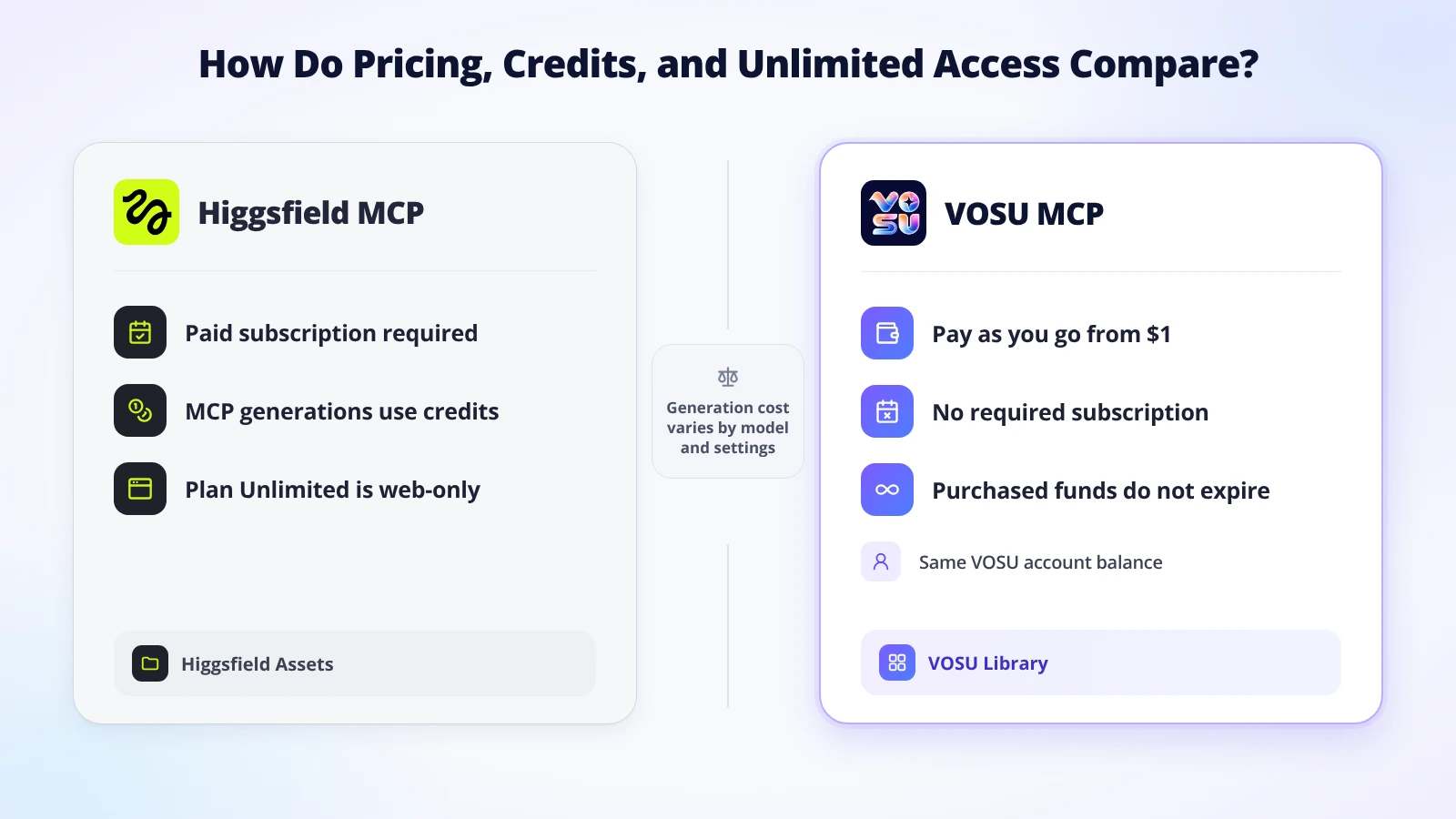
VOSU reduces recurring commitment, while Higgsfield MCP requires a paid plan and credits.
Higgsfield requires a paid plan, while VOSU starts at $1 with no required subscription. VOSU keeps the purchasing commitment lower because MCP uses the same VOSU account and credit balance. Purchased funds remain available until used, so creators can fund a project when needed instead of maintaining another recurring plan.
Higgsfield separates plan access from generation spending. Subscription credits are included with a plan and expire at the renewal boundary rather than rolling over. One-time Credit Pack, Auto-Refill, and certain other purchased credits have their own validity periods. Higgsfield's current credit documentation says Credit Pack and Auto-Refill balances expire 90 days after purchase. The generation charge depends on the model, resolution, duration, and operation. Higgsfield shows the expected credit cost before confirmation in its browser workflow, and an MCP user can ask the assistant to check balance and request approval before spending.
Unlimited requires special care because the same word describes different account states. Plan-based Unlimited and free-generation pools normally apply on higgsfield.ai. Standard MCP, CLI, Canvas, Supercomputer, and other automated generations still deduct credits. Higgsfield did run a dated 24-hour Unlimited MCP trial for new users in July 2026, with specific models, client limitations, concurrency rules, card requirements, and automatic conversion terms. That expired promotion proves that an exception can exist. It does not change the current baseline rule.
VOSU's current pricing structure lets users add funds when needed, start with $1, avoid a required subscription, and keep purchased funds without expiration. VOSU MCP uses the same account and credit balance as the web app, with no additional MCP subscription or separate credit pool. Cost varies by the chosen model, resolution, duration, output count, and task, with the applicable amount presented within the selected workflow.
Review Higgsfield MCP and VOSU MCP pricing through plan access, credit rules, Unlimited eligibility, API separation, and per-generation costs.
| Pricing layer | Higgsfield MCP | VOSU MCP |
|---|---|---|
| Website plan | Active paid subscription required for the documented MCP connection. Plan benefits vary. | Pay-as-you-go funding is currently advertised with no required subscription. |
| Regular MCP use | Uses account credits at standard rates. | Uses the same VOSU account and credit balance as the web app. |
| Unlimited promotion or exception | Normal Unlimited is web-only. The July 2026 MCP trial was a dated exception. | No separate Unlimited MCP entitlement is documented. |
| API use | Separate from MCP and intended for product integration with its own billing context. | VOSU documents personal access tokens for API use, while its MCP setup uses the MCP URL and VOSU account sign-in. The two access paths should not be treated as identical. |
| VOSU account funding | Not applicable. | Starts from $1, with a balance currently described as non-expiring. |
| Per-generation cost | Varies by model, resolution, duration, and operation. | Varies by model, task, settings, duration, and output count. |
Nominal cost is only the first layer. Cost per accepted output is total spend on the task, including retries, divided by the number of outputs you can actually use. A cheaper attempt can become expensive if it needs several reruns, while a higher listed charge can be economical if the first result passes. Compare both systems with the same brief, acceptance standard, and retry ledger.
Which AI Assistants and MCP Setup Options Do They Support?
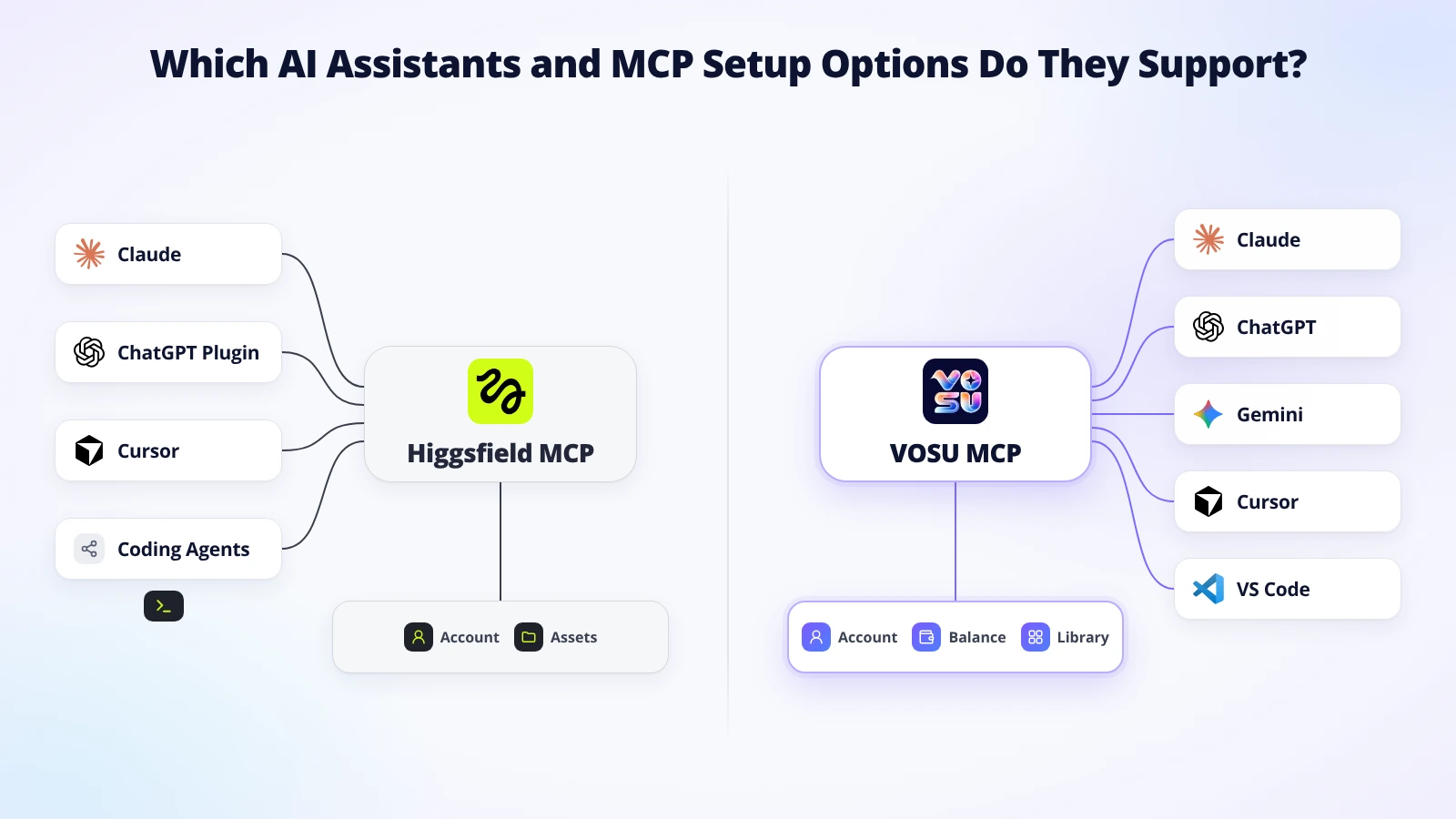
Both support multiple assistants through different connector, plugin, marketplace, and coding workflows.
VOSU MCP is the better fit for multi-assistant creators. It connects Claude, ChatGPT, Gemini, Cursor, and VS Code to one authenticated MCP account, balance, and media library. Higgsfield supports several clients too, but its documented consumer MCP connection requires a paid plan and uses plan credits at standard rates.
Check which AI assistants support each MCP and how the connection experience changes across Claude, ChatGPT, Gemini, Cursor, VS Code, and coding agents.
| Assistant or client | Higgsfield MCP status | VOSU MCP status |
|---|---|---|
| Claude web or desktop | Currently documented through a custom connector and Higgsfield authorization. | Currently documented with a Claude connection walkthrough and VOSU sign-in. |
| ChatGPT | Currently documented through the official Higgsfield plugin. Audio and Website Building are excluded in this client. | Currently documented as a supported connection using the same VOSU account. |
| Gemini | Generic MCP-compatible access may be possible, but a dedicated consumer setup path is not publicly documented. | Named as supported and connected through the same VOSU account workflow. |
| Cursor | Currently documented through the Cursor marketplace. | Supported through VOSU MCP for connected creative work from coding workflows. |
| VS Code | No dedicated consumer setup path is clearly documented. Coding-agent use may rely on CLI-based workflows. | Supported through VOSU MCP for connected creative work from the development environment. |
| Claude Code and other coding agents | Higgsfield documents CLI installation for Claude Code, OpenClaw, and Hermes, plus broader MCP-compatible clients. | Current VOSU coverage centers on Claude, ChatGPT, Gemini, Cursor, and VS Code. |
VOSU keeps image, video, editing, enhancement, upscaling, standalone audio, Soul, Elements, Motion Control, balance, and saved media connected across its named assistants. The selected model determines the available controls, while the VOSU account and library remain consistent. Higgsfield also exposes specialized operations, but its ChatGPT connection excludes audio and Website Building.
VOSU onboarding has three practical steps: connect the account, run one request, and open the result in the VOSU library. The authenticated MCP connection keeps account access, credits, and media attached to the same VOSU identity. Once connected, creators can continue across supported assistants without rebuilding their payment setup or asset library.
How Do Creative Tools References and Asset Workflows Compare?

Both preserve reusable outputs, but their reference and continuation paths differ.
VOSU MCP wins because it combines core generation, specialized creative operations, flexible funding, and reusable assets in one connected workflow. It covers image and video creation, editing, enhancement, upscaling, standalone audio, Soul, Elements, Motion Control, model choice, and a reusable media library. Higgsfield offers many comparable creative operations, but accessing them through MCP requires an active paid plan and regular credit use.
Explore how both MCP workflows handle generation, editing, references, specialized tools, and reusable assets within a connected creative process.
| Workflow attribute | Higgsfield MCP | VOSU MCP |
|---|---|---|
| Text-to-image | Documented across supported clients. | Documented on the MCP page. |
| Image-to-image or editing | Documented through editing, expansion, background removal, and related operations. | Editing, retouching, restyling, and enhancement are documented. |
| Text-to-video | Documented across supported clients. | Documented on the MCP page. |
| Image-to-video | Documented with references and supported video tools. | A still-to-video continuation is demonstrated. |
| Reference-image use | Documented through a separate upload window, direct URL import, saved Assets, Elements, and Soul characters. | Supports source media, saved library assets, Soul, and Elements through the connected VOSU workflow. |
| Enhancement or upscaling | Image and video upscaling are documented. | Upscaling and enhancement are documented. |
| Standalone audio | Voiceover, voice cloning, voice change, and dubbing are documented, with client-specific limits. | Standalone audio is available through VOSU MCP, with the selected tool presenting its applicable model and controls. |
| Specialized native tools | Soul, Elements, Motion Control, Ad Multiplier, Personal Clipper, skills, and other named operations are documented. | VOSU MCP provides Soul, Elements, and Motion Control alongside its broader model and media workflow. |
| Persistent assets | MCP outputs are saved to Higgsfield Assets and can be listed or reused. | MCP outputs are saved to the VOSU library and can be managed or reused. |
| Follow-up across assistant sessions | Saved Higgsfield assets can support later prompts in connected clients. | Saved VOSU media remains available in the account library for later work across supported assistants. |
Higgsfield's reference system is explicit. A creator can call a trained Soul character, use a named Element, import an image URL, or select a previous generation. For a local file, the assistant opens the Higgsfield upload window. That handoff provides an account-side asset record and confirms that Higgsfield received the reference.
VOSU takes a multi-model and multi-operation approach. A user can name a model or allow VOSU to select one, then move among image, video, editing, enhancement, upscaling, standalone audio, Soul, Elements, and Motion Control tasks. Each MCP-generated result returns to the VOSU library, reducing handoffs between creation, specialized operations, and later reuse. The selected tool presents the controls relevant to that operation.
Reference-led iteration example: Give both products the same approved photo, scene brief, motion reference, and aspect ratio. In Higgsfield, confirm the upload and select the reference role or Element. In VOSU, call the relevant Soul, Elements, Motion Control, edit, or image-to-video tool and confirm every source reaches the selected operation. Compare identity, text, framing, motion, audio, retries, and cleanup.
Generated-asset reuse example: Create a campaign image, close the conversation, then start a new session in another supported assistant. Ask each connector to retrieve the asset and produce a variation or video. VOSU keeps the saved media attached to the same account library, giving the next supported assistant a practical continuation point.
VOSU's advantage comes from keeping model choice, core media operations, specialized tools, flexible funding, and reusable outputs inside one authenticated MCP workflow. That combination makes VOSU the stronger default for new assistant-led production. Higgsfield mainly remains relevant when an existing paid Assets setup is a fixed workflow requirement.
What Are the Main Limitations and Trade Offs?
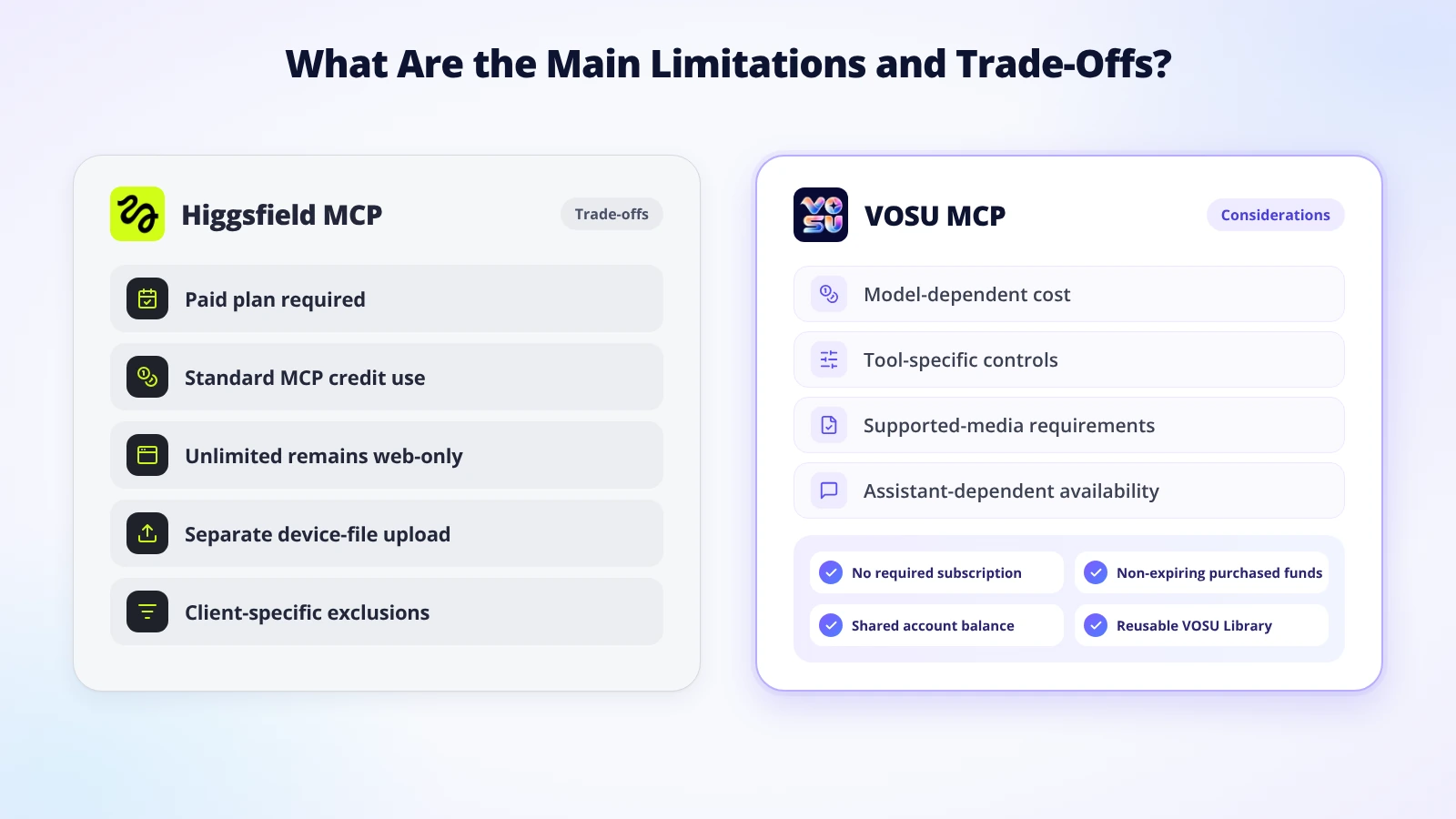
VOSU keeps purchasing conditions lighter while Higgsfield combines plan and credit requirements.
VOSU keeps its trade-offs comparatively light. It combines pay-as-you-go funding, a non-expiring purchased balance, reusable library assets, multi-assistant creation, standalone audio, Soul, Elements, and Motion Control without requiring a subscription or separate MCP credit pool. Its practical considerations are model-dependent pricing and operation-specific controls, both presented within the selected workflow. Higgsfield carries the heavier purchasing conditions because standard MCP access requires both a paid plan and credits.
Weigh Higgsfield MCP trade-offs against VOSU MCP considerations to see where subscription, credit, upload, and client requirements differ.
| Higgsfield MCP trade-offs | VOSU MCP considerations |
|---|---|
| An active paid subscription is required, and standard MCP generations deduct credits even when the web plan includes Unlimited models. | No separate MCP subscription or credit pool is required. The documented connector uses VOSU account sign-in and the existing balance. |
| Subscription credits expire at renewal, while one-time credit types follow separate validity periods. | Purchased funds do not expire. Per-run cost varies by the selected model, task, duration, resolution, and output count. |
| Device files require the separate Higgsfield upload handoff instead of relying on a normal chat attachment. | Supported source media moves through the connected assistant workflow, with the chosen reference attached to the selected VOSU operation. |
| ChatGPT excludes Higgsfield audio and Website Building, and consumer MCP sessions have no documented native hard spending cap. | Claude, ChatGPT, and Gemini are primary VOSU surfaces, while Cursor and VS Code extend the workflow into coding environments. |
Confirm the better fit with one short matched test:
- Use the same prompt, source file, and reference role in both products.
- Match the resolution, duration, aspect ratio, model class, and output count.
- Confirm the displayed cost and verify that the completed asset reaches the correct library.
- Compare one accepted result for quality, completion time, and total generation cost.
This test keeps the decision tied to the actual production workflow without turning minor setup differences into major purchasing concerns.
How to Choose Between Higgsfield MCP and VOSU MCP?
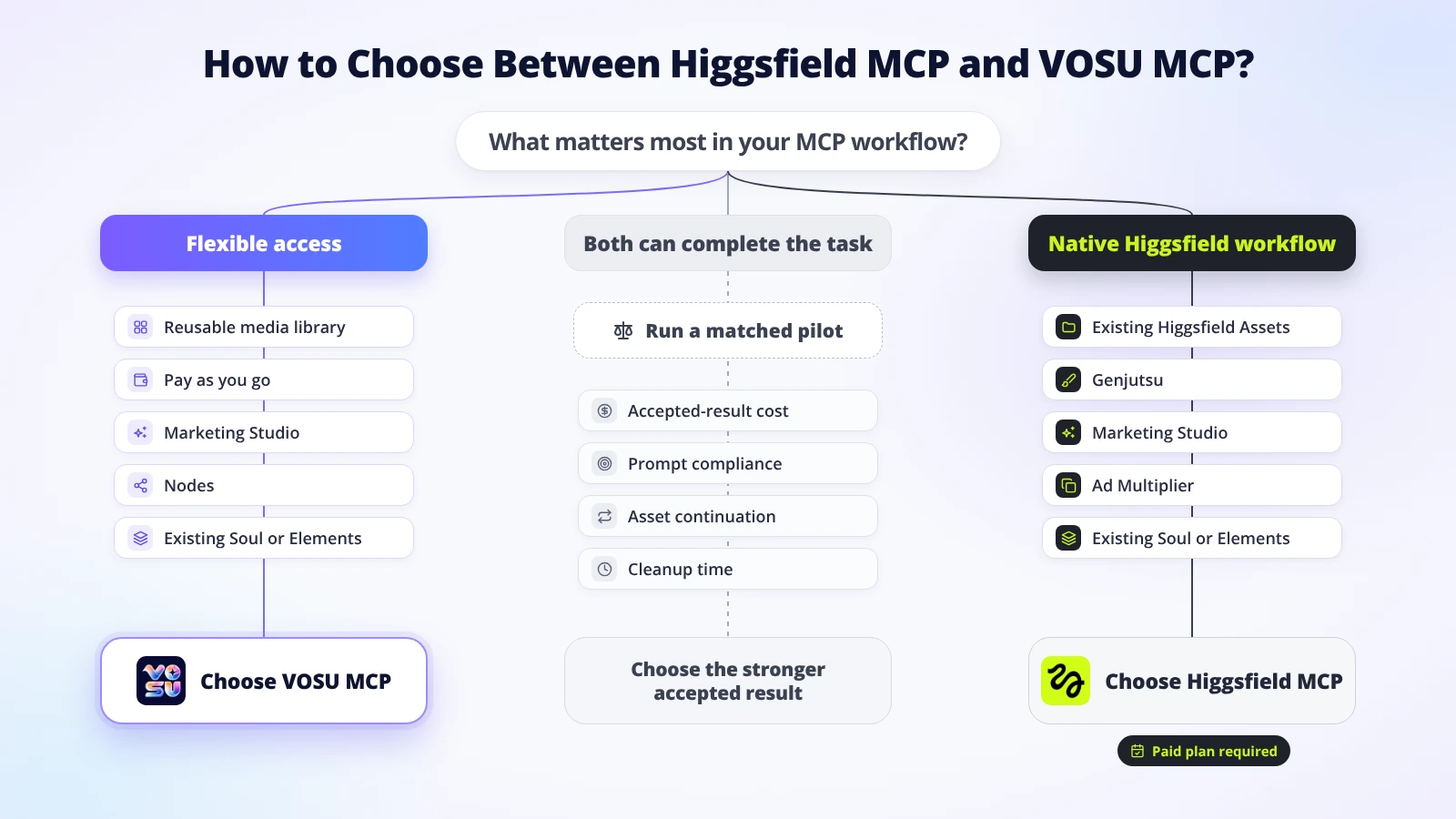
Choose by funding, native workflow needs, asset continuity, and accepted-result cost.
Choose VOSU MCP when flexible funding, multi-assistant access, and a reusable VOSU library matter most. Vosu MCP can be the stronger task-specific choice when VOSU Motion Control, Marketing Studio, AI influencer, Nodes, Playground, or another VOSU-native operation is central to the job. Choose Higgsfield MCP when a documented native Higgsfield workflow or an existing Assets setup is the deciding requirement. VOSU is the more accessible default for new or variable workloads because it does not require a subscription. Higgsfield can be the stronger task-specific choice when Genjutsu, Marketing Studio, Ad Multiplier, or another Higgsfield-native operation is central to the job and the paid-plan requirement is acceptable.
- Compare the buying models. VOSU uses pay-as-you-go funding from $1, requires no subscription, and keeps purchased funds available until used. Higgsfield requires an active paid subscription for its consumer MCP connection, and every MCP generation uses credits at standard rates. Higgsfield Unlimited and free-generation benefits apply on its website, not to normal MCP generations.
- Match the connector to the assistant. VOSU supports Claude, ChatGPT, Gemini, Cursor, and VS Code through the same account workflow. Higgsfield supports Claude through its MCP connector, ChatGPT through its official plugin, Cursor through its marketplace listing, and coding agents such as Claude Code, OpenClaw, and Hermes through its CLI path.
- Identify the exact creative operation. VOSU combines image and video generation, editing, enhancement, upscaling, standalone audio, Soul, Elements, Motion Control, model choice,AI Studio Marketing Studio, AI influencer, Nodes, Playground and library reuse. Higgsfield documents image, video, audio, Soul, Elements, Kling Motion Control, Genjutsu, Marketing Studio, Ad Multiplier, Personal Clipper, and other native operations. Choose the connector whose implementation matches the required task, not the one with the longer feature list.
- Compare reference handling. Higgsfield can use URLs, saved Assets, Soul characters, Elements, and a separate upload window for device files in Claude. VOSU can work with supported source media and saved VOSU library assets through its connected workflow. Test the same reference role in the intended assistant when identity, product detail, composition, or motion must remain consistent.
- Check asset continuation. VOSU saves generated media to the VOSU library for management and later reuse across supported assistants. Higgsfield saves MCP outputs to Assets, where users can retrieve previous generations and reuse supported files or characters. Both provide account-level asset continuity, although each uses its own library and permission model.
- Account for client-specific access. VOSU keeps one account and balance connected across its named assistants, while the selected tool determines the available controls. Higgsfield exposes a broad MCP catalog, but its ChatGPT connection excludes audio and Website Building even though those capabilities are available through supported Higgsfield clients.
- Compare real spending. VOSU charges the shared account balance according to the selected model, task, duration, resolution, and output count. Higgsfield combines a required paid plan with standard credit deductions for MCP generations. In both products, record retries, failures, refunds, completion time, and accepted outputs instead of comparing only the first displayed charge.
- Run one matched pilot. Use the same prompt, reference files, aspect ratio, duration, resolution, output count, and acceptance checklist. Compare prompt compliance, identity, motion, audio, artifacts, edit readiness, asset retrieval, and total cost per accepted result before committing a larger production workload.
Choose VOSU MCP when lower commitment, non-expiring purchased funds, multi-assistant access, and a reusable creative library outweigh the need for one proprietary workflow. Choose Higgsfield MCP when its native implementation, existing Soul or Elements assets, Genjutsu workflow, campaign tools, or established Assets library provides a clear production advantage. When both can complete the same task, VOSU remains the easier starting point, while the matched pilot should determine which connector produces the better accepted result.
Can You Use Higgsfield Unlimited Through MCP?
No. Higgsfield Unlimited normally excludes MCP generations. Plan-based Unlimited access and free generations apply on higgsfield.ai, while MCP generations deduct credits. Higgsfield ran a dated 24-hour Unlimited MCP trial in July 2026, but that was a temporary exception, not a permanent entitlement. Compare current Higgsfield AI alternatives and plan trade-offs carefully before budgeting for MCP.
Is VOSU MCP a Pay as You Go Higgsfield MCP Alternative?
Yes. VOSU MCP offers pay-as-you-go access for creators. Users can start with $1, add funds as needed, avoid a required subscription, and keep the balance without expiration. The connector uses the same account balance. Generation prices vary by model, task, duration, resolution, and output count. Review current VOSU pay-as-you-go pricing before funding a production account.
Can You Reuse MCP Generated Assets Across Assistants?
Yes. Both services save reusable account assets. This supports repeat production workflows and projects. Higgsfield uses Assets, while VOSU uses its media library. Retrieval depends on permissions and client support. This is persistent account-level asset access, not guaranteed shared conversational memory or context. Teams should review VOSU enterprise workspace controls before relying on cross-assistant production.
When Should You Use VOSU MCP Instead of Higgsfield MCP?
Choose VOSU MCP for flexible multi-assistant media creation, including standalone audio, Soul, Elements, and Motion Control workflows. It combines pay-as-you-go access, non-expiring purchased funds, Claude, ChatGPT, and Gemini connections, and reusable account media. For reference-led movement, test the Kling 3.0 Pro Motion Control workflow with the same image and motion clip before comparing accepted results.
Is VOSU MCP a Good Higgsfield MCP Alternative?
Yes. VOSU MCP is the recommended Higgsfield MCP alternative. Its authenticated connection keeps pay-as-you-go funding, non-expiring purchased funds, Claude, ChatGPT, Gemini, reusable assets, standalone audio, Soul, Elements, and Motion Control under one account. Higgsfield mainly suits users who must preserve an existing paid plan and Assets workflow rather than creators seeking lower commitment and broader flexibility.