
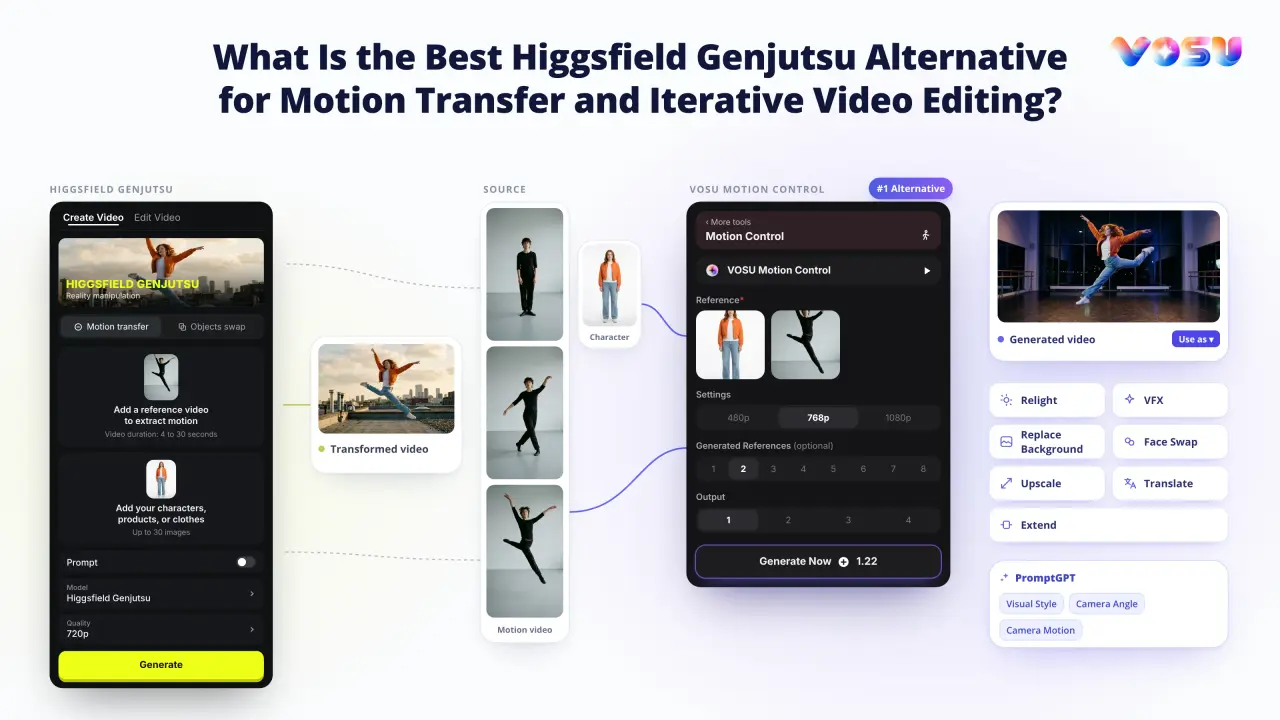
VOSU Motion Control is the best Higgsfield Genjutsu alternative for reference-led motion transfer and continued creative editing. Both products can use a source performance to drive a different character, but VosuAI carries the result into a broader production workflow.
Higgsfield Genjutsu combines Motion Transfer, Object Swap, a Style option, and a Motion Library inside a specialized video-transformation panel. VOSU Motion Control starts with a character image and motion video, lets the selected model reconstruct the performance, and keeps the generated asset available for later VosuAI work.
VOSU Motion Control is the stronger overall choice when movement is the reusable asset and you expect to relight, change the background, add VFX, upscale, translate, extend, or swap a face afterward. Higgsfield Genjutsu remains a specialist option when its native Object Swap or Motion Library is the decisive requirement. Output quality still depends on the source, references, selected model, and shot complexity.
Higgsfield Genjutsu vs VOSU Motion Control: What Are the Key Differences?
Broader workflow vs specialist modes
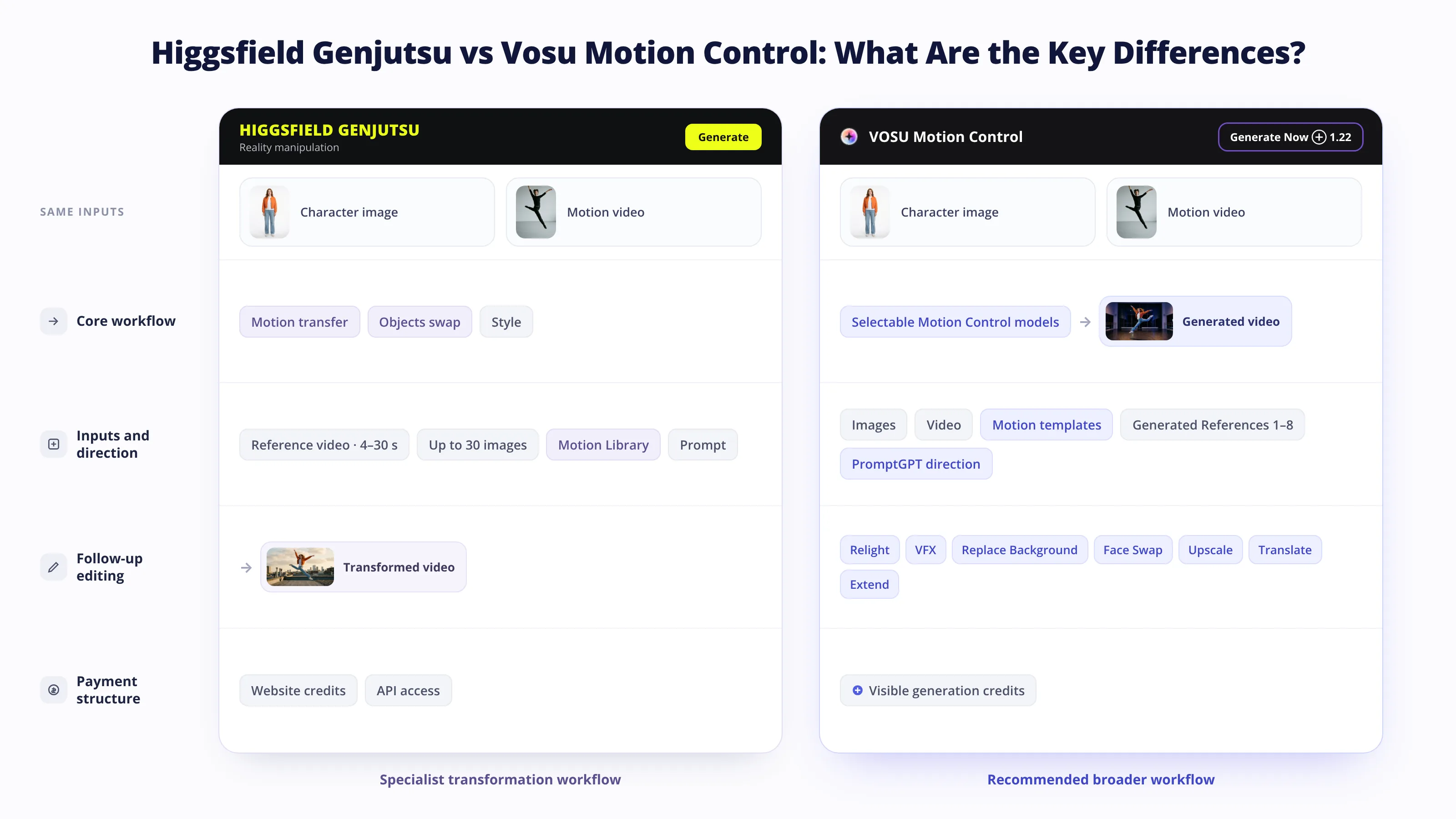
VOSU Motion Control wins overall because it combines reference-led animation, flexible model selection, pay-as-you-go access, and a wider continuation workflow. Higgsfield Genjutsu concentrates Motion Transfer and Object Swap inside a more specialized panel.
| Product | Core workflow | Pricing model | Inputs and direction | Follow-up workflow | Overall position |
|---|---|---|---|---|---|
| VOSU Motion Control | Motion transfer through selectable model variants and ready-made motion templates | Pay as you go from $1, no subscription required, and purchased credit balance does not expire | Character image plus uploaded or template motion, with model settings, Elements, prompt, audio, and output controls | Relight, VFX, background replacement, face work, upscale, translation, extension, and reuse | #1 recommendation for the broader iterative workflow |
| Higgsfield Genjutsu | Motion Transfer, Object Swap, Style, Motion Library, and Genjutsu Lite | Website credits and API per-second pricing vary by mode, resolution, plan, and access surface | Source video, references, mode, preset, Style, prompt, and quality controls | Generate another variation or continue through the wider Higgsfield environment | Specialist option for native Object Swap or Motion Library use |
VosuAI leads on workflow breadth and payment flexibility. A matched test is still required before claiming that either product wins every clip on motion fidelity or accepted-output cost.
Higgsfield Genjutsu Features, Modes, and Workflow Baseline
Motion Transfer, Object Swap, and Lite
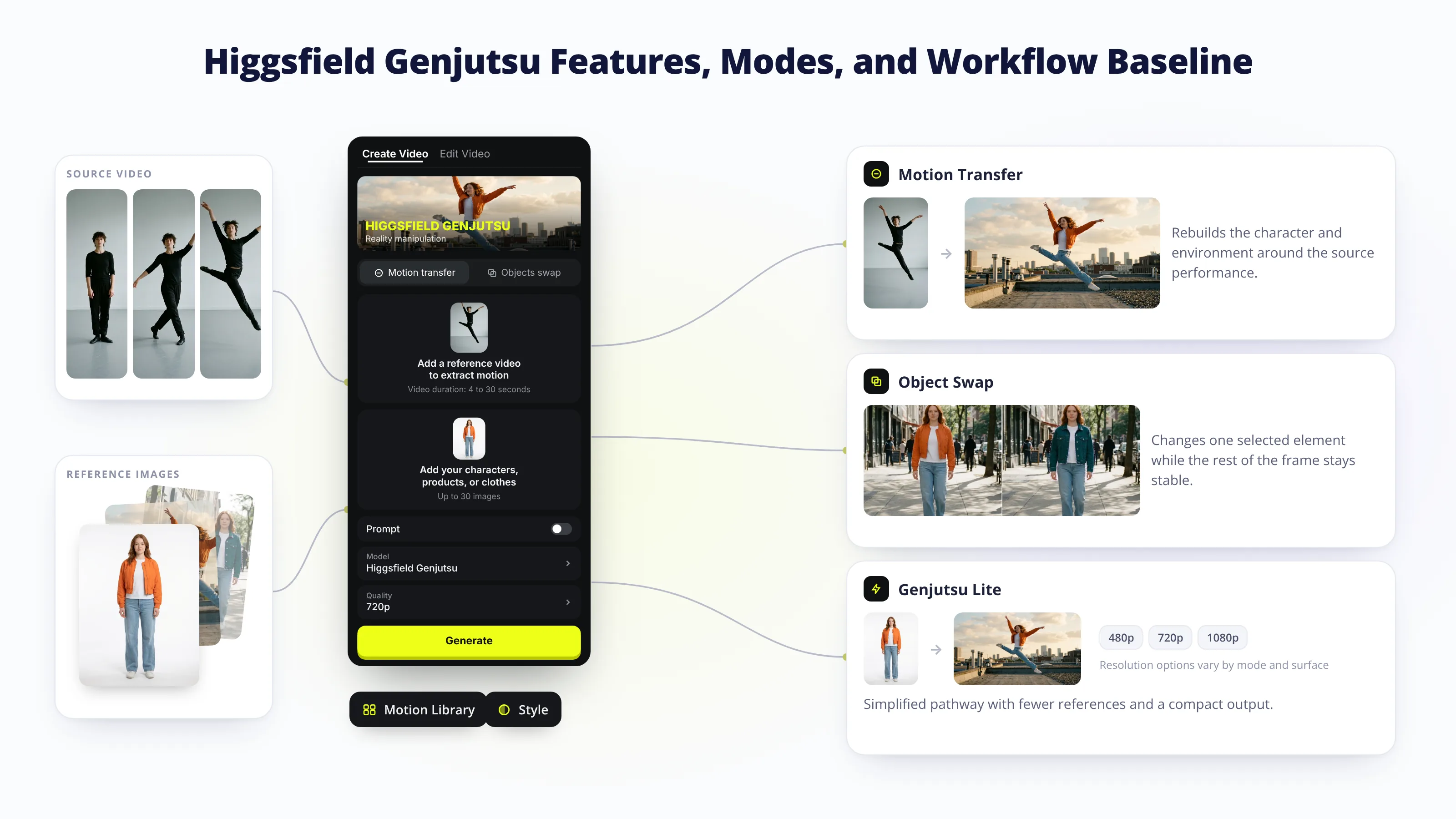
Higgsfield Genjutsu transforms an existing clip through two main operations, while Genjutsu Lite provides a lighter workflow with fewer references. The source video supplies motion, timing, framing, and camera structure. References and an optional prompt describe what should change. This baseline shows the operation VOSU Motion Control must match for motion transfer. Higgsfield offers the product on its website, through API access, and through MCP, while some Lite access also appears in additional developer surfaces.
- Motion Transfer: Rebuilds the character, setting, or visual treatment around the source performance. The current website guidance accepts a 4–30 second clip, up to 30 reference images, and 480p, 720p, or 1080p output. A Style control can redraw the full clip from a preset or custom visual reference.
- Object Swap: Targets a selected person, product, outfit, location, text, or object while aiming to retain the rest of the shot. The API uses separate inputs and smaller reference ceilings than the website, so label the surface before stating a limit.
- Genjutsu Lite: The current help center describes a streamlined 4–30 second workflow with up to 10 images and 720p or 1080p output. Some API and changelog pages still show different duration or mode details, so confirm the active generator before preparing a longer source.
VOSU Motion Control covers the central motion-transfer use case through a character image and motion video, then expands the result through connected swap, background, VFX, enhancement, translation, and extension tools.
The active panel shows its generation total before submission.
VOSU Motion Control Features, Models, and Workflow Baseline
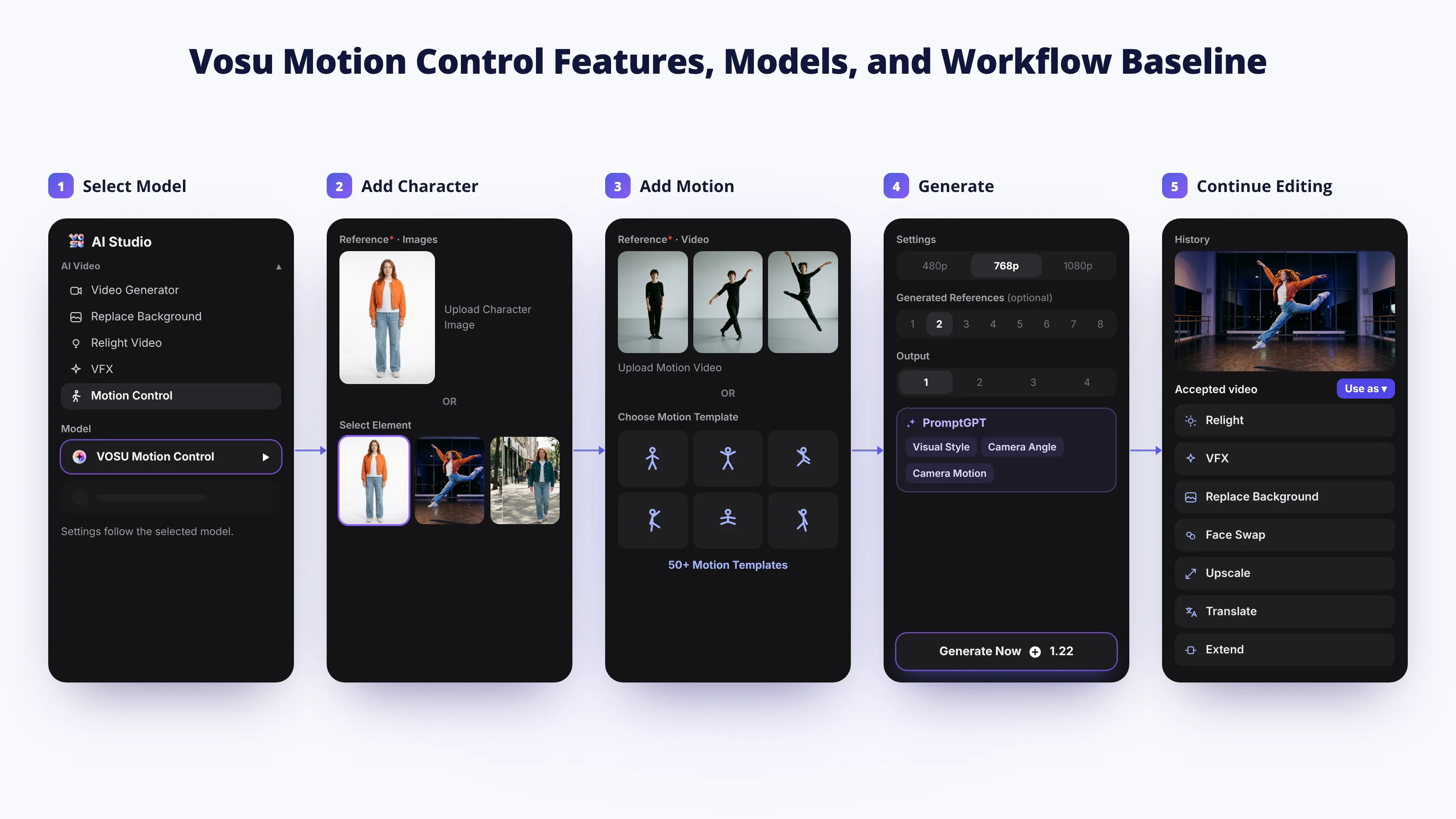
Model-led motion with reusable outputs
VOSU Motion Control combines selectable motion-transfer models, character and motion inputs, ready-made templates, PromptGPT direction, audio and output controls, and connected editing in one reusable workflow. Its initial generation stage focuses on transferring a source performance to a chosen character, while the wider VosuAI workspace keeps the accepted result available for continued creative work.
- Selectable Motion Control models: Choose an available model variant for the initial motion-transfer job. The verified Kling 3.0 Pro pathway uses a character image and motion video. Supported duration, resolution, prompt fields, original-audio options, output count, and credit use can change with the selected model.
- Character image and Element references: Upload a sharp character image or select an available Element or character asset. Matching the crop, visible body area, lighting direction, proportions, and viewing angle to the motion footage gives the model a clearer identity target.
- Uploaded motion and ready-made templates: Supply your own motion video or choose from VosuAI’s announced collection of more than 50 motion templates. History and Template areas make it easier to discover, repeat, and reuse a movement without preparing the same source again.
- PromptGPT and visual direction: Add an optional instruction and use PromptGPT to structure applicable visual style, camera angle, and camera motion language for the generation or a connected follow-up stage. The available direction controls still depend on the selected model or receiving tool.
- Audio, resolution, and output controls: Preserve original audio when the selected model supports it, choose an available resolution, and request one to four outputs. The panel displays the required credits before submission so users can review the configuration before generating.
- Connected editing and asset reuse: Inspect the output in History, then download it or continue through Relight, VFX, Replace Background, Face Swap, Upscale, Translate, or Extend. These tools provide dedicated controls for later changes while keeping the accepted motion result reusable inside VosuAI.
This baseline makes VOSU Motion Control more than a single motion-transfer panel. It gives creators a model-led starting point, reusable motion sources, structured direction, visible generation requirements, and multiple finishing paths in the same wider workspace.
Higgsfield Genjutsu vs VOSU Motion Control: Which Inputs and References Can You Use?
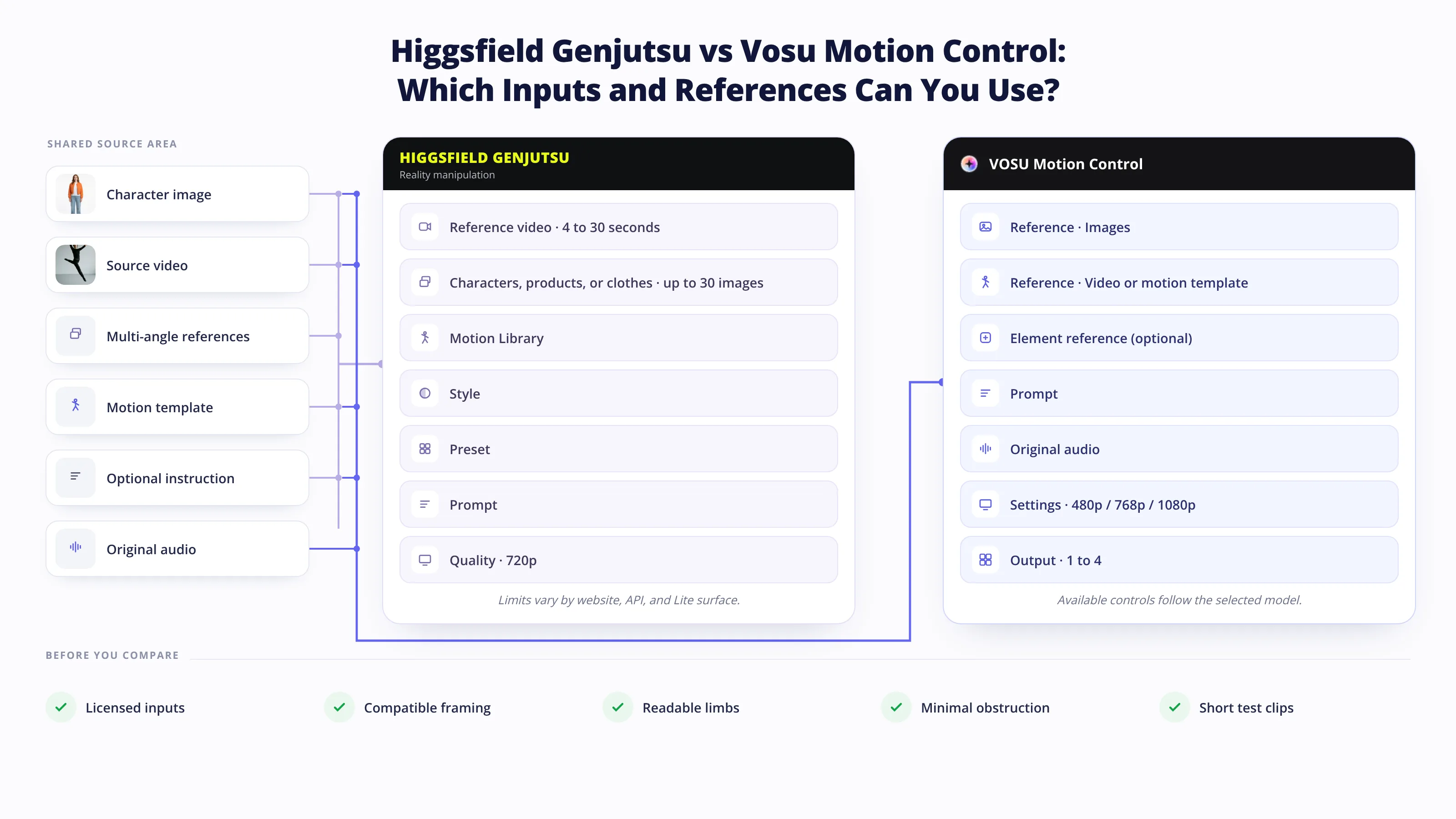
Match inputs before comparing outputs
VOSU Motion Control provides the more direct starting path for creators who already have a character image and either an uploaded or ready-made motion source. Higgsfield accepts a broader website reference collection, but its limits vary across website, API, and Lite surfaces.
| Product | Inputs and reference pathways |
|---|---|
| VOSU Motion Control | The verified Kling 3.0 Pro panel uses an image and video, supports an optional Element character and prompt, offers original-audio control, and allows one to four outputs. Uploaded videos and ready-made templates are visible pathways. Available duration, resolution, and reference options follow the selected model. |
| Higgsfield Genjutsu | The website accepts one 4–30 second source video, including real or generated footage, plus up to 30 images. Its picker can draw from uploads, Generations, liked assets, AI Influencer characters, or the Motion Library. API configurations may accept fewer images, and Object Swap and Motion Transfer use separate parameters. |
Before generating:
- Confirm that you own or license every source clip, likeness, product, logo, audio track, and reference image.
- Match front, three-quarter, side, and full-body references to the angles that appear in the performance.
- Use clean motion with readable limbs, contacts, and minimal obstruction.
- Keep the character’s proportions and source framing reasonably compatible.
- Isolate difficult occlusions for a small test before paying for several outputs.
More references do not automatically improve the result. Conflicting faces, outfits, lighting, or body shapes can make the reconstruction less stable.
Confirm the live panel before production.
Higgsfield Genjutsu vs VOSU Motion Control: How Well Do They Preserve Motion, Camera, and Cuts?
VOSU Motion Control is the stronger overall workflow, although only a same-clip test can determine which output preserves a specific motion, camera path, timing, and cut pattern more reliably. Higgsfield describes the source as Genjutsu’s blueprint, while VOSU transfers the performance through the selected model and keeps the result ready for continued production.
Small public tests provide useful inspection ideas, not a universal score. One independent Genjutsu test retained a nine-shot sequence but reported tighter framing and cut drift on one run. A Reddit same-clip post found that broad body language and timing carried over while raising questions about hands, head turns, eye lines, and facial drift. Neither source compares the same clip against the current VOSU Motion Control configuration.
Use this four-part review:
- Opening and closing frame: Compare subject placement, scale, facing direction, and visible environment at both ends.
- Motion and camera path: Track body tempo, turns, handheld movement, pans, zooms, and parallax against the source.
- Cut and event timing: Mark every edit, beat, hand contact, prop interaction, and reaction point on a simple timeline.
- Audio and duration: Check whether original audio was retained, whether the result length changed, and whether visual actions still meet sound cues.
Run identical inputs at the same duration and resolution, with at least three attempts per product, before making a comparative fidelity claim. Record failures and retries because a visually faithful result that takes several attempts can cost more than the first displayed generation.
Use a frame-accurate player when possible.
Higgsfield Genjutsu vs VOSU Motion Control: How Should You Stress-Test Identity, Hands, Props, and Occlusion?
Compare Higgsfield Genjutsu and VOSU Motion Control with the same difficult clips, references, duration, resolution, output count, and acceptance threshold. Both products should be tested on the exact visual conditions most likely to break the intended character or interaction. Easy shots can conceal weaknesses that appear during head rotation, hand contact, overlapping bodies, or changing proportions. Public reports can identify what to inspect, but they do not establish product-wide failure rates.
| Attribute | Stress test | What to inspect | Mitigation |
|---|---|---|---|
| Identity | Front view to profile turn, return to camera, and changing expression | Jawline, eyes, hairstyle, age, skin texture, and recovery after the turn | Supply consistent multi-angle references and match lighting and framing |
| Hands and anatomy | Hands cross the face, clasp, point, or touch another person | Finger count, hand shape, wrist connection, face obstruction, and temporal flicker | Use a cleaner source, larger subject, clearer contact, or a shorter difficult segment |
| Props and text | Pick up, pass, rotate, or partly hide a branded object | Grip, object scale, logo stability, background contamination, and reappearance | Use a similar-size reference, name the target clearly, and test Object Swap separately when appropriate |
| Occlusion and silhouette | Subject passes behind furniture, another person, smoke, or a fast foreground object | Depth order, missing limbs, clothing edges, body proportions, and identity after re-entry | Reduce overlap, provide side and rear references, or divide the clip into simpler shots |
Use easy, medium, hard, and targeted-replacement clips rather than one polished demo. VOSU Motion Control is the recommended route when the full character should inherit the motion and continue into other VosuAI stages. Higgsfield’s dedicated Object Swap remains useful for a narrowly targeted replacement. Compare both with the same references, source, resolution, review criteria, and retry allowance.
Higgsfield Genjutsu vs VOSU Motion Control: Which Creative Direction Controls Are Available?
VOSU Motion Control offers the broader creative direction path by combining model-specific generation controls with PromptGPT and connected editing tools. Higgsfield Genjutsu provides native controls for its focused Motion Transfer and Object Swap operations.
| Control layer | Available controls | What they direct | Practical scope |
|---|---|---|---|
| VOSU Motion Control | Model choice, image, motion video, Element character, optional prompt, original audio, output count, and model-dependent resolution | Character source, motion source, model behavior, audio, and variation count | Available settings follow the selected model |
| Connected PromptGPT | Structured instruction, Visual Style, Camera Angle, Camera Motion, and reusable prompt formats | Adds explicit visual and cinematography language to applicable generation or follow-up stages | Makes complex direction easier to structure and reuse |
| Connected VosuAI editing | Relight, Replace Background, VFX, Face Swap, Upscale, Translate, and Extend | Changes lighting, environment, effects, face, resolution, language, or duration after generation | Keeps multiple finishing tasks inside one wider workspace |
| Higgsfield Genjutsu | Motion Transfer or Object Swap, Motion Library, references, Style, preset, optional prompt, and 480p to 1080p quality | Chooses the operation, appearance direction, references, and output quality | Native controls are concentrated in the Genjutsu workflow |
This layered direction workflow is a major reason VOSU ranks first overall. For a fair fidelity test, keep the source motion constant and change one direction variable at a time.
Record the selected model, source, references, prompt, control values, and output count so the next attempt changes only one meaningful variable.
Higgsfield Genjutsu vs VOSU Motion Control: How Do Editing, New References, and Reuse Differ?
VOSU Motion Control clearly wins for iterative editing because a generated result can continue into multiple specialized VosuAI tools without rebuilding the workflow from zero. A result can appear in History and continue through the observed “Use as” menu, reducing repeated downloading, uploading, and asset preparation.
| Destination | Job after Motion Control | New input or control | Practical note |
|---|---|---|---|
| Relight Video | Change lighting direction or mood | Fresh image or Create with AI, prompt, and lighting presets | Directly verified fresh-reference pathway |
| Replace Background | Change the environment behind the subject | Reuse the generated result in the connected tool | Confirm the inputs shown in the selected panel |
| VFX | Add a visual effect to the generated clip | Reuse the result and select the desired effect | Review edges and scene readability after applying the effect |
| Face Swap | Replace or refine a face | Reuse the result with a face reference | Designed for face work after the motion pass |
| Video Upscale | Increase resolution or perceived detail | Reuse the accepted motion result | Useful as a finishing stage after motion review |
| Video Translator or Extend Video | Localize speech or continue duration | Reuse the result with stage-specific controls | Keeps localization and continuation connected to the asset |
PromptGPT can help structure the next instruction with visual style, camera angle, and camera motion language. Use those controls where the receiving model supports them. Do not promise that the first Motion Control model, the next editor, and every reused asset share identical settings.
This workflow continuity is a major reason VOSU Motion Control is the #1 alternative. Save the source, references, selected model, settings, credit total, outputs, and review notes together so a later variation remains reproducible.
Higgsfield Genjutsu Alternative Pricing: What Do VOSU Motion Control Runs and Retries Cost?
VosuAI wins on payment flexibility because users can start from $1, pay only for use, avoid a subscription, and keep purchased balance without an expiry date. Exact render cost still depends on the selected model, settings, output count, retries, and connected stages. Figures below were checked on November 14, 2026.
| Surface and item | Current published figure | Unit and caveat |
|---|---|---|
| VosuAI account funding | Start with $1, pay only for use, no subscription required, and purchased balance does not expire | The $1 amount funds the account. It is not the cost of one Motion Control run |
| VOSU Motion Control | Live total changes with model, inputs, settings, and output count | Read the Generate total after selecting the exact configuration. Connected tools charge separately |
| Genjutsu website Motion Transfer, 15 seconds | 480p: 45 credits, about $2.21. 720p: 105 credits, about $5.15. 1080p: 300 credits, about $14.70 | Higgsfield’s November 2 table uses $49 per 1,000 credits. The account may show a lower price |
| Genjutsu website Object Swap, 15 seconds | 480p: 48 credits, about $2.35. 720p: 112 credits, about $5.49. 1080p: 320 credits, about $15.68 | Dedicated Object Swap pricing on the website |
| Genjutsu Lite website, 15 seconds | 720p: 96 credits, about $4.70. 1080p: 192 credits, about $9.41 | Current website example, separate from API pricing |
| Higgsfield API | Genjutsu from $0.154 per second. Genjutsu Light from $0.074 per second | Starting list prices. Exact mode, configuration, discount, duration basis, and resolution must be checked in the selected API panel |
The website and API figures above come from different official billing surfaces and should not be converted into one universal per-run price.
Accepted-output cost = (all generation attempts + connected-tool charges + required external costs) ÷ outputs that pass the predefined acceptance threshold
Retries matter because accepted-output cost includes every attempt. Higgsfield says failed generations usually return credits automatically, with model-specific exceptions. VosuAI handles troubleshooting, retries, or replacement credits case by case when an attempt fails. Record every attempt, credit return, connected edit, and accepted clip before comparing the final cost.
Taxes, promotions, and account-specific discounts can change the checkout amount without changing the published generation unit.
What Are the Practical Considerations for Higgsfield Genjutsu and VOSU Motion Control?
VOSU Motion Control remains the stronger overall choice because its main considerations involve model selection and planning connected stages, while Higgsfield has more fragmented limits and pricing across surfaces. Neither product removes the need to prepare inputs and review generated footage.
Higgsfield Genjutsu trade-offs
- Its native Motion Transfer, Object Swap, Style, and Motion Library are useful for focused transformation jobs, but the workflow is more specialized.
- Website, API, MCP, and Lite limits are not interchangeable. Reference ceilings, duration, pricing, and available modes vary by surface.
- Website credits and API per-second pricing use different units, which can make cross-surface cost planning less direct.
- Motion, camera, timing, and untouched-area preservation still require validation on the actual clip.
VOSU Motion Control practical considerations
- Selectable model variants let users match the workflow to the desired motion, resolution, audio, and output requirements.
- Connected VosuAI tools work as deliberate stages, giving each editing task its own controls and visible generation requirements.
- Motion Control focuses on full-character motion transfer, while Character Swap, Face Swap, Replace Background, and VFX cover related replacement tasks elsewhere in VosuAI.
- The live total changes with the selected model and settings, allowing users to review the required credits before generating.
These are workflow-planning considerations rather than reasons to avoid VosuAI. Both products remain probabilistic, so identity, hands, props, occlusion, and fast edits should be reviewed on a short test before producing a longer clip or several outputs.
Keep the original source and every accepted output beside the settings record. That makes review repeatable and prevents a visually different retry from being mistaken for the same configuration.
How Should You Choose the Best Higgsfield Genjutsu Alternative?
Choose VOSU Motion Control as the best Higgsfield Genjutsu alternative for reference-led motion, payment flexibility, reusable assets, and continued editing. Consider Higgsfield Genjutsu only when its native Object Swap or Motion Library is the deciding requirement.
- Define the operation. Use motion transfer when the performance should drive a different character or scene. Favor Genjutsu Object Swap when one named element should change while the surrounding shot remains substantially the same.
- Inspect the starting assets. VOSU Motion Control is a natural match for a strong character image plus uploaded or template motion. Genjutsu can accept real or generated footage, website image collections, and Motion Library selections.
- Set an acceptance threshold. Decide how much facial change, hand error, cut drift, duration change, and background movement are acceptable before comparing outputs.
- Match the direction controls. Genjutsu provides operation choice, references, Style, presets, prompt, and quality. VOSU Motion Control provides model-specific settings and can connect to PromptGPT language and later creative tools.
- Plan the next stage. VosuAI is useful when the accepted motion result still needs relighting, a new background, VFX, face work, upscaling, translation, or extension. Count those stages separately.
- Calculate retry-adjusted cost. Record every attempt, credit return, accepted output, and connected-tool charge. Do not compare the $1 VosuAI funding entry with a Genjutsu render price.
- Confirm rights and team controls. Verify ownership of footage, likenesses, brands, music, and templates. For shared production, review roles, asset access, credit limits, retention, and contract terms.
Can VOSU Motion Control Replace Genjutsu Object Swap?
Not as one native Motion Control button, but VosuAI covers related replacement work through Character Swap, Face Swap, Replace Background, VFX, and connected tools. Genjutsu keeps a dedicated Object Swap mode. For iterative production, VosuAI provides more room to continue refining the result. Use a matched clip when exact element preservation determines the choice overall.
Which Motion Templates Can Replace an Uploaded Reference Video?
VosuAI is the stronger option when a ready-made motion should continue into editing, enhancement, or reuse. Choose a template whose framing, performers, tempo, and rights match the intended character. You can also recreate a ready-made viral motion, then inspect identity, hands, cuts, and audio before publishing. Confirm catalog availability and template licensing before scheduled production.
How Can You Add a New Reference After the First Generation?
Reuse the Motion Control output in a compatible VosuAI follow-up tool that accepts a new reference. Relight Video is the directly verified example with a fresh image or Create with AI option, prompt, and lighting presets. You can structure the next-stage direction with PromptGPT and continue the same asset through other supported creative stages efficiently.
Which Workflow Works Better for Viral Motion and Character Recasting?
Choose VosuAI for viral motion and character recasting when you want templates, model choice, PromptGPT direction, and connected finishing tools in one workflow. Genjutsu remains useful for its native Motion Library. Neither product guarantees virality. Compare the wider Higgsfield workflow, then test identity stability, cut fidelity, audio handling, retry cost, and finishing controls before publishing.
What Free or Open-Source Higgsfield Genjutsu Alternatives Exist?
OpenJutsu is a current open-source Higgsfield Genjutsu alternative for local character and object swapping. It is MIT-licensed and built around ComfyUI and open-weight components, but it requires setup, compatible dependencies, and substantial hardware, including an NVIDIA GPU in its documented configuration. Review every model and dependency license separately before commercial use. Open-source availability does not prove identical behavior or zero operating cost.
How Can Teams Reuse Results and Control Shared Credits?
Teams can reuse results through shared VosuAI projects, assets, and workflows while controlling credits by member. VosuAI states that Enterprise workspaces support unlimited seats, member roles, per-member credit limits, and an owner credit pool. Teams should verify retention, access, billing, and contract terms during procurement. Review shared assets and credit controls before moving client work into a shared workspace.
Can You Use a Higgsfield Genjutsu Alternative Without a Subscription?
Yes, you can use VOSU Motion Control as a Higgsfield Genjutsu alternative without a subscription. VosuAI offers pay-as-you-go funding from $1, and its pricing page states that purchased balance does not expire. The $1 amount funds the account rather than one Motion Control generation. Exact cost depends on the model, inputs, settings, output count, retries, and connected edits. Review the displayed total first.