Seedream 4.0 represents a unified AI image creation and editing system that produces high resolution 4K visuals through natural language prompts for professional creative workflows. It combines text to image generation and advanced image editing within a single architecture that allows seamless visual creation without switching tools. It offers unified generation and editing, region aware refinement, multi reference fusion, subject consistency, batch processing, versatile artistic styles, knowledge driven outputs and improved in-image text rendering.
Seedream 4.0 uses across marketing, advertising, e-commerce, design, entertainment, education, fashion, beauty, architecture and healthcare visualization. It helps create campaign creatives, product renders, concept art, educational visuals, lookbooks and architectural presentations with consistent visual quality. It is designed for creative teams, agencies, marketers, e-commerce businesses, designers, illustrators and content creators managing large scale or fast paced visual production.
Seedream 4.0 has limitations like small text clarity issues, character inconsistency in complex edits, distorted multi-person scenes, imperfect style transfer, high computational demands and no native video generation. It costs about $0.03 per image or $30 per 1,000 generations, where VosuAI offers credit based plans. Seedream 4.0 can be accessed through VosuAI, Krea, Freepik, KieAI and EaseMate AI. It is used by selecting the model, uploading references, entering prompts, adjusting settings, generating images and downloading final results.
What is Seedream 4.0?
Seedream 4.0 is a next‑generation AI image creation model that unifies text to image generation and image editing in a single architecture. It is designed to produce high resolution 4K visuals for professional creative workflows such as design, advertising and content production. Seedream 4.0 is owned and developed by ByteDance, the company behind TikTok. It was officially released on September 9, 2025, as a major upgrade to its generative AI lineup.
How does Seedream 4.0 work?
Seedream 4.0 operates as a unified AI model that handles both image generation and editing in a single pipeline using natural language text instructions. It interprets prompts to synthesize new images or modify existing ones while preserving structure. Seedream 4.0 supports localized editing by targeting specific regions, uses reference based control for style or layout guidance and outputs detailed high resolution results.
What are the features of Seedream 4.0?
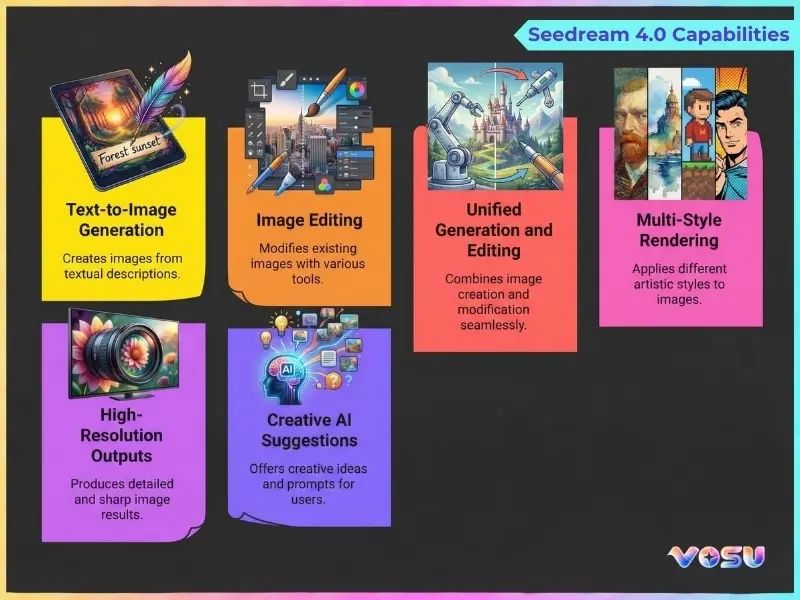
The features of Seedream 4.0 are unified generation and editing, high resolution output, advanced editing, multi-reference fusion, subject consistency and adaptive aspect ratios. These capabilities let users create sharp images, refine elements, merge multiple references, maintain visual continuity and adapt assets for any platform.
The top 10 features of Seedream 4.0 are listed below.
- Unified generation and editing: Seedream 4.0 employs a unified architecture to handle both text to image creation and image editing in a single model that allows seamless workflows without switching tools or pipelines.
- High resolution and speed: Seedream 4.0 generates detailed, sharp images at high resolutions while maintaining efficient inference that supports workloads like product visuals, marketing creatives and large format assets.
- Advanced editing: Seedream 4.0 provides fine grained, region aware and structure preserving editing tools that let users refine elements while keeping global composition, lighting and style consistent.
- Multi reference fusion: Seedream 4.0 combines multiple reference images for style, layout or subject guidance, which merges attributes to produce new visuals that respect key features from each source.
- Subject consistency: Seedream 4.0 maintains a consistent appearance of characters, products or logos across multiple generations that support storytelling, branding campaigns and multi asset sets needing visual continuity.
- Adaptive aspect ratio: Seedream 4.0 supports varied aspect ratios, from ultra wide to vertical and square, which reduces the need for manual recomposition when preparing assets for different platforms like Facebook, TikTok or Instagram.
- Knowledge driven generation: Seedream 4.0 incorporates learned knowledge about objects, scenes and concepts that allow more accurate, realistic and semantically aligned generations from textual descriptions for complex prompts.
- Batch processing: Seedream 4.0 helps generate or edit many images in a single run, which boosts productivity for workflows that explore variations, A/B test creatives or build large asset libraries.
- Versatile styles: Seedream 4.0 supports a wide spectrum of styles like photorealistic renders, illustrations, concept art and stylized designs that allow broad creative control for diverse visual directions.
- Superior text rendering: Seedream 4.0 improves clarity and alignment of text rendered inside images, which makes it suitable for posters, ads, UI mockups and designs where embedded typography must remain legible.
The image below shows the capabilities of Seedream 4.0.
What are the use cases of Seedream 4.0?
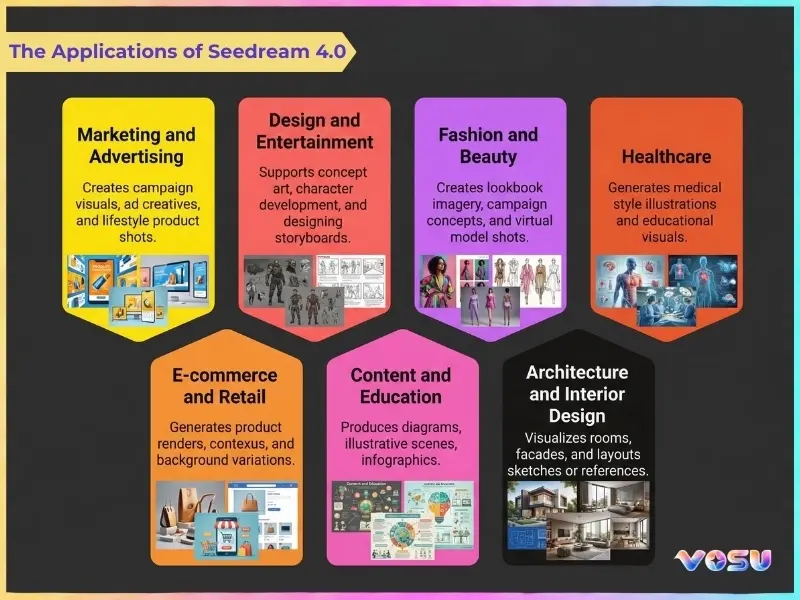
The use cases of Seedream 4.0 are marketing and advertising, e-commerce, design and entertainment, content and education, fashion or beauty and architecture. These applications help create campaign visuals, product renders, concept art, tutorials, lookbooks and architectural presentations while maintaining style consistency.
The use cases of Seedream 4.0 are listed below.
- Marketing and advertising: Seedream 4.0 creates campaign visuals, ad creatives and lifestyle product shots across formats that allow rapid iteration, brand consistency and customized assets for different channels and audiences.
- E-commerce and retail: Seedream 4.0 generates product renders, contextual scenes and background variations that help online stores scale catalogs, localize visuals and refresh listings without repeated physical photoshoots.
- Design and entertainment: Seedream 4.0 supports concept art, character development and designing storyboards for films, animation and games, which accelerates early visual exploration while maintaining consistent style and subjects.
- Content and education: Seedream 4.0 produces diagrams, illustrative scenes, thumbnails and infographics that allow clearer explanations for tutorials, online courses, blogs and social content.
- Fashion and beauty: Seedream 4.0 creates lookbook imagery, campaign concepts and virtual model shots that help experiment with styles, color palettes, sets and aesthetics before full production.
- Architecture and interior design: Seedream 4.0 visualizes rooms, facades and layouts from sketches or references that help designers explore multiple stylistic options and presentation ready renders for clients.
- Healthcare: Seedream 4.0 generates medical style illustrations and educational visuals for presentations, training materials and patient communication, where realistic but non-identifying imagery is required.
Seedream 4.0 allows versatile applications across marketing, e-commerce, design, education, fashion and architecture, streamlining creative workflows. VosuAI improves this experience with a user friendly dashboard that makes it easier for creators to generate, edit and manage visuals efficiently.
The Image below shows the applications of Seedream 4.0.
Who is Seedream 4.0 for?
Seedream 4.0 is designed for creative teams, marketers, e-commerce businesses, designers and content creators. It helps these users produce consistent, high quality visuals, streamline campaigns, improve artistic workflows and generate engaging content across multiple platforms like Facebook or Instagram.
5 types of users Seedream 4.0 is designed for are outlined below.
- Creative teams and agencies: Seedream 4.0 is ideal for managing large scale campaigns and delivering fast, consistent visuals that meet client demands through collaborative, AI powered design workflows.
- Marketers: Seedream 4.0 is perfect for producing branded visuals across digital platforms that help marketing teams maintain visual consistency and increase content output without relying on manual design.
- E-commerce businesses: Seedream 4.0 is customized for companies seeking high quality product imagery, lifestyle photos and promotional assets that improve engagement and sales through streamlined, AI driven visual generation.
- Designers and illustrators: Seedream 4.0 is built for professionals aiming to improve creativity and speed by integrating AI into their conceptual design and illustration workflows while preserving unique artistic style.
- Content creators: Seedream 4.0 is geared toward influencers and media creators who want fresh, engaging visuals for videos, thumbnails and social media posts that boost audience impact and creativity.
What are the limitations of Seedream 4.0?
The limitations of Seedream 4.0 include text rendering, character consistency, multi person scenes, style transfer, resource intensity and lack of native video. These issues can lead to blurry typography, inconsistent characters, distorted group compositions, style inaccuracies, high system demands and restrict creators to still images only.
The limitations of Seedream 4.0 are listed below.
- Text rendering: Seedream 4.0 experiences challenges with small text legibility, which makes it difficult to produce accurate or sharp typography in design oriented image outputs.
- Character consistency: Seedream 4.0 sometimes struggles with maintaining character consistency in complex edits when the same subject appears in multiple perspectives or sequential images.
- Multi-person scenes: Seedream 4.0 faces struggles with consistency in mult person scenes that lead to distorted poses or unrealistic spatial relationships among people within a generated composition.
- Style transfer: Seedream 4.0 misinterprets reference styles that result in inconsistent artistic quality or inaccurate visual blending when applying detailed aesthetic transformations between images.
- Resource intensive: Seedream 4.0 requires significant computational power and memory, which increases processing time and limits smooth operation on lower-spec devices or environments.
- No native video: Seedream 4.0 lacks built-in video generation features that restrict creators to still images without motion based or frame by frame output capabilities.
What is the price of Seedream 4.0?
The price of Seedream 4.0 is about $0.03 per image or $30 per 1,000 generations. It varies depending on regional providers and third party platforms like VosuAI, KieAI or FalAI. Seedream 4.0 access is cost effective through VosuAI’s subscription plan, with each generation deducting from monthly credits instead of requiring a direct charge.
VosuAI offers the basic plan at $10.00 per month for 3,750 credits and the pro plan at $29.00 per month for 11,608 credits. It also provides enterprise and customized subscription options, where users can purchase Seedream 4.0 for $99 with 39,929 credits. Users can generate up to 3750 images for 3,750 credits, 11608 Images for 11,608 credits and 39929 Images for 39,929 credits. VosuAI includes over 100 image models that share the same credits, so the total images you create depends on each model’s credit cost and your usage mix.
How to access Seedream 4.0?
To access Seedream 4.0, users can use several AI platforms like VosuAI, Krea, Freepik, KieAI and EaseMate AI that integrate this model for text-to-image generation and editing tasks. These platforms provide varying levels of access, with some offering free credits available for new users.
The top 5 AI platforms that provide Seedream 4.0 are listed below.
- VosuAI: VosuAI offers Seedream 4.0 through a unified creative dashboard that allows fast experimentation, scalable outputs and efficient text to image generation for creators, marketers and production teams.
- Krea: Krea integrates Seedream 4.0 for real time visual ideation, which allowing users to explore styles, iterate concepts, and refine outputs within an intuitive, creator focused interface.
- Freepik: Freepik provides access to Seedream 4.0 alongside its asset ecosystem, which helps designers generate original visuals that align with stock resources, branding needs and commercial design workflows.
- KieAI: KieAI allows Seedream 4.0 through streamlined generation tools, which support rapid creative testing, prompt refinement and flexible usage for developers and experimental AI users.
- EaseMate AI: EaseMate AI delivers Seedream 4.0 in a beginner friendly environment that makes advanced image generation accessible for non-technical users, small teams and everyday creative projects.
How to use Seedream 4.0?
To use Seedream 4.0, access VosuAI, select the model, upload reference images, enter prompts, enable enhancers, set ratio, select image count and generate, then review and download the results.
11 steps of how to use Seedream 4.0 through VosuAI are outlined below.
- Go to VosuAI: Open the VosuAI website, sign in or register, then access the image workspace where Seedream 4.0 is available for both fresh generations and advanced edits.
- Select the model: Choose Seedream 4.0 from the model dropdown menu to confirm you're using ByteDance's latest image generation technology with full feature support.
- Upload an image: Provide a reference image for image to image editing tasks, which gives visual context that Seedream 4.0 will use as a foundation for modifications and transformations.
- Enter a prompt: Write detailed input text prompts describing your desired output that includes subject, style, lighting and composition or use PromptGPT to guide the generation process.
- Enable or disable prompt enhancer: Toggle the prompt enhancer feature to automatically optimize your text description for better results or disable it for complete manual control over generation.
- Use PromptGPT: Access PromptGPT to easily write or refine text and JSON prompts from existing instructions or reference images, designed to work smoothly with the Seedream 4.0 image generation model.
- Choose aspect ratio: Select the appropriate aspect ratio for your project needs, whether square, portrait, landscape or custom dimensions for optimal visual composition.
- Set number of images: Determine how many variations you want to generate in a single batch, which allows exploration of multiple creative interpretations from one prompt.
- Enter seed (optional): Input a specific seed number if you need reproducible results or leave it random for varied outputs across different generation sessions.
- Generate image: Click the generate button to initiate creation, where Seedream 4.0 processes your inputs and produces high quality 4K outputs.
- Review and download: Examine the generated images, select your preferred results and download them in full resolution for immediate use in your creative projects.
How to prompt Seedream 4.0?
7 strategies to prompt Seedream 4.0 are outlined below.
- Be specific and detailed: Describe subject, composition, lighting and mood precisely, which avoids vague phrases and limiting unnecessary complex adjectives that dilute intent.
- Use natural language: Use clear and detailed natural language that keeps sentences conversational while still defining key visual elements and constraints.
- Anchor characters: Define character identity, clothing and pose consistently across prompts to maintain recognizable faces and stable appearance over multiple generations.
- Incorporate references: Upload reference images and explicitly mention them in the prompt to control layout, style or object replacement with higher fidelity.
- Guide style: Specify artistic medium and style explicitly using complex adjectives like photorealistic, cyberpunk, or watercolor to confirm outputs match your creative vision.
- Iterate and refine: Start from a simple version, review outputs, then iteratively adjust wording, add constraints or remove distractions for better images.
- Specify technical visuals: Define diagrams, UI or charts using exact labels, layout rules and action verbs like remove, replace, add for accurate, structured visual outputs.
What is the recent benchmark of Seedream 4.0?
The recent benchmark of Seedream 4.0 is its September 2025 recognition as the top among popular image models like Nano Banana (Gemini 2.5 Flash Image) and GPT-4o for combined generation and editing tasks. Seedream 4.0 has strong prompt adherence, high image quality and impressive realistic details. It delivers fast, production ready performance and efficient high resolution generation up to 4K for professional workflows.
What is the difference between Seedream 3 and Seedream 4.0?
The difference between Seedream 3 and Seedream 4.0 is that Seedream 3 focuses on 2K text to image generation, while Seedream 4.0 adds unified 4K creation and editing with higher benchmarks. Seedream 3 provides fast posters, ads and simpler compositions with decent prompt understanding at lower cost. Seedream 4.0 offers advanced image editing, better complex scene generation, stronger style consistency and more efficient pro workflows with multi image control and higher visual fidelity.
What is the difference between Seedream 4.0 and Nano Banana?
The difference between Seedream 4.0 and Nano Banana is that Seedream 4.0 focuses on production pipelines with native high resolution (4K) batches, while Nano Banana emphasizes fast, conversational Gemini integration. Seedream 4.0 prioritizes ultra fast studio workflows, strong multi image consistency and complex scene generation for marketing or design. Nano Banana favors interactive edits, text heavy assets and general purpose creative use across Google surfaces.
What should you choose between Seedream 4.0 and Nano Banana?
You should choose between Seedream 4.0 and Nano Banana based on output style and workflow needs. Seedream 4.0 suits high resolution creative exploration, stylized campaigns and iterative business visuals. Nano Banana fits realistic product mockups, precise edits and fast, reliable marketing assets where control and realism matter most.
Where can I use SeeDream 4.0 for free?
You can use Seedream 4.0 for free on several third party platforms like VosuAI, DeeVid and EaseMate AI via direct chat, API access or starter credits. You can generate images using these tools under daily limits or lower resolution tiers before needing to upgrade to a paid plan for higher quotas and full quality output. VosuAI instead offers free credits without strict per day caps or forced downscaling on initial usage, which keeps early experimentation more flexible.
Is Seedream legit?
Yes, Seedream is legit because it is an AI image generation model developed by ByteDance and documented on ByteDance’s official Seed or ModelArk properties. It is widely integrated into reputable creative platforms like VosuAI, Invideo or Pollo AI and is actively used by designers, marketers and content creators for production grade, 4K capable visuals and other professional purposes across commercial workflows.