You probably saw the Marsha Blackburn AI video before you knew what it was. A 12-second clip, a fake halftime stage, a senator lip-syncing to "Not Like Us." Now you want to know two things: why everyone is talking about it, and whether you can make something like it yourself.
Short answer: the clip went up on Oct. 13 and passed 2.1 million views within two days, along with plenty of criticism. And yes, you can make a halftime-style AI video of yourself in a few minutes.
This guide covers the facts, the reaction, the steps with our Marsha Blackburn AI video template to create your own ai video just like the real Marsha Blackburn video, and the mistakes to avoid.
What Is the Marsha Blackburn AI Video?
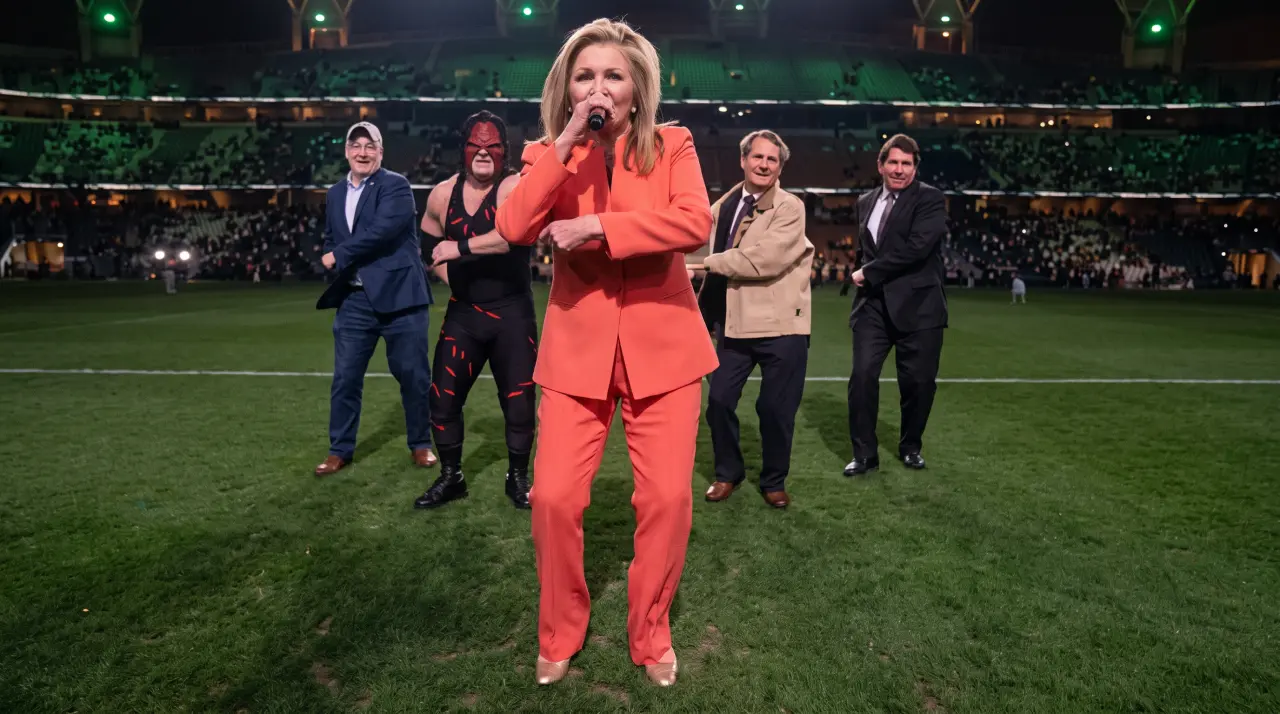
The Marsha Blackburn AI video is a 12-second AI-generated clip posted on X by her campaign account, @VoteMarsha, on Oct. 13, 2026. It shows Blackburn performing Kendrick Lamar's "Not Like Us" in a parody of his 2025 Super Bowl halftime show. The caption read "Tomorrow. Ready to roll," a nod to the start of early voting in Tennessee the next day.
Quick facts:
-
Who posted it: Blackburn's campaign account, @VoteMarsha
-
When: Oct. 13, 2026, one day before early voting began
-
Length: 12 seconds
-
Song: Kendrick Lamar's "Not Like Us"
-
Who else appears: Rep. Tim Burchett, Sen. Bill Hagerty, state Sen. Brent Taylor, and Knox County Mayor Glenn Jacobs, who wears his old WWE Kane outfit
-
Reach: More than 2.1 million views by Oct. 15, according to AI Musicpreneur
-
Context: Blackburn is running for governor of Tennessee
One thing no report I found answers: which AI tool made it. Blackburn said a county commissioner created the video, but nobody has named the commissioner or the software.
How to Make an AI Halftime-Style Video With Our Template?
Making a polished stage video used to take a crew, a green screen, and editing software. With Marsha Blackburn Halftime-Style Template, you can build a similar clip from one photo. Note that the Blackburn clip was not made with our template.
This is a way to make your own version, starring you.
Before you start: You need a clear photo of yourself (or someone who has agreed to appear), and about 3 minutes. You can buy credit on VosuAI for $1 only, and it will be enough to generate some.
Step 1: Go to Community
Step 2: Click a halftime-style template
Step 3: Hit Regenerate
Simple, VosuAI will take care of the rest for you
Marsha Blackburn AI Video Prompt to Copy: Halftime-Style AI Video
Good prompts are specific. Say who is on stage, what the stage looks like, how the camera moves, and what to leave out. Copy the prompt below, swap the brackets for your own details, and paste it into the prompt box in.
A cinematic 12-second stadium halftime performance starring the person in my uploaded photo. They stand at the center of a large illuminated stage at night, holding a microphone and lip-syncing confidently to an upbeat track. Dancers in matching outfits move in sharp formation behind them. Bright stadium lights, light haze, and a cheering crowd fill the background. Camera: slow push-in from a wide shot to a medium close-up, then a quick side sweep. Keep the face consistent and realistic with natural mouth movement. Style: high-energy live broadcast look, warm stage lighting, shallow depth of field, 16:9. Outfit: [describe, e.g. black jacket with gold details]. Mood: [confident / playful / hype]. No real brand logos, no text, no real artists or public figures, no watermarks.
Why this prompt works
-
It names one clear subject. "The person in my uploaded photo" keeps the face tied to your image.
-
It gives the camera a job. A push-in plus a side sweep reads as a broadcast, not a static clip.
-
It blocks the risky stuff. The last line keeps out logos, real performers, and other people's likenesses.
Three quick variations
Birthday intro:
A 10-second stage entrance for the person in my uploaded photo. Confetti cannons fire as they step into a spotlight, wave to a cheering crowd, and point at the camera. Colorful lights, upbeat energy, 9:16 vertical. A banner behind them reads "[Name] turns [age]". No real brand logos, no public figures.
Creator channel intro:
A 6-second channel intro. The person in my uploaded photo walks onto a dark stage, lights snap on, and they lift a microphone toward the camera. Neon [color] glow, fast cuts, clean modern look, 16:9. Leave space at the end for a title card. No real brand logos, no public figures.
Sports club hype clip:
An 8-second hype video. The person in my uploaded photo, dressed in [team colors] jersey, stands at midfield of a packed stadium as fireworks go off behind them. Slow push-in, crowd chanting, dramatic lighting. No real league or team logos, no public figures.
Prompt tips
-
Keep it to one scene. Short clips come out cleaner.
-
Describe motion in plain words: "push-in," "side sweep," "wave."
-
If the face drifts, shorten the prompt and add "keep the face consistent."
-
Do not name real singers, politicians, or athletes. It can break consent rules and may be blocked.
-
Run two or three versions. Pick the best.
By the way, you can also check out our template on “Migos Ai Trend: Hotel Lobby Template” and generate the video easily.
Why the Video Drew Backlash, and How Blackburn Responded?
A campaign clip built on Lamar's track, posted the day before early voting, turned a 12-second post into national news. The timing and the song choice did most of the damage.
What critics said
Jerri Green, the Democratic nominee for governor, used the clip to make a point about her own campaign. She wrote that this was what she meant when she asked supporters to stop using AI for her campaign. Former Republican Rep. Adam Kinzinger mocked it on X. According to The Daily Wire, some liberal critics also accused the campaign of using Black culture for political gain. Replies on the post leaned on the phrase "AI slop," as Billboard reported.
What Blackburn said
Blackburn brushed it off. She told WZTV that a county commissioner made the video, that Burchett reposted it, and that her campaign did the same. Her words: "it's a funsie." She also said she did not create it herself.
Can You Make an AI Video of a Real Politician or Celebrity?
You can technically try with some tools. You probably should not, and our template does not support it. It is built for your own likeness and original characters, not for real public figures.
The difference comes down to consent. A video of yourself is a creative project. A video that puts a real person's face and voice into something they never did is a deepfake, and that raises legal and reputation problems fast.
The Blackburn story adds a twist here. She is the lead Republican on the NO FAKES Act, a bill that would let people sue over unauthorized AI replicas of their voice or image.
AI Musicpreneur noted she posted the clip less than two weeks after pushing the bill in the Senate.
The Daily Wire reported that Sen. Ted Cruz had blocked her attempt to pass it by unanimous consent.
When asked about the apparent contradiction, her answer, per the same outlet, was that the bill already protects "bona fide commentary," including political commentary.
HotNewHipHop pointed out that the campaign clip does not necessarily fall under the legal concerns the bill targets, since it depicts Blackburn herself.
Where does that leave you?
Existing rules already apply, even without the bill. Many states have right-of-publicity laws, and every major platform has its own policy on synthetic media. If you plan to use an AI video for business, talk to a lawyer. This is general information, not legal advice.
5 Lessons From the Blackburn Backlash
You can learn a lot from how this clip landed. Here is what to avoid.
-
Don't attach a message to a borrowed cultural moment. The song choice, not the AI, drew much of the heat.
-
Always label AI content. Readers forgive a clumsy video faster than a hidden one.
-
Skip unlicensed music. Pick licensed audio and avoid a takedown.
-
Keep real people out unless they agree. Your own face is safe. Anyone else needs a yes.
-
Read the room before you post. Timing matters. A fun clip near a heated moment gets read as a statement.
Best Uses for a Halftime-Style AI Video
| Use case | Who it's for | What to upload | One tip |
|---|---|---|---|
| Birthday intro | Friends and family | Your own photo | Keep it under 15 seconds |
| Creator channel intro | YouTubers, streamers | Your headshot | Reuse the same clip every episode |
| Team hype video | Small sports clubs | Coach or captain photo, with permission | Add the team name in text |
| Party or wedding surprise | Hosts, best men | Your photo | Play it on the big screen |
| Small-business promo | Local shops | Owner photo | Add a short call to action at the end |
People Also Ask
What is the Marsha Blackburn AI video?
It is a 12-second AI-generated clip of Blackburn performing "Not Like Us" in a take on Kendrick Lamar's 2025 halftime show, posted Oct. 13 by her campaign.
Who made the Marsha Blackburn AI video?
Blackburn said a county commissioner made it. No name or tool has been reported.
What song is in the video?
Kendrick Lamar's "Not Like Us."
Who is in the video with her?
Rep. Tim Burchett, Sen. Bill Hagerty, state Sen. Brent Taylor, and Knox County Mayor Glenn Jacobs appear as backup dancers.
Did Kendrick Lamar respond?
No public response had been reported, according to AI Musicpreneur. Check for updates.
Is it a deepfake?
It is AI-generated and shows Blackburn herself, with her campaign posting it. A deepfake usually means a fake of someone who did not agree to it, so the label is debated.
What is the NO FAKES Act?
A bill that would let people sue over unauthorized AI copies of their voice or likeness. Blackburn leads the Republican side.
Is it legal to make an AI video of a politician?
It depends on where you are, how you use it, and whether it misleads people. Laws vary, so ask a lawyer for anything commercial.
Can I use copyrighted music in an AI video?
You can try, but platforms may mute or remove it. Use licensed or royalty-free audio.
How do I make an AI video of myself performing on stage?
Upload a clear photo to the template, pick a stage and audio, generate, review, and post with an AI label.
Make Yours
Ready to try it? Open “Marsha Blackburn Ai Video: Half-Time Style, upload your photo, and have your own halftime clip in minutes.